Pixlr
5.0 out of 5 starsAverage Ratings 0 Ratings
Average Ratings 1 Rating
Similar Products
-
Adobe FireflyAdobe Firefly is a versatile AI-powered creative platform designed to help users generate and edit multimedia content with ease. It allows users to create images, videos, and audio using simple text prompts within an interactive and flexible workspace. The platform features tools like generative fill, image editing, and video editing, enabling users to refine and enhance their creations. Firefly also includes quick actions such as background removal, cropping, resizing, and format conversion to streamline workflows. Users can explore an infinite canvas for creative production and experiment with various styles and outputs. The platform encourages creativity by allowing users to remix content from a shared community gallery. With its intuitive design, it reduces the need for advanced technical skills. Firefly integrates AI capabilities to speed up content creation and editing processes. It supports both beginners and professionals in producing high-quality results. Overall, Adobe Firefly provides a powerful and accessible environment for modern digital creativity.
-
RallyFuelRallyFuel is an online platform catering to college sports enthusiasts, available on both iOS and Android. Fans aged 18 and above can purchase personalized videos, group videos with a maximum of 12 teammates, digitally signed cards, live video calls, and fan messages from college athletes who are part of RallyFuel. Additionally, U.S. businesses have the opportunity to order sponsored posts, brand videos, photographs, and athlete appearances. Each item features a fixed price applicable to all buyers, along with a service fee disclosed prior to completing the purchase. As the seller, RallyFuel compensates athletes with a predetermined rate based on the type of content and the size of their audience, regardless of their school, sport, or performance level. Fans can also participate in free game predictions, accumulating points and badges as they rise through the leaderboards while keeping track of the RallyFuel NIL Index; their orders do not influence any rankings. Established in 2025 in St. Petersburg, Florida, RallyFuel operates independently and is not associated with any universities, conferences, or the NCAA. This platform fosters a unique connection between fans and athletes, enhancing the overall college sports experience.
-
YodeckNext-generation technology for digital signage professionals Yodeck, a cloud-based digital signage platform, is unbeatable. It powers your screen with dynamic content that instantly engages your target audience. Yodeck makes it easy to create, schedule, and design content from the web. To get your message across to those who matter most to you, use attention-grabbing media such as videos, images and PDF files, Office documents, data dashboards, and social media. It provides enterprise-grade security and control. Yodeck's drag-and-drop editing feature allows users to be creative in organizing content into interesting layouts. Yodeck is proud to offer a unique digital signage solution for businesses of all sizes. This includes local diners as well as global leaders like Delta Airlines, Autodesk and Adobe.
-
Label LIVELabel LIVE is the easiest to use label printer app for designing and printing labels. You can print barcodes and address labels, shelf tags, inventory labels, and many other jobs using Label LIVE. Use your Mac or Windows 10 desktop computer to work with thermal label printers from mydpi, Brother, DYMO and Zebra. Label LIVE generates PDFs that can be sent to any printer that is installed using a driver. This means you can send complex print jobs to inkjet and laser printers, too. Need to import spreadsheet data? Label LIVE can import Excel, Numbers or CSV files with a few clicks.
-
Switcher StudioSwitcher Studio allows you to capture video from multiple angles and edit it in real-time. This will allow you to connect with your community in a more engaging way. You can stream it live or save it for later. Your audience will be attracted to you with relevant content. Make it look great. There's no need to purchase, lug or learn largeequipment. Switcher is compatible with iPads and iPhones. Switcher is so intuitive that anyone can create amazing video with it. You don't need to hire outside videographers or producers. It takes an hour to edit every minute of edited video. Every minute of live-editing takes, well, one second. You can share every moment, live or recorded, external or internal, with video -- no matter what it holds.
-
PDF GuruEasily convert, edit, merge, and compress your PDF files with just a few simple clicks. You can quickly download your document without any hassle, as our PDF converter generates files in mere seconds! To ensure the safety of your digital information, we implement HTTPS encryption while you create PDF files on our site. You can redact PDFs, alter text, insert new elements, and engage in various other tasks, all from a single platform. Our user-friendly interface is designed for seamless navigation, allowing you to utilize our PDF creator with minimal effort. Compatible with every major operating system, our online PDF maker functions flawlessly on Windows, Mac OS, Linux, iOS, and Android. For those who wish to maintain privacy, you have the option to secure your file by locking or restricting access, preventing others from opening, editing, or printing it. This comprehensive tool simplifies your document management and enhances your productivity.
-
PBXwarePBXware is the first and most established IP PBX Professional Open Standards Turnkey Telephony Platform. PBXware has been providing flexible, reliable and scalable Next Generation Communication Systems (NGCS) and VoIP solutions to small and medium-sized businesses (SMBs), enterprises and Internet Telephony Service Providers, (ITSPs), call centers and governments around the world since 2004. This is done by combining the best of the latest technologies. Bicom Systems softswitch is available in the Business, Call Center, and Multi-Tenant Editions. Each edition supports specific features that maximize performance, reliability, expandability, and expandability.
-
CirrusPrintCirrusPrint helps you manage and streamline your printing and document delivery across multiple networks. It solves cloud migration issues related to printing and provides the fastest and most direct way to deliver documents to users. With CirrusPrint, traditional network printing is still possible without any changes to operations. You can also print to your users, email your printers, and send a file from your smartphone to a printer anywhere in the country. CirrusPrint can be used on Windows or Linux, either in the cloud or at your own data center. It can accept print jobs and other documents, compress them, and deliver them to remote printers and users. It is easy to integrate with applications. You can print to it as any network printer, email files, drop files into the device, or use REST API. CirrusPrint jobs are sent quickly and securely to remote printers as exact duplicates of the original job.
-
SiteDocsYour Safety & Compliance Made Simple! Businesses that operate in the construction, oil & gas, mining, manufacturing, electrical, plumbing, heating, and excavating industries know all too well how important it is to comply with all mandatory documentation. It is also important to know how a company organizes everything. SiteDocs is an interactive safety management system that transforms organizations from pen-and paper archiving to a fully cloud-based, digital workspace. The system is accessible from any device running iOS or Android and features allow users to work remotely, on mobile, or offline. Employees can now sign and upload photos, add comments, and acknowledge receipt of important documentation. Administrators can also ensure that records, reports and certifications of staff are automatically updated by using the web-based panel's system parameters.
-
GroupTogetherGroupTogether is a user-friendly online platform designed for creating group cards, collecting gifts, and sending eGift Cards quickly and effortlessly. It allows users to initiate a group card, decide whether to gather funds or select a gift, and then distribute a single link to friends, family, coworkers, or teammates. Participants have the option to add personalized messages, share photos, and include GIFs, while also contributing a specific amount, any amount they choose, or simply signing the card without making a financial contribution. With privacy assured, GroupTogether eliminates the discomfort of using personal banking details and ensures secure transactions, complete with verifiable records of contributions and expenditures. Organizers have the flexibility to use the collected funds for a variety of gifts, including eGift Cards, gift baskets, flowers, or the versatile GroupTogether AnyCard that allows recipients to choose from over 100 eGift Cards. The platform provides the option for digital delivery or downloadable PDFs for printing, making it a practical solution for various occasions such as remote team celebrations, workplace events, classroom activities, birthdays, farewells, and retirements. Moreover, this seamless process fosters a sense of community and connection, even in virtual settings.
Description
PhotoStack Studio is a versatile photo editing and design application specifically designed for Windows desktops, allowing users to create various visual content such as social media posts, thumbnails, posters, and other print layouts. This software features a combination of layered editing capabilities for both photos and text, alongside additional tools like shapes, effects, shadows, editable cutout masks, and precise subject selection with specialized edge-refinement brushes. Users have the option to start their projects from pre-existing templates, incorporate brand kits that include logos, colors, fonts, and contact information, and easily export designs in sizes suitable for campaigns. The application supports a wide range of file formats, including JPG, PNG, WebP, TIFF, HEIC, and camera RAW files, while also facilitating the importation of images directly from camera cards. For printing needs, it offers various tools such as photo-size presets, contact sheets, tiled posters, and ID layout options. Additionally, users may take advantage of optional AI features by utilizing their OpenAI or xAI API key, although the core editing functions and subject cutouts are processed locally on the device. Designed for Windows 10/11 x64 systems, the application boasts an English user interface and operates without requiring a subscription. Notably, it prepares files for users to upload manually rather than posting them directly to social media platforms. In this way, PhotoStack Studio prioritizes user autonomy and flexibility in managing their design projects.
Description
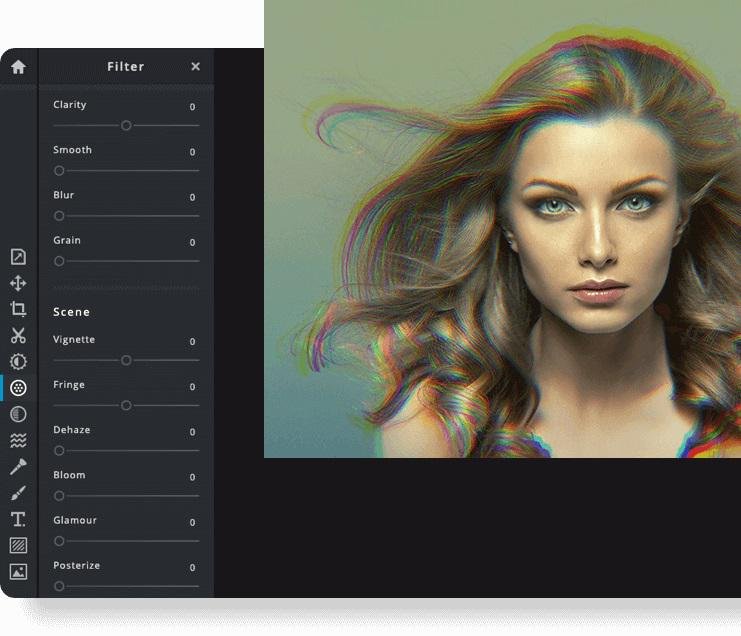
Pixlr is a free online photo editor that enables users to enhance images and create stunning designs directly in their browser. With advanced AI-powered tools, you can enjoy a seamless and intuitive photo editing experience that delivers professional results in no time. The editor supports a wide range of image formats, including PSD (Photoshop), PXD, JPEG, PNG (with transparency), WebP, SVG, and others. You have the option to start with a blank canvas or choose from our selection of expertly designed templates. Thanks to our innovative AI design tools, tedious editing tasks are a thing of the past; you can effortlessly remove backgrounds from images with just one click, capturing even the finest details like individual strands of hair. Let the power of AI and machine learning elevate your photo editing and background removal to unprecedented heights! With straightforward controls, such as toggles and adjustable sliders, achieving stunning and unique photo effects has never been easier. Explore endless creative possibilities and transform your images with Pixlr today!
API Access
Has API
No
API Access
Has API
No




Pricing Details
$29.99 one-time
One-time purchase: $29.99 (also listed as 299 kr). Includes a 30-day free trial and a license for up to 10 Windows PCs. No subscription.
Free Trial
Yes
Free Version
No
Pricing Details
$2.49 per month
$1.49/month if billed annually
Free Trial
Yes
Free Version
No
Deployment
Web-Based
No
On-Premises
No
iPhone App
No
iPad App
No
Android App
No
Windows
Yes
Mac
No
Linux
No
Chromebook
No
Deployment
Web-Based
Yes
On-Premises
No
iPhone App
Yes
iPad App
Yes
Android App
Yes
Windows
No
Mac
No
Linux
No
Chromebook
No
Customer Support
Business Hours
No
Live Rep (24/7)
No
Online Support
Yes
Customer Support
Business Hours
No
Live Rep (24/7)
No
Online Support
Yes
Types of Training
Training Docs
Yes
Webinars
No
Live Training (Online)
No
In Person
No
Types of Training
Training Docs
Yes
Webinars
No
Live Training (Online)
Yes
In Person
No
Vendor Details
Company Name
Perseus Technology (Areusecure AB)
Founded
2026
Country
Sweden
Website
photostackstudio.com
Vendor Details
Company Name
Pixlr
Founded
2008
Country
Sweden
Website
pixlr.com
Product Features
Graphic Design
Collaboration
No
Data Visualization
No
Filtering
No
Image Database
No
Image Editor
No
Templates
No
Product Features
Business Card
Contact Management
No
Data Extraction
No
Design Templates
No
Image Editor
No
Print Management
No
Step-by-Step Wizard
No
Graphic Design
Collaboration
No
Data Visualization
No
Filtering
No
Image Database
No
Image Editor
No
Templates
No
Alternatives
No Alternatives