Average Ratings 0 Ratings
Average Ratings 1 Rating
Similar Products
-
Wave BrowserWave Browser is designed for people who want a safer, faster, and more meaningful way to explore the web. Built on strong security principles, Wave puts you in control of your privacy with customizable cookie and tracker blocking, incognito mode, and clear permission choices. AppEsteem Certification ensures Wave meets strict, independently verified standards for clean installation, transparent behavior, and responsible software practices, giving you confidence every time you browse. Wave is also built for productivity, offering tools that help you stay organized and move through information with purpose. Tab grouping, bookmarks, and a reading list keep ideas within reach, while split screen let you research, compare, or watch without switching between windows. Memory Saver mode helps your device stay fast during heavy sessions, and the built-in AI Assistant and messaging integrations bring your favorite tasks closer to a single click. Designed to be simple and user-friendly, Wave Browser removes friction from everyday browsing. The free ad blocker keeps pages clean, and built-in tools—like the converter, package tracker, price tracker, translation tool, stock tracker, and content notifier—help you get things done without extra extensions. Most importantly, Wave is a browser with real ocean impact built in. Through a certified partnership with 4ocean, Wave helps fund the removal of 100,000 pounds of trash from our ocean, rivers, and coastlines every year. A live impact tracker shows exactly how much waste the Wave community has helped remove, with verified monthly updates from cleanup crews in the U.S., Indonesia, and the Dominican Republic. With Wave Browser, your everyday browsing directly supports a cleaner planet and the people working to protect it.
-
ShiftShift puts you in control of your browser. Arrange apps, bars, and controls exactly where you want them, building a personalized workspace that works around you — not the other way around. Connect over 1,500 web apps, jump between dedicated Spaces for work, side hustles, and personal browsing, and manage multiple accounts without ever logging in and out. As a pioneer in carbon-neutral browsing, Shift is committed to rethinking what a browser can be — for the people who use it and the world they live in. Started in Victoria, British Columbia in 2016, Shift is a Certified B Corp and proud member of the Redbrick portfolio. What you can do with Shift: - Build your browser: Design a layout tailored to how you use the internet. - Create Spaces: Keep work, side hustles, and passion projects in their own lane. - Integrate Apps: Bring your favorite web apps together in one place. - Templates: Pick from 6 ready-made layouts to get started fast. - Shift AI: A built-in AI assistant that helps you get more done across every tab and app.
-
Kasm WorkspacesKasm Workspaces streams your workplace environment directly to your web browser…on any device and from any location. Kasm is revolutionizing the way businesses deliver digital workspaces. We use our open-source web native container streaming technology to create a modern devops delivery of Desktop as a Service, application streaming, and browser isolation. Kasm is more than a service. It is a platform that is highly configurable and has a robust API that can be customized to your needs at any scale. Workspaces can be deployed wherever the work is. It can be deployed on-premise (including Air-Gapped Networks), in the cloud (Public and Private), or in a hybrid.
-
HERE Enterprise BrowserEverything works right here™. The product of years of collaboration with the world’s largest financial institutions, HERE Enterprise Browser is the first and only browser that solves both enterprise security and workforce productivity. Built on Google Chromium, HERE streamlines workflow and improves employee experience.
-
GaffaGaffa is a REST API built for web scraping and browser automation, allowing developers to run real, full browsers at scale with a single API call. It removes the difficulty of managing headless browser frameworks, rotating proxies, CAPTCHA solving, and scaling infrastructure, all of which are handled automatically. JavaScript-heavy and dynamic websites render exactly as they would for a human visitor by default. Beyond standard scraping, Gaffa supports AI-driven structured data extraction (extract data into a defined schema without writing CSS selectors), screenshot and PDF capture, infinite-scroll and form-filling automation, and clean Markdown conversion for feeding webpages directly into LLM and RAG pipelines. A rotating residential proxy network keeps access reliable across regions, and a credit-based pricing model means teams pay only for the browser time and bandwidth they actually use. Gaffa is designed for AI engineers, data teams, and developers who want production-grade web data extraction without having to build and maintain their own infrastructure.
-
Bitdefender Ultimate Small Business SecurityBitdefender Small Business Security provides robust, enterprise-level cyber-defense tailored for smaller companies, ensuring protection across various platforms including Windows, macOS, iOS, and Android. With a centralized management system that is user-friendly, it allows organizations lacking dedicated IT personnel to efficiently implement and oversee their security measures from a single interface. The solution features a multi-layered approach to endpoint protection, incorporating machine learning, behavioral analysis, real-time monitoring, process termination, and rollback capabilities to safeguard against both known and emerging threats. Additionally, it includes ransomware prevention and remediation strategies that detect unusual encryption activities and facilitate file recovery from backups. Users are also protected against fileless attacks, with measures like memory and back-injection interference as well as script blocking. The software further enhances security by preventing phishing and fraud through the blocking of malicious websites and alerting users accordingly, while offering advanced exploit protection with real-time shields for common applications such as browsers, Office software, and Adobe Reader, thus ensuring all-encompassing endpoint security. This comprehensive suite of features makes it an ideal choice for small businesses seeking to fortify their cybersecurity defenses.
-
LTXMost AI video tools hand you a black box: closed weights, a subscription, and no way to see what is happening under the hood. LTX takes the opposite approach. Built by Lightricks, LTX is an open foundation model that generates and simulates across video, audio, and the physical world, and it puts the weights, the code, and the control in your hands. At the center of the model is LTX-2.5, a 22B-parameter dual-stream diffusion transformer that produces native 4K video at up to 50 frames per second, with audio and video generated together in a single pass rather than stitched together afterward. Artificial Analysis, an independent benchmarking group, currently ranks LTX among the top three AI video models in the world. You choose how you want to use it. Download the open weights and run LTX-2.5 on your own hardware. License the model for on-premise deployment backed by enterprise support. Or build directly on LTX Studio, the production suite that turns the model into a full creative workflow. Companies like ElevenLabs, Asteria Film Co., Magnopus, and NVIDIA already rely on LTX for their own work. LTX is not built for one-off social clips. It is infrastructure for teams that generate motion, audio, and physical environments as part of their own products and pipelines.
-
MobiPDFMobiPDF (formerly PDF Extra) is an intuitive reader and editor that allows you to read, edit, create, OCR, organize, annotate, fill and sign, convert, and share any PDF. This makes MobiPDF an excellent choice for users seeking a budget-friendly alternative to Adobe Acrobat Pro. HERE’S WHAT YOU GET WITH MOBIPDF: Multiple Page View Modes: Enjoy a distraction-free "Read Mode". Advanced Editing Tools: Experience a Word-like PDF editing environment. Two-Way Conversions: Convert PDFs to and from Word, Excel, PowerPoint, or image formats. OCR Support: Make scanned documents searchable. Markup Tools: Highlight, comment, strikethrough, stamp, and more to enhance your documents. Effortless PDF Organizer: Reorder, compress, split, and combine PDFs with ease. Sign & Secure: Add signatures, create and fill forms, and protect your PDFs with passwords, encryption, and digital certificates. Offline Mode: Work freely on your projects, even offline. Seamless translation: One-click translate any PDF into 50+ languages.
-
JS7 JobSchedulerJS7 JobScheduler, an Open Source Workload Automation System, is designed for performance and resilience. JS7 implements state-of-the-art security standards. It offers unlimited performance for parallel executions of jobs and workflows. JS7 provides cross-platform job execution and managed file transfer. It supports complex dependencies without the need for coding. The JS7 REST-API allows automation of inventory management and job control. JS7 can operate thousands of Agents across any platform in parallel. Platforms - Cloud scheduling for Docker®, OpenShift®, Kubernetes® etc. - True multi-platform scheduling on premises, for Windows®, Linux®, AIX®, Solaris®, macOS® etc. - Hybrid cloud and on-premises use User Interface - Modern GUI with no-code approach for inventory management, monitoring, and control using web browsers - Near-real-time information provides immediate visibility to status changes, log outputs of jobs and workflows. - Multi-client functionality, role-based access management - OIDC authentication and LDAP integration High Availability - Redundancy & Resilience based on asynchronous design and autonomous Agents - Clustering of all JS7 Products, automatic fail-over and manual switch-over
-
EcwidEcwid by Lightspeed makes it easy to add an online shop to any website or social media profile. Ecwid is used by hundreds of thousands merchants in 175 different countries. It has everything you need for reaching your customers wherever they may be: in-person or through your website, Instagram and Facebook, Amazon, Google Shopping, or Amazon. Ecwid's integrated point-of-sale and email marketing integrations and dedicated mobile app allow you to manage your marketing, sales, and merchandising from anywhere.
Description
Whale's interface combines the familiarity of traditional browsers with its distinct character, featuring vibrant skins and practical toolbars. Embark on a journey with Whale and discover a previously unseen web experience. It adorns your browser's windows and tabs with beautiful colors and intriguing patterns. All active web pages within the current window are organized as tabs for easy access. Users can navigate through the site and utilize functionalities such as searching, bookmarking, and creating scrapbooks, among others. The area flanking the address bar is equipped with various essential buttons for seamless web browsing. You can easily add a bookmark to instantly revisit your favorite sites. By logging into Whale, you can manage your account settings with ease. Key features of Whale can be accessed or you can adjust settings as needed. Notably, the content of the webpage displayed on the right screen is retained in the PC's memory for one minute, allowing you to quickly reopen Dual Tab and find the last page you viewed if you do so within that timeframe. This innovative approach to browsing ensures that users can navigate their online world with both efficiency and flair.
Description
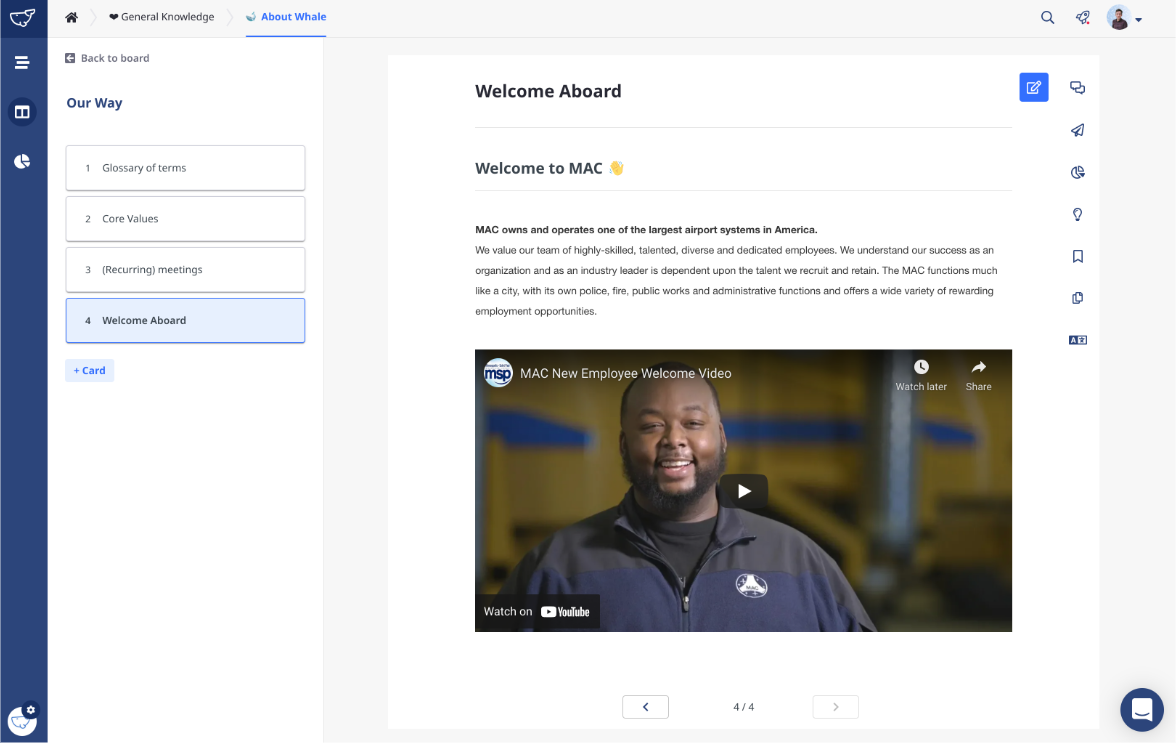
Whale is the simple yet powerful tool that helps you a) capture, share and manage company knowledge with ease, and b) maintain consistency across your teams and build a foundation for growth.
Embed SOP suggestions in your team’s workflows with Whale’s powerful browser extension.
We know you’re busy so grab one of our +75 templates and roll out new processes and SOPs in minutes.
Engage your subject matter experts to keep all your documentation relevant and up-to-date.
Send, schedule and track read assignments to make sure every employee is up-to-speed with the latest updates.
Easily find exactly what you need with the full-text search and customize it to your needs with the built-in tagging manager.
Whale’s editor makes it easy to create easy-to-digest content. Use the screen recorder, Giphy, and Unsplash library, Google, and one drive integration to take it to the next level.
Automate what and how knowledge should flow to your teams so you can streamline the onboarding and training process of your new hires.
API Access
Has API
No
API Access
Has API
Yes




Integrations
Adobe Marketo Engage
No
Asana
No
Basecamp
No
Constant Contact Lead Gen & CRM
No
Criminal IP
Yes
Freshsales
No
Gmail
No
HubSpot CRM
No
HubSpot Customer Platform
No
Liner
Yes
Integrations
Adobe Marketo Engage
Yes
Asana
Yes
Basecamp
Yes
Constant Contact Lead Gen & CRM
Yes
Criminal IP
No
Freshsales
Yes
Gmail
Yes
HubSpot CRM
Yes
HubSpot Customer Platform
Yes
Liner
No
Pricing Details
Free
Free Trial
No
Free Version
Yes
Pricing Details
$0 per month
Professional
Secure knowledge sharing for super effective teams
* All features
* Unlimited boards
* Unlimited playbooks
* Unlimited Cards
* Auto-suggest
* Google Drive integration
* One Drive integration
* Browser extension
Enterprise
Ultimate knowledge control and flexibility that scales
*Personal success coach
*Custom integration
*Fitted to your needs
*Customer service priority
*Onboarding Workshops
Secure knowledge sharing for super effective teams
* All features
* Unlimited boards
* Unlimited playbooks
* Unlimited Cards
* Auto-suggest
* Google Drive integration
* One Drive integration
* Browser extension
Enterprise
Ultimate knowledge control and flexibility that scales
*Personal success coach
*Custom integration
*Fitted to your needs
*Customer service priority
*Onboarding Workshops
Free Trial
No
Free Version
Yes
Deployment
Web-Based
No
On-Premises
No
iPhone App
Yes
iPad App
Yes
Android App
Yes
Windows
Yes
Mac
Yes
Linux
Yes
Chromebook
No
Deployment
Web-Based
Yes
On-Premises
No
iPhone App
Yes
iPad App
Yes
Android App
Yes
Windows
No
Mac
No
Linux
No
Chromebook
No
Customer Support
Business Hours
No
Live Rep (24/7)
No
Online Support
Yes
Customer Support
Business Hours
Yes
Live Rep (24/7)
Yes
Online Support
Yes
Types of Training
Training Docs
Yes
Webinars
No
Live Training (Online)
No
In Person
No
Types of Training
Training Docs
Yes
Webinars
Yes
Live Training (Online)
Yes
In Person
Yes
Vendor Details
Company Name
NAVER Whale
Country
Korea
Website
whale.naver.com/en/
Vendor Details
Company Name
Whale
Founded
2018
Country
Belgium
Website
www.usewhale.io
Product Features
Product Features
Business Process Management
Access Controls / Permissions
Yes
Alerts / Notifications
Yes
Business Process Automation
Yes
Business Rules Management
Yes
Collaboration
Yes
Process Change Tracking
Yes
Process Mapping
No
Process Modeling & Design
No
Visual Workflow Management
No
Knowledge Management
Artificial Intelligence (AI)
No
Cataloging / Categorization
Yes
Collaboration
Yes
Content Management
Yes
Decision Tree
No
Discussion Boards
Yes
Full Text Search
Yes
Knowledge Base Management
Yes
Self Service Portal
No
Onboarding
Course Management
Yes
Document Management
Yes
E-Verify / I-9 Forms
No
Electronic Forms
No
Electronic Signature
No
Employee Handbook
Yes
Employee Portal
Yes
File Management
Yes
Job Description Management
Yes
Orientation Management
Yes
Self Service Portal
No
Task Management
Yes
Tax Forms
No
Training Management
Yes
