Average Ratings 0 Ratings
Average Ratings 0 Ratings
Similar Products
-
ActiveCampaignActiveCampaign is an autonomous marketing platform that revolutionizes the workflows of marketers, agencies, and entrepreneurs. The platform powers forms, landing pages, email, SMS, WhatsApp, automation, and a CRM, as well as the ability to integrate with over 1000 applications. With Active Intelligence, it's easy to create personalized, engaging, data-driven marketing campaigns. Other platforms focus on reporting past failures; ActiveCampaign’s Active Intelligence swiftly flags potential problems and creates opportunities proactively. Predictive insights and goal-driven AI agents replace dashboards and guesswork. Within a single tool, you get real-time reporting and proactive optimizations in addition to market-leading deliverability. That means you can act on insights faster, easily streamline processes, and drive growth for your business. By combining a user-friendly interface with a comprehensive suite of features, the platform is powerful, accessible, and designed to scale with your business. It's easy to get started: While traditional tools force teams through long setup cycles and training, ActiveCampaign delivers measurable lifts in engagement and conversions in days. 89% of surveyed customers say the platform meets their business needs better than the competition, and 88% say ActiveCampaign delivers value faster than competitors.
-
BrandMailBrandMail®, created by BrandQuantum, is an innovative software tool that integrates seamlessly with Microsoft Outlook, enabling all employees within the organization to automatically generate emails that consistently reflect the brand through an easy-to-use toolbar that grants access to brand guidelines and the most current pre-approved materials. With this solution, email signatures are crafted according to your branding requirements, ensuring a uniform appearance regardless of the device or platform used to view them. These signatures are secure and managed from a central location, providing peace of mind regarding their integrity. Notably, users can view their signatures, banners, and surveys when composing, replying to, or forwarding emails. Unlike other solutions, BrandMail does not redirect emails through external servers nor does it modify the rules within your exchange environment, functioning entirely within Microsoft Outlook. By utilizing BrandMail, organizations can turn every email into a branding opportunity while also reducing the security vulnerabilities linked to the manipulation of HTML signatures, thereby enhancing both brand consistency and cybersecurity. This not only streamlines communication but also reinforces the brand identity across all employee interactions.
-
InboxAllyInboxAlly is email deliverability software that moves your messages out of spam and promotions and into the primary inbox. It builds and protects sender reputation, warms new domains and IPs automatically, verifies inbox placement across the major mailbox providers, and monitors blacklists in real time. It layers onto any ESP or SMTP setup without changing how you send. Every plan carries a REST API, a dedicated customer success manager and 24/7 live support. Used by marketers, agencies, cold outreach teams and deliverability consultants.
-
GetResponseGetResponse offers an all-in-one marketing platform designed to equip marketers, solopreneurs, creators, coaches, and small business owners with powerful, user-friendly tools for email marketing, automation, and content monetization. With more than 25 years of experience, GetResponse supports audience growth and engagement through email campaigns, enables seamless course creation and sales, and helps turn passion into profit. It’s the ideal choice for building personal brands, selling products and services, and creating loyal customer communities.
-
NotifyreElevate your business communications with Notifyre's secure SMS and fax solutions. Streamline SMS and faxing processes online, via email, app, or effortlessly integrate through our developer-friendly SMS and fax API. We're ISO 27001 certified and fully HIPAA compliant, giving you the utmost security for your faxes and SMS messages. Notifyre users from flexible pay-as-you-go fax & SMS and outstanding value receive fax plans and 10DLC number plans. 5 Star service guarantee! -Fax Online, Email to Fax, Fax API - Receive Fax Online -> Encrypted Cloud Storage -Online Fax Numbers -Fax Number Porting -Fax Broadcast 40,000+ Utilise the power of SMS messaging in your business, engaging with your audiences via SMS. Send SMS broadcasts or bulk SMS for marketing, promotions, surveys, support, alerts, or notifications all via a user-friendly secure online SMS portal. - 10DLC Virtual SMS Numbers -> Book a Demo for one-on-one guidance! - SMS Online, Email to SMS, SMS API - Mass Text Message Broadcast + SMS Marketing - Subscriber Management - Contact Management, Bulk Upload + Merge Fields + SMS Templates - Appointment Reminders, eCommerce Promo & Cart Reminders, SMS Alerts & Notification & More
-
CloudFilerCloudFiler provides filing and searching in both New and Classic Outlook on all phones & tablets, all popular browsers, Macs and ARM based devices. Created Microsoft's new web Add-in technology by the architect of the Oasys email management system previously owned by Arup Group Ltd and the Excitech Mail system owned by Symetri and latterly Pentagon. File to: the cloud, Windows folders, SharePoint, OneDrive, Egnyte, Autodesk Forma, Bentley ProjectWise, etc. Favoured by the biggest businesses globally.
-
PBRS Power BI Reports DistributionPBRS brings automated report production and distribution to organizations using Microsoft Power BI and SSRS. Developed by ChristianSteven Software, it runs in your Windows environment and coordinates reporting tasks that would otherwise involve manual exports or multiple automation flows. Build workflows for Power BI Service, Power BI Report Server, Power BI Paginated Reports and Microsoft SSRS. Launch them at regular intervals, on custom calendars, after a dataset refresh completes, or in response to supported database, file, email and system events. For personalized (Dynamic) reporting, PBRS reads SQL or JSON instructions to apply each recipient's filters, parameters, output format and delivery details. Report bursting allows a shared report to become separate outputs for customers, branches, departments or individual users. Produce PDF documents, Excel workbooks and CSV files where supported. Use Excel templates and formatting, merge suitable exports into workbook tabs, or collect several reports into a single email, ZIP archive or bookmarked PDF. Passwords and encryption help protect PDF documents. Route finished files to email addresses, Teams, SharePoint, OneDrive, Google Drive, Dropbox, FTP or SFTP servers, network folders, Slack and printers. Deliver exported documents to external audiences without requiring them to access Power BI. Execution records, notifications, retry settings and blank-report handling support unattended operation. A REST API lets developers connect supported scheduling and execution functions to their own applications. PBRS suits reporting operations that need consistent output, recipient-specific content and coordinated delivery across multiple reporting sources.
-
TremendousTremendous is the easiest way to distribute digital rewards and incentives globally. Tremendous allows you to instantly reward your recipients using gift cards, prepaid Visa®, cards, cash, or other digital rewards. Companies large and small can easily track, buy, and manage incentive programs at scale with us. Tremendous allows customers to send rewards individually or in bulk. Our API also allows customers to integrate with our API and automatically send rewards. We work with top brands around the world to support their specific use cases, such as market research, customer loyalty and health & wellbeing, employee rewards, referrals, etc. Tremendous is completely free to use. There are no platform fees Tremendous is currently the only platform that allows cash disbursements (Bank/ACH, PayPal). Tremendous has the best international coverage (230+ countries and regions). Tremendous has created the best API in the industry
-
MuzaicMuzaic.ai is a browser-based tool that scores video automatically. You give it a cut (or a folder of cuts); it returns a finished audio mix — music, SFX, ambience and voiceover as separate layers — mastered to broadcast spec, in roughly 30 seconds per clip. What it actually does The pipeline runs in four stages. First it analyses the video: scenes, objects, pacing, colour and sentiment. From that it builds an audio plan and commits each concept to a clear direction (the site's example: a string quartet under a battle scene) rather than averaging toward something inoffensive. Then it composes every layer to fit the picture and the other layers — SFX land on the action, ambience ducks under speech, the voiceover is drafted from your brief rather than read out. Finally it mixes and masters the result. Existing audio in the source can be kept, replaced or mixed under. Output is three concepts per clip, exported as MP3 or WAV. Layer balance is adjusted inside Muzaic before export; the deliverable is the finished mix, not separate stems. The commercial angle Pricing is metered in minutes of finished audio, not per track or per download; downloads are unlimited. Personal is free for 10 minutes a month, non-commercial only. Creator ($45/month) covers your own brand and paid ads. Studio ($249/month) is for agencies: the licence travels to the client and the legal cover extends to them too. Enterprise adds TV, radio, cinema and OOH, plus a custom contract, DPA and SLA. What it is not It is not a music-generation toy. The free tier exists to test the workflow on your own footage; nothing from it may be published. The target user is a team producing hundreds of ad variants a month, where the audio step is the bottleneck.
-
MonkMost enterprise invoices are never paid from an emailed invoice. Across the $2B+ in receivables Monk manages, 92% have to be submitted through the buyer accounts payable portal instead, and a failed submission is usually silent. Monk is an AI-native accounts receivable platform built around that problem. It files invoices into more than 600 corporate AP portals, including Coupa, Ariba and SAP Business Network, uploads 87% without a person, and brings each rejection back onto the invoice record with the reason attached. Collections runs on the same data. Julia, the Monk agent for Intelligent Collections, reads inbound replies and answers what the customer wrote instead of advancing a dunning schedule, clearing 90% of invoices without escalation. Outbound mail sends through your existing Gmail or Microsoft 365 mailbox. Payments match at 80%, rising to 95% once rules are added. Runs on QuickBooks, NetSuite or Dynamics 365 Business Central. SOC 2 Type II. Live in one to three days.
Description
OutMass is a convenient browser extension compatible with Chrome and Edge that enhances Outlook on the web by integrating mass-email and mail-merge functionalities. Users can create campaigns directly within Outlook, ensuring that all emails are dispatched through their own Microsoft accounts using the official Graph API, allowing recipients to perceive them as standard messages rather than bulk mail. It accommodates both Microsoft 365 and personal Outlook accounts seamlessly. Campaigns are initiated from a CSV file, where each column serves as a merge tag, ensuring that every recipient receives a tailored message. The tool also features open and click tracking to identify engaged recipients, along with a daily check for replies to ensure timely responses. For those who do not open the emails, automated follow-ups are sent, and these cease as soon as a reply is received. Additional features include scheduled sending options, daily send limits, A/B subject line testing, an AI-powered email writer, reusable templates, comprehensive campaign reports with CSV export capabilities, unsubscribe links, and the ability to attach OneDrive links. The user-friendly interface supports 13 different languages, making it accessible to a wide audience. Users can start with a free plan that allows for 250 emails per month, while the Starter plan offers 2,500 emails for $9/month, and the Pro plan provides 10,000 emails for $19/month, catering to varying needs and budgets. OutMass truly empowers users to manage their email campaigns effectively and efficiently.
Description
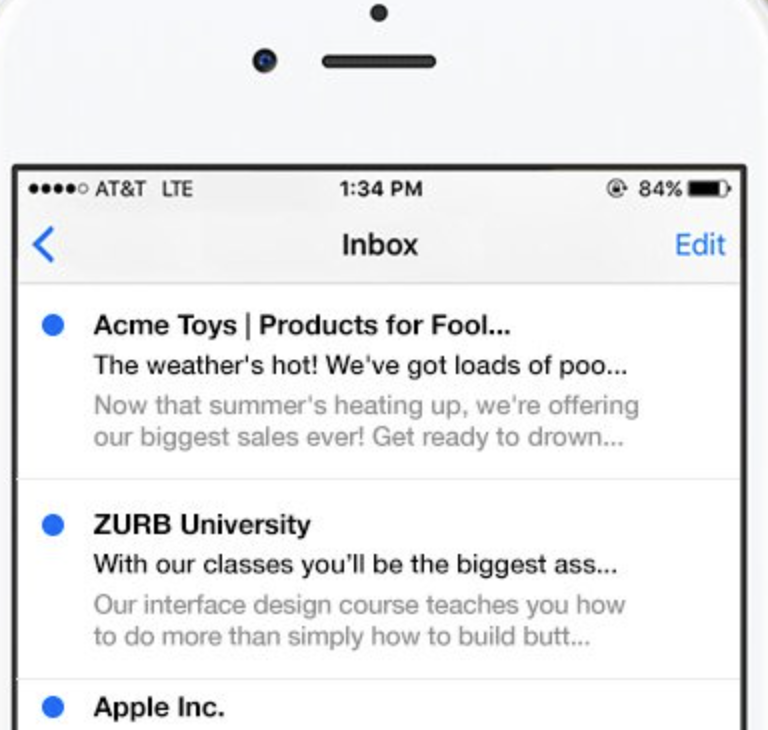
People typically choose to open an email based on two main criteria: the sender's name and the subject line. However, mobile email applications often cut off these elements, which can result in amusing yet often unfortunate outcomes. It's a bit embarrassing, isn't it? At ZURB, we frequently send emails, and we realized we needed a solution to quickly and effectively create engaging subject lines. After searching for an existing tool and coming up empty, we developed TestSubject. This straightforward tool allows you to assess how your email's subject line and sender name appear across various popular mobile devices and email clients. Simply copy and paste your text to receive immediate previews, ensuring you can test before hitting send for added confidence. In addition, you can see how your subject line and sender name display on leading mobile platforms, making it easier than ever to optimize your email's first impression.
API Access
Has API
No
API Access
Has API
No
Screenshots View All
No images available


Integrations
Google Chrome
No
Microsoft Outlook
No
Pricing Details
$9 per month
Free Trial
No
Free Version
Yes
Pricing Details
No price information available.
Free Trial
No
Free Version
No
Deployment
Web-Based
Yes
On-Premises
No
iPhone App
No
iPad App
No
Android App
No
Windows
No
Mac
No
Linux
No
Chromebook
No
Deployment
Web-Based
Yes
On-Premises
No
iPhone App
No
iPad App
No
Android App
No
Windows
No
Mac
No
Linux
No
Chromebook
No
Customer Support
Business Hours
No
Live Rep (24/7)
No
Online Support
Yes
Customer Support
Business Hours
Yes
Live Rep (24/7)
No
Online Support
Yes
Types of Training
Training Docs
Yes
Webinars
No
Live Training (Online)
No
In Person
No
Types of Training
Training Docs
Yes
Webinars
No
Live Training (Online)
No
In Person
No
Vendor Details
Company Name
Metis Information Technologies Ltd
Founded
2026
Country
United Kingdom
Website
getoutmass.com
Vendor Details
Company Name
ZURB
Founded
1998
Country
United States
Website
zurb.com/playground/testsubject
Product Features
Product Features
Email Testing
A/B Testing
No
Accessibility Testing
No
DMARC Analytics
No
Deliverability Rates
No
HTML Validation
No
IP Blacklist Checking
No
Improvement Recommendations
No
Pre-Send Email Testing
No
Preview Across Browsers & Devices
No
Reporting / Analytics
No
Sender Reputation Scoring
No
Spam Testing
No
