Average Ratings 3 Ratings
Average Ratings 0 Ratings
Similar Products
-
Google WorkspaceGoogle Workspace is an all-in-one cloud productivity platform developed by Google to help businesses manage communication, collaboration, document creation, and workflow automation from a centralized environment. The platform combines professional email, cloud storage, video conferencing, document editing, team messaging, scheduling, and AI-powered assistance into one subscription-based ecosystem optimized for modern work environments. Google Workspace includes applications such as Gmail, Google Drive, Google Meet, Docs, Sheets, Slides, Calendar, Chat, Keep, Forms, Sites, NotebookLM, and Gemini AI, enabling teams to work together seamlessly across devices and locations. One of the platform’s core strengths is its built-in AI functionality powered by Gemini, which helps users draft emails, summarize meetings, generate research insights, automate repetitive tasks, and improve productivity using contextual awareness from workplace data. Google Workspace also supports advanced collaboration features including real-time editing, appointment scheduling, eSignatures, document sharing, cloud storage management, and AI-assisted research tools. Businesses benefit from enterprise-grade security features such as AI-powered threat protection, data classification, endpoint management, Data Loss Prevention, secure access controls, and compliance support for enterprise environments. The platform offers scalable pricing plans suitable for startups, small businesses, enterprises, educational institutions, nonprofits, and government organizations. Google Workspace also simplifies data migration and onboarding with built-in migration tools and partner support for transferring emails, files, and business information securely into the cloud.
-
ClickUpWork is broken because your tools are. Dozens of apps, zero shared context, your team stuck playing messenger between all of them. That's not collaboration. That's overhead. ClickUp eliminates the mess. One platform: tasks, docs, chat, goals, time tracking, whiteboards, and AI Agents that work autonomously while you sleep. Everything shares one connected brain. No silos. No duplicated effort. No lost threads. Manage any workflow with custom views, automations, and real-time collaboration baked into every layer. 15+ views including List, Board, Gantt, Timeline, and Calendar. Create rich documents with nested pages and embedded tasks. Set measurable goals with automatic rollups that connect daily output to company objectives. Track time natively with timers, estimates, and workload views that prevent burnout. Over 1,000 integrations plug into your existing stack without adding chaos. GitHub, Slack, Google Drive, Figma, Salesforce, Zoom, and hundreds more — all feeding into one system of record. Built-in AI writes, summarizes, and executes entire workflows on its own. Not a bolt-on — native intelligence woven through every feature. AI Agents handle complex multi-step work around the clock without waiting for humans. SOC 2 Type II certified. SSO/SAML. Custom roles. Audit logs. Scales from five people to fifty thousand. Stop patching a broken system. Start free today. No credit card, no commitment.
-
AnacondaAnaconda is an AI-native development platform that gives teams a governed path from early experimentation to production AI deployment. The platform is built around trusted open-source packages, secure Python package management, controlled environments, and production-grade orchestration. Anaconda helps organizations avoid broken environments, dependency conflicts, security gaps, and deployment delays that can slow AI initiatives. Anaconda Core provides validated packages, automated security scanning, and intelligent dependency conflict resolution for Python and data science teams. Its platform capabilities support AI orchestration, trusted distribution, and enterprise workflows for building and scaling models. Anaconda is widely used across the AI, data science, Python, and enterprise developer communities. The company positions open source as a foundation for AI innovation and emphasizes Python as a core language for the next era of AI development. Anaconda also provides learning courses, certifications, reports, guides, professional services, documentation, and support resources. By combining package governance, environment management, open-source security, and AI development workflows, Anaconda helps teams build trusted AI systems on their own terms.
-
PipefyPipefy is a low-code Business Orchestration and Automation Technologies (BOAT) platform designed to act as a modern middleware layer for the enterprise stack. Rather than replacing existing Systems of Record (SORs) like SAP, Oracle, or Salesforce, Pipefy wraps them in an agile orchestration layer. This architecture allows technical teams to modernize legacy operations and extend the life of core systems without the risks associated with "rip and replace" projects. Pipefy provides the infrastructure to sanitize data inputs, manage complex business logic, and orchestrate API calls between fragmented endpoints. Technical & Architectural Highlights: • Adaptive Governance Framework: Pipefy solves the "Shadow IT" problem by establishing IT-sanctioned "Safe Zones." Business users can build workflows within these guardrails, while IT retains control over critical data, integrations, and permissions via a centralized console. • Agentic AI Engine (BYOLLM): The platform features a governable AI Agent Studio. Unlike "black box" solutions, Pipefy supports a Bring Your Own LLM approach, allowing enterprises to integrate preferred models (Azure OpenAI, AWS Bedrock) securely to automate document analysis (OCR) and decision-making. • Robust Connectivity: Built with an API-first philosophy, Pipefy offers a GraphQL API, Webhooks, and enterprise-grade iPaaS capabilities to ensure seamless data interoperability across the stack. • Security & Compliance: Engineered for regulated industries, the platform is ISO 27001, ISO 27701, and SOC2 Type II certified, supporting compliance with GDPR and SOX standards. Pipefy empowers IT leaders to eliminate technical debt and clear development backlogs by safely delegating low-complexity builds to business units.
-
SynchredibleSynchredible makes it easy to synchronize, copy, and back up individual folders or entire drives with just a single click. Its intuitive assistant guides you step by step in setting up tasks that can be scheduled, triggered by changes (real-time monitoring), or executed automatically when an external storage device is connected. Keep your data synchronized effortlessly and manage it seamlessly! With years of proven technology, Synchredible not only transfers data from A to B but also supports bidirectional synchronization. It automatically detects changes and reliably syncs the most recently edited files. Thanks to advanced duplicate detection, Synchredible saves valuable time by skipping unchanged files, enabling fast synchronization of large datasets in seconds! Synchredible is highly versatile, supporting local folder synchronization, network and USB device synchronization, as well as synchronization with cloud storage.
-
LALAL.AIAny audio or video can be extracted to extract vocal, accompaniment, and other instruments. High-quality stem cutting based on the #1 AI-powered technology in the world. Next-generation vocal remover and music source separator service for fast, simple, and precise stem removal. You can remove vocal, instrumental, drums and bass tracks, as well as acoustic guitar, electric guitar, and synthesizer tracks, without any quality loss. You can start the service free of charge. Upgrade to get more files processed and faster results. Only for personal use. Move to the next level. You can process thousands of minutes of audio and/or video. This software is suitable for both personal and business use. Each LALAL.AI package has a limit on the amount of audio/video that can be split. The package minute limit is deducted from each file that has been fully split. You can split as many files you like, provided their total length does not exceed the minute limit.
-
FilerevFilerev is a powerful tool that helps you easily find and manage hidden files, duplicate files, large files, and oversized folders, ensuring a streamlined and clutter-free digital workspace. Key features include advanced scanning technology that identifies the unorganized files taking up the most space and cluttering your Google Drive. Filerev enhances productivity by saving time and reducing the frustration of manual file organization. The custom filters and bulk delete tool give you complete control over finding and removing unwanted files in your account. The storage analyzer lets you browse your folders by size to see where the space is being used in your Google Drive. Whether you're an individual, a small business, or a large enterprise, Filerev offers robust solutions tailored to your needs. Visit filerev.com to discover how Filerev can transform your Google Drive experience and boost efficiency.
-
FathomFathom is an AI meeting assistant that helps users capture, summarize, search, and act on meetings with less manual work. The platform creates accurate transcripts, instant summaries, action items, and follow-up notes so users can focus on live conversations instead of taking notes. Fathom supports both traditional meeting capture and bot-free capture through its desktop app. Teams can use Fathom as a shared source of truth across customer calls, internal meetings, strategy sessions, and project conversations. Ask Fathom lets users search across meetings and ask questions about conversations, decisions, commitments, risks, and next steps. The platform also supports topic monitoring so important moments and signals are easier to find. Fathom syncs meeting notes, insights, and action items into tools such as Slack, Salesforce, HubSpot, Notion, Asana, Gmail, Zoom, Google Meet, Microsoft Teams, ChatGPT, Claude, Zapier, and API or MCP workflows. It supports security and compliance needs with SOC 2 Type II, GDPR, HIPAA compliance, SSO, and SCIM. By combining AI notetaking, bot-free capture, transcripts, summaries, integrations, search, and workflow automation, Fathom helps teams move from meetings to execution faster.
-
MLM SoftMLM Soft Cloud Platform (MLM Soft Cloud) is a high performance ERP class software designed for MLM and Direct Selling companies. We know how important it is to get your product or opportunity to market as quickly as possible. We can drastically reduce the time required to achieve this. Our cloud-based platform can deliver MLM software in just one week. The platform is fully customizable, from the design to the content, including languages, currencies, wallets, roles of access, messages, and reporting. Our compensation plan engine is configurable to any algorithm. MLM Soft is designed to be the core of your MLM IT landscape. It can be integrated into any 3rd-party software, including ecommerce, CRM, payment, marketing and more, thanks to its full rest API.
-
SearchUnifySearchUnify is an enterprise Agentic AI platform built to transform customer support through autonomous, intelligent operations. Powered by SearchUnifyFRAG™ (Federated Retrieval Augmented Generation), the SCORE framework, and Agentic RAG, the platform unifies siloed enterprise data to deliver contextually accurate, real-time responses across the support lifecycle. Its core product suite includes Cognitive Search for AI-powered retrieval across fragmented knowledge sources, SearchUnifyGPT™ for cited generative AI answers across every support touchpoint, SUVA (Virtual Assistant) for autonomous multi-turn query resolution, Knowbler for knowledge creation and management, and Agent Helper for real-time AI assistance during case resolution. The Agentic AI Suite deploys eight purpose-built agents across the support lifecycle. The AI Support Agent handles end-to-end self-service case resolution. The AI SupportPlus Agent autonomously resolves CRM tickets, initiates clarification loops when context is missing, and hands off complex cases with full context. The AI Classification Agent manages real-time case tagging and routing. The AI Escalation Manager predicts and mitigates escalation risk. The AI Knowledge Agent automates knowledge creation and identifies content gaps. The AI Competency Agent resolves complex L2 technical workflows autonomously. The AI Agent Partner provides in-the-moment guidance to support teams. The AI Case Quality Auditor evaluates 100% of closed cases for continuous improvement. The platform supports BYOLLM, Model Context Protocol (MCP), and a governance layer with role-based access control, PII masking, and compliance with ISO 27001, HIPAA, and SOC 2. It integrates with 100+ enterprise platforms including Salesforce, Zendesk, and ServiceNow.
Description
Obsidian serves as a robust knowledge management tool that operates using a directory of plain text Markdown files stored locally. Much like the way our minds shift from one concept to another, your second brain should mimic this non-linear pattern. In Obsidian, the process of creating and navigating "connections" between notes is seamless and intuitive. Cultivate your notes with care, and at the end of your day, take a moment to appreciate the intricate web of knowledge you've created. Personalization in note-taking is key, and if you've experimented with various applications but always felt something was amiss, Obsidian offers a refreshing alternative. Designed to be highly customizable, it features 22 essential plugins and 149 additional community-created plugins, allowing you to tailor your toolkit and get started in just a few minutes. Furthermore, when Obsidian reaches version 1.0, you'll have the option to integrate third-party plugins or even create your own, opening up endless possibilities. In today's landscape, where cloud services are vulnerable to sudden changes or shutdowns, relying on proprietary formats and facing potential data lock-in is the last thing you need. With Obsidian, your information remains securely within a local folder, giving you peace of mind and complete control over your data. This ensures that your knowledge remains accessible and safe, no matter what the future holds.
Description
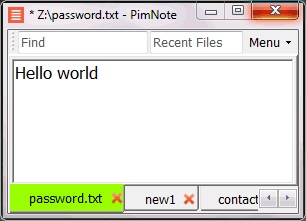
PimNote is a text editor that allows for faster document access. It also combines both the useful and unutilized features of all other text editors.
This tool is designed for knowledge management. You can quickly access the recent file list with a single click. You can easily access an old file that has been opened long ago with the unlimited and searchable recent files list. You can type less with the one-click search and find history feature.
This product is designed for remote work. No freezing from a remote file monitoring/opening/writing when disconnected. You can save files offline by closing the application and not closing the tabs. During file opening, auto-reconnect the network drive. Recurring file notifications are displayed politely on top bar, instead of a popup dialog box that requires frequent actions and tends not to be used.
API Access
Has API
Yes
API Access
Has API
No


Integrations
Aureon
Yes
Dropbox
Yes
Epiphany
Yes
Friendware
Yes
GitHub
Yes
HoverNotes
Yes
Inbox AI
Yes
MarkSnip
Yes
Msty
Yes
OpenClaw
Yes
Integrations
Aureon
No
Dropbox
No
Epiphany
No
Friendware
No
GitHub
No
HoverNotes
No
Inbox AI
No
MarkSnip
No
Msty
No
OpenClaw
No
Pricing Details
$25 one-time payment
Free Trial
No
Free Version
Yes
Pricing Details
No price information available.
Free Trial
No
Free Version
Yes
Deployment
Web-Based
No
On-Premises
No
iPhone App
Yes
iPad App
Yes
Android App
Yes
Windows
Yes
Mac
Yes
Linux
Yes
Chromebook
No
Deployment
Web-Based
No
On-Premises
No
iPhone App
No
iPad App
No
Android App
No
Windows
Yes
Mac
No
Linux
No
Chromebook
No
Customer Support
Business Hours
No
Live Rep (24/7)
No
Online Support
Yes
Customer Support
Business Hours
No
Live Rep (24/7)
No
Online Support
Yes
Types of Training
Training Docs
Yes
Webinars
No
Live Training (Online)
No
In Person
No
Types of Training
Training Docs
Yes
Webinars
No
Live Training (Online)
No
In Person
Yes
Vendor Details
Company Name
Obsidian
Website
obsidian.md/
Vendor Details
Company Name
Pimtel
Founded
2018
Website
www.pimtel.com/pimnote/
Product Features
Note-Taking
Categories / Organization
No
Clip From Web
No
Document Scanning
No
Formatting / Markdown
No
Handwriting
No
Hyperlinking
No
Image Insertion
No
List/Checklist Creation
No
Printing
No
Search
No
Sharing / Collaboration
No
Syncing
No
Templates
No
Voice Notes
No
Text Editors
API
No
Auto-Complete
No
Code Folding
No
Column Editing
No
Customizable Themes
No
Debugging
No
Formatting / Table Editing
No
Keyboard Shortcuts
No
Multi-Monitor Editing
No
Syntax Highlighting
No
WYSIWYG
No
Product Features
Text Editors
API
No
Auto-Complete
No
Code Folding
No
Column Editing
No
Customizable Themes
No
Debugging
No
Formatting / Table Editing
No
Keyboard Shortcuts
No
Multi-Monitor Editing
No
Syntax Highlighting
No
WYSIWYG
No
