Average Ratings 36 Ratings
Average Ratings 2 Ratings
Similar Products
-
HERE Enterprise BrowserEverything works right here™. The product of years of collaboration with the world’s largest financial institutions, HERE Enterprise Browser is the first and only browser that solves both enterprise security and workforce productivity. Built on Google Chromium, HERE streamlines workflow and improves employee experience.
-
Wave BrowserWave Browser is designed for people who want a safer, faster, and more meaningful way to explore the web. Built on strong security principles, Wave puts you in control of your privacy with customizable cookie and tracker blocking, incognito mode, and clear permission choices. AppEsteem Certification ensures Wave meets strict, independently verified standards for clean installation, transparent behavior, and responsible software practices, giving you confidence every time you browse. Wave is also built for productivity, offering tools that help you stay organized and move through information with purpose. Tab grouping, bookmarks, and a reading list keep ideas within reach, while split screen let you research, compare, or watch without switching between windows. Memory Saver mode helps your device stay fast during heavy sessions, and the built-in AI Assistant and messaging integrations bring your favorite tasks closer to a single click. Designed to be simple and user-friendly, Wave Browser removes friction from everyday browsing. The free ad blocker keeps pages clean, and built-in tools—like the converter, package tracker, price tracker, translation tool, stock tracker, and content notifier—help you get things done without extra extensions. Most importantly, Wave is a browser with real ocean impact built in. Through a certified partnership with 4ocean, Wave helps fund the removal of 100,000 pounds of trash from our ocean, rivers, and coastlines every year. A live impact tracker shows exactly how much waste the Wave community has helped remove, with verified monthly updates from cleanup crews in the U.S., Indonesia, and the Dominican Republic. With Wave Browser, your everyday browsing directly supports a cleaner planet and the people working to protect it.
-
1Password1Password is a password manager that's secure, scalable, easy-to-use, and trusted by some of the most prestigious companies in the world. 1Password makes it easy to keep your employees safe online with its simple interface. Good security habits will become second nature once 1Password is a part of your employees' workflow. 1Password Advanced Protection now available with 1Password Business You can set Master Password policies, enforce two factor authentication across the entire team, limit access with firewall rules, review sign in attempts, and require that your team use the latest version 1Password. 1Password for Agents is a secure identity and credential access platform designed to help personal AI agents authenticate to websites and perform authorized tasks without handling sensitive login information. Our award-winning apps can be downloaded for Mac, iOS and Linux as well as Windows, Android, and Windows. 1Password syncs seamlessly between devices so that your employees have access to their passwords at all times. Your risk is reduced and your productivity increases when everyone uses 1Password.
-
CloudFilerCloudFiler provides filing and searching in both New and Classic Outlook on all phones & tablets, all popular browsers, Macs and ARM based devices. Created Microsoft's new web Add-in technology by the architect of the Oasys email management system previously owned by Arup Group Ltd and the Excitech Mail system owned by Symetri and latterly Pentagon. File to: the cloud, Windows folders, SharePoint, OneDrive, Egnyte, Autodesk Forma, Bentley ProjectWise, etc. Favoured by the biggest businesses globally.
-
MobiOfficeMobiOffice (formerly OfficeSuite) is an easy-to-use office suite alternative, used by over 250 million users across 195 countries. Available on Windows, Android, iOS, and macOS, MobiOffice includes MobiDocs, MobiSheets, and MobiSlides. MobiOffice helps you manage text documents, spreadsheets, and presentations with ease. It's compatible with all major file formats including Microsoft Office (DOCX, ODT, PPTX), Google (Docs, Sheets, Slides), Apple iWork, and more. Explore each component: MobiDocs: Create and modify documents with comprehensive formatting options. MobiSheets: Simplify data management and analysis to visualize insights and generate reports effortlessly. MobiSlides: Craft impressive presentations with customizable templates and multimedia capabilities. MobiOffice integrates with MobiDrive, MobiSystems’ cloud storage solution for easy document saving and synchronization. Try it free for 7 days to see how this office suite meets your needs. Optimized for all major platforms, MobiOffice’s components - MobiDocs, MobiSheets, and MobiSlides - are available as a complete suite or as standalone apps on Windows, delivering tailored and affordable solutions that suit individual needs.
-
YoffixYoffix is a versatile and secure hybrid workplace management platform tailored for organizations operating within the Microsoft 365 ecosystem. Specifically designed to integrate seamlessly with Microsoft Teams and Outlook, Yoffix empowers companies to oversee all aspects of their workplaces, from managing desk and room bookings to enforcing hybrid policies, handling visitors, and ensuring resource compliance. Beyond merely functioning as booking software, Yoffix fosters genuine collaboration among teams, enabling them to coordinate office attendance, minimize no-shows and double bookings, and enhance onsite teamwork, ultimately transforming the office into a hub of productivity. For IT, HR, and workplace management teams, Yoffix provides comprehensive control through customizable roles, permission-based governance, and sophisticated analytics on space utilization, attendance patterns, and team presence. The platform features single sign-on capabilities via Entra ID, two-way calendar synchronization, and extensive integrations with Microsoft to support swift onboarding without the need for additional tools. Moreover, Yoffix is fully compliant with GDPR regulations, ISO 27001 certified, and offers a flexible modular pricing structure, making it an ideal choice for organizations looking to optimize their hybrid work environments. Additionally, its user-friendly interface ensures that employees can easily navigate the system, enhancing overall workplace satisfaction and efficiency.
-
Kasm WorkspacesKasm Workspaces streams your workplace environment directly to your web browser…on any device and from any location. Kasm is revolutionizing the way businesses deliver digital workspaces. We use our open-source web native container streaming technology to create a modern devops delivery of Desktop as a Service, application streaming, and browser isolation. Kasm is more than a service. It is a platform that is highly configurable and has a robust API that can be customized to your needs at any scale. Workspaces can be deployed wherever the work is. It can be deployed on-premise (including Air-Gapped Networks), in the cloud (Public and Private), or in a hybrid.
-
UptimeRobotThe ultimate uptime monitoring service. Get 50 monitors with 5-minute checks completely free. Set up in seconds and stay informed about your website’s health at all times. Website monitoring: Get instant alerts when your website goes down. Reliable and accurate monitoring helps you fix issues before they affect users and prevent revenue loss. SSL certificate monitoring: Avoid losing visitors due to expired SSL certificates. Get notified 30 days before expiration so you can renew in time. Ping and port monitoring: Check if your server is online or if your email service is running on port 465. Monitor any port you need with real-time alerts. Cron job monitoring: Track scheduled tasks with heartbeat monitoring. We verify if the request arrives on time, making sure server-side jobs and internet-connected devices are running properly. Status pages: Create up to 100 branded status pages, protect them with a password, and allow subscribers to receive updates. Stay informed with email, SMS, voice calls, push notifications, or integrations with Slack, Zapier, PagerDuty, Telegram, Discord, Microsoft Teams, Google Chat, and more. Maintenance windows: Pause monitoring when you schedule downtime to avoid unnecessary alerts
-
Proton PassProton Pass for Business is a privacy-first password and identity manager that helps organizations secure access at scale without sacrificing usability. Built with end-to-end encryption and a strict zero-knowledge architecture, it ensures that passwords, passkeys, secure notes, and payment details remain accessible only to authorized users within your team. Not even Proton can view your data. Teams can securely create, store, and share credentials via encrypted vaults, enabling safe and efficient collaboration. Granular admin controls allow IT managers to oversee permissions, enforce strong password policies, monitor access, and manage users throughout the employee lifecycle from onboarding to offboarding. Built-in password generation, autofill, and cross-device syncing streamline everyday workflows while maintaining high security standards. Proton Pass for Business also includes advanced features such as email alias integration to protect employee identities, dark web monitoring to detect compromised credentials, and detailed activity logs for visibility and compliance. Its open-source foundation promotes transparency and trust, and independent audits reinforce its security model. Hosted in Switzerland and protected by strong privacy laws, Proton Pass offers organizations a secure alternative to traditional password managers. With seamless browser extensions, an intuitive design, and enterprise-ready controls, it empowers teams to reduce credential-related risks, prevent unauthorized access, and improve productivity, all within a secure, encrypted environment.
-
ManageEngine Endpoint CentralManageEngine Endpoint Central is a unified endpoint management and security platform designed for IT teams managing diverse and distributed device environments eliminating the need for multiple disconnected products for patching, remote access, mobile management, and security. The platform supports Windows, macOS, Linux, iOS, Android, and Chrome OS. Automated patch deployment covers OS and 1,000+ third-party applications with scheduling, testing, rollback, and compliance reporting. Software can be deployed, updated, or removed across thousands of endpoints simultaneously. OS imaging workflows provision new devices quickly, while continuous asset inventory supports license compliance and audit readiness. Security capabilities are built directly into the platform. Vulnerability assessment identifies and prioritizes endpoint weaknesses by severity. Application control prevents unauthorized software execution. Device control governs USB and peripheral access. Endpoint privilege management removes unnecessary admin rights. EDR delivers behavioral threat detection and incident response, while NGAV blocks malware, ransomware, and zero-day threats. BitLocker and FileVault encryption enforces disk protection across Windows and macOS. Built-in remote desktop allows technicians to connect instantly without third-party software. Integrated MDM covers iOS and Android enrollment, app management, and remote wipe for corporate and BYOD environments. DEX monitoring gives IT teams real-time visibility into device performance enabling proactive issue resolution before productivity is impacted. Available as cloud or on-premises across Free, Professional, Enterprise, UEM, and Security editions.
Description
The business-focused browser has arrived, created on the foundation of Chromium open source and supported by Microsoft's robust security and innovative features. Microsoft Edge offers a swift and secure browsing experience that prioritizes data protection while also saving you time and resources. It is compatible with various platforms, including supported versions of Windows, macOS, iOS, and Android, making it the ideal browser for Windows users. With Microsoft Edge, you can effortlessly sync your passwords, favorites, and settings between multiple devices, enhancing convenience and accessibility. Designed to integrate seamlessly with Mac systems, Microsoft Edge allows for easy synchronization of your passwords, bookmarks, and preferences across numerous devices. You can start enjoying the benefits of Microsoft Edge by downloading it as your reliable web browser today. For users on iOS devices, Microsoft Edge is readily available for download, enabling you to sync your passwords, favorites, and collections across all your signed-in devices. Furthermore, you can scan the QR code to quickly install the app on your device. Likewise, Android users can also download Microsoft Edge, which supports the synchronization of passwords, favorites, and collections, ensuring a cohesive browsing experience across all signed-in devices. The availability of Microsoft Edge on multiple platforms makes it a versatile choice for anyone seeking a dependable browser.
Description
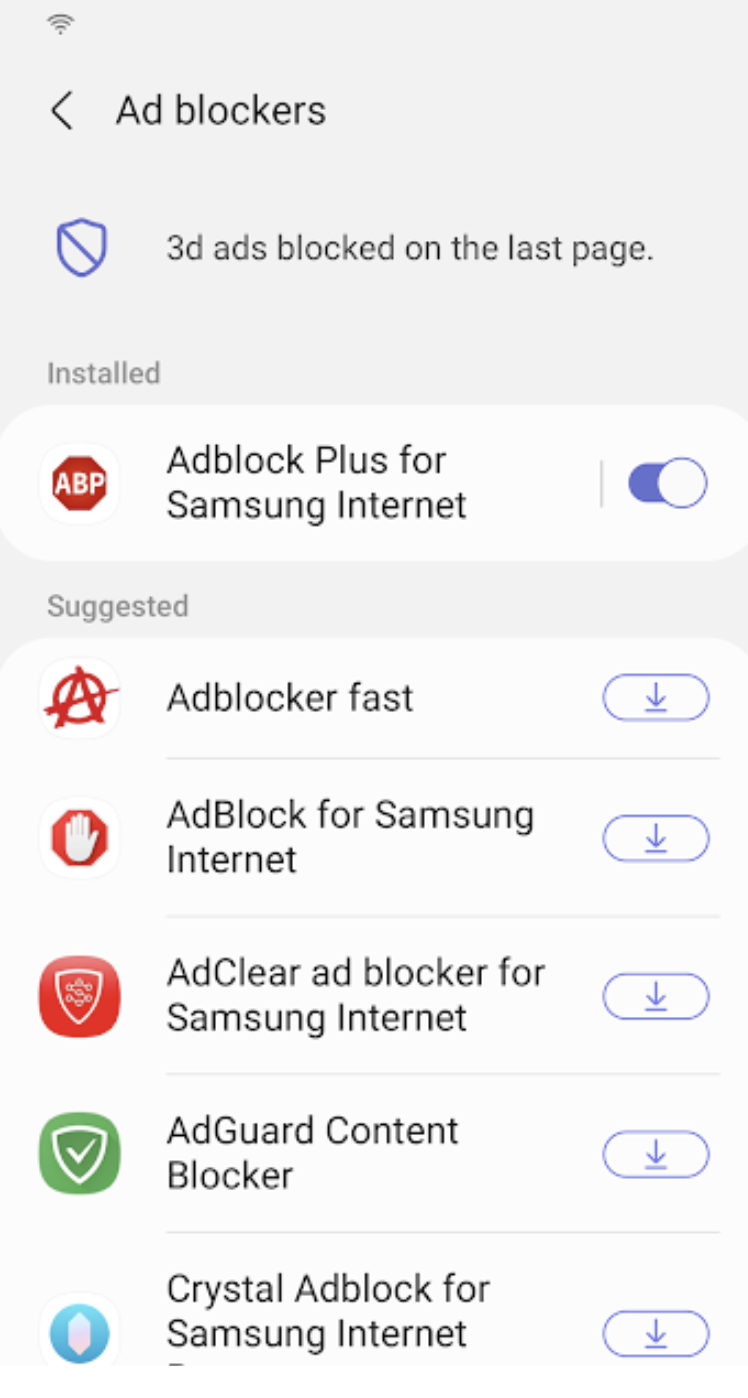
Samsung Internet for Android is an efficient and dependable web browser designed for mobile devices such as phones and tablets. It enhances your online experience with features like secret mode for privacy, biometric login for secure access, and a content blocker to minimize distractions. This browser also supports third-party applications that can offer additional filtering for unwanted content, ensuring a streamlined browsing experience. Online shopping becomes safer and more convenient with the integration of the Web Payments API, allowing for secure checkouts with just a few taps. Progressive Web Apps provide the flexibility to be installed like traditional apps or accessed directly through the browser, with a badge appearing in the URL bar when available. The Video Assistant feature allows users to easily toggle between different viewing modes for an optimized video experience, while the pop-up player enables seamless browsing without interrupting video playback. Overall, Samsung Internet for Android prioritizes user convenience and security in its design.
API Access
Has API
Yes
API Access
Has API
No




Integrations
8th Wall
Yes
Adblock Plus
Yes
Acronis Cyber Protect Cloud
Yes
Aboard
Yes
Agilitest
Yes
AgitarOne
Yes
Bitwarden
Yes
Content Professor
Yes
CrankWheel
Yes
Curiosity
Yes
Integrations
8th Wall
Yes
Adblock Plus
Yes
Acronis Cyber Protect Cloud
No
Aboard
No
Agilitest
No
AgitarOne
No
Bitwarden
No
Content Professor
No
CrankWheel
No
Curiosity
No
Pricing Details
Free
Free Trial
No
Free Version
Yes
Pricing Details
No price information available.
Free Trial
No
Free Version
No
Deployment
Web-Based
No
On-Premises
No
iPhone App
Yes
iPad App
Yes
Android App
Yes
Windows
Yes
Mac
Yes
Linux
Yes
Chromebook
No
Deployment
Web-Based
No
On-Premises
No
iPhone App
No
iPad App
No
Android App
Yes
Windows
No
Mac
No
Linux
No
Chromebook
No
Customer Support
Business Hours
Yes
Live Rep (24/7)
No
Online Support
No
Customer Support
Business Hours
No
Live Rep (24/7)
No
Online Support
Yes
Types of Training
Training Docs
Yes
Webinars
No
Live Training (Online)
No
In Person
No
Types of Training
Training Docs
No
Webinars
No
Live Training (Online)
No
In Person
No
Vendor Details
Company Name
Microsoft
Founded
1975
Country
United States
Website
www.microsoft.com/en-us/edge
Vendor Details
Company Name
Samsung
Founded
1938
Country
South Korea
Website
www.samsung.com/us/support/owners/app/samsung-internet
