Average Ratings 0 Ratings
Average Ratings 14 Ratings
Similar Products
-
Google WorkspaceGoogle Workspace is an all-in-one cloud productivity platform developed by Google to help businesses manage communication, collaboration, document creation, and workflow automation from a centralized environment. The platform combines professional email, cloud storage, video conferencing, document editing, team messaging, scheduling, and AI-powered assistance into one subscription-based ecosystem optimized for modern work environments. Google Workspace includes applications such as Gmail, Google Drive, Google Meet, Docs, Sheets, Slides, Calendar, Chat, Keep, Forms, Sites, NotebookLM, and Gemini AI, enabling teams to work together seamlessly across devices and locations. One of the platform’s core strengths is its built-in AI functionality powered by Gemini, which helps users draft emails, summarize meetings, generate research insights, automate repetitive tasks, and improve productivity using contextual awareness from workplace data. Google Workspace also supports advanced collaboration features including real-time editing, appointment scheduling, eSignatures, document sharing, cloud storage management, and AI-assisted research tools. Businesses benefit from enterprise-grade security features such as AI-powered threat protection, data classification, endpoint management, Data Loss Prevention, secure access controls, and compliance support for enterprise environments. The platform offers scalable pricing plans suitable for startups, small businesses, enterprises, educational institutions, nonprofits, and government organizations. Google Workspace also simplifies data migration and onboarding with built-in migration tools and partner support for transferring emails, files, and business information securely into the cloud.
-
Construction Daily ReportsYou can save up to an hour per day on daily reports CDR – Construction Daily Reports is the fastest custom daily reporting solution available for the construction industry. It can be accessed on our mobile app for Android or Apple devices as well as our website portal. You can customize your reports by entering project details. Then, you can take photos and make notes using your mobile device. CDR will email your completed report in professional PDF format to you after you sign it. We also save it on our servers so that you can upload it to your cloud storage. CDR is a mobile-friendly, time-saving construction software designed to simplify your reporting process. Start your free trial now!
-
CompanyCamCompanyCam is a photo-based solution created specifically for contractors. Users can take unlimited photos—which are location and time stamped, sent to the cloud, and stored securely. Every photo is organized by project and instantly available to your team, allowing you to see what’s going on anytime, anywhere.
-
FathomFathom is an AI meeting assistant that helps users capture, summarize, search, and act on meetings with less manual work. The platform creates accurate transcripts, instant summaries, action items, and follow-up notes so users can focus on live conversations instead of taking notes. Fathom supports both traditional meeting capture and bot-free capture through its desktop app. Teams can use Fathom as a shared source of truth across customer calls, internal meetings, strategy sessions, and project conversations. Ask Fathom lets users search across meetings and ask questions about conversations, decisions, commitments, risks, and next steps. The platform also supports topic monitoring so important moments and signals are easier to find. Fathom syncs meeting notes, insights, and action items into tools such as Slack, Salesforce, HubSpot, Notion, Asana, Gmail, Zoom, Google Meet, Microsoft Teams, ChatGPT, Claude, Zapier, and API or MCP workflows. It supports security and compliance needs with SOC 2 Type II, GDPR, HIPAA compliance, SSO, and SCIM. By combining AI notetaking, bot-free capture, transcripts, summaries, integrations, search, and workflow automation, Fathom helps teams move from meetings to execution faster.
-
MuzaicMuzaic.ai is a browser-based tool that scores video automatically. You give it a cut (or a folder of cuts); it returns a finished audio mix — music, SFX, ambience and voiceover as separate layers — mastered to broadcast spec, in roughly 30 seconds per clip. What it actually does The pipeline runs in four stages. First it analyses the video: scenes, objects, pacing, colour and sentiment. From that it builds an audio plan and commits each concept to a clear direction (the site's example: a string quartet under a battle scene) rather than averaging toward something inoffensive. Then it composes every layer to fit the picture and the other layers — SFX land on the action, ambience ducks under speech, the voiceover is drafted from your brief rather than read out. Finally it mixes and masters the result. Existing audio in the source can be kept, replaced or mixed under. Output is three concepts per clip, exported as MP3 or WAV. Layer balance is adjusted inside Muzaic before export; the deliverable is the finished mix, not separate stems. The commercial angle Pricing is metered in minutes of finished audio, not per track or per download; downloads are unlimited. Personal is free for 10 minutes a month, non-commercial only. Creator ($45/month) covers your own brand and paid ads. Studio ($249/month) is for agencies: the licence travels to the client and the legal cover extends to them too. Enterprise adds TV, radio, cinema and OOH, plus a custom contract, DPA and SLA. What it is not It is not a music-generation toy. The free tier exists to test the workflow on your own footage; nothing from it may be published. The target user is a team producing hundreds of ad variants a month, where the audio step is the bottleneck.
-
AestheticsProAestheticsPro is today's most comprehensive medical aesthetic software. HIPAA cloud compliant with integrated POS, targeted advertising, and results driven reporting paired with electronic charting and client portal with "book now" capabilities. AestheticsPro provides everything you need to run your medical spa business.
-
Nasdaq MetrioNasdaq Metrio is a sustainability reporting platform tailored for businesses at various stages of their ESG journey. It merges meticulous data collection, tracking, and management with emissions calculations and assurance. Additionally, it provides a comprehensive library of metrics from various rater and ranker frameworks as well as regulatory bodies, all cross-referenced, de-duplicated, and clarified, complete with guidance notes.
-
Portfolio ManagerBlue Sky's "Portfolio Manager" Lease Management Software is an easy to learn and use SaaS solution for centralized management of lease contracts. By managing your lease contracts and associated maintenance contracts throughout the entire lifecycle you can strengthen the audit process, reduce costs, increase cash flows and mitigate risk with centralized visibility that drives enterprise value. Portfolio Manager provides complete status management for running leasing RFP's, tracking status, notes, documents and next steps for every open project. Flat file data imports allow for efficient data entry. Fully customizable with robust reporting capabilities. The report writer allows every data field to be exported to excel. Pre-built templates are available to feed most ASC842 lease accounting software templates. End of lease term management is automated with custom parameters and automatic notifications to ensure you never miss an end of lease term notification. Custom Programming available.
-
ClickLearnClickLearn simplifies complex business processes using popular software. You can create multi-format learning materials in any language and publish them to a 24/7 learning portal with just one click. A video walkthrough of the process, with narration in your preferred language. Put your learning to the test. This interactive simulation of your workplace allows you to test your knowledge without any hints. Interactive simulation of your workplace environment that guides you through the process. This guide is step-by-step. ClickLearn wrote this guide with perfectly cropped screenshots. ClickLearn Assist can be your go-to helper when you are stuck, need process help, or want to try a new process in the live system. You don't have to worry about making another mistake. All your learning materials can be auto-translated with a click of a button
-
DocmosisDocmosis is a self-hosted or SaaS template-based document generation solution. Integrate with custom-built software applications or popular third-party apps using the API. Create templates using MS Word or LibreOffice. Add plain-text placeholders to control: the insertion of text/images/tables; conditionally add/remove any content; perform calculations; loop over repeating data; format data/numbers and much more. Integrate with: Custom software built using Java, C#, Python, PHP, Ruby and more via a REST API; Low-code and no-code platforms like Appian, Bubble, Mendix, Outsystems; Third-party form builders or apps that can perform a webhook such as FormAssembly or Salesforce. Used by customers in Finance, Health, Legal, Education, Government, HR, Insurance, Logistics, and Manufacturing to generate customized letters invoices, proposals, contracts, statements, reports and more.
Description
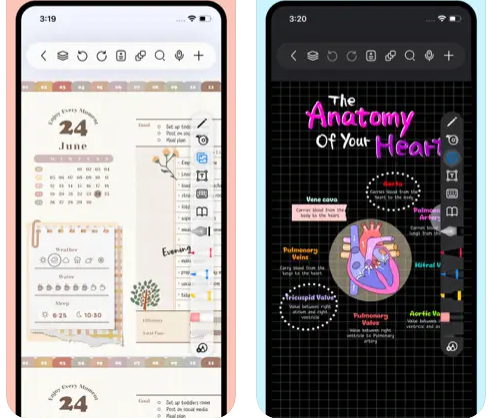
Freenotes delivers a digital note-taking platform that seamlessly combines the experience of writing on paper with advanced AI features. The app provides realistic pen strokes that replicate authentic handwriting, enhancing both sketching and note-taking, and includes functionalities such as handwriting-to-text conversion, a variety of stickers, and multiple brush styles. Your notes are easily synced through iCloud and various multi-cloud backup options. Freenotes also enables PDF annotation, allowing users to highlight, mark up, and translate text within their documents, as well as add hyperlinks to other pages or external websites. It supports picture-in-picture video mode and split-screen functionality, making it possible to take notes while watching educational videos or attending lectures. The integrated AI assistant allows you to capture screenshots or upload documents to receive quick answers or summaries of content. To keep your notes organized, you can categorize them into folders, and a swift search feature helps you find information rapidly. Additionally, Freenotes is designed to enhance productivity, making it an ideal choice for students and professionals alike.
Description
Zoho Notebook is a cross-platform note-taking and knowledge management app for individuals, students, professionals, and teams. Capture ideas using text, checklists, images, audio, video, sketches, files, scanned documents, and rich media, then organize them with notebooks, collections, tags, reminders, and Kanban-style Noteboards.
Notebook includes powerful search and productivity capabilities such as OCR-based search, PDF content search and annotation, recurring reminders, Email-In, version history, and offline access with automatic synchronization across devices.
Notebook AI adds AI-powered writing assistance, summarization, content generation, Ask with My Content, Mind Maps, and audio/video transcription. Teams can use Notebook for Business for shared workspaces, co-owner and edit access, centralized administration, organization-level knowledge management, Whiteboards, and built-in Notebook AI.
Zoho Notebook integrates with tools including Microsoft Teams, Slack, Google Workspace, Zapier, Zoho Flow, IFTTT, Zoho apps, and MCP-compatible AI assistants such as ChatGPT and Claude. Zoho Notebook is available on the web, Windows, macOS, Linux, iPhone, iPad, and Android.
API Access
Has API
No
API Access
Has API
No



Integrations
Axis LMS
No
Google Chrome
No
IFTTT
No
Microsoft Edge
No
Microsoft Teams
No
Mozilla Firefox
No
Safari
No
Slack
No
Speak
No
Stackreaction
No
Integrations
Axis LMS
Yes
Google Chrome
Yes
IFTTT
Yes
Microsoft Edge
Yes
Microsoft Teams
Yes
Mozilla Firefox
Yes
Safari
Yes
Slack
Yes
Speak
Yes
Stackreaction
Yes
Pricing Details
Free
Free Trial
No
Free Version
Yes
Pricing Details
$1.99/monthly
Freemium. Essential is free; paid plans include Pro, Pro Lite, Pro Plus and Notebook for Business.
Free Trial
Yes
Free Version
Yes
Deployment
Web-Based
No
On-Premises
No
iPhone App
Yes
iPad App
Yes
Android App
No
Windows
No
Mac
Yes
Linux
No
Chromebook
No
Deployment
Web-Based
Yes
On-Premises
No
iPhone App
Yes
iPad App
Yes
Android App
Yes
Windows
Yes
Mac
Yes
Linux
Yes
Chromebook
No
Customer Support
Business Hours
No
Live Rep (24/7)
No
Online Support
Yes
Customer Support
Business Hours
No
Live Rep (24/7)
No
Online Support
No
Types of Training
Training Docs
Yes
Webinars
No
Live Training (Online)
No
In Person
No
Types of Training
Training Docs
Yes
Webinars
No
Live Training (Online)
No
In Person
No
Vendor Details
Company Name
Freenotes
Country
China
Website
apps.apple.com/us/app/freenotes-ai-notes-taking/id6464237904
Vendor Details
Company Name
Zoho
Founded
1996
Country
India
Website
www.zohocorp.com
Product Features
Note-Taking
Categories / Organization
No
Clip From Web
No
Document Scanning
No
Formatting / Markdown
No
Handwriting
No
Hyperlinking
No
Image Insertion
No
List/Checklist Creation
No
Printing
No
Search
No
Sharing / Collaboration
No
Syncing
No
Templates
No
Voice Notes
No
Product Features
Note-Taking
Categories / Organization
No
Clip From Web
Yes
Document Scanning
No
Formatting / Markdown
Yes
Handwriting
No
Hyperlinking
Yes
Image Insertion
Yes
List/Checklist Creation
Yes
Printing
Yes
Search
Yes
Sharing / Collaboration
Yes
Syncing
Yes
Templates
No
Voice Notes
No
