You can save up to an hour per day on daily reports CDR – Construction Daily Reports is the fastest custom daily reporting solution available for the construction industry. It can be accessed on our mobile app for Android or Apple devices as well as our website portal. You can customize your reports by entering project details. Then, you can take photos and make notes using your mobile device. CDR will email your completed report in professional PDF format to you after you sign it. We also save it on our servers so that you can upload it to your cloud storage. CDR is a mobile-friendly, time-saving construction software designed to simplify your reporting process. Start your free trial now!
Learn more

Google Workspace is an all-in-one cloud productivity platform developed by Google to help businesses manage communication, collaboration, document creation, and workflow automation from a centralized environment. The platform combines professional email, cloud storage, video conferencing, document editing, team messaging, scheduling, and AI-powered assistance into one subscription-based ecosystem optimized for modern work environments. Google Workspace includes applications such as Gmail, Google Drive, Google Meet, Docs, Sheets, Slides, Calendar, Chat, Keep, Forms, Sites, NotebookLM, and Gemini AI, enabling teams to work together seamlessly across devices and locations. One of the platform’s core strengths is its built-in AI functionality powered by Gemini, which helps users draft emails, summarize meetings, generate research insights, automate repetitive tasks, and improve productivity using contextual awareness from workplace data. Google Workspace also supports advanced collaboration features including real-time editing, appointment scheduling, eSignatures, document sharing, cloud storage management, and AI-assisted research tools. Businesses benefit from enterprise-grade security features such as AI-powered threat protection, data classification, endpoint management, Data Loss Prevention, secure access controls, and compliance support for enterprise environments. The platform offers scalable pricing plans suitable for startups, small businesses, enterprises, educational institutions, nonprofits, and government organizations. Google Workspace also simplifies data migration and onboarding with built-in migration tools and partner support for transferring emails, files, and business information securely into the cloud.
Learn more
Kilonotes
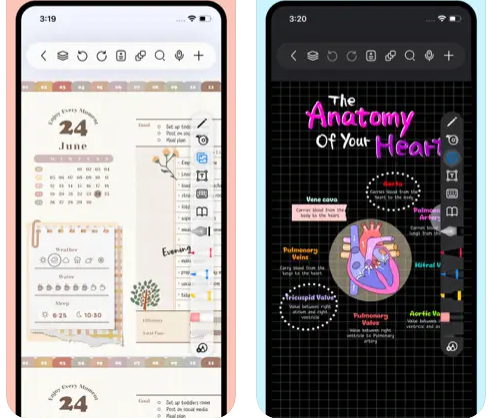
Kilonotes is an innovative app for digital note-taking and PDF reading, aimed at assisting both students and professionals through a seamless handwriting experience and a wide array of study tools. It enables users to capture lecture notes, annotate PDFs, tackle exercises, engage with online lessons, and systematically organize reading materials, making it a dependable companion for academic pursuits. The handwriting feature replicates the authentic sensation of writing on paper, complemented by customizable options that allow users to tailor their notebooks and layouts to their preferences. Additionally, Kilonotes offers an assortment of photo editing tools and a split-screen capability, facilitating note-taking while watching videos or attending lectures. The app's recording functionality is particularly useful, as it allows users to document spoken content alongside their notes for future reference. Furthermore, Kilonotes is equipped with features that enable quick extraction of essential points from study resources. A standout feature is its card-based learning mode, which empowers users to convert their notes into flashcards, thereby enhancing their knowledge retention and study efficiency. Overall, Kilonotes stands out as an all-in-one solution for efficient learning and organization, catering to the diverse needs of its users.
Learn more
CollaNote
CollaNote is an all-in-one app for note-taking and PDF editing designed for iPad, iPhone, and Mac, uniquely combining handwriting, sketching, collaborative features, and artificial intelligence tools within a single platform. Users can select from a wide array of over 25 pens and brushes, enjoy stabilized handwriting for a more fluid writing experience, and take advantage of infinite paper options with a variety of customizable templates. The app allows for the seamless import and annotation of PDFs, slides, images, and documents, along with the capability to export notes as PDFs and utilize iCloud for effortless backup and synchronization. It also offers translation features supporting more than 90 languages, lets users create media-rich flashcards, supports real-time collaboration, and includes the ability to protect notes with passwords. Among its innovative AI-driven functionalities, CollaNote features a built-in AI calculator for handwritten notes, smart drawing tools that automatically generate shapes, AI-generated stickers, and writing assistance. Additionally, the app facilitates synchronized audio recording with handwritten notes, providing users with the ability to revisit lectures or important meeting details in their original context, enhancing the overall learning experience.
Learn more