Average Ratings 1 Rating
Average Ratings 33 Ratings
Similar Products
-
ManageEngine Endpoint CentralManageEngine Endpoint Central is a unified endpoint management and security platform designed for IT teams managing diverse and distributed device environments eliminating the need for multiple disconnected products for patching, remote access, mobile management, and security. The platform supports Windows, macOS, Linux, iOS, Android, and Chrome OS. Automated patch deployment covers OS and 1,000+ third-party applications with scheduling, testing, rollback, and compliance reporting. Software can be deployed, updated, or removed across thousands of endpoints simultaneously. OS imaging workflows provision new devices quickly, while continuous asset inventory supports license compliance and audit readiness. Security capabilities are built directly into the platform. Vulnerability assessment identifies and prioritizes endpoint weaknesses by severity. Application control prevents unauthorized software execution. Device control governs USB and peripheral access. Endpoint privilege management removes unnecessary admin rights. EDR delivers behavioral threat detection and incident response, while NGAV blocks malware, ransomware, and zero-day threats. BitLocker and FileVault encryption enforces disk protection across Windows and macOS. Built-in remote desktop allows technicians to connect instantly without third-party software. Integrated MDM covers iOS and Android enrollment, app management, and remote wipe for corporate and BYOD environments. DEX monitoring gives IT teams real-time visibility into device performance enabling proactive issue resolution before productivity is impacted. Available as cloud or on-premises across Free, Professional, Enterprise, UEM, and Security editions.
-
Thinfinity WorkspaceThinfinity Workspace 7.0's Technical Highlights: - Progressive Web App (PWA) technology for a seamless user experience - Integrated Thinfinity VNC, VirtualUI, and z/Scope for maximum versatility - HTML5 terminal emulation supporting DEC terminals, TN 5220, and TN 3270 protocols - Robust enterprise-grade audit logs for security and compliance management - Proprietary VNC protocol for real-time monitoring and troubleshooting IMPROVE USER EXPERIENCE - Deliver business-critical apps, desktops and files from a single web portal. - Provide simplified remote browser access for your users, while confining them to only the resources that they need. SIMPLIFY IT AND AVOID VPNs - Forget traditional VPN deployments and complexities. - Enable access from Chromebooks, mobile devices or any computer with a Web Browser. Zero setup. KEEP YOUR BUSINESS SECURE - Use enterprise-grade encrypted connections. - Integrate with your existing and external identity platforms. - Apply 2FA or MFA policies with all identity providers.
-
3CX3CX is an open-standards, software-based IP PBX that provides complete Unified Communications right out of the box. 3CX is suitable for all industries and sizes. It can provide everything you need, from mobility and status to advanced call center features and more, at a fraction the cost. 3CX is ideal for remote companies and includes mobile apps, video conference, and website live chat. The installation, management, and maintenance of the PBX are so simple that you can easily manage it yourself, on your own appliance, server, or on a cloud-based platform. You can also choose to have it hosted on 3CX for an easy solution.
-
4K Video DownloaderYou can watch videos from anywhere, anytime, even offline. It's easy to download: simply copy the link from your browser, and then click 'Paste Link" in the application. You can save full playlists and channels on YouTube in high-quality and other video or audio formats. Download your YouTube Mix, Watch Later and Liked videos as well as private YouTube playlists. Receive new videos from your favorite YouTube channels automatically. You can feel the action around you with virtual reality videos. To experience the amazing VR experience in 360deg, download 360deg videos. You can bypass any restrictions placed by your Internet service provider to bypass your school firewall or workplace firewall. To access YouTube and other sites, set up an in-app proxy connection.
-
pCloud BusinesspCloud Business is a cloud storage and file synchronization platform designed for teams that need controlled access, cross-platform compatibility, and predictable storage allocation. It provides centralized file management with granular permissions and optional client-side encryption. Founded in 2013 in Switzerland, pCloud operates under EU-aligned privacy standards and offers data residency in Luxembourg (EU) and Dallas, Texas (US). The platform supports over 23 million users globally. Core Functionality : - Per-User Storage Allocation : 1 TB or 2 TB per user, suitable for small to mid-sized teams and distributed environments. - Virtual File System (pCloud Drive) : Mounts as a local drive on Windows, macOS, and Linux. Files are streamed on demand, reducing local disk usage. - File Sync & Sharing : Folder-level sync, link-based sharing, and permission control (view/edit/manage). Supports password-protected and time-limited links. - Admin & Access Control : Centralized user management, role assignment, and storage distribution via admin console. - Versioning & File History : File versioning with up to 180 days retention, enabling rollback and recovery. - Cross-Platform Support : Native clients for Windows, macOS, Linux, iOS, Android, plus web interface. - Client-Side Encryption (Optional) : Zero-knowledge encryption via pCloud Encryption for sensitive data; encryption keys are not stored server-side. Technical Positioning: - Swiss jurisdiction; GDPR-aligned processing - No file size limits - Works without mandatory ecosystem lock-in (no bundled office suite required) - Compatible with heterogeneous environments (Linux included) Trial : 30-day free trial available for up to 10 users.
-
JDisc DiscoveryJDisc Discovery is a powerful IT asset management and network discovery tool, designed to provide organizations with clear, real-time insights into their entire IT environment. By automatically scanning the network, it identifies and catalogs devices, from physical servers and workstations to virtual machines and network appliances, giving users a detailed inventory of their assets. The tool captures essential data such as hardware specifications, installed software, system configurations, and interdependencies among devices. A key advantage of JDisc Discovery is its agentless architecture. Rather than requiring installation on each device, it uses multiple protocols (like SNMP, SSH, WMI) to gather information, ensuring quick deployment and compatibility across various operating systems, including Windows, Linux, and Unix. This makes it ideal for diverse and dynamic IT ecosystems, enabling efficient and non-intrusive data collection.
-
Files.com6,000+ companies trust Files.com to automate and secure business critical transfers. We obsess about security, compliance, reliability, and performance so your critical business processes just work every time. Easily manage any transfer flow without writing scripts or code, and onboard workloads and partners effortlessly. We support standard file transfer protocols (FTP, SFTP, AS2) for working with external partners and also provide native apps for high performance internal transfers. As a fully Cloud-Native SaaS, there are no servers for you to buy or maintain, there is no installation required, and high availability and redundancy are built in and free. Our InfoSec Program is audited annually by Kirkpatrick Price, a leading information security CPA firm. Our audit covers the scope of the entire Files.com business (not just datacenter operations) and names Files.com specifically. Beware of smaller competitors who try to pass off someone else’s audit as their own. Technical capabilities include encryption at-rest and in-transit, four types of two-factor authentication, nine enterprise identity (SSO) integrations, configurable password and session policies, and a perfect “A+” score from Qualys SSL Labs.
-
PDF GuruEasily convert, edit, merge, and compress your PDF files with just a few simple clicks. You can quickly download your document without any hassle, as our PDF converter generates files in mere seconds! To ensure the safety of your digital information, we implement HTTPS encryption while you create PDF files on our site. You can redact PDFs, alter text, insert new elements, and engage in various other tasks, all from a single platform. Our user-friendly interface is designed for seamless navigation, allowing you to utilize our PDF creator with minimal effort. Compatible with every major operating system, our online PDF maker functions flawlessly on Windows, Mac OS, Linux, iOS, and Android. For those who wish to maintain privacy, you have the option to secure your file by locking or restricting access, preventing others from opening, editing, or printing it. This comprehensive tool simplifies your document management and enhances your productivity.
-
Securden Endpoint Privilege ManagerSecurden Endpoint Privilege Manager (EPM) enables enterprises to remove admin rights without impacting productivity on Windows, Mac, and Linux endpoints. Securden EPM helps elevate applications for standard users and grant admin rights on a Just-in-Time (JIT) basis, eliminating standing privileges while ensuring users can run required applications without friction. Organizations can enforce application control using allowlisting and blocklisting to prevent unauthorized or risky software execution while enabling secure operations. The solution supports on-demand application elevation and policy-based granular application elevation control, allowing security teams to define exactly which apps can run with elevated rights and under what conditions. Privilege management continues even on offline endpoints, ensuring protection for remote and traveling users. Built-in JIT local admin rights reduce risk by granting temporary elevation only when required. Additional capabilities include application usage tracking for better policy decisions, continuous local administrator group monitoring to prevent privilege creep, and secure remote access for IT helpdesk teams to troubleshoot systems without exposing credentials. Securden EPM also helps organizations meet compliance requirements such as HIPAA, PCI-DSS, GDPR, and NERC-CIP. With a highly scalable architecture and a wide array of integrations, the platform delivers enterprise-grade endpoint privilege management while maintaining operational efficiency and user productivity.
-
DbVisualizerDbVisualizer is a universal database client for anyone who works with data, from indie developers and startups to professional teams managing complex database environments, including developers, DBAs, analysts, and data engineers working across relational and NoSQL databases. Key features: - SQL editor with intelligent autocomplete, visual query builders, variables, and execution tools - AI Assistant for answering questions, explaining errors, and analyzing code - Git integration for managing SQL scripts and team collaboration - Customizable layouts, key bindings, and UI themes - Favorites for frequently used scripts and database objects - Configurable security settings for organizational requirements Connects via JDBC to MySQL, PostgreSQL, SQL Server, Oracle, Snowflake, SQLite, Cassandra, BigQuery, and more. Runs on Windows, macOS, and Linux. Nearly 7 million downloads, with Pro users in 150 countries, scaling from solo projects to enterprise database management.
Description
Altima Linux is an open-source operating system that has been tailored to meet our preferences, featuring a curated selection of top-notch open-source software applications. It serves as an excellent alternative to both Windows and MacOS, built on the robust foundation of Debian Linux. This desktop environment comes equipped with all the free software necessary for everyday computing tasks, while additional specialized applications are available through detailed installation guides. You can download it for free and revitalize many older computers, breathing new life into what you might have considered outdated hardware, which is often just bogged down by unnecessary bloat. Key applications included are LibreOffice, PhotoShack, Inkscape, Sublime Text, QEMU, Nginx, Audacity, VLC Media Player, Epiphany, and Remmina, with recommendations for supplementary downloads like VirtualBox and WINE. A standout feature of Altima Linux is its seamless integration of the aesthetics of both Windows and Mac, creating a user-friendly desktop environment that appeals to both novices and seasoned users alike. We trust that you will find great enjoyment in exploring and utilizing Altima Linux as your computing solution. Embrace the opportunity to experience a modern yet familiar interface that enhances productivity and creativity.
Description
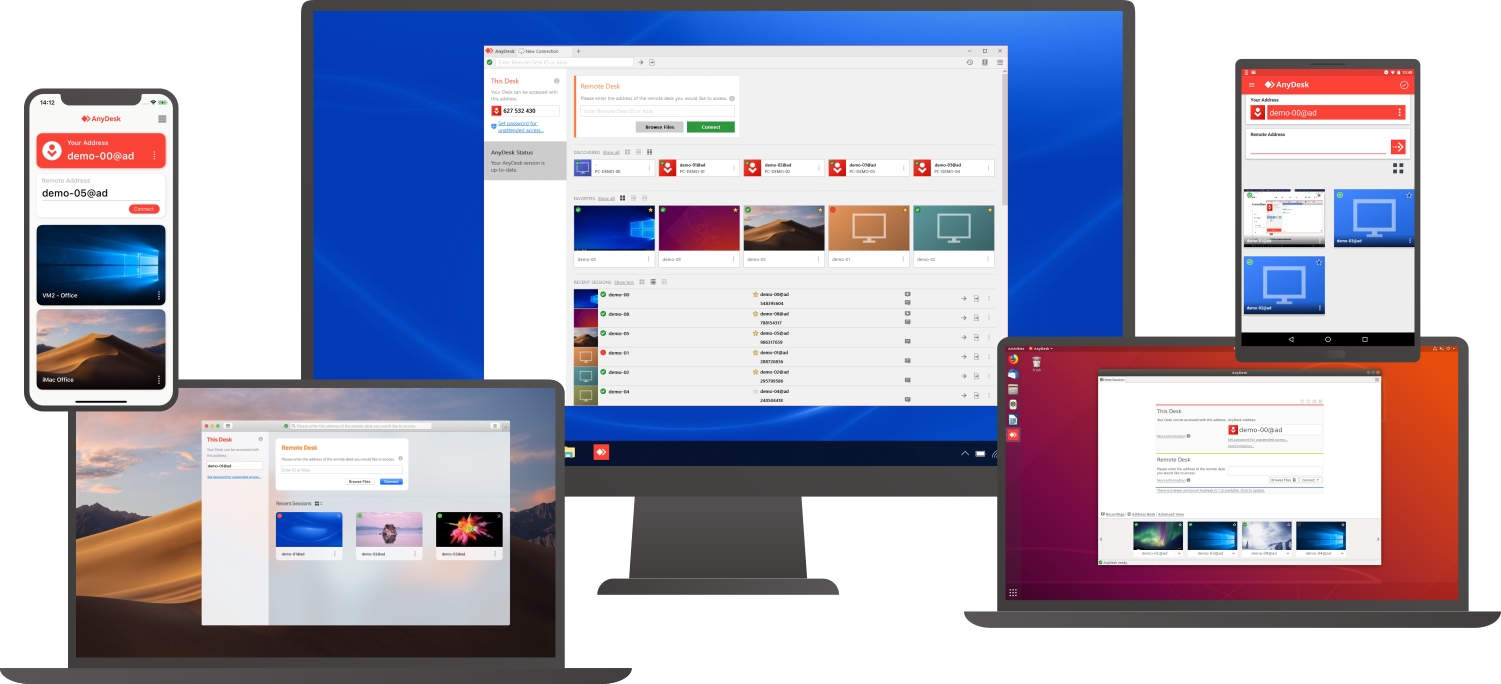
Access a computer remotely, whether you're just down the hall or on a different continent. AnyDesk guarantees secure and dependable remote desktop connections tailored for both IT specialists and individuals on the move. This versatile application is compatible with a wide range of devices and operating systems, including Windows, macOS, iOS, Android, Linux, FreeBSD, and even Raspberry Pi! Seamlessly collaborate and communicate, whether you're conducting online meetings and presentations or co-editing documents from afar. You can easily transfer files between computers using the new transfer tab or by simply copying and pasting. There's no need for administrative rights or complex installations; just download the lightweight 3MB file, and you're ready to go. If you require unattended access while traveling, it’s simple to set up by installing the software and establishing a password. Plus, you can personalize the AnyDesk interface to provide a remote desktop experience that aligns with your brand identity, ensuring a cohesive user experience. With these user-friendly features, AnyDesk makes remote work more efficient than ever before.
API Access
Has API
Yes
API Access
Has API
No


Integrations
Atera
No
Coronium
No
DNSGuard
Yes
Devolutions Remote Desktop Manager
No
Halo Service Desk
No
HaloCSM
No
HaloITSM
No
HaloPSA
No
LibreOffice
Yes
StoreApp
No
Integrations
Atera
Yes
Coronium
Yes
DNSGuard
No
Devolutions Remote Desktop Manager
Yes
Halo Service Desk
Yes
HaloCSM
Yes
HaloITSM
Yes
HaloPSA
Yes
LibreOffice
No
StoreApp
Yes
Pricing Details
Free
Free Trial
No
Free Version
Yes
Pricing Details
$10.99 per month
Free Trial
Yes
Free Version
Yes
Deployment
Web-Based
No
On-Premises
No
iPhone App
No
iPad App
No
Android App
No
Windows
No
Mac
No
Linux
Yes
Chromebook
No
Deployment
Web-Based
Yes
On-Premises
No
iPhone App
Yes
iPad App
Yes
Android App
Yes
Windows
Yes
Mac
Yes
Linux
Yes
Chromebook
No
Customer Support
Business Hours
No
Live Rep (24/7)
No
Online Support
Yes
Customer Support
Business Hours
Yes
Live Rep (24/7)
No
Online Support
Yes
Types of Training
Training Docs
Yes
Webinars
No
Live Training (Online)
No
In Person
No
Types of Training
Training Docs
Yes
Webinars
No
Live Training (Online)
No
In Person
No
Vendor Details
Company Name
Gotoogle
Founded
2010
Country
Australia
Website
www.altimalinux.com
Vendor Details
Company Name
AnyDesk Software
Founded
2013
Country
Germany
Website
anydesk.com
Product Features
Product Features
Remote Desktop
Chat
No
Cross-Platform Access
Yes
File Transfer
Yes
Group View
No
Mobile Device Access
No
Multi Monitor Support
No
Record Remote Sessions
Yes
Remote Print
No
Remote Wake
No
User Management
Yes
Remote Support
Diagnostic Tools
No
File Transfer
Yes
Live Chat
No
Real-time Chat
No
Remote Control
Yes
Screen Sharing
Yes
Session Recording
Yes
Session Transfer
Yes
Surveys & Feedback
No
Screen Sharing
Annotations / Drawing Tools
No
Desktop / Browser Sharing
Yes
Mobile Screen Sharing
No
Presenter Control Management
Yes
Remote Control
Yes
Screen Capture
No
Screen Mirroring
No
Screen Recording
Yes
