Average Ratings 0 Ratings
Average Ratings 0 Ratings
Similar Products
-
FathomFathom is an AI meeting assistant that helps users capture, summarize, search, and act on meetings with less manual work. The platform creates accurate transcripts, instant summaries, action items, and follow-up notes so users can focus on live conversations instead of taking notes. Fathom supports both traditional meeting capture and bot-free capture through its desktop app. Teams can use Fathom as a shared source of truth across customer calls, internal meetings, strategy sessions, and project conversations. Ask Fathom lets users search across meetings and ask questions about conversations, decisions, commitments, risks, and next steps. The platform also supports topic monitoring so important moments and signals are easier to find. Fathom syncs meeting notes, insights, and action items into tools such as Slack, Salesforce, HubSpot, Notion, Asana, Gmail, Zoom, Google Meet, Microsoft Teams, ChatGPT, Claude, Zapier, and API or MCP workflows. It supports security and compliance needs with SOC 2 Type II, GDPR, HIPAA compliance, SSO, and SCIM. By combining AI notetaking, bot-free capture, transcripts, summaries, integrations, search, and workflow automation, Fathom helps teams move from meetings to execution faster.
-
StackAIStackAI is an enterprise AI automation platform that allows organizations to build end-to-end internal tools and processes with AI agents. It ensures every workflow is secure, compliant, and governed, so teams can automate complex processes without heavy engineering. With a visual workflow builder and multi-agent orchestration, StackAI enables full automation from knowledge retrieval to approvals and reporting. Enterprise data sources like SharePoint, Confluence, Notion, Google Drive, and internal databases can be connected with versioning, citations, and access controls to protect sensitive information. AI agents can be deployed as chat assistants, advanced forms, or APIs integrated into Slack, Teams, Salesforce, HubSpot, ServiceNow, or custom apps. Security is built in with SSO (Okta, Azure AD, Google), RBAC, audit logs, PII masking, and data residency. Analytics and cost governance let teams track performance, while evaluations and guardrails ensure reliability before production. StackAI also offers model flexibility, routing tasks across OpenAI, Anthropic, Google, or local LLMs with fine-grained controls for accuracy. A template library accelerates adoption with ready-to-use workflows like Contract Analyzer, Support Desk AI Assistant, RFP Response Builder, and Investment Memo Generator. By consolidating fragmented processes into secure, AI-powered workflows, StackAI reduces manual work, speeds decision-making, and empowers teams to build trusted automation at scale.
-
IruIru AI reimagines enterprise security and IT management with a unified, AI-driven platform that eliminates tool fragmentation and operational overhead. At its core is the Iru Context Model, a dynamic intelligence layer that connects identity, endpoint, and compliance management into one cohesive ecosystem. The platform offers passwordless authentication, device-bound access policies, and real-time vulnerability detection—creating a trust fabric that safeguards every user and device. Iru’s endpoint suite integrates management, detection, and response capabilities across Apple, Windows, and Android environments for holistic protection. Its Compliance Automation engine continuously maps and updates controls, ensuring organizations remain audit-ready while accelerating deal cycles. By merging automation with contextual intelligence, Iru empowers IT and security teams to make faster, smarter decisions. Companies gain a consolidated view of their infrastructure, reducing zero-day exploit risks and boosting productivity across teams. With a 4.75/5 G2 rating and adoption by thousands of high-growth enterprises, Iru delivers a future-ready foundation for secure, intelligent business operations.
-
BrandMailBrandMail®, created by BrandQuantum, is an innovative software tool that integrates seamlessly with Microsoft Outlook, enabling all employees within the organization to automatically generate emails that consistently reflect the brand through an easy-to-use toolbar that grants access to brand guidelines and the most current pre-approved materials. With this solution, email signatures are crafted according to your branding requirements, ensuring a uniform appearance regardless of the device or platform used to view them. These signatures are secure and managed from a central location, providing peace of mind regarding their integrity. Notably, users can view their signatures, banners, and surveys when composing, replying to, or forwarding emails. Unlike other solutions, BrandMail does not redirect emails through external servers nor does it modify the rules within your exchange environment, functioning entirely within Microsoft Outlook. By utilizing BrandMail, organizations can turn every email into a branding opportunity while also reducing the security vulnerabilities linked to the manipulation of HTML signatures, thereby enhancing both brand consistency and cybersecurity. This not only streamlines communication but also reinforces the brand identity across all employee interactions.
-
Construction Daily ReportsYou can save up to an hour per day on daily reports CDR – Construction Daily Reports is the fastest custom daily reporting solution available for the construction industry. It can be accessed on our mobile app for Android or Apple devices as well as our website portal. You can customize your reports by entering project details. Then, you can take photos and make notes using your mobile device. CDR will email your completed report in professional PDF format to you after you sign it. We also save it on our servers so that you can upload it to your cloud storage. CDR is a mobile-friendly, time-saving construction software designed to simplify your reporting process. Start your free trial now!
-
Google WorkspaceGoogle Workspace is an all-in-one cloud productivity platform developed by Google to help businesses manage communication, collaboration, document creation, and workflow automation from a centralized environment. The platform combines professional email, cloud storage, video conferencing, document editing, team messaging, scheduling, and AI-powered assistance into one subscription-based ecosystem optimized for modern work environments. Google Workspace includes applications such as Gmail, Google Drive, Google Meet, Docs, Sheets, Slides, Calendar, Chat, Keep, Forms, Sites, NotebookLM, and Gemini AI, enabling teams to work together seamlessly across devices and locations. One of the platform’s core strengths is its built-in AI functionality powered by Gemini, which helps users draft emails, summarize meetings, generate research insights, automate repetitive tasks, and improve productivity using contextual awareness from workplace data. Google Workspace also supports advanced collaboration features including real-time editing, appointment scheduling, eSignatures, document sharing, cloud storage management, and AI-assisted research tools. Businesses benefit from enterprise-grade security features such as AI-powered threat protection, data classification, endpoint management, Data Loss Prevention, secure access controls, and compliance support for enterprise environments. The platform offers scalable pricing plans suitable for startups, small businesses, enterprises, educational institutions, nonprofits, and government organizations. Google Workspace also simplifies data migration and onboarding with built-in migration tools and partner support for transferring emails, files, and business information securely into the cloud.
-
InboxAllyInboxAlly is email deliverability software that moves your messages out of spam and promotions and into the primary inbox. It builds and protects sender reputation, warms new domains and IPs automatically, verifies inbox placement across the major mailbox providers, and monitors blacklists in real time. It layers onto any ESP or SMTP setup without changing how you send. Every plan carries a REST API, a dedicated customer success manager and 24/7 live support. Used by marketers, agencies, cold outreach teams and deliverability consultants.
-
Proton MailSecure your company’s communications with Proton Mail — the business email solution trusted by over 50,000 organizations. With end-to-end encryption built in, your internal and external communications stay confidential by default. Proton Mail helps your business meet GDPR, HIPAA, and other compliance standards, while giving you full control over your data under strong Swiss privacy laws. Empower your team with encrypted email and calendar, support for your custom email domains, professional branding, and simple migration from providers like Google Workspace or Microsoft 365 — no IT team required.
-
UptimeRobotThe ultimate uptime monitoring service. Get 50 monitors with 5-minute checks completely free. Set up in seconds and stay informed about your website’s health at all times. Website monitoring: Get instant alerts when your website goes down. Reliable and accurate monitoring helps you fix issues before they affect users and prevent revenue loss. SSL certificate monitoring: Avoid losing visitors due to expired SSL certificates. Get notified 30 days before expiration so you can renew in time. Ping and port monitoring: Check if your server is online or if your email service is running on port 465. Monitor any port you need with real-time alerts. Cron job monitoring: Track scheduled tasks with heartbeat monitoring. We verify if the request arrives on time, making sure server-side jobs and internet-connected devices are running properly. Status pages: Create up to 100 branded status pages, protect them with a password, and allow subscribers to receive updates. Stay informed with email, SMS, voice calls, push notifications, or integrations with Slack, Zapier, PagerDuty, Telegram, Discord, Microsoft Teams, Google Chat, and more. Maintenance windows: Pause monitoring when you schedule downtime to avoid unnecessary alerts
-
Fax.CloudFax.Cloud is a secure cloud fax solution built for organizations that must meet strict compliance standards. It offers encrypted, point-to-point online faxing with confirmed delivery and detailed audit trails for just 2¢ CAD per page. Fax.Cloud supports PIPEDA, HIPAA, and SOC2 requirements while avoiding common email risks like spam filtering, wrong recipients, and lost messages. Users can send and receive faxes from a web portal, email, desktop, or mobile device with no phone lines or hardware required. Teams can be set up in minutes with user permissions, notifications, and centralized document management. Local and toll-free numbers make it easy to scale as your business grows. Upgrade to secure cloud faxing today.
Description
Effortlessly save emails to Notion with a single click and transform them into tasks to enhance your organization and manage your workload effectively.
- After signing up, simply forward your email to our designated inbox; within a minute, our automated system will seamlessly integrate your email, complete with attachments and metadata, into your Notion database.
- You can directly save all attachments to Notion, making them readily available for download.
- Assign a unique robot inbox to each Notion page so that emails can be saved into various databases as needed.
- To archive an outgoing email, just BCC TaskRobin; you can also establish forwarding rules to automatically save emails from specific senders or containing certain keywords in the subject line.
- Easily manage your tasks by creating a filter view in Notion based on the metadata of emails stored in their respective columns, simplifying your workflow tremendously!
- When forwarding your emails to TaskRobin, add a line of #hashtags to categorize and organize them efficiently within Notion, enabling straightforward filtering and prioritization.
- Don’t forget to include the URL of your browser tab while forwarding, ensuring all relevant information is captured and saved. This process not only enhances organization but also streamlines your email management experience.
Description
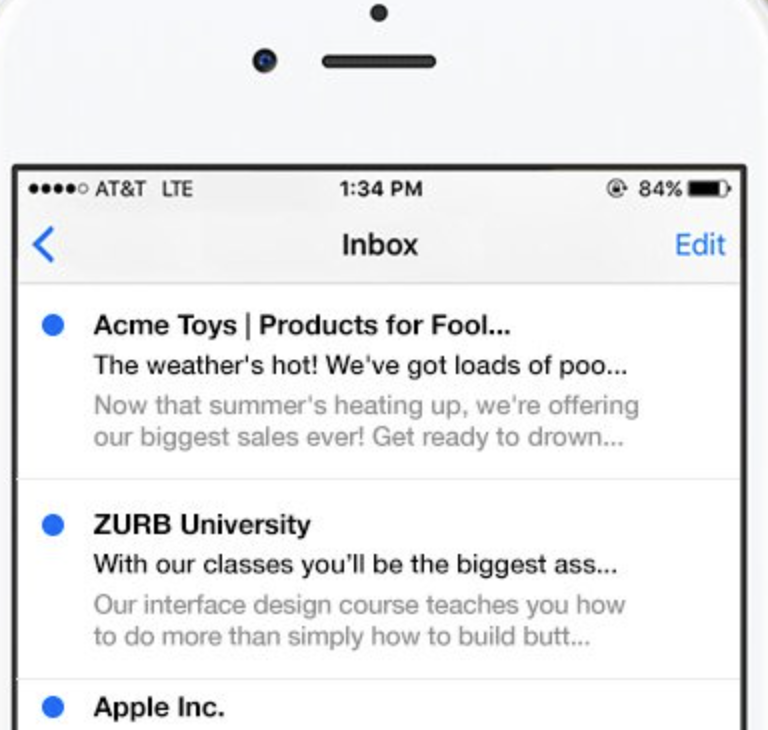
People typically choose to open an email based on two main criteria: the sender's name and the subject line. However, mobile email applications often cut off these elements, which can result in amusing yet often unfortunate outcomes. It's a bit embarrassing, isn't it? At ZURB, we frequently send emails, and we realized we needed a solution to quickly and effectively create engaging subject lines. After searching for an existing tool and coming up empty, we developed TestSubject. This straightforward tool allows you to assess how your email's subject line and sender name appear across various popular mobile devices and email clients. Simply copy and paste your text to receive immediate previews, ensuring you can test before hitting send for added confidence. In addition, you can see how your subject line and sender name display on leading mobile platforms, making it easier than ever to optimize your email's first impression.
API Access
Has API
No
API Access
Has API
No




Integrations
Notion
No
Pricing Details
$3.99/month/user
Free Trial
Yes
Free Version
No
Pricing Details
No price information available.
Free Trial
No
Free Version
No
Deployment
Web-Based
Yes
On-Premises
No
iPhone App
No
iPad App
No
Android App
No
Windows
No
Mac
No
Linux
No
Chromebook
No
Deployment
Web-Based
Yes
On-Premises
No
iPhone App
No
iPad App
No
Android App
No
Windows
No
Mac
No
Linux
No
Chromebook
No
Customer Support
Business Hours
Yes
Live Rep (24/7)
Yes
Online Support
Yes
Customer Support
Business Hours
Yes
Live Rep (24/7)
No
Online Support
Yes
Types of Training
Training Docs
Yes
Webinars
No
Live Training (Online)
No
In Person
Yes
Types of Training
Training Docs
Yes
Webinars
No
Live Training (Online)
No
In Person
No
Vendor Details
Company Name
TaskRobin
Founded
2022
Website
taskrobin.io
Vendor Details
Company Name
ZURB
Founded
1998
Country
United States
Website
zurb.com/playground/testsubject
Product Features
Productivity
Collaboration
No
Database Creation
No
Document Creation
No
File Sharing
No
Notes Management
No
Office Suite
No
Presentation Tools
No
Project Management
No
Task Management
No
Team Chat
No
Product Features
Email Testing
A/B Testing
No
Accessibility Testing
No
DMARC Analytics
No
Deliverability Rates
No
HTML Validation
No
IP Blacklist Checking
No
Improvement Recommendations
No
Pre-Send Email Testing
No
Preview Across Browsers & Devices
No
Reporting / Analytics
No
Sender Reputation Scoring
No
Spam Testing
No
