Average Ratings 0 Ratings
Average Ratings 0 Ratings
Similar Products
-
Nasdaq BoardvantageThe board portal platform and collaboration tool for boards and senior executives. Learn how Nasdaq Boardvantage can make board processes paperless, and reduce the time it takes to prepare meetings. You can create single- or multi-day meetings in a matter of seconds. Add details, attach files, track attendance, and even initiate remote meetings. To protect information, encryption and multiple layers provide protection for confidentiality, integrity, availability, and security. Quickly create and distribute Board and Committee Evaluations, Conflict of Interest, and general questionnaires. Manage files, contacts and signatures. Collaboration with notifications, annotations and unanimous consent votes, esignatures and in-app email security. Accessible on any device, smartphone, tablet, or desktop. Sync seamlessly online and offline.
-
PackageX WorkflowsBuilding Logistics is a comprehensive solution that manages the incoming flow of packages in buildings, offices, universities, and hotels, ensuring seamless tracking, scanning, sorting, and recipient notifications for each package. With PackageX’s advanced AI scanning technology, the system captures text, QR codes, and barcodes to ensure flawless package intake, enabling efficient package management. The platform also features data validation, automatic contact matching, customizable notifications, and chain of custody tracking, all designed to improve delivery workflows and reduce errors. By providing a more efficient system, PackageX increases delivery speed, accuracy, and overall operational efficiency, making it the ideal choice for managing package logistics in high-traffic environments. With 99% accuracy in package intake, zero lost packages, and twice the efficiency of traditional methods, PackageX delivers a seamless and hassle-free recipient experience.
-
TremendousTremendous is the easiest way to distribute digital rewards and incentives globally. Tremendous allows you to instantly reward your recipients using gift cards, prepaid Visa®, cards, cash, or other digital rewards. Companies large and small can easily track, buy, and manage incentive programs at scale with us. Tremendous allows customers to send rewards individually or in bulk. Our API also allows customers to integrate with our API and automatically send rewards. We work with top brands around the world to support their specific use cases, such as market research, customer loyalty and health & wellbeing, employee rewards, referrals, etc. Tremendous is completely free to use. There are no platform fees Tremendous is currently the only platform that allows cash disbursements (Bank/ACH, PayPal). Tremendous has the best international coverage (230+ countries and regions). Tremendous has created the best API in the industry
-
Dialpad SupportCustomer experience shouldn't run on disconnected tools and static scripts. Dialpad Contact Center brings voice, digital channels, and human agents together in a single AI-native platform, built to act — not just record — on every customer interaction. This is Agentic AI in practice: agents that reason through a problem, take the next step, and drive it to resolution without waiting on a human to intervene. Where legacy systems leave data trapped in silos, Dialpad Contact Center closes that gap, linking voice and data so context travels with the customer instead of getting lost between systems. The payoff compounds. Dialpad has already generated over 775 million AI recaps, and each new interaction adds to a growing base of operational intelligence — sharper resolution paths, more productive agents, better outcomes quarter over quarter. None of it runs unchecked: Dialpad's Guardian layer keeps AI operations secure and governed, so intelligence scales without sacrificing oversight. In practice, that means up to 80% of issues get resolved autonomously, freeing your team to focus on the conversations that genuinely need a human. Intelligence works at the edge; people stay at the center of the experience. And you don't have to take the ROI on faith. Through Dialpad's Proving Ground, enterprises can validate performance and cost savings before rolling out at scale — a far more reliable path than betting on a brittle, rules-based bot.
-
ShippoEcommerce is complex. Shipping doesn’t have to be. Shippo helps you grow your business by integrating with your workflows, providing experienced support, and connecting you with easy access to the best rates at the most carriers. >> Easy access to the best rates on the most carriers - Access over 85 carriers worldwide and best rates at each, including regionals others cannot provide. >> The end-to-end shipping platform for every business - Make shipping a seamless part of your business - connect your e-commerce platform or build our implementation-ready API directly into your workflow, fulfill orders quickly with smart defaults and configurable automations, and gain insights that help you ship smarter with analytics and reporting. >> Support every step of the way - Go with confidence thanks to our experienced customer support, implementation and success teams. We have the shipping knowledge to get you started quickly and keep you up and running consistently. >> Grow into the future with Shippo - You will only ship more tomorrow. Shippo is there for you with 99.99% uptime, a modern tech stack, and all the features you need to create a greater brand connection to your customers and scale to match your highest ambitions
-
GroupTogetherGroupTogether is a user-friendly online platform designed for creating group cards, collecting gifts, and sending eGift Cards quickly and effortlessly. It allows users to initiate a group card, decide whether to gather funds or select a gift, and then distribute a single link to friends, family, coworkers, or teammates. Participants have the option to add personalized messages, share photos, and include GIFs, while also contributing a specific amount, any amount they choose, or simply signing the card without making a financial contribution. With privacy assured, GroupTogether eliminates the discomfort of using personal banking details and ensures secure transactions, complete with verifiable records of contributions and expenditures. Organizers have the flexibility to use the collected funds for a variety of gifts, including eGift Cards, gift baskets, flowers, or the versatile GroupTogether AnyCard that allows recipients to choose from over 100 eGift Cards. The platform provides the option for digital delivery or downloadable PDFs for printing, making it a practical solution for various occasions such as remote team celebrations, workplace events, classroom activities, birthdays, farewells, and retirements. Moreover, this seamless process fosters a sense of community and connection, even in virtual settings.
-
ClickUpWork is broken because your tools are. Dozens of apps, zero shared context, your team stuck playing messenger between all of them. That's not collaboration. That's overhead. ClickUp eliminates the mess. One platform: tasks, docs, chat, goals, time tracking, whiteboards, and AI Agents that work autonomously while you sleep. Everything shares one connected brain. No silos. No duplicated effort. No lost threads. Manage any workflow with custom views, automations, and real-time collaboration baked into every layer. 15+ views including List, Board, Gantt, Timeline, and Calendar. Create rich documents with nested pages and embedded tasks. Set measurable goals with automatic rollups that connect daily output to company objectives. Track time natively with timers, estimates, and workload views that prevent burnout. Over 1,000 integrations plug into your existing stack without adding chaos. GitHub, Slack, Google Drive, Figma, Salesforce, Zoom, and hundreds more — all feeding into one system of record. Built-in AI writes, summarizes, and executes entire workflows on its own. Not a bolt-on — native intelligence woven through every feature. AI Agents handle complex multi-step work around the clock without waiting for humans. SOC 2 Type II certified. SSO/SAML. Custom roles. Audit logs. Scales from five people to fifty thousand. Stop patching a broken system. Start free today. No credit card, no commitment.
-
NotifyreElevate your business communications with Notifyre's secure SMS and fax solutions. Streamline SMS and faxing processes online, via email, app, or effortlessly integrate through our developer-friendly SMS and fax API. We're ISO 27001 certified and fully HIPAA compliant, giving you the utmost security for your faxes and SMS messages. Notifyre users from flexible pay-as-you-go fax & SMS and outstanding value receive fax plans and 10DLC number plans. 5 Star service guarantee! -Fax Online, Email to Fax, Fax API - Receive Fax Online -> Encrypted Cloud Storage -Online Fax Numbers -Fax Number Porting -Fax Broadcast 40,000+ Utilise the power of SMS messaging in your business, engaging with your audiences via SMS. Send SMS broadcasts or bulk SMS for marketing, promotions, surveys, support, alerts, or notifications all via a user-friendly secure online SMS portal. - 10DLC Virtual SMS Numbers -> Book a Demo for one-on-one guidance! - SMS Online, Email to SMS, SMS API - Mass Text Message Broadcast + SMS Marketing - Subscriber Management - Contact Management, Bulk Upload + Merge Fields + SMS Templates - Appointment Reminders, eCommerce Promo & Cart Reminders, SMS Alerts & Notification & More
-
WinningBidder.comWinningBidder.com offers low cost online auction software tailored for fundraising purposes. Our user-friendly software ensures that event organizers can initiate an auction within minutes, while maintaining a rich array of features. Bidders can take advantage of features such as maximum bidding, outbid alerts, and dynamic "popcorn" bidding. Rather than requiring bidders to download an app, our approach involves sharing a personalized auction URL with supporters. This enables them to explore listed items and place bids using any device. The system operates at remarkable speed, making it particularly suitable for events held in areas with unreliable connectivity, such as charity golf outings. WinningBidder.com imposes no restrictions on the quantity of items, bidders, or events, making WinningBidder.com the ideal solution for all your online auction requirements throughout the year.
-
Proton PassProton Pass for Business is a privacy-first password and identity manager that helps organizations secure access at scale without sacrificing usability. Built with end-to-end encryption and a strict zero-knowledge architecture, it ensures that passwords, passkeys, secure notes, and payment details remain accessible only to authorized users within your team. Not even Proton can view your data. Teams can securely create, store, and share credentials via encrypted vaults, enabling safe and efficient collaboration. Granular admin controls allow IT managers to oversee permissions, enforce strong password policies, monitor access, and manage users throughout the employee lifecycle from onboarding to offboarding. Built-in password generation, autofill, and cross-device syncing streamline everyday workflows while maintaining high security standards. Proton Pass for Business also includes advanced features such as email alias integration to protect employee identities, dark web monitoring to detect compromised credentials, and detailed activity logs for visibility and compliance. Its open-source foundation promotes transparency and trust, and independent audits reinforce its security model. Hosted in Switzerland and protected by strong privacy laws, Proton Pass offers organizations a secure alternative to traditional password managers. With seamless browser extensions, an intuitive design, and enterprise-ready controls, it empowers teams to reduce credential-related risks, prevent unauthorized access, and improve productivity, all within a secure, encrypted environment.
Description
Share your contact information even when you're not online, as your digital business card is available around the clock, ensuring you never run out of cards. You can distribute as many cards as you like, include as much information as necessary, and update your contact details whenever you wish. Going paperless does not confine you to a single application; you can incorporate your personal ScreenTag link into your email signature, social media profiles, or promotional materials. Those who receive your information won’t need an app to save you to their contacts, as everything operates seamlessly within their web browser and standard contacts application. Transitioning to a paperless approach doesn’t mean compromising your brand’s image; we, as professional designers, understand that a business card serves as a crucial tool for representing your visual brand identity, and a digital version is no exception. With ScreenTag, you can easily gather your recipients’ contact information and have it automatically stored in your CRM or email marketing software, streamlining your networking efforts and enhancing your communication strategy. This modern approach to business connectivity allows for greater flexibility and accessibility in managing your professional relationships.
Description
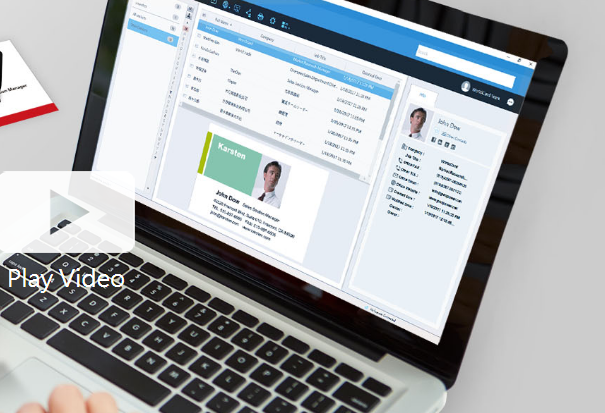
Business cards can be recognized and the associated data can be exported as a CSV file prior to the subscription's expiration. If you wish to retain the images of the business cards, it is advisable to reach out to PenPower's customer service for assistance. Please note that after the subscription expires, user data will be retained by the system for a period of 180 days; if renewal does not occur within this timeframe, all data will be permanently deleted. To optimize performance with WorldCard Team, it is recommended that the NAS edition should not exceed 20 users, while the Basic edition is best suited for fewer than 100 users. The maximum number of users allowed for the Windows Server edition will depend on the performance capabilities of your server. Additionally, you can transfer contact data to WorldCard Team from either WorldCard or WorldCard Mobile. When implementing the WorldCard Team system in your organization, we highly recommend migrating all contacts to WorldCard Team rather than continuing with WorldCard for improved efficiency and streamlined management of your business contacts. This approach not only enhances organization but also facilitates better collaboration among team members.
API Access
Has API
No
API Access
Has API
No



Integrations
Salesforce
Yes
AWeber
Yes
ActiveCampaign
Yes
Campaign Monitor
Yes
HubSpot CRM
Yes
HubSpot Customer Platform
Yes
Mailchimp
Yes
Microsoft 365
Yes
Zoho CRM
Yes
iContact
Yes
Integrations
Salesforce
Yes
AWeber
No
ActiveCampaign
No
Campaign Monitor
No
HubSpot CRM
No
HubSpot Customer Platform
No
Mailchimp
No
Microsoft 365
No
Zoho CRM
No
iContact
No
Pricing Details
$9.95 per year
Free Trial
No
Free Version
No
Pricing Details
Contact PenPower Technologies for pricing details.
Free Trial
Yes
Free Version
No
Deployment
Web-Based
Yes
On-Premises
No
iPhone App
No
iPad App
No
Android App
No
Windows
No
Mac
No
Linux
No
Chromebook
No
Deployment
Web-Based
Yes
On-Premises
No
iPhone App
Yes
iPad App
Yes
Android App
Yes
Windows
Yes
Mac
Yes
Linux
No
Chromebook
No
Customer Support
Business Hours
Yes
Live Rep (24/7)
No
Online Support
Yes
Customer Support
Business Hours
Yes
Live Rep (24/7)
No
Online Support
No
Types of Training
Training Docs
Yes
Webinars
No
Live Training (Online)
No
In Person
No
Types of Training
Training Docs
Yes
Webinars
No
Live Training (Online)
Yes
In Person
No
Vendor Details
Company Name
BCN Integrated
Founded
2012
Country
United Kingdom
Website
www.screentag.mobi
Vendor Details
Company Name
PenPower Technology
Founded
1991
Country
United States
Website
www.worldcardteam.com/EN/
Product Features
Business Card
Contact Management
No
Data Extraction
No
Design Templates
No
Image Editor
No
Print Management
No
Step-by-Step Wizard
Yes
Product Features
Business Card
Contact Management
Yes
Data Extraction
Yes
Design Templates
No
Image Editor
No
Print Management
No
Step-by-Step Wizard
No
Contact Management
Activity Management
No
Appointment Management
No
Contact Database
Yes
Contact History
No
Contact Import/Export
Yes
Customer Pipeline
No
Email Marketing
No
Group Management
No
Interaction Tracking
Yes
Lead Management
No
Prospecting Tools
No
Sales Pipeline Management
No
Search / Filter
No
Segmentation
Yes
Shared Contacts
Yes
Social Media Integration
No
CRM
Calendar/Reminder System
No
Call Logging
No
Document Storage
No
Email Marketing
Yes
Internal Chat Integration
No
Lead Scoring
No
Marketing Automation Integration
No
Mobile Access
Yes
Quotes / Proposals
No
Segmentation
No
Social Media Integration
Yes
Task Management
No
Territory Management
No
Customer Engagement
Analytics
No
Churn Management
No
Communication Management
Yes
Community Management
Yes
Content Syndication
Yes
Feedback Collection
Yes
Gamification
No
Live Chat
No
Video Content
No
