Average Ratings 11 Ratings
Average Ratings 0 Ratings
Similar Products
-
PaligoPaligo supports teams working with complex technical documentation that needs to grow, adapt, and stay consistent over time. Built specifically for structured content at scale, Paligo enables organizations to treat documentation as a long-term business asset—powered by reuse, automation, and strong content governance. Paligo’s cloud-based CCMS is designed around modular content. Teams can write once, reuse components across multiple outputs, and keep documentation aligned across products, formats, and languages. This reduces manual effort, speeds up updates, and cuts translation overhead, allowing teams to publish faster while minimizing errors. The platform pairs advanced structured authoring capabilities with a modern, approachable interface. This makes Paligo effective for experienced documentation specialists while remaining accessible to contributors across the organization. From creation and collaboration to translation and multichannel delivery, Paligo brings the entire documentation workflow into one controlled environment. Paligo’s purpose is to help organizations move past static, fragmented documentation practices and build content operations that support continuous growth. With Paligo, teams stay in control of complexity and deliver documentation that evolves alongside their business.
-
Maropost Marketing CloudAll your email marketing needs can be met in one tool Maropost's cloud-based marketing platform allows you to: - Send targeted messages at the right times to the right contacts Personalization tools can be used to target advanced segmentation and targeting - Get top deliverability and a 360-degree perspective of your customers Maropost is trusted by millions of customers to send targeted emails every month via media, publishing, ecommerce, and retail businesses. Our cloud-based marketing automation platform is designed to maximize revenue for multi-channel customer engagement. Our marketing and email automation platform allows you to increase audience engagement, customer acquisition, and sales growth. Maropost offers advanced reporting, segmentation, email automation, and much more. Maropost's email marketing platform turns prospects into clients by delivering targeted messages at the right times to the right people. Maropost delivers inboxes with industry-leading efficiency.
-
Nasdaq MetrioNasdaq Metrio is a sustainability reporting platform tailored for businesses at various stages of their ESG journey. It merges meticulous data collection, tracking, and management with emissions calculations and assurance. Additionally, it provides a comprehensive library of metrics from various rater and ranker frameworks as well as regulatory bodies, all cross-referenced, de-duplicated, and clarified, complete with guidance notes.
-
Macaw AMSMacaw AMS can be used to sell Insurance. Macaw AMS can be used by brokers, MGAs or MGUs, Program Managers, and Lloyds Coverholders to automate their operations. Macaw AMS was built with a customer-centric approach. It supports CRM, Sales and Underwriting. Customers, producers, and service providers can access self-service portals. Macaw AMS has built-in Document Management and Task Management capabilities. It is equipped with adaptors that allow for integrated and in-flow services such as eSignature, Payments, OFAC checks, Mass Emailing, Computer Telephony, and Mass Emailing, using 3rd Party Services. The data analytics part of Macaw AMS offers powerful data visualization with predefined dashboards, allowing users to easily upload datasets and view dynamic charts for clear, multi-dimensional insights. Interactive, real-time visualizations help uncover trends and insights, driving informed decision-making. Macaw AMS is hosted on cloud and tested for cybersecurity. The database is relational, and the core components of the Java-based application are written in Java. Macaw AMS is capable of processing 500-1000 policies per day at its peak. Macaw AMS is expected reduce per policy costs by 30%.
-
IntelexIntelex delivers a unified software system for overseeing Environmental, Health, Safety, and Quality (EHSQ) initiatives. Its expandable platform is crafted to consolidate, oversee, and scrutinize EHS and Quality data comprehensively. The solution works on any device to meet the realities of your workplace. With Intelex, your organization can: Elevate your EHSQ program outcomes by supervising workflows for superior performance and command. Discern patterns and propensities through goal-setting to deepen understanding and improve decision-making in your EHSQ program. Diminish occurrences and cut down on administrative tasks by efficiently supervising, managing, refining, and extracting insights from your safety data via our intuitive safety software. Simplify the management and reporting of air, water, and waste emissions, and oversee environmental outputs to fulfill sustainability objectives. Foster ongoing improvements in quality by seamlessly logging and monitoring all instances of nonconformity within a unified, web-based system. Investigate trends across various departments, sites, or locations. Intelex can help you manage compliance with international standards and regulations such as: OSHA, WCB, ISO 45001, EPA, ISO
-
LinkSquaresLinkSquares, a web application, is designed to make legal and finance teams more efficient. The AI-powered contract repository automatically extracts key terms from contracts and provides key insights through deep search, custom reports, and analytics. LinkSquares helps high-growth companies save hundreds of hours and thousands in costs by eliminating the need to review contracts manually and requiring outside counsel. LinkSquares analyzes and extracts structured data from every contract. The result is more that a full-text search. LinkSquares provides interactive Dashboards, custom reports, and other tools that help you put your contract data into action. LinkSquares provides automation and insight to every stage of your contract lifecycle. You can draft faster, review faster, and get agreements done sooner. LinkSquares does everything except write contracts for you. (And that's something we're also working on.)
-
MRPeasyThe ultimate MRP solution for small manufacturers! MRPeasy offers an affordable, user-friendly, and cloud-based MRP system tailored specifically for small manufacturing businesses. Transform your customer orders into manufacturing orders and let the system schedule them automatically. It effortlessly books items from your inventory, and if needed, initiates purchase orders on your behalf. Depending on the real-time requirements, MRPeasy allows for both forward and backward scheduling. Automated checks ensure the availability of workers, workstations, and materials. Maintain a comprehensive overview of all your operations at all times! MRPeasy also smoothly integrates with premier accounting software such as QuickBooks and Xero, along with e-commerce platforms like Shopify and WooCommerce. This integration creates an all-encompassing business management solution that meets your every need.
-
CreatioCreatio is a global vendor of an agentic AI-native no-code platform designed to automate workflows and CRM with a maximum degree of freedom. Powered by intuitive no-code development, visual process design, and embedded AI, the Creatio platform enables organizations to build and evolve applications of any complexity and scale—supporting both structured and unstructured workflows, advanced analytics, and flexible dashboards. By empowering business users alongside IT, Creatio reduces application development time by up to 10× and accelerates time-to-value. At the core of the platform are AI agents that can understand context, analyze data, make decisions, and execute tasks across end-to-end workflows. This agentic approach allows organizations to automate entire business processes, not just individual tasks—driving efficiency, agility, and measurable business outcomes. Creatio also provides a rich marketplace of pre-built applications, connectors, and industry-specific solutions, enabling rapid deployment and continuous innovation. Built on a modern, AI-native architecture, the platform ensures seamless integration and adaptability within any digital ecosystem. Creatio CRM is a full-featured suite for marketing, sales, and service automation, unified on the same agentic no-code platform with embedded AI agents. Organizations can deploy it as a complete CRM suite or as modular solutions, gaining the flexibility to scale while maintaining a single, intelligent system of engagement.
-
Nexcess Digital CloudNexcess Digital Cloud functions as a managed hosting and cloud infrastructure provider, dedicated to offering dependable, secure, and high-performance hosting services tailored for businesses across various sizes. Their extensive range of offerings encompasses managed dedicated servers, cloud dedicated hosting, managed VPS hosting, along with specialized environments for WordPress, WooCommerce, and Magento. Aimed at organizations that demand exceptional uptime and expert assistance, Nexcess Digital Cloud integrates enterprise-grade infrastructure with fully managed services, ensuring proactive technical support is always available. Their hosting solutions are meticulously engineered for performance, security, scalability, and uninterrupted business operations, allowing clients to concentrate on their growth rather than server management. Furthermore, customers benefit from a dedicated team of hosting professionals who are on hand 24/7 to provide help with deployment, maintenance, troubleshooting, and optimization, ensuring a seamless experience. This commitment to service excellence sets Nexcess apart in the competitive landscape of digital solutions.
-
SilverwareAt Silverware, we believe in empowering hospitality businesses with innovative, reliable, and scalable technology. Founded over 30 years ago, we provide enterprise solutions for tier-one hotels and resorts, multi-unit restaurant operations, and large-scale venues. As a Fullsteam company, our commitment goes beyond just providing software—we build relationships. With over 100+ integrations and a dedicated support team, we’re with you at every step. That’s why hospitality leaders in over 30 countries trust Silverware POS to drive operational efficiency and enhance guest experiences, ensuring success through custom-tailored solutions that grow with your business. Set the gold standard with Silverware.
Description
Notepad++ serves as a free alternative to traditional Notepad and is designed for editing source code across various programming languages. Functioning within the Microsoft Windows ecosystem, it operates under the terms of the GNU General Public License. The editor is built on the robust Scintilla editing framework and is developed using C++, making use of the pure Win32 API and Standard Template Library (STL) to achieve enhanced execution speed and a compact file size. By optimizing numerous processes while maintaining user-friendliness, Notepad++ aims to contribute to the reduction of global carbon dioxide emissions. The software’s efficiency allows computers to use less CPU power, enabling them to operate at lower energy levels, which in turn leads to reduced power consumption and a more sustainable environment. This approach exemplifies how software development can align with eco-friendly initiatives.
Description
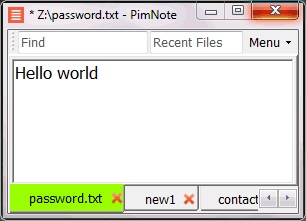
PimNote is a text editor that allows for faster document access. It also combines both the useful and unutilized features of all other text editors.
This tool is designed for knowledge management. You can quickly access the recent file list with a single click. You can easily access an old file that has been opened long ago with the unlimited and searchable recent files list. You can type less with the one-click search and find history feature.
This product is designed for remote work. No freezing from a remote file monitoring/opening/writing when disconnected. You can save files offline by closing the application and not closing the tabs. During file opening, auto-reconnect the network drive. Recurring file notifications are displayed politely on top bar, instead of a popup dialog box that requires frequent actions and tends not to be used.
API Access
Has API
No
API Access
Has API
No

Integrations
C#
Yes
Accops HySecure
Yes
CSS
Yes
Editpad
Yes
HTML
Yes
Java
Yes
LaTeX
Yes
Logix
Yes
MATLAB
Yes
Objective-C
Yes
Integrations
C#
Yes
Accops HySecure
No
CSS
No
Editpad
No
HTML
No
Java
No
LaTeX
No
Logix
No
MATLAB
No
Objective-C
No
Pricing Details
Free
Free Trial
No
Free Version
Yes
Pricing Details
No price information available.
Free Trial
No
Free Version
Yes
Deployment
Web-Based
No
On-Premises
No
iPhone App
No
iPad App
No
Android App
No
Windows
Yes
Mac
No
Linux
No
Chromebook
No
Deployment
Web-Based
No
On-Premises
No
iPhone App
No
iPad App
No
Android App
No
Windows
Yes
Mac
No
Linux
No
Chromebook
No
Customer Support
Business Hours
No
Live Rep (24/7)
No
Online Support
No
Customer Support
Business Hours
No
Live Rep (24/7)
No
Online Support
Yes
Types of Training
Training Docs
Yes
Webinars
No
Live Training (Online)
No
In Person
No
Types of Training
Training Docs
Yes
Webinars
No
Live Training (Online)
No
In Person
Yes
Vendor Details
Company Name
Notepad++
Founded
2003
Website
sourceforge.net/projects/notepadplusplus.mirror/
Vendor Details
Company Name
Pimtel
Founded
2018
Website
www.pimtel.com/pimnote/
Product Features
Code Editors
API
No
Auto-Complete
No
Code Folding
No
Column Editing
No
Customizable Themes
No
Debugging
No
Formatting / Table Editing
No
Keyboard Shortcuts
No
Multi-Monitor Editing
No
Syntax Highlighting
No
WYSIWYG
No
Text Editors
API
No
Auto-Complete
No
Code Folding
No
Column Editing
No
Customizable Themes
No
Debugging
No
Formatting / Table Editing
No
Keyboard Shortcuts
No
Multi-Monitor Editing
No
Syntax Highlighting
No
WYSIWYG
No
Product Features
Text Editors
API
No
Auto-Complete
No
Code Folding
No
Column Editing
No
Customizable Themes
No
Debugging
No
Formatting / Table Editing
No
Keyboard Shortcuts
No
Multi-Monitor Editing
No
Syntax Highlighting
No
WYSIWYG
No
