Pixlr
5.0 out of 5 starsAverage Ratings 0 Ratings
Average Ratings 1 Rating
Similar Products
-
Adobe FireflyAdobe Firefly is a versatile AI-powered creative platform designed to help users generate and edit multimedia content with ease. It allows users to create images, videos, and audio using simple text prompts within an interactive and flexible workspace. The platform features tools like generative fill, image editing, and video editing, enabling users to refine and enhance their creations. Firefly also includes quick actions such as background removal, cropping, resizing, and format conversion to streamline workflows. Users can explore an infinite canvas for creative production and experiment with various styles and outputs. The platform encourages creativity by allowing users to remix content from a shared community gallery. With its intuitive design, it reduces the need for advanced technical skills. Firefly integrates AI capabilities to speed up content creation and editing processes. It supports both beginners and professionals in producing high-quality results. Overall, Adobe Firefly provides a powerful and accessible environment for modern digital creativity.
-
Community PhoneModernizing communication for your business, our service connects your business number seamlessly with your employees' phones. With an array of incredible features, callers can navigate through a dial menu voiced by professional actors, allowing them to make purchases, listen to MP3s, or reach specific staff members with ease. You can conveniently make and receive calls using your number across various devices without the caller being aware of the multiple lines. Employees benefit from hidden in-house menus, can transfer calls, and send voicemails directly to their email, all through an intuitive dialpad. Implementing these business functionalities requires no additional software or hardware, making it hassle-free. Your dialpad becomes a vibrant tool, enabling the effortless transfer of your business or personal number at the touch of a button. Choose from an array of contemporary voice features tailored for your business or personal line, and we'll handle the activation on your existing phone without any effort on your part. Our commitment is to adapt your number to your evolving needs whenever you desire.
-
Switcher StudioSwitcher Studio allows you to capture video from multiple angles and edit it in real-time. This will allow you to connect with your community in a more engaging way. You can stream it live or save it for later. Your audience will be attracted to you with relevant content. Make it look great. There's no need to purchase, lug or learn largeequipment. Switcher is compatible with iPads and iPhones. Switcher is so intuitive that anyone can create amazing video with it. You don't need to hire outside videographers or producers. It takes an hour to edit every minute of edited video. Every minute of live-editing takes, well, one second. You can share every moment, live or recorded, external or internal, with video -- no matter what it holds.
-
Rezku Point of SaleRezku POS is designed exclusively for the busiest restaurants, bars and pizzerias, providing a comprehensive solution that puts your brand in league with national chains. You can now get your own fully custom-branded, downloadable smartphone ordering app for your restaurant exclusively from Rezku. Rezku comes packaged with all of the advanced functionality restaurants need, without having to resort to 3rd parties and additional fees, including loyalty perks, gift card program with eGift cards, delivery driver management, custom reporting, and a beautiful, customized white-label online ordering site with zero commission for orders. Rezku's fully-loaded feature-set spans the entire scope of operational needs including mobile POS, customer facing displays, advanced kitchen display systems and sticky label printing. Rezku also includes the latest business management functionality industry professionals crave, with an incredibly well-designed manager’s smartphone app that lets you control every aspect of the system, including menus, pricing and time cards, all from the palm of your hand. Rezku delivers exceptional value, revolutionizing your entire operation, modernizing your operations, and growing your bottom line.
-
CompanyCamCompanyCam is a photo-based solution created specifically for contractors. Users can take unlimited photos—which are location and time stamped, sent to the cloud, and stored securely. Every photo is organized by project and instantly available to your team, allowing you to see what’s going on anytime, anywhere.
-
MobiPDFMobiPDF (formerly PDF Extra) is an intuitive reader and editor that allows you to read, edit, create, OCR, organize, annotate, fill and sign, convert, and share any PDF. This makes MobiPDF an excellent choice for users seeking a budget-friendly alternative to Adobe Acrobat Pro. HERE’S WHAT YOU GET WITH MOBIPDF: Multiple Page View Modes: Enjoy a distraction-free "Read Mode". Advanced Editing Tools: Experience a Word-like PDF editing environment. Two-Way Conversions: Convert PDFs to and from Word, Excel, PowerPoint, or image formats. OCR Support: Make scanned documents searchable. Markup Tools: Highlight, comment, strikethrough, stamp, and more to enhance your documents. Effortless PDF Organizer: Reorder, compress, split, and combine PDFs with ease. Sign & Secure: Add signatures, create and fill forms, and protect your PDFs with passwords, encryption, and digital certificates. Offline Mode: Work freely on your projects, even offline. Seamless translation: One-click translate any PDF into 50+ languages.
-
LeakCheckTake control of your cybersecurity and safeguard your credentials with ASCOMP LeakCheck. This privacy-focused Windows application allows you to verify if your email addresses and passwords have been compromised in historical data leaks, performing all checks securely right from your desktop. Security is the top priority: LeakCheck uses advanced k-anonymity technology. Your passwords are never transmitted in plain text; instead, encrypted hashes are used to safely query extensive breach databases. If any match is found, the software displays immediate warnings alongside detailed context, including the name, source, and date of the breach. With LeakCheck, you can proactively defend your online identity, pinpoint vulnerable accounts, and update compromised passwords before unauthorized users can exploit them.
-
PDF GuruEasily convert, edit, merge, and compress your PDF files with just a few simple clicks. You can quickly download your document without any hassle, as our PDF converter generates files in mere seconds! To ensure the safety of your digital information, we implement HTTPS encryption while you create PDF files on our site. You can redact PDFs, alter text, insert new elements, and engage in various other tasks, all from a single platform. Our user-friendly interface is designed for seamless navigation, allowing you to utilize our PDF creator with minimal effort. Compatible with every major operating system, our online PDF maker functions flawlessly on Windows, Mac OS, Linux, iOS, and Android. For those who wish to maintain privacy, you have the option to secure your file by locking or restricting access, preventing others from opening, editing, or printing it. This comprehensive tool simplifies your document management and enhances your productivity.
-
OkylineOkyline is an Executable Data Design (EDD) platform focused on executable validation contracts and operational data quality control. Rather than managing separate specifications, validation code, tests, and monitoring dashboards, Okyline centralizes validation and quality supervision around a single readable executable contract acting as the operational reference for enterprise data flows. The same contract powers deterministic validation, advanced business invariant checks, multi-format execution, data quality gates, and historical quality analytics across APIs, events, files, LLM structured outputs, and distributed operational systems. Contracts are designed directly from annotated sample data, making validation rules immediately understandable for developers, architects, QA teams, and business analysts. The Community Edition includes the public specification, a free Java runtime engine, a Claude AI assistant for contract generation, and an online studio supporting executable JSON validation contracts and JSON Schema transpilation. The Enterprise Edition adds native validation for JSONL, XML, CSV, FIXED, and EDI flows together with operational quality dashboards and data quality gates, without requiring databases or centralized infrastructure.erprise Edition supports direct validation of JSON, JSONL, XML, CSV, FIXED, and EDI flows with operational quality dashboards and analytics, without databases.
-
ONLYOFFICE DocsONLYOFFICE Docs is a secure online office suite for teams and businesses of all sizes. Create and edit docs, sheets, slides, fillable forms and PDFs. Collaborate with your teammates in real time using two co-editing modes, version history and other tools. Enable the AI assistant of your choice — ChatGPT, DeepSeek, Mistral, Groq AI, etc. Generate new content, summarize, translate and do more with your favourite AI tool while working on office files. Integrate ONLYOFFICE Docs into your business platform, whether it be Odoo, Alfresco, Confluence, Pipedrive, Nextcloud, Redmine, SuiteCRM, etc., via an integration app (40+ available integrations). Use Docs within ONLYOFFICE DocSpace, a room-based document collaboration platform equipped with the online office suite. Create dedicated spaces for different purposes, invite your teammates, assign access permissions and collaborate the way you like. With DocSpace, you can store, share and co-edit office files, and even interact with third parties.
Description
MenuCapture is a web-based AI tool designed specifically for enhancing restaurant menu images. It allows restaurant owners, chefs, agencies, and web designers to upload photos of their dishes and specify the changes they want in simple terms, such as modifying lighting, altering backgrounds, adjusting how the food is presented, or even changing ingredients. Instead of creating completely new images, the platform makes edits directly to the original photos and maintains a history of these changes by saving them as distinct versions. Users have the ability to work on batches of up to 10 images at a time, export them in sizes suitable for food delivery services and social media platforms, and share the enhanced images on a customizable hosted menu page complete with a link and QR code. Additionally, MenuCapture offers an API that facilitates the editing of menu pictures and allows for seamless integration into existing workflows. With subscription plans that include 300 photo edits monthly, users can also enjoy the first edit free upon signing up, making it an accessible option for those looking to enhance their visual presentations. The platform’s user-friendly interface and straightforward editing process make it an ideal solution for anyone involved in the culinary and hospitality industries.
Description
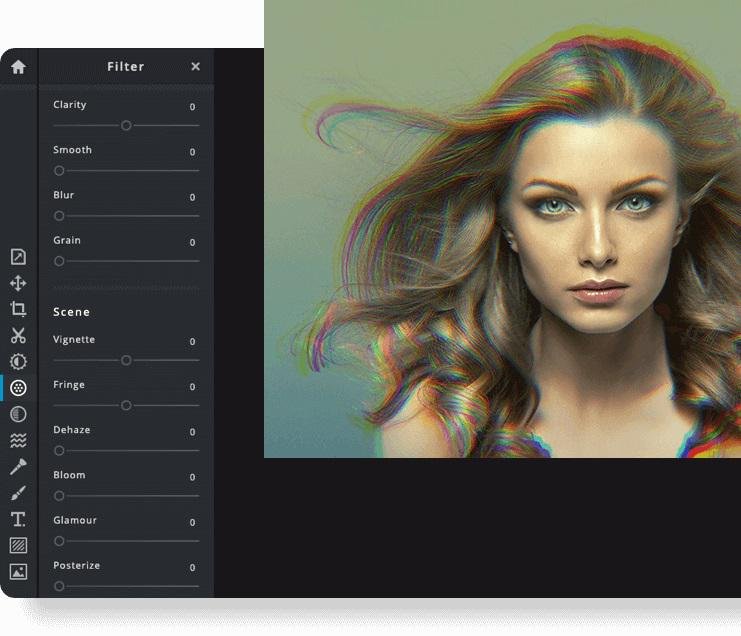
Pixlr is a free online photo editor that enables users to enhance images and create stunning designs directly in their browser. With advanced AI-powered tools, you can enjoy a seamless and intuitive photo editing experience that delivers professional results in no time. The editor supports a wide range of image formats, including PSD (Photoshop), PXD, JPEG, PNG (with transparency), WebP, SVG, and others. You have the option to start with a blank canvas or choose from our selection of expertly designed templates. Thanks to our innovative AI design tools, tedious editing tasks are a thing of the past; you can effortlessly remove backgrounds from images with just one click, capturing even the finest details like individual strands of hair. Let the power of AI and machine learning elevate your photo editing and background removal to unprecedented heights! With straightforward controls, such as toggles and adjustable sliders, achieving stunning and unique photo effects has never been easier. Explore endless creative possibilities and transform your images with Pixlr today!
API Access
Has API
Yes
API Access
Has API
No
Screenshots View All
No images available




Integrations
Gmail
Yes
Google Drive
Yes
OpenClaw
No
Prodia
Yes
YouTube
Yes
Pricing Details
$19/month
The monthly plan costs $19/month, and the annual plan costs $159/year. Both plans include 300 photo edits per month. The first edit is free after signup; downloads require a paid plan.
Free Trial
Yes
Free Version
No
Pricing Details
$2.49 per month
$1.49/month if billed annually
Free Trial
Yes
Free Version
No
Deployment
Web-Based
Yes
On-Premises
No
iPhone App
No
iPad App
No
Android App
No
Windows
No
Mac
No
Linux
No
Chromebook
No
Deployment
Web-Based
Yes
On-Premises
No
iPhone App
Yes
iPad App
Yes
Android App
Yes
Windows
No
Mac
No
Linux
No
Chromebook
No
Customer Support
Business Hours
No
Live Rep (24/7)
No
Online Support
Yes
Customer Support
Business Hours
No
Live Rep (24/7)
No
Online Support
Yes
Types of Training
Training Docs
Yes
Webinars
No
Live Training (Online)
No
In Person
No
Types of Training
Training Docs
Yes
Webinars
No
Live Training (Online)
Yes
In Person
No
Vendor Details
Company Name
MenuCapture
Country
Japan
Website
www.menucapture.com
Vendor Details
Company Name
Pixlr
Founded
2008
Country
Sweden
Website
pixlr.com
Product Features
Product Features
Business Card
Contact Management
No
Data Extraction
No
Design Templates
No
Image Editor
No
Print Management
No
Step-by-Step Wizard
No
Graphic Design
Collaboration
No
Data Visualization
No
Filtering
No
Image Database
No
Image Editor
No
Templates
No
Alternatives
No Alternatives
