Average Ratings 1 Rating
Average Ratings 0 Ratings
Similar Products
-
MobiPDFMobiPDF (formerly PDF Extra) is an intuitive reader and editor that allows you to read, edit, create, OCR, organize, annotate, fill and sign, convert, and share any PDF. This makes MobiPDF an excellent choice for users seeking a budget-friendly alternative to Adobe Acrobat Pro. HERE’S WHAT YOU GET WITH MOBIPDF: Multiple Page View Modes: Enjoy a distraction-free "Read Mode". Advanced Editing Tools: Experience a Word-like PDF editing environment. Two-Way Conversions: Convert PDFs to and from Word, Excel, PowerPoint, or image formats. OCR Support: Make scanned documents searchable. Markup Tools: Highlight, comment, strikethrough, stamp, and more to enhance your documents. Effortless PDF Organizer: Reorder, compress, split, and combine PDFs with ease. Sign & Secure: Add signatures, create and fill forms, and protect your PDFs with passwords, encryption, and digital certificates. Offline Mode: Work freely on your projects, even offline. Seamless translation: One-click translate any PDF into 50+ languages.
-
CloudFilerCloudFiler provides filing and searching in both New and Classic Outlook on all phones & tablets, all popular browsers, Macs and ARM based devices. Created Microsoft's new web Add-in technology by the architect of the Oasys email management system previously owned by Arup Group Ltd and the Excitech Mail system owned by Symetri and latterly Pentagon. File to: the cloud, Windows folders, SharePoint, OneDrive, Egnyte, Autodesk Forma, Bentley ProjectWise, etc. Favoured by the biggest businesses globally.
-
Adobe AcrobatAdobe Acrobat is an all-in-one PDF productivity and e-signature platform and one of the leading enterprise document platforms that scales for global teams — designed to simplify document creation, editing, collaboration, and protection. Users can edit text and images directly within PDFs, reorganize pages, and compare file versions to quickly identify changes. The software enables fast conversion between PDFs and common file formats such as Microsoft Word, Excel, PowerPoint, and image files. Integrated e-signature capabilities allow businesses to collect legally binding signatures and track responses securely. With Acrobat Studio, Adobe Acrobat expands beyond core PDF and e‑signature tasks into an AI‑powered workspace for document insight, content creation, and collaboration.Acrobat AI Assistant adds intelligent document support by summarizing content, generating insights, and answering contextual questions with cited references. PDF Spaces creates a collaborative workspace where teams can centralize files, comments, and AI-driven guidance. Built-in protection tools safeguard documents with encryption, permissions, and redaction features. Mobile apps such as Acrobat Reader and Adobe Scan ensure access and editing capabilities from anywhere. Designed for individuals, students, and enterprises, Adobe Acrobat helps reduce document processing time and improve overall productivity.
-
PBRS Power BI Reports DistributionPBRS brings automated report production and distribution to organizations using Microsoft Power BI and SSRS. Developed by ChristianSteven Software, it runs in your Windows environment and coordinates reporting tasks that would otherwise involve manual exports or multiple automation flows. Build workflows for Power BI Service, Power BI Report Server, Power BI Paginated Reports and Microsoft SSRS. Launch them at regular intervals, on custom calendars, after a dataset refresh completes, or in response to supported database, file, email and system events. For personalized (Dynamic) reporting, PBRS reads SQL or JSON instructions to apply each recipient's filters, parameters, output format and delivery details. Report bursting allows a shared report to become separate outputs for customers, branches, departments or individual users. Produce PDF documents, Excel workbooks and CSV files where supported. Use Excel templates and formatting, merge suitable exports into workbook tabs, or collect several reports into a single email, ZIP archive or bookmarked PDF. Passwords and encryption help protect PDF documents. Route finished files to email addresses, Teams, SharePoint, OneDrive, Google Drive, Dropbox, FTP or SFTP servers, network folders, Slack and printers. Deliver exported documents to external audiences without requiring them to access Power BI. Execution records, notifications, retry settings and blank-report handling support unattended operation. A REST API lets developers connect supported scheduling and execution functions to their own applications. PBRS suits reporting operations that need consistent output, recipient-specific content and coordinated delivery across multiple reporting sources.
-
Expedience SoftwareEXPEDIENCE AUTOMATES MICROSOFT WORD PROPOSALS Use Microsoft Word to craft business proposals, RFP responses, or Statements of Work (SOWs)? Expedience delivers unmatched efficiency, flawless branding consistency, and 100% document accuracy – without ever leaving Microsoft Word! THE MICROSOFT ADVANTAGE Native to Microsoft Word, Expedience leverages the best of Microsoft 365: • Use Rich Content (tables, charts, videos, PowerPoint slides, etc) • Consistent Corporate Branding • Copilot Generative AI • Excel Data Integration • Realtime Collaboration AUTOMATED SALES PROPOSALS & SOWs Create complete Microsoft Word document proposals, sales documents, and SOWs in just a few clicks - even from Excel spreadsheets! Consistent, accurate, and perfectly formatted every time. TRUSTED CONTENT Expedience stores your curated, branded, approved content in a library for quick reuse. This means that your team will have trusted content at their fingertips directly within Microsoft Word.
-
QuickAppsQuickApps is a No-code SharePoint application development and business process automation solution that is packed with powerful web apps. It enables business experts to create applications and automate business processes at an 80% faster turnaround time with a simple point-and-click configuration. QuickApps accelerates, simplifies, and democratizes app development to help organizations transform digitally. QuickApps can be used by the SharePoint On-Premise and SharePoint Online business users alike to: Create insightful Dashboards & Charts Automate business reports Data Consolidation and Aggregation Create Dynamic Navigation and Dynamic Forms More than 75,000 professionals and 200 organizations rely on QuickApps to accelerate and simplify app development on SharePoint.
-
Files.com6,000+ companies trust Files.com to automate and secure business critical transfers. We obsess about security, compliance, reliability, and performance so your critical business processes just work every time. Easily manage any transfer flow without writing scripts or code, and onboard workloads and partners effortlessly. We support standard file transfer protocols (FTP, SFTP, AS2) for working with external partners and also provide native apps for high performance internal transfers. As a fully Cloud-Native SaaS, there are no servers for you to buy or maintain, there is no installation required, and high availability and redundancy are built in and free. Our InfoSec Program is audited annually by Kirkpatrick Price, a leading information security CPA firm. Our audit covers the scope of the entire Files.com business (not just datacenter operations) and names Files.com specifically. Beware of smaller competitors who try to pass off someone else’s audit as their own. Technical capabilities include encryption at-rest and in-transit, four types of two-factor authentication, nine enterprise identity (SSO) integrations, configurable password and session policies, and a perfect “A+” score from Qualys SSL Labs.
-
SmartDrawSmartDraw makes professional drawings and diagrams accessible to everyone. Non-technical users can quickly create floor plans, while professionals get the precision and scale they require. With industry-leading floor planning tools and an intuitive interface for traditional diagramming like flowcharts and organizational charts, SmartDraw delivers enterprise-ready power without unnecessary complexity. Key features: - Large collection of symbols and templates - Ability to create custom shapes - Import PDFs, images, Google Maps, Visio files, Visio stencils - Draw to any scale - Enrich drawings with data - Generate manifest and bills of materials - Generate diagrams from data automatically like org charts, AWS, Azure, PI Boards, and more - Use natural language text prompts to generate diagrams with AI - Save files directly to OneDrive, SharePoint, or Google Drive, or other preferred provider - Integrations with the Microsoft and Google enterprise stack plus Confluence and Jira SmartDraw supports a wide range of industries and real-world use cases, helping teams plan, document, and communicate more effectively. Construction professionals use it to create scaled floor plans, site layouts, and electrical and plumbing drawings. Fire departments rely on it for fire pre-planning and incident documentation, while police departments use it for accident reconstruction and crime scene diagrams. IT teams build network diagrams and cloud architectures, HR leaders create organizational charts, and product managers map out processes and workflows. From physical layouts to business processes, SmartDraw provides a single platform that adapts to the needs of each role and industry.
-
BrandMailBrandMail®, created by BrandQuantum, is an innovative software tool that integrates seamlessly with Microsoft Outlook, enabling all employees within the organization to automatically generate emails that consistently reflect the brand through an easy-to-use toolbar that grants access to brand guidelines and the most current pre-approved materials. With this solution, email signatures are crafted according to your branding requirements, ensuring a uniform appearance regardless of the device or platform used to view them. These signatures are secure and managed from a central location, providing peace of mind regarding their integrity. Notably, users can view their signatures, banners, and surveys when composing, replying to, or forwarding emails. Unlike other solutions, BrandMail does not redirect emails through external servers nor does it modify the rules within your exchange environment, functioning entirely within Microsoft Outlook. By utilizing BrandMail, organizations can turn every email into a branding opportunity while also reducing the security vulnerabilities linked to the manipulation of HTML signatures, thereby enhancing both brand consistency and cybersecurity. This not only streamlines communication but also reinforces the brand identity across all employee interactions.
-
Diplomat Managed File TransferDiplomat MFT from Coviant Software is a secure and scalable managed file transfer platform that replaces manual scripts and outdated FTP with reliable, automated file delivery. It supports secure protocols like SFTP, FTPS, HTTPS, and AS2, and integrates easily with cloud services including AWS S3, Azure Blob Storage, Google Cloud, Oracle Cloud, SharePoint, Dropbox, and more. Trusted for over 20 years without a single breach, Diplomat MFT helps organizations meet compliance standards like HIPAA, HITECH, GLBA, PCI/DSS, GDPR, and DORA. Advanced security features include automated PGP encryption, MFA, IP whitelisting, and threat intelligence scanning. Still using insecure or outdated tools for critical file transfers? Diplomat MFT is the smarter alternative. Built to simplify operations, close compliance gaps, and protect your most sensitive data. Start your free trial today.
Description
MacroView DMF integrates SharePoint Online and On-Premises with the Office suite (Word. Outlook. Excel. PowerPoint. Adobe Reader. Adobe Acrobat. Windows. This provides a complete document management and email management solution.
It makes it easy to save files and emails, and allows users to search and find files faster. It can be configured to meet your needs, featuring intuitive tree-view navigation and familiar right-click menus.
DMF enables you to:
- Save directly from Outlook, Word, Excel, PowerPoint to any SharePoint location.
Drag and drop to save emails and/or attachments with automatic metadata capture (for example To, From Subject, Sent Time, Sent Time, File properties, etc.
To save hundreds of emails, right-click in the Outlook file listing
- Upload from Windows while capturing key metadata such as creation date and original author.
- Use powerful rules to automatically file incoming and outgoing emails.
Description
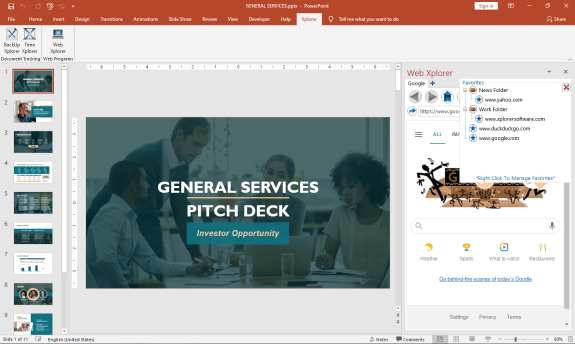
The First MS Office Task Pane Integrated Fully Functionally Web Browser.
Browse the Web and do your research right from your MS Office Task Pane.
*Viewing can be switched to mobile format to take advantage of space constraints
*Save Your Favorites for Easy Navigation
*Save Your Passwords for Your Most Visited Sites
*Set up multiple tabs to open automatically when you open the app
*View Browser Compatible Documents, Audio, Video, and Images (.pdf) right in the Task Pane
You can increase your productivity by never leaving your active screen.
Works with:
Word
API Access
Has API
No
API Access
Has API
No




Integrations
Microsoft Excel
No
Microsoft Outlook
No
Microsoft PowerPoint
No
Microsoft Project
No
Microsoft Word
No
SMS Deliverer
No
Splunk User Behavior Analytics
Yes
Integrations
Microsoft Excel
Yes
Microsoft Outlook
Yes
Microsoft PowerPoint
Yes
Microsoft Project
Yes
Microsoft Word
Yes
SMS Deliverer
Yes
Splunk User Behavior Analytics
No
Pricing Details
No price information available.
Free Trial
Yes
Free Version
No
Pricing Details
$29.00
FREE 7 day trial. Purchase a perpetual license that is good for 2 users.
Free Trial
Yes
Free Version
No
Deployment
Web-Based
Yes
On-Premises
Yes
iPhone App
No
iPad App
No
Android App
No
Windows
No
Mac
No
Linux
No
Chromebook
No
Deployment
Web-Based
No
On-Premises
No
iPhone App
No
iPad App
No
Android App
No
Windows
Yes
Mac
No
Linux
No
Chromebook
No
Customer Support
Business Hours
Yes
Live Rep (24/7)
No
Online Support
Yes
Customer Support
Business Hours
No
Live Rep (24/7)
No
Online Support
Yes
Types of Training
Training Docs
Yes
Webinars
No
Live Training (Online)
Yes
In Person
Yes
Types of Training
Training Docs
Yes
Webinars
No
Live Training (Online)
No
In Person
No
Vendor Details
Company Name
MacroView
Founded
1994
Country
Australia
Website
macroview365.com/document-management-sharepoint-office365/
Vendor Details
Company Name
Breakthrough Applications
Founded
2020
Country
United States
Website
www.xplorersoftware.com
Product Features
Document Management
Access Controls
No
Archiving & Retention
Yes
Collaboration Tools
Yes
Compliance Tracking
Yes
Document Archiving
Yes
Document Assembly
Yes
Document Capture
No
Document Conversion
No
Document Delivery
No
Document Indexing
No
Document Retention
Yes
Electronic Signature
No
Email Management
Yes
File Recovery
Yes
File Type Conversion
Yes
Forms Management
No
Full Text Search
Yes
Offline Access
Yes
Optical Character Recognition
Yes
Print Management
No
Version Control
Yes
