Average Ratings 0 Ratings
Average Ratings 10 Ratings
Similar Products
-
ForethoughtForethought is the most advanced generative AI agent for customer support and your 24/7 AI team member. Trained on your unique data sets and upholding the highest security protocols, Forethought delivers natural conversations through AI and eliminates inefficiencies to improve response times, resolution rates, and customer satisfaction scores at every interaction. - Add an AI Agent that is a 24/7 team member, reducing workload so your team can focus on delivering exceptional support. - Only Forethought ingests historical and current ticket data for AI specific to your business needs to deliver a personalized experience. - We're not just about meeting privacy standards – we're setting them, to keep you and your data secure every step of the way.
-
TitanPartnering with Salesforce, Titan Forms and Apps are a game-changer in the industry, making the world’s number #1 CRM accessible, and effortless for anyone to use. At the touch of a button, and with zero code, experience strength, speed, and agility for Salesforce Forms and your business processes. Slash time to market, nuke code, and tackle any use case on a single platform. Our best-of-breed forms and applications for Salesforce cater to any industry and it’s our mission to provide custom solutions for difficult problems. Build beautiful web portals, sign documents, generate docs, send surveys, automate contracts, fill out Salesforce forms, and so much more in just a few simple clicks. No code required and with our new AI assistant you can build even faster and with fewer errors. We are the only product on the market that empowers you to send data to Salesforce and pull it back in real-time without any development or added expense. Our customers and partners are the heartbeat of Titan. If you need a feature, simply request it via our Titan X Lab and we will consider it for our roadmap! So what’s stopping you? Schedule a demo today.
-
SurveySparrowA platform for managing Omni-channel Experiences. You can do more than just survey. Power-up your experience management programs. All touch points can have an omnichannel experience. All data in one location. You can customize and share email surveys to increase open-rates. You can customize the subject, body, or share from an email address you choose. White-label your emails, and share. For feedback, share a QR code that can be scannable. Share the code with respondents. Respondents can scan the code to access the survey and take it. Generate multiple unique survey links for sharing surveys. These links can be tracked and used to measure survey performance. You can white-label your survey by using Custom Domain. You can embed surveys to engage customers and visitors on your website. You can embed the survey as a popup card, chatbot on your website, or inline embed. Our mobile SDK allows you to quickly create surveys and collect actionable information.
-
JotformTrusted by over 25 million users worldwide, Jotform is an all-in-one platform that simplifies data collection, workflow automation, and online sales, all without coding. With Jotform’s drag-and-drop Form Builder, businesses can create customized forms and surveys to collect leads, contact information, payments, appointments, and e-signatures with ease. Choose from over 10,000 templates for everything from feedback surveys to registration forms, or build your own from scratch. Jotform's advanced features, such as conditional logic, autoresponders, and over 200 integrations, further streamline processes. In addition, Jotform's AI-powered Agents offer real-time customer support by guiding users through the form submission process, answering questions, and ensuring a smooth experience, all while reducing the need for manual intervention. With Jotform’s Store Builder, you can also set up an online store, sell products, services, and subscriptions, collect donations, and receive payments through 30+ supported payment gateways. Finally, Jotform’s tools like Approvals, PDF Editor, and Report Builder help businesses transform collected data into actionable insights and automate workflows for even greater efficiency.
-
SogolyticsSogolytics, an experience management platform, allows companies to collect, analyze and use employee and customer data to drive business growth. Sogolytics is used by organizations across all industries to track interactions at all touchpoints with customers and employees. The best-in-class reporting delivers real-time, actionable insights that help to prevent and mitigate potential problems. SogoCX improves every aspect of a company's customer experience. This means improved conversion rates, simplified data management, and understanding customers to increase return on investment. Organizations can use SogoCX to measure key metrics like NPS, CSAT and CES. SogoEX software is used by organizations to collect and use data to improve engagement and reduce turnover. This platform allows HR and leadership to drive organizational changes through real-time feedback collection and employee engagement.
-
SurveyLegendSurveyLegend is the next generation of online surveys -- engaging, platform-independent, & beautiful. We empower individuals and companies to create beautiful, mobile-friendly surveys. You can create stunning surveys, forms and polls, polls, voting and questionnaires, NPS customer satisfaction, customer experience surveys, employee satisfaction surveys... using your computer or tablet. You can also customize the look of your survey with eye-catching graphics that are informative. Drag and drop is all you need to create questionnaires. It's never been easier to listen to customers, measure employee satisfaction, manage client experience, and maintain student & employee engagement. SurveyLegend is used by thousands of people all over the globe, including amazing companies like L'Oreal and Universal, Harvard, Greenpeace and Airbnb, as well as individuals and start-ups like CocaCola, Roche, Sony, Universal, Harvard, Greenpeace and Greenpeace.
-
ParasoftParasoft's mission is to provide automated testing solutions and expertise that empower organizations to expedite delivery of safe and reliable software. A powerful unified C and C++ test automation solution for static analysis, unit testing and structural code coverage, Parasoft C/C++test helps satisfy compliance with industry functional safety and security requirements for embedded software systems.
-
AddSearchAddSearch transforms the way organizations connect users with information. More than just a traditional site search, AddSearch now offers AI Answers and AI Conversations, enabling businesses to deliver direct, conversational, and context-aware responses to user queries. These advanced capabilities complement AddSearch’s proven site search and content recommendation solutions, helping organizations create effortless, engaging, and personalized digital experiences. With AddSearch, you can choose between AI-driven answers, conversational interfaces, or lightning-fast search results—all fully customizable for websites, e-commerce platforms, or web applications. Our Crawler and Indexing API ensure your content is always up-to-date, while our expert implementation services save valuable developer time and maximize results. Today, nearly 2,000 customers worldwide—across Media, Telecommunications, Government, Education, E-commerce, and more—trust AddSearch to provide best-in-class search and AI-driven discovery. AddSearch product portfolio includes: - AI Answers – instant, accurate, and direct responses powered by generative AI. - AI Conversations – natural, chat-like interactions for deeper user engagement. - Autocomplete & Smart Ranking – predictive suggestions and optimized result ordering. - Personalized Search – tailored experiences based on behavior and preferences. - Content & Product Recommendations – boost engagement and conversions. - Advanced Analytics – insights into user behavior - Flexible Content Controls – include/exclude content, synonyms, filters, and facets, promote - Enterprise Features – SSO, organizational user management, audit logs, SLA up to 99.999%. - Seamless Implementation – works with any CMS, via crawler or API
-
WaitWellWaitWell provides organizations with a modern way to coordinate walk-in traffic and scheduled services through a secure, cloud-based queuing and appointment platform. Customers can join virtual queues or book appointments via QR codes, SMS, web links, kiosks, or by chatting with Waillo, an AI agent native to WaitWell that answers questions, explains services, and routes customers into the correct line using natural language. Customers receive live status updates and AI-driven wait time forecasts that reduce uncertainty. WaitWell includes strong real-time reporting and operational dashboards. Waillo Insights builds on this foundation by enabling leaders to ask plain-language questions of their data to uncover service constraints, monitor performance trends, and refine staffing decisions. With real-time visibility, integrated payments, open APIs, and HIPAA and SOC 2 compliance, WaitWell supports scalable, efficient service delivery across locations.
-
BirdeyePlease also update our description as follows: Birdeye is the top-rated reputation, social media, and customer experience platform for local brands and multi-location businesses. Over 150,000 businesses leverage Birdeye’s AI-powered platform to get found online, improve online reputation, streamline social publishing, connect through digital channels, and deliver a wowing customer experience.
Description
Eclipse AI serves as an easily integrated AI solution designed to identify risk factors associated with customer attrition. By enabling users to input voice-of-customer data from various sources such as surveys, reviews, chat logs, and phone conversations, Eclipse AI analyzes this information. It subsequently produces actionable strategies aimed at mitigating the risks of customer churn, leveraging both the analyzed data and established industry best practices. This innovative tool not only helps in retaining customers but also enhances overall customer satisfaction through targeted interventions.
Description
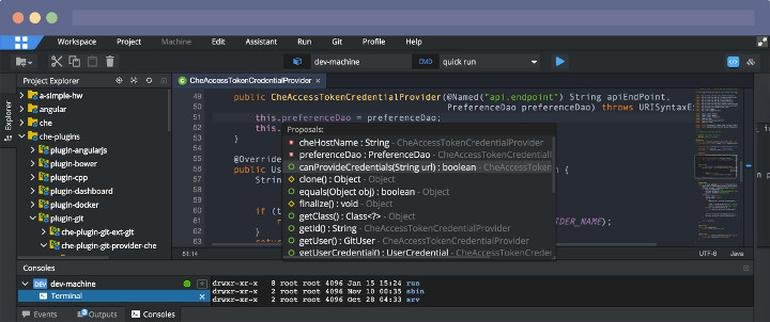
Eclipse IDE stands as the premier open platform tailored for professional developers engaged in computer programming, and it has never been better. This IDE provides essential tools to drive rapid innovation with a simplified configuration process, including the Eclipse IDE Installer 2020-09, which now incorporates a Java Runtime Environment (JRE) in several of its packages. The enhancements also extend to theming and styling, featuring an improved dark theme for Windows and a refined light theme for GTK. Additionally, Eclipse IDE has transitioned to require Java 11 as its minimum operating version while maintaining the ability to compile older versions as desired. Among its new experimental features is support for aarch64, along with robust Linux support that has been integrated into this version. Furthermore, Node.js is now embedded within all LSP-based tools, facilitating seamless functionality from the start. Eclipse IDE remains free and open source, distributed under the Eclipse Public License 2.0, underscoring its commitment to community-driven development. The platform thrives on an extensive ecosystem of plugins, bolstered by an active and engaged community of contributors. This collaborative environment ensures that Eclipse IDE continues to evolve and meet the diverse needs of developers worldwide.
API Access
Has API
No
API Access
Has API
No
Screenshots View All
No images available

Integrations
Amazon Q Developer
No
C++
No
DeepGit
No
Eclipse Jetty
No
JFrog
No
JavaScript
No
Kovair DevOps
No
Macaw
No
OpenText Dimensions CM
No
RKTracer
No
Integrations
Amazon Q Developer
Yes
C++
Yes
DeepGit
Yes
Eclipse Jetty
Yes
JFrog
Yes
JavaScript
Yes
Kovair DevOps
Yes
Macaw
Yes
OpenText Dimensions CM
Yes
RKTracer
Yes
Pricing Details
No price information available.
Free Trial
Yes
Free Version
No
Pricing Details
No price information available.
Free Trial
No
Free Version
No
Deployment
Web-Based
Yes
On-Premises
No
iPhone App
No
iPad App
No
Android App
No
Windows
No
Mac
No
Linux
No
Chromebook
No
Deployment
Web-Based
Yes
On-Premises
No
iPhone App
No
iPad App
No
Android App
No
Windows
No
Mac
No
Linux
No
Chromebook
No
Customer Support
Business Hours
No
Live Rep (24/7)
No
Online Support
Yes
Customer Support
Business Hours
No
Live Rep (24/7)
No
Online Support
Yes
Types of Training
Training Docs
No
Webinars
Yes
Live Training (Online)
No
In Person
No
Types of Training
Training Docs
Yes
Webinars
No
Live Training (Online)
No
In Person
No
Vendor Details
Company Name
Eclipse AI
Country
Australia
Website
eclipse-ai.com
Vendor Details
Company Name
Eclipse Foundation
Country
Canada
Website
www.eclipse.org/eclipseide/
Product Features
Customer Experience
Action Management
No
Analytics
No
Customer Segmentation
No
Dashboard
No
Feedback Management
No
Knowledge Management
No
Multi-Channel Collection
No
Sentiment Analysis
No
Survey Management
No
Text Analysis
No
Trend Analysis
No
Product Features
Application Development
Access Controls/Permissions
No
Code Assistance
No
Code Refactoring
No
Collaboration Tools
Yes
Compatibility Testing
No
Data Modeling
No
Debugging
No
Deployment Management
No
Graphical User Interface
No
Mobile Development
No
No-Code
No
Reporting/Analytics
No
Software Development
Yes
Source Control
No
Testing Management
No
Version Control
No
Web App Development
Yes
Code Editors
API
No
Auto-Complete
No
Code Folding
No
Column Editing
No
Customizable Themes
No
Debugging
No
Formatting / Table Editing
No
Keyboard Shortcuts
No
Multi-Monitor Editing
No
Syntax Highlighting
No
WYSIWYG
No
IDE
Code Completion
No
Compiler
No
Cross Platform Support
No
Debugger
No
Drag and Drop UI
No
Integrations and Plugins
No
Multi Language Support
No
Project Management
No
Text Editor / Code Editor
No
