Average Ratings 0 Ratings
Average Ratings 0 Ratings
Similar Products
-
Uptime.comUptime.com website monitoring solutions provide unmatched visibility and availability, empowering engineering, operations and SRE teams to monitor & respond to their most essential services. Simple & intuitive industry leading Enterprise-grade features delivered at a fair price, that are continuously improving. G2, Sourceforge and TechRadar Pro have recognized us as one of the world’s best uptime monitors for several consecutive years, including this one. Try 100% free.
-
UptimeRobotThe ultimate uptime monitoring service. Get 50 monitors with 5-minute checks completely free. Set up in seconds and stay informed about your website’s health at all times. Website monitoring: Get instant alerts when your website goes down. Reliable and accurate monitoring helps you fix issues before they affect users and prevent revenue loss. SSL certificate monitoring: Avoid losing visitors due to expired SSL certificates. Get notified 30 days before expiration so you can renew in time. Ping and port monitoring: Check if your server is online or if your email service is running on port 465. Monitor any port you need with real-time alerts. Cron job monitoring: Track scheduled tasks with heartbeat monitoring. We verify if the request arrives on time, making sure server-side jobs and internet-connected devices are running properly. Status pages: Create up to 100 branded status pages, protect them with a password, and allow subscribers to receive updates. Stay informed with email, SMS, voice calls, push notifications, or integrations with Slack, Zapier, PagerDuty, Telegram, Discord, Microsoft Teams, Google Chat, and more. Maintenance windows: Pause monitoring when you schedule downtime to avoid unnecessary alerts
-
OvermonitorOvermonitor is cloud-based infrastructure, website, and endpoint monitoring built for teams that want fast setup, clear alerts, and practical visibility without the complexity or cost of enterprise monitoring suites. Monitor websites, servers, endpoints, processes, Windows services, event logs, uptime, response time, SSL certificates, and internal network health from one easy dashboard. At the core of Overmonitor is a small, lightweight server agent that installs quickly, pairs with your account, and reports a heartbeat every minute from inside your network. This gives you visibility beyond public uptime checks, helping detect server outages, stalled services, failing processes, internal connectivity problems, and endpoint health issues before they become customer-facing downtime. Overmonitor supports city-level geotargeted monitoring, practical maintenance windows that reduce alert noise, push notifications for alerts, audible dashboard alerts for operations screens, process monitor rollups, embeddable performance graphs, and flexible à la carte pricing so you only pay for the monitoring you need. Designed for SaaS operators, IT teams, MSPs, developers, and small businesses, Overmonitor helps you track availability, analyze website performance, monitor infrastructure health, and improve end-user experience without being locked into a bloated monitoring platform.
-
Code-Cube.ioCode-Cube.io is a comprehensive marketing observability solution that ensures the accuracy and reliability of tracking data across digital platforms. It continuously monitors tags, dataLayers, and conversion events to detect issues the moment they occur. By providing real-time alerts, the platform allows teams to quickly respond to tracking failures before they affect campaign performance or reporting accuracy. Its automated auditing capabilities remove the need for time-consuming manual QA processes, saving valuable resources. With features like Tag Monitor, users can oversee tag behavior across both client-side and server-side environments with full transparency. DataLayer Guard further strengthens data integrity by validating events, parameters, and values in real time. The platform helps businesses avoid wasted ad spend caused by incorrect or incomplete data signals. It also supports multi-domain tracking, ensuring consistency across complex digital ecosystems. Code-Cube.io is trusted by global brands to maintain high-quality marketing data at scale. Ultimately, it enables organizations to optimize performance and make confident, data-driven decisions.
-
CloudflareCloudflare is the foundation of your infrastructure, applications, teams, and software. Cloudflare protects and ensures the reliability and security of your external-facing resources like websites, APIs, applications, and other web services. It protects your internal resources, such as behind-the firewall applications, teams, devices, and devices. It is also your platform to develop globally scalable applications. Your website, APIs, applications, and other channels are key to doing business with customers and suppliers. It is essential that these resources are reliable, secure, and performant as the world shifts online. Cloudflare for Infrastructure provides a complete solution that enables this for everything connected to the Internet. Your internal teams can rely on behind-the-firewall apps and devices to support their work. Remote work is increasing rapidly and is putting a strain on many organizations' VPNs and other hardware solutions.
-
TrustInSoft AnalyzerTrustInSoft commercializes a source code analyzer called TrustInSoft Analyzer, which analyzes C and C++ code and mathematically guarantees the absence of defects, immunity of software components to the most common security flaws, and compliance with a specification. The technology is recognized by U.S. federal agency the National Institute of Standards and Technology (NIST), and was the first in the world to meet NIST’s SATE V Ockham Criteria for high quality software. The key differentiator for TrustInSoft Analyzer is its use of mathematical approaches called formal methods, which allow for an exhaustive analysis to find all the vulnerabilities or runtime errors and only raises true alarms. Companies who use TrustInSoft Analyzer reduce their verification costs by 4, efforts in bug detection by 40, and obtain an irrefutable proof that their software is safe and secure. The experts at TrustInSoft can also assist clients in training, support and additional services.
-
AdRem NetCrunchNetCrunch is commercial, self-hosted, agentless network and IT infrastructure monitoring software for Windows Server. It monitors network devices, servers, virtualization platforms, cloud services, applications, websites, logs, telemetry, and network traffic across distributed environments. NetCrunch supports 680+ monitoring targets and provides 270+ ready-to-use Monitoring Packs for devices, applications, and operating systems. Policy-based monitoring automatically applies monitoring settings, Monitoring Packs, thresholds, and alerts to matching devices and systems. Licensing is based on monitored nodes and network interfaces rather than individual sensors, checks, or metrics. NetCrunch provides real-time dashboards and automatic Layer 2 and routing topology maps for visibility into network status and performance. Network traffic analysis supports NetFlow, sFlow, IPFIX, and other flow technologies. Its alerting system supports event correlation, dependency-aware suppression, predictive thresholds, escalation, and 40+ automated response actions, including scripts, notifications, API calls, and integrations with external systems. Distributed Monitoring Probes extend monitoring to remote and isolated locations. NetCrunch also provides a REST API for integration and automation with external IT management, service management, and operational systems. NetCrunch is self-hosted on Windows Server and can monitor on-premises, air-gapped, cloud, and hybrid IT environments.
-
NinjaOneNinjaOne automates the hardest parts of IT, empowering more than 20,000 IT teams. By providing deep insights into endpoints, robust security measures, and centralized control, NinjaOne boosts efficiency while safeguarding sensitive data and cutting IT expenses. This comprehensive platform offers a versatile toolkit for managing and securing endpoints, including patch management, mobile device oversight, software distribution, remote support, backup solutions, and more, thanks to its extensive IT and security integrations.
-
New RelicAround 25 million engineers work across dozens of distinct functions. Engineers are using New Relic as every company is becoming a software company to gather real-time insight and trending data on the performance of their software. This allows them to be more resilient and provide exceptional customer experiences. New Relic is the only platform that offers an all-in one solution. New Relic offers customers a secure cloud for all metrics and events, powerful full-stack analytics tools, and simple, transparent pricing based on usage. New Relic also has curated the largest open source ecosystem in the industry, making it simple for engineers to get started using observability.
-
TinyPNGTinyPNG (by Tinify) is a free image optimization service built for developers and designers. It utilizes smart lossy compression to reduce the file sizes of JPEG, PNG, WebP, and AVIF files by up to 80% with no visible quality loss. That means faster load times, better SEO, and lower bandwidth. You can compress, convert, and resize images via a clean web interface or integrate it into your workflow with the API. The platform also provides an image CDN for fast global delivery of optimized assets. SDKs are available for Python, Node.js, PHP, Java, Ruby, and .NET. WordPress plugin included, plus plenty of community-driven integrations. No tuning, no noise, Tinify just works. Whether you're optimizing a handful of images or processing millions, it scales effortlessly. All plans include a generous free tier, and support is quick when you need it. George the panda 🐼 approves.
Description
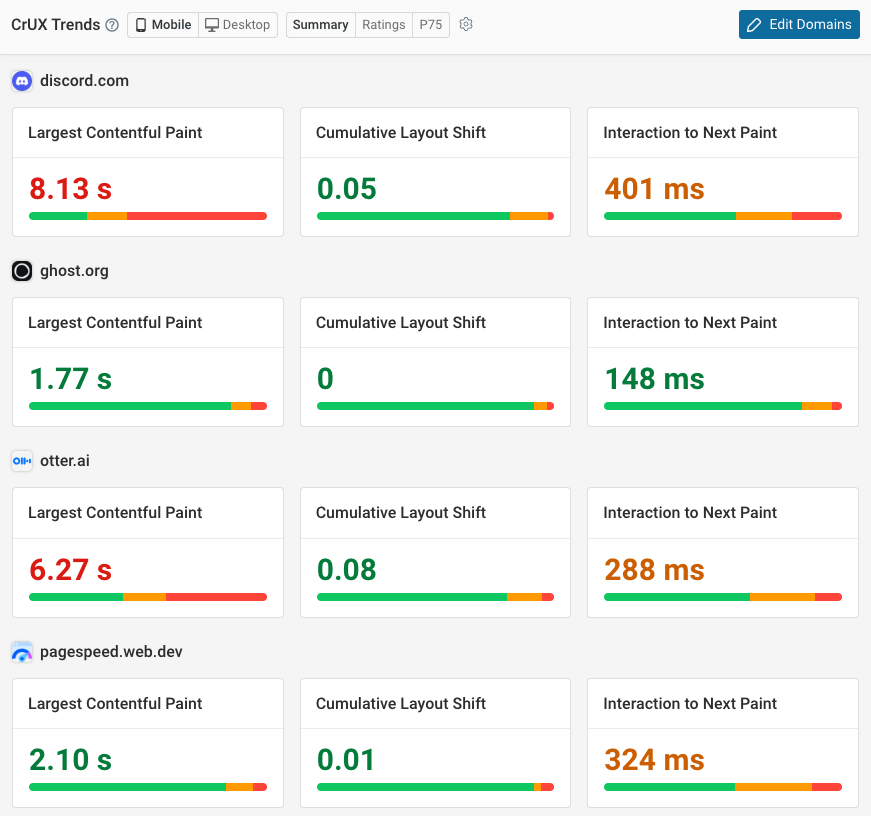
DebugBear tracks the speed of your website and alerts you when there's a problem. Receive alerts in Slack, by email, or in Microsoft Teams.
Analyze your website using in-depth debug data, like a Lighthouse report, request waterfall, and a rendering filmstrip.
DebugBear also supports advanced features, like the ability to test pages that require login or testing the second (cached) load of a page.
Description
Attract authentic and pertinent followers, enhance your visibility, and expand your connections - all conveniently within a single platform. This comprehensive solution allows you to streamline your networking efforts effectively.
API Access
Has API
Yes
API Access
Has API
No


Screenshots View All
No images available
Integrations
GitHub
Yes
Slack
Yes
Google Chrome
Yes
JFrog Xray
No
Jira
No
Lighthouse
Yes
Netlify
Yes
OpenAI
No
Trello
Yes
Vercel
Yes
Integrations
GitHub
Yes
Slack
Yes
Google Chrome
No
JFrog Xray
Yes
Jira
Yes
Lighthouse
No
Netlify
No
OpenAI
Yes
Trello
No
Vercel
No
Pricing Details
$125/mo
Free Trial
Yes
Free Version
No
Pricing Details
$10/month
Free Trial
Yes
Free Version
No
Deployment
Web-Based
Yes
On-Premises
No
iPhone App
No
iPad App
No
Android App
No
Windows
No
Mac
No
Linux
No
Chromebook
No
Deployment
Web-Based
Yes
On-Premises
No
iPhone App
No
iPad App
No
Android App
No
Windows
No
Mac
No
Linux
No
Chromebook
No
Customer Support
Business Hours
No
Live Rep (24/7)
No
Online Support
Yes
Customer Support
Business Hours
No
Live Rep (24/7)
No
Online Support
Yes
Types of Training
Training Docs
Yes
Webinars
No
Live Training (Online)
Yes
In Person
No
Types of Training
Training Docs
Yes
Webinars
No
Live Training (Online)
No
In Person
No
Vendor Details
Company Name
DebugBear
Founded
2018
Country
United Kingdom
Website
www.debugbear.com
Vendor Details
Company Name
Testlemon
Founded
2024
Country
Poland
Website
testlemon.com
Product Features
Website Monitoring
Availability Testing
No
Event Logs
No
Event-Based Notifications
No
FTP Monitoring
No
Mail Server Monitoring
No
Maintenance Scheduling
No
Performance Metrics
Yes
Real Time Monitoring
Yes
Transaction Monitoring
Yes
Uptime Reporting
No
Website Optimization Tools
Competitor Analysis
Yes
Content Management
No
Keyword Research Tools
No
Link Management
No
Performance Metrics
Yes
Problem Area Alerts
Yes
Product Features
API Testing
Functional Testing
No
Fuzz Testing
No
Load Testing
No
Penetration Testing
No
Runtime and Error Detection
No
Security Testing
No
UI Testing
No
Validation Testing
No
Automated Testing
Hierarchical View
No
Move & Copy
No
Parameterized Testing
No
Requirements-Based Testing
No
Security Testing
No
Supports Parallel Execution
No
Test Script Reviews
No
Unicode Compliance
No
Software Testing
Automated Testing
No
Black-Box Testing
No
Dynamic Testing
No
Issue Tracking
No
Manual Testing
No
Quality Assurance Planning
No
Reporting / Analytics
No
Static Testing
No
Test Case Management
No
Variable Testing Methods
No
White-Box Testing
No
Website Monitoring
Availability Testing
No
Event Logs
No
Event-Based Notifications
No
FTP Monitoring
No
Mail Server Monitoring
No
Maintenance Scheduling
No
Performance Metrics
No
Real Time Monitoring
No
Transaction Monitoring
No
Uptime Reporting
No
