Average Ratings 0 Ratings
Average Ratings 0 Ratings
Similar Products
-
CodemagicCodemagic’s macOS build environments facilitate the smooth creation of hybrid applications, bolstered by an extensive array of preinstalled software. You can efficiently configure your Cordova Android and iOS application builds and workflows through a single codemagic.yaml file. To maintain the performance of your Android and iOS applications, Codemagic provides automated testing on simulators, emulators, and actual devices, ensuring you receive prompt feedback on your build outcomes. Integration with the Apple Developer Portal streamlines iOS code signing, enabling seamless deployment to App Store Connect and Google Play. Similarly, you can also set up your React Native app builds and workflows in one straightforward codemagic.yaml file. With multiple versions of Xcode, Android SDK, and npm preinstalled, Codemagic’s macOS build machines are designed for effortless Android and iOS builds. Moreover, Codemagic simplifies the automation of testing for your React Native applications across a variety of testing platforms. This comprehensive approach not only boosts productivity but also enhances the overall development experience.
-
LogicalDOCLogicalDOC empowers organizations all over the globe to take complete control of their document management. This premier document management system (DMS), which focuses on business process automation and quick content retrieval, allows teams to create, collaborate and manage large volumes of documents. It also stores valuable company data in one central repository. The system features include drag-and-drop document uploads, forms management, optical characters recognition (OCR), duplicate detection and barcode recognition, event logs, document archiving and integrated document workflow. Schedule a free, no obligation, one-on-one demo today.
-
DbVisualizerDbVisualizer is a universal database client for anyone who works with data, from indie developers and startups to professional teams managing complex database environments, including developers, DBAs, analysts, and data engineers working across relational and NoSQL databases. Key features: - SQL editor with intelligent autocomplete, visual query builders, variables, and execution tools - AI Assistant for answering questions, explaining errors, and analyzing code - Git integration for managing SQL scripts and team collaboration - Customizable layouts, key bindings, and UI themes - Favorites for frequently used scripts and database objects - Configurable security settings for organizational requirements Connects via JDBC to MySQL, PostgreSQL, SQL Server, Oracle, Snowflake, SQLite, Cassandra, BigQuery, and more. Runs on Windows, macOS, and Linux. Nearly 7 million downloads, with Pro users in 150 countries, scaling from solo projects to enterprise database management.
-
MobiPDFMobiPDF (formerly PDF Extra) is an intuitive reader and editor that allows you to read, edit, create, OCR, organize, annotate, fill and sign, convert, and share any PDF. This makes MobiPDF an excellent choice for users seeking a budget-friendly alternative to Adobe Acrobat Pro. HERE’S WHAT YOU GET WITH MOBIPDF: Multiple Page View Modes: Enjoy a distraction-free "Read Mode". Advanced Editing Tools: Experience a Word-like PDF editing environment. Two-Way Conversions: Convert PDFs to and from Word, Excel, PowerPoint, or image formats. OCR Support: Make scanned documents searchable. Markup Tools: Highlight, comment, strikethrough, stamp, and more to enhance your documents. Effortless PDF Organizer: Reorder, compress, split, and combine PDFs with ease. Sign & Secure: Add signatures, create and fill forms, and protect your PDFs with passwords, encryption, and digital certificates. Offline Mode: Work freely on your projects, even offline. Seamless translation: One-click translate any PDF into 50+ languages.
-
TheBestPDFWelcome to our state-of-the-art SaaS platform that specializes in online document editing and conversion. Tailored specifically for businesses and entrepreneurs, TheBestPDF offers exceptional file management solutions suitable for teams of any size. You can store your documents in various formats and sizes within our secure vault. Choose from multiple plans designed to help you optimize your resources and expenses. Our platform is accessible across all devices and operating systems, making it highly versatile. Your business data is protected with HTTPS encryption, guaranteeing that every file you create remains secure. Effortlessly redact, insert objects, and sign PDFs, simplifying document management for your organization. With our speedy PDF converter, document conversion is quick and efficient, ideal for busy teams. Setting up your company’s document workflows is a breeze thanks to our intuitive editor interface. We're committed to fostering long-term partnerships by providing 24/7 customer support. By bringing together innovative thinkers, we deliver integrated solutions that effectively address your business challenges while enhancing productivity and collaboration.
-
ONLYOFFICE DocsONLYOFFICE Docs is a secure online office suite for teams and businesses of all sizes. Create and edit docs, sheets, slides, fillable forms and PDFs. Collaborate with your teammates in real time using two co-editing modes, version history and other tools. Enable the AI assistant of your choice — ChatGPT, DeepSeek, Mistral, Groq AI, etc. Generate new content, summarize, translate and do more with your favourite AI tool while working on office files. Integrate ONLYOFFICE Docs into your business platform, whether it be Odoo, Alfresco, Confluence, Pipedrive, Nextcloud, Redmine, SuiteCRM, etc., via an integration app (40+ available integrations). Use Docs within ONLYOFFICE DocSpace, a room-based document collaboration platform equipped with the online office suite. Create dedicated spaces for different purposes, invite your teammates, assign access permissions and collaborate the way you like. With DocSpace, you can store, share and co-edit office files, and even interact with third parties.
-
Admin By Request Endpoint Privilege ManagementAdmin By Request EPM is an endpoint privilege management solution for Windows, macOS, and Linux. It removes permanent local admin rights and grants elevation only when a task requires it, so a compromised account can't take over an entire system. Elevation applies to applications rather than user accounts, and privileges can be delegated by user or group to fit developers, general staff, and third-party contractors alike. Threat and behavioral analytics identify risky users, assets, and software, and every session is logged for auditing. The solution runs from a single portal, works online or offline, and requires no additional servers or databases.
-
pCloud BusinesspCloud Business is a cloud storage and file synchronization platform designed for teams that need controlled access, cross-platform compatibility, and predictable storage allocation. It provides centralized file management with granular permissions and optional client-side encryption. Founded in 2013 in Switzerland, pCloud operates under EU-aligned privacy standards and offers data residency in Luxembourg (EU) and Dallas, Texas (US). The platform supports over 23 million users globally. Core Functionality : - Per-User Storage Allocation : 1 TB or 2 TB per user, suitable for small to mid-sized teams and distributed environments. - Virtual File System (pCloud Drive) : Mounts as a local drive on Windows, macOS, and Linux. Files are streamed on demand, reducing local disk usage. - File Sync & Sharing : Folder-level sync, link-based sharing, and permission control (view/edit/manage). Supports password-protected and time-limited links. - Admin & Access Control : Centralized user management, role assignment, and storage distribution via admin console. - Versioning & File History : File versioning with up to 180 days retention, enabling rollback and recovery. - Cross-Platform Support : Native clients for Windows, macOS, Linux, iOS, Android, plus web interface. - Client-Side Encryption (Optional) : Zero-knowledge encryption via pCloud Encryption for sensitive data; encryption keys are not stored server-side. Technical Positioning: - Swiss jurisdiction; GDPR-aligned processing - No file size limits - Works without mandatory ecosystem lock-in (no bundled office suite required) - Compatible with heterogeneous environments (Linux included) Trial : 30-day free trial available for up to 10 users.
-
RunMyJobs by RedwoodRunMyJobs by Redwood is the only SAP endorsed and premium-certified and the most awarded SAP-certified SaaS workload automation platform and only allowing enterprises to achieve end-to-end IT process automation and unify complex across any application, system or environment without limits and with high availability as you scale. We're the #1 job scheduling choice for SAP customers with seamless integration to S/4HANA, BTP, RISE, ECC and more while maintaining a clean core. Empower teams with seamless integration with any present and future tech stack, a low-code editor and a rich library of templates. Monitor processes in real-time with predictive SLA management and get proactive notifications via email or SMS on performance issues or delays in all your processes. Redwood team provides 24/7/365 day global support with the industry’s strongest SLAs and 15-minute response times and a proven approach to migration that secures continuous operations, including team training, on-demand learning and more.
-
DocmosisDocmosis is a self-hosted or SaaS template-based document generation solution. Integrate with custom-built software applications or popular third-party apps using the API. Create templates using MS Word or LibreOffice. Add plain-text placeholders to control: the insertion of text/images/tables; conditionally add/remove any content; perform calculations; loop over repeating data; format data/numbers and much more. Integrate with: Custom software built using Java, C#, Python, PHP, Ruby and more via a REST API; Low-code and no-code platforms like Appian, Bubble, Mendix, Outsystems; Third-party form builders or apps that can perform a webhook such as FormAssembly or Salesforce. Used by customers in Finance, Health, Legal, Education, Government, HR, Insurance, Logistics, and Manufacturing to generate customized letters invoices, proposals, contracts, statements, reports and more.
Description
CotEditor is specifically designed for macOS and aligns perfectly with the expectations of macOS users. Its rapid launch time ensures that you can begin writing without delay whenever inspiration strikes. As an open-source project, CotEditor invites contributions from anyone interested in enhancing its capabilities. It supports syntax highlighting for over 50 popular programming languages, such as HTML, PHP, Python, Ruby, and Markdown, while also allowing users to create personalized settings. The interface enables you to split the window into several panes, facilitating the simultaneous view of various sections of your document. You can easily inspect the Unicode character data of any selected character, which is displayed conveniently in a popover. There is no need for complicated configuration files requiring technical expertise; all your settings, including syntax definitions and themes, can be managed through a straightforward preferences window. With CotEditor, the worry of losing unsaved changes is eliminated, as it automatically backs up your work during editing sessions. Additionally, it provides a feature to identify and list characters in your document that cannot be converted to the desired encoding, ensuring a smooth writing experience. This combination of user-friendliness and powerful features makes CotEditor a valuable tool for writers and developers alike.
Description
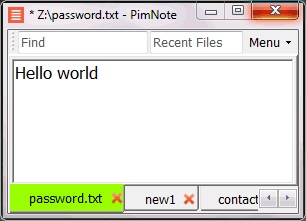
PimNote is a text editor that allows for faster document access. It also combines both the useful and unutilized features of all other text editors.
This tool is designed for knowledge management. You can quickly access the recent file list with a single click. You can easily access an old file that has been opened long ago with the unlimited and searchable recent files list. You can type less with the one-click search and find history feature.
This product is designed for remote work. No freezing from a remote file monitoring/opening/writing when disconnected. You can save files offline by closing the application and not closing the tabs. During file opening, auto-reconnect the network drive. Recurring file notifications are displayed politely on top bar, instead of a popup dialog box that requires frequent actions and tends not to be used.
API Access
Has API
No
API Access
Has API
No


Integrations
C#
No
CSS
Yes
Dash
Yes
HTML
Yes
Markdown
Yes
PHP
Yes
Perl
Yes
Python
Yes
Ruby
Yes
Swift
Yes
Integrations
C#
Yes
CSS
No
Dash
No
HTML
No
Markdown
No
PHP
No
Perl
No
Python
No
Ruby
No
Swift
No
Pricing Details
No price information available.
Free Trial
No
Free Version
No
Pricing Details
No price information available.
Free Trial
No
Free Version
Yes
Deployment
Web-Based
No
On-Premises
No
iPhone App
No
iPad App
No
Android App
No
Windows
No
Mac
Yes
Linux
No
Chromebook
No
Deployment
Web-Based
No
On-Premises
No
iPhone App
No
iPad App
No
Android App
No
Windows
Yes
Mac
No
Linux
No
Chromebook
No
Customer Support
Business Hours
No
Live Rep (24/7)
No
Online Support
Yes
Customer Support
Business Hours
No
Live Rep (24/7)
No
Online Support
Yes
Types of Training
Training Docs
No
Webinars
No
Live Training (Online)
No
In Person
No
Types of Training
Training Docs
Yes
Webinars
No
Live Training (Online)
No
In Person
Yes
Vendor Details
Company Name
CotEditor
Founded
2014
Country
Japan
Website
coteditor.com
Vendor Details
Company Name
Pimtel
Founded
2018
Website
www.pimtel.com/pimnote/
Product Features
Code Editors
API
No
Auto-Complete
No
Code Folding
No
Column Editing
No
Customizable Themes
No
Debugging
No
Formatting / Table Editing
No
Keyboard Shortcuts
No
Multi-Monitor Editing
No
Syntax Highlighting
No
WYSIWYG
No
Text Editors
API
No
Auto-Complete
No
Code Folding
No
Column Editing
No
Customizable Themes
No
Debugging
No
Formatting / Table Editing
No
Keyboard Shortcuts
No
Multi-Monitor Editing
No
Syntax Highlighting
No
WYSIWYG
No
Product Features
Text Editors
API
No
Auto-Complete
No
Code Folding
No
Column Editing
No
Customizable Themes
No
Debugging
No
Formatting / Table Editing
No
Keyboard Shortcuts
No
Multi-Monitor Editing
No
Syntax Highlighting
No
WYSIWYG
No
