Average Ratings 0 Ratings
Average Ratings 0 Ratings
Similar Products
-
DialedInDialedIn is a cloud-based call center software built for teams that demand reliability, performance, and control at scale. It streamlines operations with intelligent tools that simplify call management, optimize agent workflows, and improve customer experiences. Rather than adding layers of complexity, DialedIn provides a flexible, scalable system that reduces wasted time and helps contact centers operate more efficiently. From inbound and outbound calling to blended environments, DialedIn is engineered to adapt to evolving business needs while maintaining compliance and uptime. • Intelligent Call Routing: Matches each customer with the right agent to improve satisfaction and better balance workloads. • Proven Dial Strategies: Leverages advanced algorithms to enhance contact rates and reduce downtime. • Customizable Tools: Adapts to your specific operational needs, ensuring that the technology works for you, not the other way around. • 100% US-Based Support: Offers comprehensive support, including technical and account management, ensuring maximum utilization of the dialer. • CleanCallerID™: An innovative feature that monitors and swaps out DIDs tagged as SPAM/SCAM by carriers with fresh DIDs automatically, ensuring uninterrupted customer interaction. With built-in analytics, reporting, and automation features, supervisors gain full visibility into agent performance and call outcomes, allowing for smarter decision-making and stronger ROI. DialedIn is not only designed to maximize live connections but also to keep agents connected with customers through secure, dependable, and user-friendly technology. By removing friction from daily operations, DialedIn empowers contact centers of all sizes to focus less on manual processes and more on delivering excellence.
-
CallTrackingMetricsCallTrackingMetrics is the only SaaS platform that uses call tracking and conversion intelligence to inform contact center automation--resulting in a more personalized customer experience. Find out which marketing campaigns are generating leads or conversions and use that data for automated call flows and to power your contact centre. Our phone, text, online, and live chat tools allow you to unify communications across your organization. CallTrackingMetrics is trusted by more than 100,000 users worldwide to manage communications for their sales, marketing, and service teams. Call tracking features include reliable dynamic numbers insertion (DNI), for session-level attribution, local and toll-free tracking numbers, and omnichannelattribution across calls, texts and form fills. Contact center features include a browser-based softphone and smart routing options.
-
QEvalContact center QA teams evaluate 1 to 5% of calls manually. QEval eliminates that bottleneck by applying AI speech analytics and automated scoring to 100% of interactions across voice, chat, and email, using a classification engine trained on 138M+ real conversations. Capabilities span quality monitoring, compliance detection for PCI, HIPAA, and GDPR at 98% accuracy, sentiment analysis, keyword identification, agent coaching workflows, performance gamification, and predictive analytics across 110+ configurable dashboards. Quality scoring runs at 94% accuracy with zero manual intervention. Deployment takes 30 days. Industry standard is 90 to 120. No disruption to live operations. Etech Global Services built QEval from two decades of running Fortune 500 contact centers in healthcare, telecom, retail, banking, and BPO. ISO 27001, SOC 2, PCI-DSS certified. Built for QA leaders and operations teams scaling coverage without adding headcount. QEval also provides call recording management, screen capture, custom evaluation forms, calibration tools for QA consistency, root cause analysis, trend identification, and automated alert systems for compliance breaches. The voice of customer module tracks customer sentiment across touchpoints to identify service gaps and training opportunities. Real-time monitoring lets supervisors intervene during live interactions. Role-based access controls, audit trails, and data encryption ensure enterprise-grade security. QEval supports multi-site and multilingual contact center environments with centralized reporting across locations. API integrations connect QEval with existing CRM, telephony, and workforce management systems. Automated report scheduling delivers insights to stakeholders without manual effort.
-
Intermedia UniteIntermedia Unite is an all-in-one business communications and collaboration platform designed to keep employees connected and responsive across locations, devices, and teams. The solution combines cloud phone service, video meetings, team messaging, file sharing, customer engagement tools, and productivity features into one integrated platform. By consolidating multiple communication tools, Unite reduces app switching and gives employees a simpler way to call, meet, chat, share files, and engage customers from desktop or mobile devices. Its enterprise-grade calling system includes more than 100 voice features that support professional business communications and consistent customer interactions. The platform also supports enhanced Microsoft Teams experiences, helping organizations extend communication capabilities within their existing collaboration environment. AI features such as transcription, summaries, and conversation insights help users retain important information, identify follow-up actions, and improve team efficiency. Mobile and desktop apps allow employees to maintain a consistent business identity whether they are in the office, remote, or on the go. Backed by strong uptime commitments and J.D. Power-certified support, Intermedia Unite is built for reliability and ease of use. By unifying communications, collaboration, and engagement, Unite helps organizations increase productivity while improving the way teams serve customers.
-
Yeastar P-Series PBX SystemFocusing on delivering "Easy-first Unified Communications", Yeastar P-Series Phone System offers companies of all sizes with a complete package for calls, video, messaging, and integrations, out of the box. Available in the Appliance, Software, and Cloud Editions, P-Series provides flexible deployment options, allowing you to have it sited on-premises or in the cloud. Balancing costs and future growth, it requires a lower total cost of ownership, less training, and fewer management efforts. The ease of use and future-proof adaptability are paramount.
-
Thinfinity WorkspaceThinfinity Workspace 7.0's Technical Highlights: - Progressive Web App (PWA) technology for a seamless user experience - Integrated Thinfinity VNC, VirtualUI, and z/Scope for maximum versatility - HTML5 terminal emulation supporting DEC terminals, TN 5220, and TN 3270 protocols - Robust enterprise-grade audit logs for security and compliance management - Proprietary VNC protocol for real-time monitoring and troubleshooting IMPROVE USER EXPERIENCE - Deliver business-critical apps, desktops and files from a single web portal. - Provide simplified remote browser access for your users, while confining them to only the resources that they need. SIMPLIFY IT AND AVOID VPNs - Forget traditional VPN deployments and complexities. - Enable access from Chromebooks, mobile devices or any computer with a Web Browser. Zero setup. KEEP YOUR BUSINESS SECURE - Use enterprise-grade encrypted connections. - Integrate with your existing and external identity platforms. - Apply 2FA or MFA policies with all identity providers.
-
net2phonenet2phone is an AI-powered business communication platform for companies serious about customer experience. Trusted by 500,000+ users and backed by 30+ years of experience, net2phone eliminates the friction of scattered channels and disconnected tools, so every conversation drives retention and growth. Communication breaks down when channels are scattered and tools do not talk to each other. net2phone solves this with a connected business VoIP and unified communications platform built for teams that cannot afford dropped context or slow resolutions. Unite, net2phone's unified communications solution, brings voice, messaging, video, and chat into a single place, with call and video recording, transcription, sentiment analysis on voice calls, automated action item tracking, and AI-generated follow-up emails. AI Agent handles inquiries and completes workflows on its own, answering questions, resolving support cases, scheduling, and managing returns across phone and chat, in 30+ languages, with seamless handoff to human agents when needed. Coach AI analyzes 100% of voice, video, and text interactions, giving managers full visibility into team performance with sentiment analysis, call summaries, and coaching recommendations by user or department. uContact, net2phone's omnichannel contact center, gives high-volume sales and support teams the automation, AI-driven routing, and real-time dashboards they need to deliver consistent customer experiences at scale. Every net2phone solution connects to the tools businesses already use, with a drag-and-drop workflow builder for automating processes without writing code, backed by enterprise-grade security and expert guidance at every step, from setup to integration to ongoing optimization.
-
AircallAircall transforms business communications with an intelligent, cloud-based phone system built for modern sales and customer support. More than just a calling tool, it provides an all-in-one hub that connects phone, SMS, and WhatsApp conversations in a single platform. Its AI Assist Pro feature delivers real-time coaching during calls and simplifies follow-up, enabling reps to sell smarter and resolve support issues faster. Teams can leverage advanced capabilities like call routing, IVR, analytics dashboards, and power dialers to maximize efficiency. With integrations across Salesforce, HubSpot, Zendesk, Intercom, Shopify, and 250+ other apps, Aircall seamlessly fits into existing workflows. Businesses benefit from reliable call quality, international number coverage, and scalable features that grow with their needs. Customer stories highlight improvements such as a 4% increase in CSAT scores and the ability to process 25,000+ calls per month with stability and ease. Aircall makes customer conversations more personal, productive, and impactful—without the complexity of traditional systems.
-
Dialpad SupportCustomer experience shouldn't run on disconnected tools and static scripts. Dialpad Contact Center brings voice, digital channels, and human agents together in a single AI-native platform, built to act — not just record — on every customer interaction. This is Agentic AI in practice: agents that reason through a problem, take the next step, and drive it to resolution without waiting on a human to intervene. Where legacy systems leave data trapped in silos, Dialpad Contact Center closes that gap, linking voice and data so context travels with the customer instead of getting lost between systems. The payoff compounds. Dialpad has already generated over 775 million AI recaps, and each new interaction adds to a growing base of operational intelligence — sharper resolution paths, more productive agents, better outcomes quarter over quarter. None of it runs unchecked: Dialpad's Guardian layer keeps AI operations secure and governed, so intelligence scales without sacrificing oversight. In practice, that means up to 80% of issues get resolved autonomously, freeing your team to focus on the conversations that genuinely need a human. Intelligence works at the edge; people stay at the center of the experience. And you don't have to take the ROI on faith. Through Dialpad's Proving Ground, enterprises can validate performance and cost savings before rolling out at scale — a far more reliable path than betting on a brittle, rules-based bot.
-
ZendeskZendesk serves as a robust customer service platform aimed at optimizing support processes and improving the overall experience for customers. With an extensive array of features such as automated AI tools, messaging, live chat, and customizable workflows, it empowers companies to deliver tailored and effective support through various channels. The platform also integrates effortlessly with other applications and offers real-time analytics, enabling organizations to make informed, data-backed choices. Designed to accommodate businesses of any scale—from emerging startups to established corporations—Zendesk prioritizes scalability, security, and the satisfaction of its users. Ultimately, its versatile solutions ensure that companies can adapt their customer service approach to meet evolving demands efficiently.
Description
Enhance your customer service experience using Cisco Finesse, a state-of-the-art desktop solution designed for both agents and supervisors that fosters collaboration among the teams interacting with your service organization. With its user-focused design, Finesse not only boosts the satisfaction levels of customer care representatives but also seamlessly integrates with the Cisco Collaboration suite while adhering to industry standards. The platform enables cost-effective customization of agent and supervisor interfaces via open web 2.0 APIs, making it simple to incorporate additional value-added applications. Cisco Finesse merges conventional contact center capabilities into a lightweight, browser-based desktop, eliminating the need for client-side installations. It offers a single, adaptable interface, or cockpit, which grants customer care providers swift access to various resources and information, ultimately leading to quicker and more precise service delivery. Furthermore, this innovative solution makes it easier for teams to communicate and collaborate effectively, enhancing overall operational efficiency.
Description
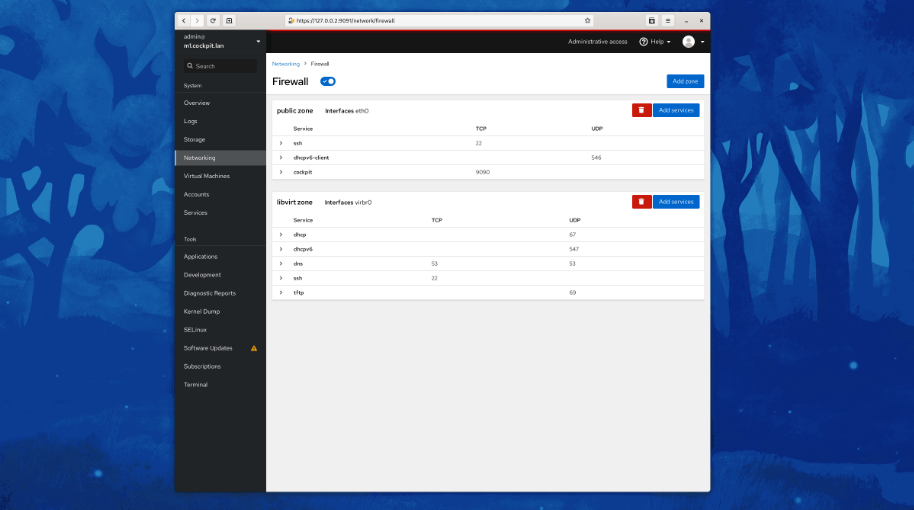
Cockpit serves as a user-friendly web-based graphical interface designed for server management, catering to everyone from beginners to seasoned Linux administrators. By leveraging system APIs and commands, Cockpit allows an entire team of administrators to manage systems in their preferred manner, whether that involves using the command line or various utilities alongside the Cockpit interface. With Cockpit, users can access their servers through a web browser and execute system tasks effortlessly using a mouse. It simplifies operations such as initiating containers, managing storage, configuring networks, and reviewing logs. Essentially, Cockpit acts like a graphical "desktop interface" tailored specifically for individual servers. If you have preferred applications or command-line tools for server management, you can continue utilizing those alongside Cockpit without any disruptions. Since Cockpit operates using the same system tools as the command line, you can seamlessly switch between Cockpit and your other preferred methods. This flexibility ensures that you can efficiently manage your servers while still maintaining your usual workflow.
API Access
Has API
No
API Access
Has API
No



Integrations
Ansible
No
CentOS
No
Cisco Jabber
Yes
Daisee
Yes
Debian
No
Dynamics Telephony
Yes
Empirix
Yes
Fedora
No
Fedora CoreOS
No
Red Hat Enterprise Linux
No
Integrations
Ansible
Yes
CentOS
Yes
Cisco Jabber
No
Daisee
No
Debian
Yes
Dynamics Telephony
No
Empirix
No
Fedora
Yes
Fedora CoreOS
Yes
Red Hat Enterprise Linux
Yes
Pricing Details
No price information available.
Free Trial
No
Free Version
No
Pricing Details
No price information available.
Free Trial
No
Free Version
Yes
Deployment
Web-Based
Yes
On-Premises
No
iPhone App
No
iPad App
No
Android App
No
Windows
No
Mac
No
Linux
No
Chromebook
No
Deployment
Web-Based
No
On-Premises
No
iPhone App
No
iPad App
No
Android App
Yes
Windows
Yes
Mac
Yes
Linux
Yes
Chromebook
No
Customer Support
Business Hours
Yes
Live Rep (24/7)
No
Online Support
Yes
Customer Support
Business Hours
No
Live Rep (24/7)
No
Online Support
Yes
Types of Training
Training Docs
Yes
Webinars
No
Live Training (Online)
No
In Person
No
Types of Training
Training Docs
Yes
Webinars
No
Live Training (Online)
No
In Person
No
Vendor Details
Company Name
Cisco
Founded
1984
Country
United States
Website
www.cisco.com/c/en/us/products/contact-center/finesse/index.html
Vendor Details
Company Name
Cockpit
Website
cockpit-project.org
Product Features
Call Center
Blended Call Center
No
Call Logging
No
Call Recording
No
Call Scripting
No
Campaign Management
No
Database
No
Escalation Management
No
IVR / Voice Recognition
No
Inbound Call Center
No
Manual Dialer
No
Outbound Call Center
No
Predictive Dialer
No
Progressive Dialer
No
Queue Management
No
Real-time Chat
No
Reporting/Analytics
No
Customer Service
Alerts / Escalation
No
Appointment Management
No
Call Center Management
No
Email Management
No
Knowledge Base
No
Live Chat
No
Performance Metrics
No
Queue Management
No
Self Service Portal
No
Social Media Integration
No
Surveys & Feedback
No
Virtual Assistant
No
Workflow Management
No
Product Features
Server Management
CPU Monitoring
No
Credential Management
No
Database Servers
No
Email Monitoring
No
Event Logs
No
History Tracking
No
Patch Management
No
Scheduling
No
User Activity Monitoring
No
Virtual Machine Monitoring
No
