Average Ratings 0 Ratings
Average Ratings 0 Ratings
Similar Products
-
CareermindsCareerminds helps organizations support their people at every stage of the talent lifecycle through outplacement services, career transition, talent solutions, and job architecture. We partner with HR and business leaders to navigate workforce change, enable growth, and build resilient, future-ready organizations. Founded in 2008, Careerminds operates across 80 languages and 100+ countries, combining global scale with a personalized, high-touch experience. Our unique delivery methodology blends advanced technology, workforce intelligence, and one-to-one coaching to deliver scalable, measurable results. Career transition Outplacement & Executive Outplacement Services: Data-driven outplacement services that help employees transition faster while supporting employers with measurable outcomes, cost efficiency, and brand protection. Workforce Redeployment: Redeployment services that enable internal mobility by aligning skills to business needs, reducing attrition and supporting agility. Job architecture: Career Frameworks: A solution that creates role clarity, defines skill expectations, and supports internal mobility and long-term workforce planning. Workforce Intelligence: A data-driven platform offering insight into skills, roles, and talent trends to support workforce planning and decision-making. Career Enablement: A modern career enablement tool that gives employees visibility into career paths and ownership of their development. Talent solutions: Career Development: A career development program that help employees build skills, grow in their roles, and prepare for future opportunities. Executive & Leadership Coaching: Executive and leadership coaching services that empower leaders to navigate change, strengthen performance, and drive sustainable growth.
-
BridgeBridge is an easy-to-use LMS with employee development built in. Uniquely combining learning management, career and skill development, and performance and talent management all in one easy-to-use solution, it helps organizations stay on top of upskilling without administrative overwhelm. With Bridge, you can easily consolidate your learning tech stack, resulting in streamlined training and development programs, saved admin time, and a more engaging experience for employees and managers alike. You have the option of using the fully integrated Talent Suite, or choosing only the stand-alone products below: Bridge LMS: Simple, effective, and hassle-free learning. Admins quickly create and distribute compliance courses, employee learning, partner and customer education, and skill-building programs across teams. Learners easily find everything they need in one place. Bridge Performance Management: With 1on1 tools, talent reviews, skills mapping, and performance analytics, Bridge moves your team beyond completion rates, giving leaders the insights they need to cut skills gaps, and align talent with business goals. Bridge Skills Management Software: With a clear view of skills mastery across your organization, AI-powered skills mapping and personalized development plans, Bridge helps your workforce build tomorrow’s skills today. Real-time labor market data from Lightcast helps you create a skills taxonomy fit for the future. With courses auto-tagged with the right skills and courses automatically recommended to your learners, upskilling stays on track year round. Plus, peer-to-peer learning and skills mentoring is effortlessly facilitated right in the platform.
-
INTOOINTOO, the global career transition and outplacement division of Gi Group Holding, has supported more than 25,000 organizations over the last three decades in helping employees successfully navigate career change. Our award-winning solutions combine personalized, unlimited one-on-one coaching with intuitive digital tools designed to accelerate job searches—helping participants secure new roles 2.5 times faster than the national average while maintaining a 97% satisfaction rate. Serving clients in over 130 countries and 40+ languages, INTOO partners with HR leaders worldwide by delivering scalable support, actionable workforce insights, and a high-touch experience throughout every transition. At INTOO, we’re guided by one simple promise: to care more about your employees, your outcomes, and your success. Our programs include: - Seven-day-a-week access to expert career coaches for support with networking, LinkedIn optimization, personal branding, interview preparation, job search strategy, and more - Personalized resume reviews designed to improve ATS performance and visibility - Live daily webinars led by career experts on a wide range of job search and career development topics - and more
-
OrangeHRM AdvancedOrangeHRM delivers a world-class HRMS experience, empowering you to become the HR hero your organization needs. From automating manual tasks to overseeing the entire employee lifecycle, our platform provides every tool necessary to help your team excel. Today, thousands of businesses globally rely on OrangeHRM as their primary HR management solution. Scalable for any stage of growth, from agile startups to global enterprises, our software streamlines HR operations through a robust suite of capabilities, including: -HR Administration -Employee Management -Reporting & Analytics -Mobile App -Recruitment -Onboarding -Request Desk -Leave Management -Time and Attendance -Roster -Performance Management -Career Development -Training -Surveys -Employee Voice -Discipline Whether you prefer cloud-based or on-premise hosting, OrangeHRM ensures your HR automation is simple, secure, and highly efficient.
-
myACIAt ACI Learning, we don’t just teach IT and cybersecurity—we prepare you to thrive in the real world. Our expert-led videos, immersive labs, and certification prep turn learning into action so you gain the skills that truly matter. myACI, our dynamic training platform, connects knowledge to performance with gamified elements, progress tracking, and powerful analytics for teams and managers alike. Scalable, flexible, and trusted by companies worldwide, ACI Learning helps you build skills, boost retention, and prove ROI with every training initiative.
-
CBT NuggetsCBT Nuggets has been a leader in on-demand IT training for more than 25 years. Subscribers have 24/7 access to training from trusted vendors like Cisco, Microsoft, AWS, and more. Our training library also offers office productivity courses for project managers, and end user courses on security best practices, Microsoft Office, and more. The CBT Nuggets training team has years of experience in their respective fields — these are certified experts in fields like networking, wireless, cybersecurity, data analytics, AI and machine learning, and more. Many CBT Nuggets courses map to IT certification exams, which are an excellent resource for those who want to become certified. As an on-the-job resource, CBT Nuggets training breaks down tricky technical topics into specific skills. Teams and training admins can assign videos to employees and track their progress. Whatever your goal, CBT Nuggets provides the training needed to be successful in your job.
-
CloverleafCloverleaf is an AI-powered coaching platform that turns assessment data, HRIS events, and calendar context into proactive, personalized coaching delivered in Slack, Microsoft Teams, Workday, and email. Cloverleaf is built on trusted behavioral assessments including DISC, CliftonStrengths, and Insights Discovery — with over 10 validated assessments available in one platform. On average, customers reduce assessment spend by 32% while gaining continuous AI-powered coaching from that data. Coaching is tailored to the individual and the specific people they're working with and the context of the moment. Before a difficult 1:1, a cross-functional standup, or a performance review, coaching arrives specific to that meeting, those people, and that interaction. Employees don't need to log into another system or think about what to ask. Cloverleaf anticipates what will be most helpful and delivers it in real time. Organizations align coaching to their own leadership frameworks and competency models, ensuring development reinforces their standards. HRIS integration triggers coaching automatically during promotions, manager changes, team transitions, and performance cycle milestones. First-time managers receive coaching on delegation, feedback, and team dynamics for their specific new team from day one. Talent and HR leaders get visibility into coaching engagement, capability reinforcement, and development trends by team, department, or organization. Development is measured by behaviors being practiced, not just courses completed. Cloverleaf is SOC 2 Type II compliant, GDPR-aligned, and ISO 27001 certified. Trusted by 45,000+ teams across organizations to strengthen manager effectiveness, engagement, and retention. 86% of users report improved team performance.
-
Randstad RiseSmartRandstad RiseSmart stands out as a prominent leader in global talent solutions, focusing on strategies for talent development and transitions for highly successful employers worldwide. By implementing a coaching-centric methodology, we empower organizations to unlock potential for their most valuable resource—their employees—throughout various phases of their careers. Our approach is tailored to assist individuals at every stage of their employment journey and to help companies effectively onboard, cultivate, engage, retain, and transition their workforce, ensuring a positive experience that aligns with the evolving needs of the business. This comprehensive support not only enhances employee satisfaction but also drives organizational success in a competitive landscape.
-
JOpt.TourOptimizerJOpt.TourOptimizer is an enterprise optimization engine for route planning, scheduling, and resource allocation across logistics, transportation, dispatch, and field service operations. It is built for organizations that need to solve complex planning problems under real-world business constraints rather than simple consumer-grade route calculation. The platform supports vehicle routing and scheduling scenarios such as VRP, CVRP, VRPTW, pickup and delivery, multi-depot planning, heterogeneous fleets, and workforce scheduling. JOpt.TourOptimizer can model time windows, working hours, visit durations, capacities, skills and expertise levels, territories, zone governance, overnight stays, alternate destinations, and custom business rules. This makes it suitable for production deployments where feasibility, transparency, and operational reliability matter. It is designed to generate practical plans that help teams balance travel time, service commitments, workload distribution, and operational cost in demanding enterprise environments. The solution is available both as an embedded Java SDK and as a Docker-based REST API with OpenAPI and Swagger support. This allows software vendors, enterprise developers, and system integrators to embed advanced optimization into TMS, ERP, CRM, WMS, dispatch systems, customer platforms, and field service applications. With support for scalable integration and modern service architectures, JOpt.TourOptimizer helps organizations improve planning efficiency, service quality, SLA compliance, transparency, and operational resilience at scale. It also supports enterprise integration strategies that require reproducible optimization runs, structured outputs, and flexible deployment models.
-
MentorCityMentorCity is an intuitive online mentoring program that helps to build the future of individuals and organizations through the power and connections of relationships. MentorCity is a unique online mentoring software that can be used by schools, companies, and associations to help with member engagement, succession planning, diversity and inclusion strategies, and leadership development. MentorCity is a powerful personal development tool that helps organizations save time by reducing matching responsibilities. This allows program administrators to concentrate their efforts on creating a mentoring culture that produces exceptional results. business mentoring software, corporate mentoring software, mentoring platform, mentoring platform software, mentoring software, online mentoring platform
Description
To foster growth, enhance reskilling, and boost both productivity and job satisfaction, organizations need to effectively manage career development. However, in many cases, this responsibility is relegated to individual employees or only addressed during annual performance evaluations. By offering customized career development resources and tools, organizations can empower individuals to take charge of their career paths. This strategy not only enhances engagement and retention but also promotes healthy internal mobility. Our online career portal, Career Innovation Zone (CiZone), equips your workforce with the confidence and skills necessary for effective self-management of their careers while also motivating managers to offer appropriate support regardless of the career circumstances faced. The platform is designed to be flexible, scalable, and accessible at any time. We are committed to collaborating with you to develop a career development system that aligns seamlessly with your organization’s specific requirements. Moreover, to ensure you continue to derive value from CiZone, we offer comprehensive training, regular platform updates, ongoing support, and periodic assessments to keep the system aligned with your evolving needs. Through these measures, we aim to create an environment where employees feel empowered and organizations thrive.
Description
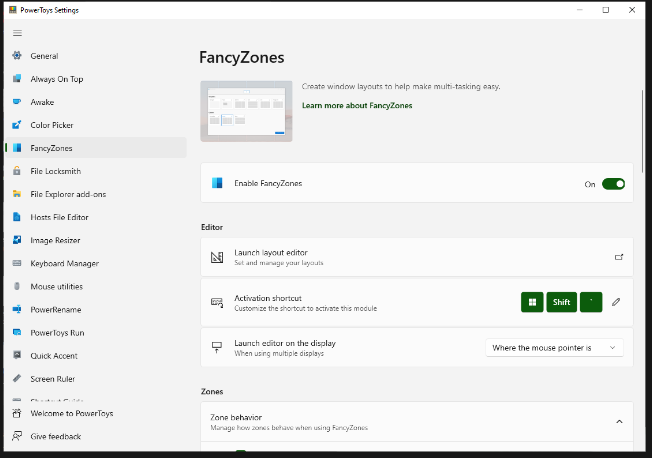
FancyZones serves as a window management tool designed to help users arrange and snap their application windows into optimized layouts, enhancing workflow efficiency and allowing for quick restoration of these layouts. This utility empowers you to specify a series of designated zones on your desktop where windows can be directed. By dragging a window into a predetermined zone or using a designated keyboard shortcut, the respective window automatically resizes and relocates to occupy that zone completely. Additionally, if you have the "Use non-primary mouse button to toggle zone activation" option activated, you can enter zone selection mode by simply clicking the secondary mouse button. When two zones are positioned next to each other, a window can be adjusted to span the combined area of both zones, effectively rounding up to the smallest rectangle that encompasses the two. As you maneuver the mouse cursor close to the shared boundary of two zones, both zones become active at the same time, giving you the flexibility to drop the window into either or both. Moreover, you can drag the window until it activates one zone and then, by pressing and holding the control key while continuing to drag, select multiple zones to expand your layout options. This feature significantly streamlines the process of organizing your desktop workspace efficiently.
API Access
Has API
API Access
Has API


Integrations
No details available.
Integrations
No details available.
Pricing Details
No price information available.
Free Trial
Free Version
Pricing Details
Free
Free Trial
Free Version
Deployment
Web-Based
On-Premises
iPhone App
iPad App
Android App
Windows
Mac
Linux
Chromebook
Deployment
Web-Based
On-Premises
iPhone App
iPad App
Android App
Windows
Mac
Linux
Chromebook
Customer Support
Business Hours
Live Rep (24/7)
Online Support
Customer Support
Business Hours
Live Rep (24/7)
Online Support
Types of Training
Training Docs
Webinars
Live Training (Online)
In Person
Types of Training
Training Docs
Webinars
Live Training (Online)
In Person
Vendor Details
Company Name
The Career Innovation Company
Founded
1998
Country
United Kingdom
Website
www.careerinnovation.com/solutions/cizone/
Vendor Details
Company Name
Microsoft
Country
United States
Website
learn.microsoft.com/en-us/windows/powertoys/fancyzones
Product Features
Talent Management
Career Development Planning
Compensation Management
Competency Management
Employee Lifecycle Management
Goal Setting / Tracking
Job Description Management
Onboarding
Performance Appraisal
Recruiting Management
Succession Planning
Training Management

