Average Ratings 0 Ratings
Average Ratings 0 Ratings
Similar Products
-
Google WorkspaceGoogle Workspace is an all-in-one cloud productivity platform developed by Google to help businesses manage communication, collaboration, document creation, and workflow automation from a centralized environment. The platform combines professional email, cloud storage, video conferencing, document editing, team messaging, scheduling, and AI-powered assistance into one subscription-based ecosystem optimized for modern work environments. Google Workspace includes applications such as Gmail, Google Drive, Google Meet, Docs, Sheets, Slides, Calendar, Chat, Keep, Forms, Sites, NotebookLM, and Gemini AI, enabling teams to work together seamlessly across devices and locations. One of the platform’s core strengths is its built-in AI functionality powered by Gemini, which helps users draft emails, summarize meetings, generate research insights, automate repetitive tasks, and improve productivity using contextual awareness from workplace data. Google Workspace also supports advanced collaboration features including real-time editing, appointment scheduling, eSignatures, document sharing, cloud storage management, and AI-assisted research tools. Businesses benefit from enterprise-grade security features such as AI-powered threat protection, data classification, endpoint management, Data Loss Prevention, secure access controls, and compliance support for enterprise environments. The platform offers scalable pricing plans suitable for startups, small businesses, enterprises, educational institutions, nonprofits, and government organizations. Google Workspace also simplifies data migration and onboarding with built-in migration tools and partner support for transferring emails, files, and business information securely into the cloud.
-
CharityTrackerSpend less time digging through stacks of papers and more time serving. Your client documents can now be accessible from anywhere. CharityTracker offers more than secure storage—it’s a smart, seamless way to optimize your case management. CharityTracker is simple to implement and cost-effective. You will love the speed at which you can get up-and-running with CharityTracker’s cloud-based, hosted solution. You’ll have CharityTracker’s beautifully-designed interface operational quickly. CharityTracker is a cloud-based, HIPAA compliant software that’s easy to use for nonprofits of all sizes. With no setup fees, hidden fees, or contracts, you can cancel anytime! Our time saving solution provides a secure way to streamline how you manage cases, record case notes & assistance, create reports, collaborate, set goals, measure outcomes, make referrals & prove your impact with change-over-time reports for your funders. We're at work in with thousands of communities! Book a free demo. Pricing starts at just $20/mo. user
-
HubSpot AEOHubSpot AEO is a specialized optimization tool designed to help businesses increase their visibility in AI-generated search results. It focuses on how brands are represented in answers provided by AI platforms such as ChatGPT, Gemini, and Perplexity. The platform provides a visibility score that measures how frequently a business appears in AI responses and evaluates the sentiment of those mentions. It also identifies and tracks relevant prompts that potential customers are using when interacting with AI tools. HubSpot AEO analyzes the sources, domains, and content types that influence AI-generated answers. This allows businesses to understand what drives their presence in AI search results. The platform provides clear, prioritized recommendations to improve visibility and performance. Integration with HubSpot’s CRM enhances insights by using customer data to refine optimization strategies. The tool simplifies the process of adapting to AI-driven search trends without requiring deep technical expertise. Overall, HubSpot AEO helps businesses stay competitive as AI becomes a primary discovery channel.
-
AddSearchAddSearch transforms the way organizations connect users with information. More than just a traditional site search, AddSearch now offers AI Answers and AI Conversations, enabling businesses to deliver direct, conversational, and context-aware responses to user queries. These advanced capabilities complement AddSearch’s proven site search and content recommendation solutions, helping organizations create effortless, engaging, and personalized digital experiences. With AddSearch, you can choose between AI-driven answers, conversational interfaces, or lightning-fast search results—all fully customizable for websites, e-commerce platforms, or web applications. Our Crawler and Indexing API ensure your content is always up-to-date, while our expert implementation services save valuable developer time and maximize results. Today, nearly 2,000 customers worldwide—across Media, Telecommunications, Government, Education, E-commerce, and more—trust AddSearch to provide best-in-class search and AI-driven discovery. AddSearch product portfolio includes: - AI Answers – instant, accurate, and direct responses powered by generative AI. - AI Conversations – natural, chat-like interactions for deeper user engagement. - Autocomplete & Smart Ranking – predictive suggestions and optimized result ordering. - Personalized Search – tailored experiences based on behavior and preferences. - Content & Product Recommendations – boost engagement and conversions. - Advanced Analytics – insights into user behavior - Flexible Content Controls – include/exclude content, synonyms, filters, and facets, promote - Enterprise Features – SSO, organizational user management, audit logs, SLA up to 99.999%. - Seamless Implementation – works with any CMS, via crawler or API
-
P3SourceP3Source is a cost-effective, and user-friendly print procurement and resale platform, meticulously designed for corporate, educational, and non-profit print buyers. P3Source also offers features for brokers, print management firms, inplants and print manufacturers to manage and resell work. Crafted by industry-savvy print enthusiasts, P3Source operates as an efficient print procurement management system, revitalizing the conventional 'Bid and Buy' RFQ process commonly used in the Printing and Marketing Services Industry. As a project management hub, P3Source capably handles dozens of simultaneous projects, bringing together all the details, files, approvals, notes, and historical data in one easy-to-search place. It archives completed projects for future access and detailed reporting. P3source's web portals tie together the supply chain. Customers can submit requests, approve projects and upload production files. Suppliers can effortlessly submit quotes, accept orders, post shipment data, and even present their invoices. This streamlined approach ensures quick, hassle-free transactions for all parties. Celebrate the future of print management with P3Source - easy, efficient, and made with you in mind.
-
Construction Daily ReportsYou can save up to an hour per day on daily reports CDR – Construction Daily Reports is the fastest custom daily reporting solution available for the construction industry. It can be accessed on our mobile app for Android or Apple devices as well as our website portal. You can customize your reports by entering project details. Then, you can take photos and make notes using your mobile device. CDR will email your completed report in professional PDF format to you after you sign it. We also save it on our servers so that you can upload it to your cloud storage. CDR is a mobile-friendly, time-saving construction software designed to simplify your reporting process. Start your free trial now!
-
B2iB2i Technologies provides adaptable, fully integrated corporate and investor relations website solutions built for complete control and effortless integration. Our platform is engineered to blend smoothly into a company’s existing corporate website, rather than requiring migration to a proprietary hosted environment. Using modular data components, presentation-ready APIs, and a WordPress plugin, we enable comprehensive investor relations functionality to operate directly within your current digital ecosystem. In contrast to many alternative providers that host IR content on proprietary systems or isolated subdomains, our approach stands apart.
-
TradingView Stock WidgetsAs fast as it takes to make a cup of coffee, grab powerful charts and add real-time financial information to your website. Simply copy and paste our iFrame codes, and you're good to go. Our display ratings make it easy to see the technical analysis of a symbol. This widget is ideal for macro-level analysis of the markets. This widget is especially useful on homepages. The widget displays the top five most active stocks, as well as the losing and winning stocks. It updates based upon current market activity so you always see the most relevant stocks. Keep an eye out for announcements and important economic events. You can also set up filters in just a few clicks. Our scrolling ticker tape allows you to go vintage Wall Street. This stock exchange-style ticker can be embedded in just a few clicks. You don't need a power suit or expensive watch.
-
one.comAll in one plan: Website tools, hosting, personalized email, and more. We will help you every step of your way. Register or transfer your domain name. Build your site and make it a success. Register the perfect domain name today to kick-start your success. We can help you transfer domain names that you already own. You can build your website using the Website Builder or more advanced WordPress. In just a few simple steps, you can create a beautiful and responsive website. Increase your customer base. You have put in the work to create something you are proud of. Now you want the rest of the world to see it. All our plans come with a free domain for a year. Our website builder is easy to use and will help you create your online dream. Google Ads can help you increase your website traffic. Sign up to receive a 1 month free trial. Our friendly support team is available 24/7/365. All plans include a free SSL certificate. Your website will be secure starting day 1.
-
CompanyCamCompanyCam is a photo-based solution created specifically for contractors. Users can take unlimited photos—which are location and time stamped, sent to the cloud, and stored securely. Every photo is organized by project and instantly available to your team, allowing you to see what’s going on anytime, anywhere.
Description
We are confident that you will absolutely enjoy it. Alternote is crafted to be the most intuitive and seamless method for taking notes, gathering information, and jotting down your thoughts, emotions, and experiences. As you begin typing, the interface subtly dims to help you concentrate on your writing. You can customize the sidebar background, color scheme, and font settings to suit your preferences. The search function allows you to find note titles and content in real-time as you type, activating the search as soon as you open Alternote, eliminating the need to shift your focus to a search field. Alternote serves as an alternative client for Evernote on Mac, enabling you to utilize Evernote’s mobile applications and clippers, ensuring all your information remains synchronized. You will maximize every pixel of Alternote, which is retina-ready and features smooth, optimized scrolling regardless of the length of your notes. Security is a priority with Alternote; there are no servers in the mix, just you, your Mac, and the Evernote backend. Text styling options are unobtrusive, appearing only when you select text, allowing for an uninterrupted writing experience. With all these features combined, Alternote ensures that your note-taking process is as efficient and enjoyable as possible.
Description
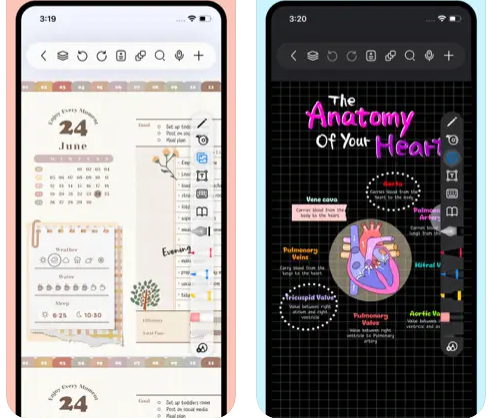
Freenotes delivers a digital note-taking platform that seamlessly combines the experience of writing on paper with advanced AI features. The app provides realistic pen strokes that replicate authentic handwriting, enhancing both sketching and note-taking, and includes functionalities such as handwriting-to-text conversion, a variety of stickers, and multiple brush styles. Your notes are easily synced through iCloud and various multi-cloud backup options. Freenotes also enables PDF annotation, allowing users to highlight, mark up, and translate text within their documents, as well as add hyperlinks to other pages or external websites. It supports picture-in-picture video mode and split-screen functionality, making it possible to take notes while watching educational videos or attending lectures. The integrated AI assistant allows you to capture screenshots or upload documents to receive quick answers or summaries of content. To keep your notes organized, you can categorize them into folders, and a swift search feature helps you find information rapidly. Additionally, Freenotes is designed to enhance productivity, making it an ideal choice for students and professionals alike.
API Access
Has API
No
API Access
Has API
No


Pricing Details
No price information available.
Free Trial
Yes
Free Version
No
Pricing Details
Free
Free Trial
No
Free Version
Yes
Deployment
Web-Based
No
On-Premises
No
iPhone App
No
iPad App
No
Android App
No
Windows
No
Mac
Yes
Linux
No
Chromebook
No
Deployment
Web-Based
No
On-Premises
No
iPhone App
Yes
iPad App
Yes
Android App
No
Windows
No
Mac
Yes
Linux
No
Chromebook
No
Customer Support
Business Hours
No
Live Rep (24/7)
No
Online Support
Yes
Customer Support
Business Hours
No
Live Rep (24/7)
No
Online Support
Yes
Types of Training
Training Docs
No
Webinars
No
Live Training (Online)
No
In Person
No
Types of Training
Training Docs
Yes
Webinars
No
Live Training (Online)
No
In Person
No
Vendor Details
Company Name
Alternote
Founded
2015
Country
Ukraine
Website
alternoteapp.com
Vendor Details
Company Name
Freenotes
Country
China
Website
apps.apple.com/us/app/freenotes-ai-notes-taking/id6464237904
Product Features
Note-Taking
Categories / Organization
No
Clip From Web
No
Document Scanning
No
Formatting / Markdown
No
Handwriting
No
Hyperlinking
No
Image Insertion
No
List/Checklist Creation
No
Printing
No
Search
No
Sharing / Collaboration
No
Syncing
No
Templates
No
Voice Notes
No
Product Features
Note-Taking
Categories / Organization
No
Clip From Web
No
Document Scanning
No
Formatting / Markdown
No
Handwriting
No
Hyperlinking
No
Image Insertion
No
List/Checklist Creation
No
Printing
No
Search
No
Sharing / Collaboration
No
Syncing
No
Templates
No
Voice Notes
No
