Average Ratings 0 Ratings
Average Ratings 1 Rating
Similar Products
-
SogolyticsSogolytics, an experience management platform, allows companies to collect, analyze and use employee and customer data to drive business growth. Sogolytics is used by organizations across all industries to track interactions at all touchpoints with customers and employees. The best-in-class reporting delivers real-time, actionable insights that help to prevent and mitigate potential problems. SogoCX improves every aspect of a company's customer experience. This means improved conversion rates, simplified data management, and understanding customers to increase return on investment. Organizations can use SogoCX to measure key metrics like NPS, CSAT and CES. SogoEX software is used by organizations to collect and use data to improve engagement and reduce turnover. This platform allows HR and leadership to drive organizational changes through real-time feedback collection and employee engagement.
-
AlosantAlosant is a branded resident experience platform designed for master-planned communities, residential developers, HOAs, and community management teams. Through one connected app experience, Alosant helps communities manage communication, events, amenity reservations, interactive maps, resident profiles, payments, access control, and day-to-day operations. Built for communities of any size that need to engage residents, Alosant makes it easier for residents to stay informed, discover events and amenities, participate in community life, and connect with the places around them. For community teams, the platform supports more efficient operations, stronger engagement, and a more consistent resident experience across every stage of community living.
-
Rise VisionRise Vision is the all-in-one platform for digital signage, screen sharing, and emergency alerts designed to help organizations communicate, teach, collaborate, and improve safety. The cloud-based system integrates digital signage, interactive digital signage, screen sharing, and emergency alerts, making it an ideal choice for organizations looking to streamline their visual communication efforts. With its easy-to-use software and world-class support, Rise Vision caters to a diverse range of industries and applications. Key features of Rise Vision include over 750 professionally designed templates that allow users to quickly create visually appealing content without the need for extensive design skills. Users can also use the AI presentation design and editing tool that's the fastest way to turn an idea in your head into engaging digital signage. The platform supports a wide range of hardware, enabling users to either utilize recommended hardware or integrate their existing technology. This flexibility ensures that organizations can implement Rise Vision in a way that best suits their needs and budget. Additionally, the seamless screen sharing capability enhances collaboration among team members, allowing for real-time sharing of presentations and information. Another significant aspect of Rise Vision is its powerful emergency alert system, which provides users with the ability to broadcast critical information during emergencies. This feature is essential for ensuring safety in environments such as schools and workplaces, where timely communication can make a significant difference. With world-class support available, users can feel confident in their ability to resolve any issues and maximize the platform's potential.
-
Shape SoftwareShape Software's purpose-built sales and marketing automation software empowers you to manage all aspects of your business from one platform. The cloud-based software from Shape offers many tools to help you manage and automate your online marketing, promotions via text, email and digital marketing ads, capture leads from online sources, nurture prospects and customers and project manage your day. You can also offer customers a secure portal to streamline your intake processes, systematically score leads with ShapeIQ, and run detailed custom reporting. Start growing your revenue with Shape's flexible suite of services today.
-
D&B HooversD&B Hoovers is a sales intelligence and revenue workflow platform that helps organizations identify, prioritize, and act on buying signals. By combining trusted company and contact data with buyer intent, website engagement insights, trigger events, and AI-powered assistance, D&B Hoovers helps revenue teams uncover opportunities sooner and make more informed decisions throughout the sales cycle. Built on the Dun & Bradstreet Data Cloud, D&B Hoovers provides comprehensive business intelligence, including company profiles, corporate family structures, decision-maker contacts, industry information, financial insights, company news, and market intelligence. Advanced search and segmentation capabilities allow users to identify high-potential accounts and build targeted prospect lists based on business characteristics, growth indicators, and buying signals. D&B Hoovers integrates into existing sales and revenue workflows, helping teams reduce research time, prioritize outreach, monitor account activity, and engage buyers with greater relevance. Real-time business triggers and account intelligence help organizations understand changing customer needs, identify opportunities, and focus efforts on the accounts most likely to convert. Whether supporting prospecting, account planning, pipeline generation, or revenue operations, D&B Hoovers provides the trusted intelligence and contextual insights needed to help teams work more efficiently and drive better business outcomes.
-
KinderpediaKINDERPEDIA is an AI-powered, cloud-based school management and communication platform for K-12 schools and childcare centres. Trusted by 2,000+ institutions in 40+ countries, it helps leaders, teachers and admin teams simplify operations, reduce repetitive work, strengthen family engagement and create a connected educational experience. The platform brings academic, administrative, financial and communication workflows into one secure ecosystem. Schools can manage student and family records, attendance, timetables, classroom activities, gradebook, assignments, progress tracking, daily reports, events, admissions, tuition, invoicing, payments and reporting. Kinderpedia includes practical AI tools. They help educators and leaders communicate clearly, create content faster, streamline reporting, document progress and identify patterns. Teachers plan schedules, record attendance, manage lessons, track progress or developmental milestones, share feedback and document observations in real time. Families receive updates, photos, videos, event alerts, progress info, invoices and notifications, with multi-language tools for diverse communities. Kinderpedia’s Admissions CRM supports the journey from first enquiry to enrolment, managing leads, follow-ups, workflows and the transition into the school management system. Financial tools support tuition plans, automated invoicing, payment tracking, family balances, overdue amounts, bank statement import and reports across one or multiple locations. Payment and accounting integrations include Stripe, Paymob, InvoiceXpress, BT Pay, SAGA-compatible exports, CSV/XLS exports and PDF invoices. Dashboards, reports, multi-location management, role-based permissions and secure cloud access give leaders visibility and control as they grow
-
NINJIONINJIO is an all-in-one cybersecurity awareness training solution that lowers human-based cybersecurity risk through engaging training, personalized testing, and insightful reporting. This multi-pronged approach to training focuses on the latest attack vectors to build employee knowledge and the behavioral science behind human engineering to sharpen users’ intuition. Our proprietary NINJIO Risk Algorithm™ identifies users’ social engineering vulnerabilities based on phishing simulation data and informs content delivery to provide a personalized experience that changes individual behavior. With NINJIO you get: - NINJIO AWARE attack vector-based training that engages viewers with Hollywood style, micro learning episodes based on real hacks. - NINJIO PHISH3D simulated phishing identifies the specific social engineering tricks most likely to fool users in your organization. - NINJIO SENSE is our new behavioral science-based training course that shows employees what it “feels like” when hackers are trying to manipulate them.
-
InfoBoxEliminate communication silos and simplify enterprise content delivery across your entire workforce. InfoBox provides IT and corporate communications teams with a secure, centralized hub for broadcasting updates, standard operating procedures (SOPs), and operational resources. Designed to overcome the low engagement of legacy intranets and messy email threads, InfoBox pushes targeted updates directly to mobile devices, web applications, and desktop email clients. Core Technical & Platform Capabilities: 1. Granular Role-Based Access & Segmentation: Categorize content delivery by department, location, role, or administrative unit to ensure users receive strictly relevant information. 2. Flexible Authentication & External Access: Support for multi-provider authentication (Google Workspace, Microsoft 365, Yahoo, and personal email accounts) enables secure inclusion of contractors, frontline workers, and external partners without requiring additional core directory domain licenses. 3. Google Workspace /Microsoft 365: Native add-on integration allows users to consume visual updates and company feeds directly inside without additional costs. 4. Cross-Platform Accessibility: Native mobile clients for iOS and Android alongside a unified Web portal (infobox.info) ensure consistent UI/UX across all endpoint devices. 5. No-Code Content Builder & Resource Management: Equips administrators with visual templates for broadcasting policy updates, announcements, and searchable document libraries without IT intervention. 6. Engagement & Usage Analytics: Gain visibility into reach, content consumption, and search trends across the organization.
-
YodeckNext-generation technology for digital signage professionals Yodeck, a cloud-based digital signage platform, is unbeatable. It powers your screen with dynamic content that instantly engages your target audience. Yodeck makes it easy to create, schedule, and design content from the web. To get your message across to those who matter most to you, use attention-grabbing media such as videos, images and PDF files, Office documents, data dashboards, and social media. It provides enterprise-grade security and control. Yodeck's drag-and-drop editing feature allows users to be creative in organizing content into interesting layouts. Yodeck is proud to offer a unique digital signage solution for businesses of all sizes. This includes local diners as well as global leaders like Delta Airlines, Autodesk and Adobe.
-
GiveLife365GiveLife365: Empowering Nonprofits with Smart CRM Solutions Managing key relationships—donors, volunteers, events, and cases—shouldn't hold back your nonprofit’s mission. GiveLife365 is a cloud-based CRM designed specifically for nonprofits, helping you streamline processes, enhance engagement, and track meaningful results, all in one platform. ✨ Why Choose GiveLife365? 💙 Donor Management – Effortlessly track donor interactions, automate receipts, and simplify fundraising 🙌 Volunteer Management – Easily recruit, schedule, and acknowledge volunteers. 🎟️ Seamless Event Handling – Promote events, manage registrations, and monitor attendance. 🔗 Simplified Memberships – Automate renewals, integrate marketing tools, and streamline payments. 📊 Real-Time Impact – Gain actionable insights with real-time reports and dashboards. 🌍 Revolutionize your nonprofit’s operations! Book a demo now and experience how GiveLife365 can drive greater impact and efficiency.
Description
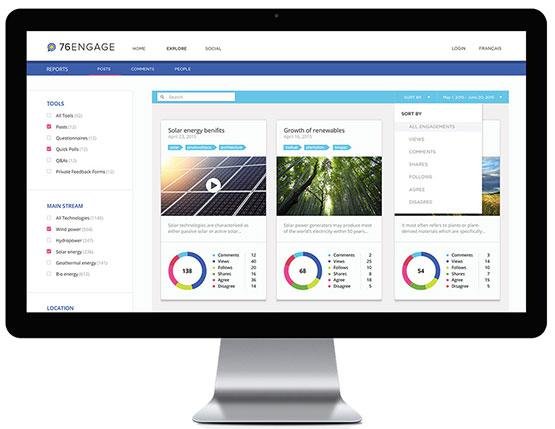
From the viewpoint of a digital engagement manager, 76engage serves as a powerful platform for enhancing digital interaction. It encompasses all essential functions such as publishing, managing, moderating, analyzing, and reporting, catering to the diverse needs of engagement managers. By providing discussions with a solid contextual foundation and relevant background, 76engage ensures that communication is clear and effective. The platform features a user-friendly content management system that simplifies the process of publishing various types of content, including text, images, and videos. With automated moderation alerts, moderators can easily review, adjust participation policies, and maintain oversight of discussions without being tethered to their screens. This allows them to engage with their community more fluidly. Additionally, 76engage offers comprehensive tracking and analysis capabilities. Engagement managers can utilize its advanced reporting interface to customize their reporting parameters, download valuable reports for sharing, and export data for further analysis with their preferred tools. This multifaceted approach empowers digital engagement professionals to optimize their strategies and foster more meaningful interactions.
Description
StageTools combines structured meeting facilitation and visual interaction in a single, seamlessly integrated Teams app.
- Work efficiently: Switching apps and sharing your screen disrupts your flow. StageTools runs entirely within Teams—no screen sharing required.
- Boost engagement: Passive meetings slow results. With StageTools, everyone can draw, highlight, and interact live.
- Moderate flexibly: Changing moderators is often clunky. StageTools lets anyone take over with one click.
- Keep everything visible: Important tools aren’t always on screen together. StageTools has its own Stage Panel, so you can use the Teams side panel to show chat, participants, Loop, or other modules side by side.
- Stay structured: Meetings often get chaotic. StageTools’ timed agenda keeps everyone focused.
- Decide faster: Decisions get postponed too often. StageTools enables live voting with automatic documentation.
- Don’t miss anything: Key info is easily lost. StageTools captures screenshots and notes instantly.
- Secure outcomes: Tasks and minutes are often incomplete. StageTools automatically documents everything and makes it available right after the meeting.
This combination of visual collaboration, structured facilitation, and technical elegance makes StageTools a true game changer – especially for hybrid teams, workshops, and project meetings.
API Access
Has API
No
API Access
Has API
Yes


Integrations
Microsoft Teams
No
Pricing Details
No price information available.
Free Trial
No
Free Version
No
Pricing Details
$8/month/organizer
Co-organizers do not require a license
Meeting Preparation with Externals Participants
Share Meeting Minutes with Externals participants
Unlimited topics
Unlimited documents
Unlimited notes
Unlimited decisions
Unlimited tasks
Meeting Preparation with Externals Participants
Share Meeting Minutes with Externals participants
Unlimited topics
Unlimited documents
Unlimited notes
Unlimited decisions
Unlimited tasks
Free Trial
Yes
Free Version
Yes
Deployment
Web-Based
Yes
On-Premises
No
iPhone App
Yes
iPad App
Yes
Android App
Yes
Windows
No
Mac
No
Linux
No
Chromebook
No
Deployment
Web-Based
Yes
On-Premises
No
iPhone App
No
iPad App
No
Android App
No
Windows
No
Mac
No
Linux
No
Chromebook
No
Customer Support
Business Hours
No
Live Rep (24/7)
No
Online Support
Yes
Customer Support
Business Hours
Yes
Live Rep (24/7)
No
Online Support
Yes
Types of Training
Training Docs
Yes
Webinars
No
Live Training (Online)
No
In Person
No
Types of Training
Training Docs
Yes
Webinars
Yes
Live Training (Online)
Yes
In Person
No
Vendor Details
Company Name
76engage
Founded
2016
Country
Canada
Website
76engage.com
Vendor Details
Company Name
relleumSystem GmbH
Founded
1998
Country
Germany
Website
www.relleum-system.com
Product Features
Community
Content Management
No
Content Moderation
No
Discussions / Forums
No
Event Management
No
Group Management
No
Ideation / Crowdsourcing
No
Member Directory
No
Membership Management
No
Social Media Management
No
Website Management
No
White Label
No
Product Features
Collaboration
Brainstorming
Yes
Calendar Management
No
Chat / Messaging
No
Contact Management
No
Content Management
Yes
Document Management
Yes
Project Management
No
Real Time Editing
Yes
Task Management
Yes
Version Control
No
Video Conferencing
Yes
