Forgot your password?
typodupeerror
Education

Children Using Technology Have Better Literacy Skills 146

eldavojohn writes "A UK study of three thousand children aged nine to sixteen suggests something that may not come as a shock to geeks: using technology increases a child's core literary skills. As Researcher Obvious put it, 'The more forms of communications children use the stronger their core literary skills.' And for those of us worried about a world of 'tl;dr' and 'Y U H8n?' the research claims that 'text speech' does not damage literacy. The biggest shortcoming of this research is that it appears the children graded their own writing in that their methodology was an online survey designed to ask the children which technology they use and then follow up with asking them how well they write to determine which children have better literacy skills."
Music

Introducing L2Ork, World's First Linux Laptop Orchestra 86

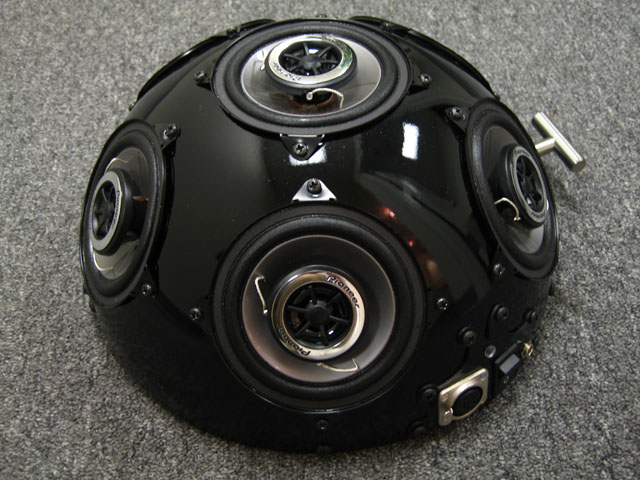
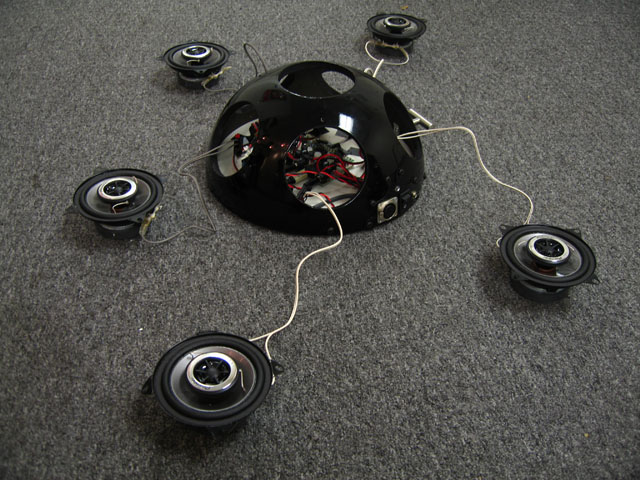
Agram writes "Take a netbook, Wiimotes, Nunchuks, and hemispherical speakers (which were once IKEA salad bowls), toss it up with some Ubuntu goodness and what you get is Virginia Tech's L2Ork, the world's first Linux-based laptop orchestra. With its affordable design and support from the Linux community, L2Ork hopes to bring laptop orchestras to K-12 education and beyond. So, regardless whether you wish to hear how L2Ork might sound or to learn how to build your own Linux-based *Ork infrastructure, perhaps this is a good opportunity to reopen the age-old debate: is Linux finally ready for some serious audio work?"

Comment Re:Might explain "Deauthorize Media" option (Score 5, Informative) 361

From DVD Player Help:
------
Authorizing DVDs
When parental controls are enabled, the computer administrator must authorize a DVD before it can be played.

To authorize DVDs (if you are the administrator):

Select how you want to authorize the DVD:

To allow the movie to be played this time only, and then to require an administrator name and password every subsequent time, click Play Once.

To allow the movie to be played this time and every subsequent time without requiring an administrator name and password, click Always Allow.

Type the administrator name and password.

To remove authorization, insert the DVD and choose Features > Deauthorize Media. Then either quit DVD Player or insert another disk to complete deauthorization.
----

Slashdot Top Deals

To err is human, to forgive, beyond the scope of the Operating System.

Working...