Average Ratings 0 Ratings
Average Ratings 0 Ratings
Similar Products
-
FilerevFilerev is a powerful tool that helps you easily find and manage hidden files, duplicate files, large files, and oversized folders, ensuring a streamlined and clutter-free digital workspace. Key features include advanced scanning technology that identifies the unorganized files taking up the most space and cluttering your Google Drive. Filerev enhances productivity by saving time and reducing the frustration of manual file organization. The custom filters and bulk delete tool give you complete control over finding and removing unwanted files in your account. The storage analyzer lets you browse your folders by size to see where the space is being used in your Google Drive. Whether you're an individual, a small business, or a large enterprise, Filerev offers robust solutions tailored to your needs. Visit filerev.com to discover how Filerev can transform your Google Drive experience and boost efficiency.
-
PhotonFilePhotonFile serves as a file transfer and private cloud storage solution tailored for individuals and teams managing large files and continuous client or project workflows. It features Photon Transfer, which facilitates live relay between the sender and the recipient while they are connected, in addition to offering a temporary cloud-based delivery option that allows recipients to retrieve files after the upload has finished. Users can access files through a browser link without the need to create an account. Photon Vault ensures that files are stored within distinct client-side encrypted Vaults, allowing for secure ongoing access and sharing. The Vault Intake feature provides upload-only links that enable file collection without revealing the contents of existing Vaults, whereas Vault Sync synchronizes selected desktop folders with their respective Vaults. PhotonFile Desktop is compatible with Windows, macOS, and Linux operating systems. The platform also includes team workspaces that incorporate role-based collaboration features and Vault access controls. Free accounts come with limitations on transfer and Vault usage, while paid subscriptions and one-time File Passes unlock additional features and greater usage capacity. Additionally, the service is designed to accommodate a variety of workflows, making it a versatile tool for both personal and professional use.
-
Files.com6,000+ companies trust Files.com to automate and secure business critical transfers. We obsess about security, compliance, reliability, and performance so your critical business processes just work every time. Easily manage any transfer flow without writing scripts or code, and onboard workloads and partners effortlessly. We support standard file transfer protocols (FTP, SFTP, AS2) for working with external partners and also provide native apps for high performance internal transfers. As a fully Cloud-Native SaaS, there are no servers for you to buy or maintain, there is no installation required, and high availability and redundancy are built in and free. Our InfoSec Program is audited annually by Kirkpatrick Price, a leading information security CPA firm. Our audit covers the scope of the entire Files.com business (not just datacenter operations) and names Files.com specifically. Beware of smaller competitors who try to pass off someone else’s audit as their own. Technical capabilities include encryption at-rest and in-transit, four types of two-factor authentication, nine enterprise identity (SSO) integrations, configurable password and session policies, and a perfect “A+” score from Qualys SSL Labs.
-
Secure EraserSecure Eraser: Secure Data Deletion, Shredders Your Files & Folders. Just because it has been removed from your hard drive doesn't mean that it is gone forever. Anyone can restore the information as long as it was not overwritten. It becomes more difficult if the computer has been resold, or given away. Secure Eraser employs the most well-known method of data disposal. It overwrites sensitive information so that it cannot be recovered even with specialized software. Our award-winning solutions for permanently destroying data eliminate cross-references that may leave traces of deleted files within the allocation table of your hard disk. This Windows software is easy to use and can overwrite sensitive data up to 35 times, regardless of whether they're files, folders or drives, recycle bins, or traces of surfing. You can also delete files that you have already deleted but not for good.
-
SynchredibleSynchredible makes it easy to synchronize, copy, and back up individual folders or entire drives with just a single click. Its intuitive assistant guides you step by step in setting up tasks that can be scheduled, triggered by changes (real-time monitoring), or executed automatically when an external storage device is connected. Keep your data synchronized effortlessly and manage it seamlessly! With years of proven technology, Synchredible not only transfers data from A to B but also supports bidirectional synchronization. It automatically detects changes and reliably syncs the most recently edited files. Thanks to advanced duplicate detection, Synchredible saves valuable time by skipping unchanged files, enabling fast synchronization of large datasets in seconds! Synchredible is highly versatile, supporting local folder synchronization, network and USB device synchronization, as well as synchronization with cloud storage.
-
PeerGFSA Comprehensive Solution for Streamlined File Orchestration and Management across Edge, Data Center, and Cloud Storage PeerGFS presents an exclusively software-based solution designed to address file management and replication challenges within multi-site and hybrid multi-cloud environments. With our extensive expertise spanning over 25 years, we specialize in file replication for geographically dispersed organizations. Here's how PeerGFS can benefit your operations: Enhanced Availability: Achieve high availability through Active-Active data centers, whether located on-premises or in the cloud. Edge Data Protection: Safeguard your valuable data at the Edge with continuous protection to the central Data Center. Improved Productivity: Empower distributed project teams by providing swift, local access to critical file information. In today's world, having a real-time data infrastructure is paramount. PeerGFS seamlessly integrates with your existing storage systems, supporting: High-volume data replication between interconnected data centers. Wide area networks characterized by lower bandwidth and higher latency. Rest assured, PeerGFS is designed to be user-friendly, making installation and management a breeze.
-
CloudFilerCloudFiler provides filing and searching in both New and Classic Outlook on all phones & tablets, all popular browsers, Macs and ARM based devices. Created Microsoft's new web Add-in technology by the architect of the Oasys email management system previously owned by Arup Group Ltd and the Excitech Mail system owned by Symetri and latterly Pentagon. File to: the cloud, Windows folders, SharePoint, OneDrive, Egnyte, Autodesk Forma, Bentley ProjectWise, etc. Favoured by the biggest businesses globally.
-
SafeticaSafetica Intelligent Data Security protects sensitive enterprise data wherever your team uses it. Safetica is a global software company that provides Data Loss Prevention and Insider Risk Management solutions to organizations. ✔️ Know what to protect: Accurately pinpoint personally identifiable information, intellectual property, financial data, and more, wherever it is utilized across the enterprise, cloud, and endpoint devices. ✔️ Prevent threats: Identify and address risky activities through automatic detection of unusual file access, email interactions, and web activity. Receive the alerts necessary to proactively identify risks and prevent data breaches. ✔️ Secure your data: Block unauthorized exposure of sensitive personal data, trade secrets, and intellectual property. ✔️ Work smarter: Assist teams with real-time data handling cues as they access and share sensitive information.
-
Diplomat MFT by Coviant SoftwareDiplomat MFT from Coviant Software is a secure and scalable managed file transfer platform that replaces manual scripts and outdated FTP with reliable, automated file delivery. It supports secure protocols like SFTP, FTPS, HTTPS, and AS2, and integrates easily with cloud services including AWS S3, Azure Blob Storage, Google Cloud, Oracle Cloud, SharePoint, Dropbox, and more. Trusted for over 20 years without a single breach, Diplomat MFT helps organizations meet compliance standards like HIPAA, HITECH, GLBA, PCI/DSS, GDPR, and DORA. Advanced security features include automated PGP encryption, MFA, IP whitelisting, and threat intelligence scanning. Still using insecure or outdated tools for critical file transfers? Diplomat MFT is the smarter alternative. Built to simplify operations, close compliance gaps, and protect your most sensitive data. Start your free trial today.
-
PDF GuruEasily convert, edit, merge, and compress your PDF files with just a few simple clicks. You can quickly download your document without any hassle, as our PDF converter generates files in mere seconds! To ensure the safety of your digital information, we implement HTTPS encryption while you create PDF files on our site. You can redact PDFs, alter text, insert new elements, and engage in various other tasks, all from a single platform. Our user-friendly interface is designed for seamless navigation, allowing you to utilize our PDF creator with minimal effort. Compatible with every major operating system, our online PDF maker functions flawlessly on Windows, Mac OS, Linux, iOS, and Android. For those who wish to maintain privacy, you have the option to secure your file by locking or restricting access, preventing others from opening, editing, or printing it. This comprehensive tool simplifies your document management and enhances your productivity.
Description
Your computer desktop is cluttered and confusing. The files and applications you need are not always in reach.
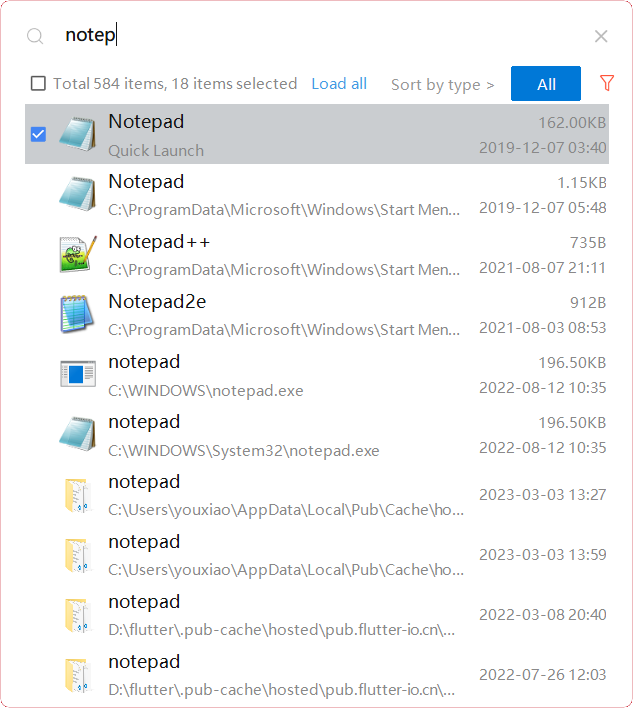
YXFile allows you to tagging file and search file as well as launch apps.
Tag Any File:
YXFile can tag every file type on any file system. The tagging is stored in a data base. YXFile will not alter your file names or create hidden files on your hard disk. You can move or rename files under the same partition. The tags won't be lost
Search for everything:
Search files and folders using their names. as well as file tags, launch items, and file tags.
Launch Apps
Launch App is a favorite feature of YXFile users. You can either type the name of the application or program you wish to open or use a shortcode. Click return and YXFile will open the program.
Description
Zush is a desktop app for Mac and Windows that names files by their content. Instead of pattern rules, it analyzes the text in PDFs and scans, what photos and screenshots show, and the content of documents, ebooks, design files, audio and video, then proposes descriptive filenames in 60+ languages. Beyond renaming, Zush can sort a batch into folders, either automatically or by following plain-language instructions, and it can watch folders such as Downloads or a scanner inbox to process new files automatically. Every change is previewed before it is applied and can be reverted from Activity history. Teams can standardize naming with Templates built from 145+ Naming Blocks and Custom AI Blocks, export them, and reuse them on other computers. Analysis can run in Zush Cloud AI, with a bring-your-own API key for Gemini, OpenRouter, OpenAI or Claude, or fully on-device with LM Studio or Ollama so files stay local. The free starter includes 50 renames without signup; Zush PRO is $10 per month or $48 one-time.
API Access
Has API
No
API Access
Has API
No




Integrations
Claude
No
Gemini
No
LM Studio
No
Ollama
No
OpenAI
No
OpenRouter
No
Integrations
Claude
Yes
Gemini
Yes
LM Studio
Yes
Ollama
Yes
OpenAI
Yes
OpenRouter
Yes
Pricing Details
$39/user
One-time payment for lifetime access to Yfile
Free Trial
Yes
Free Version
No
Pricing Details
$0; PRO $10/mo or $48 once
Free starter: 50 AI renames with no account or credit card, shared across Zush Cloud AI, BYOK and local AI. Zush PRO removes the limit: $10 per month or $48 one-time (plus VAT where applicable). One license covers up to 3 devices on Mac and Windows. 14-day refund period.
Free Trial
No
Free Version
Yes
Deployment
Web-Based
No
On-Premises
No
iPhone App
No
iPad App
No
Android App
No
Windows
Yes
Mac
No
Linux
No
Chromebook
No
Deployment
Web-Based
No
On-Premises
No
iPhone App
No
iPad App
No
Android App
No
Windows
Yes
Mac
Yes
Linux
No
Chromebook
No
Customer Support
Business Hours
Yes
Live Rep (24/7)
No
Online Support
No
Customer Support
Business Hours
No
Live Rep (24/7)
No
Online Support
Yes
Types of Training
Training Docs
Yes
Webinars
No
Live Training (Online)
No
In Person
No
Types of Training
Training Docs
Yes
Webinars
No
Live Training (Online)
No
In Person
No
Vendor Details
Company Name
ousaa
Founded
2016
Country
China
Website
yxfile.cc/
Vendor Details
Company Name
Zush
Founded
2025
Website
zushapp.com