Average Ratings 0 Ratings
Average Ratings 0 Ratings
Similar Products
-
InboxAllyInboxAlly is email deliverability software that moves your messages out of spam and promotions and into the primary inbox. It builds and protects sender reputation, warms new domains and IPs automatically, verifies inbox placement across the major mailbox providers, and monitors blacklists in real time. It layers onto any ESP or SMTP setup without changing how you send. Every plan carries a REST API, a dedicated customer success manager and 24/7 live support. Used by marketers, agencies, cold outreach teams and deliverability consultants.
-
CloudFilerCloudFiler provides filing and searching in both New and Classic Outlook on all phones & tablets, all popular browsers, Macs and ARM based devices. Created Microsoft's new web Add-in technology by the architect of the Oasys email management system previously owned by Arup Group Ltd and the Excitech Mail system owned by Symetri and latterly Pentagon. File to: the cloud, Windows folders, SharePoint, OneDrive, Egnyte, Autodesk Forma, Bentley ProjectWise, etc. Favoured by the biggest businesses globally.
-
Fax.CloudFax.Cloud is a secure cloud fax solution built for organizations that must meet strict compliance standards. It offers encrypted, point-to-point online faxing with confirmed delivery and detailed audit trails for just 2¢ CAD per page. Fax.Cloud supports PIPEDA, HIPAA, and SOC2 requirements while avoiding common email risks like spam filtering, wrong recipients, and lost messages. Users can send and receive faxes from a web portal, email, desktop, or mobile device with no phone lines or hardware required. Teams can be set up in minutes with user permissions, notifications, and centralized document management. Local and toll-free numbers make it easy to scale as your business grows. Upgrade to secure cloud faxing today.
-
MuukTestYou know that you could be testing more to catch bugs earlier, but QA testing can take a lot of time, effort and resources to do it right. MuukTest can get growing engineering teams up to 95% coverage of end-to-end tests in just 3 months. Our QA experts create, manage, maintain, and update E2E tests on the MuukTest Platform for your web, API, and mobile apps at record speed. We begin exploratory and negative tests after achieving 100% regression coverage within 8 weeks to uncover bugs and increase coverage. The time you spend on development is reduced by managing your testing frameworks, scripts, libraries and maintenance. We also proactively identify flaky tests and false test results to ensure the accuracy of your tests. Early and frequent testing allows you to detect errors in the early stages your development lifecycle. This reduces the burden of technical debt later on.
-
MedTrainerMedTrainer accelerates and simplifies healthcare workforce education, compliance, and credentialing. MedTrainer’s natively built software platform provides a seamless user experience that helps healthcare organizations thrive in managing their workforce. Learning: A healthcare-specific learning management system (LMS) enriched with thousands of education courses and resources created by subject matter experts to satisfy regulatory, accreditation requirements, and provide continuing education credit. Compliance: A technology solution that combines incident reporting, document, and policy management, and highly customizable reports to improve compliance. Credentialing: An end-to-end credentialing capability with automation, workflows, and centralized data to simplify the process and reduce costly delays. From PSV to provider enrollment and privileging, everything is in one platform with complete visibility.
-
BrandMailBrandMail®, created by BrandQuantum, is an innovative software tool that integrates seamlessly with Microsoft Outlook, enabling all employees within the organization to automatically generate emails that consistently reflect the brand through an easy-to-use toolbar that grants access to brand guidelines and the most current pre-approved materials. With this solution, email signatures are crafted according to your branding requirements, ensuring a uniform appearance regardless of the device or platform used to view them. These signatures are secure and managed from a central location, providing peace of mind regarding their integrity. Notably, users can view their signatures, banners, and surveys when composing, replying to, or forwarding emails. Unlike other solutions, BrandMail does not redirect emails through external servers nor does it modify the rules within your exchange environment, functioning entirely within Microsoft Outlook. By utilizing BrandMail, organizations can turn every email into a branding opportunity while also reducing the security vulnerabilities linked to the manipulation of HTML signatures, thereby enhancing both brand consistency and cybersecurity. This not only streamlines communication but also reinforces the brand identity across all employee interactions.
-
Google WorkspaceGoogle Workspace is an all-in-one cloud productivity platform developed by Google to help businesses manage communication, collaboration, document creation, and workflow automation from a centralized environment. The platform combines professional email, cloud storage, video conferencing, document editing, team messaging, scheduling, and AI-powered assistance into one subscription-based ecosystem optimized for modern work environments. Google Workspace includes applications such as Gmail, Google Drive, Google Meet, Docs, Sheets, Slides, Calendar, Chat, Keep, Forms, Sites, NotebookLM, and Gemini AI, enabling teams to work together seamlessly across devices and locations. One of the platform’s core strengths is its built-in AI functionality powered by Gemini, which helps users draft emails, summarize meetings, generate research insights, automate repetitive tasks, and improve productivity using contextual awareness from workplace data. Google Workspace also supports advanced collaboration features including real-time editing, appointment scheduling, eSignatures, document sharing, cloud storage management, and AI-assisted research tools. Businesses benefit from enterprise-grade security features such as AI-powered threat protection, data classification, endpoint management, Data Loss Prevention, secure access controls, and compliance support for enterprise environments. The platform offers scalable pricing plans suitable for startups, small businesses, enterprises, educational institutions, nonprofits, and government organizations. Google Workspace also simplifies data migration and onboarding with built-in migration tools and partner support for transferring emails, files, and business information securely into the cloud.
-
PhotonFilePhotonFile serves as a file transfer and private cloud storage solution tailored for individuals and teams managing large files and continuous client or project workflows. It features Photon Transfer, which facilitates live relay between the sender and the recipient while they are connected, in addition to offering a temporary cloud-based delivery option that allows recipients to retrieve files after the upload has finished. Users can access files through a browser link without the need to create an account. Photon Vault ensures that files are stored within distinct client-side encrypted Vaults, allowing for secure ongoing access and sharing. The Vault Intake feature provides upload-only links that enable file collection without revealing the contents of existing Vaults, whereas Vault Sync synchronizes selected desktop folders with their respective Vaults. PhotonFile Desktop is compatible with Windows, macOS, and Linux operating systems. The platform also includes team workspaces that incorporate role-based collaboration features and Vault access controls. Free accounts come with limitations on transfer and Vault usage, while paid subscriptions and one-time File Passes unlock additional features and greater usage capacity. Additionally, the service is designed to accommodate a variety of workflows, making it a versatile tool for both personal and professional use.
-
Captain ComplianceCaptain Compliance is a privacy management platform that simplifies compliance with global data protection legislation and new AI regulatory requirements. Our Consent Management Platform allows businesses to easily manage user consent, and create customized cookie banners. Our advanced Cookie Scanner automatically detects and categorizes all cookies on your site, ensuring compliance with a dynamic policy. Our DSAR Portal streamlines requests from data subjects, while our AI Compliance Tool monitors and adapts to evolving regulations. We even offer a virtual DPO or CPO if data privacy guidance is needed. Our Hosted Privacy Policy Generator automatically updates your privacy policies in real-time to ensure that they are always up-to date with the latest legal requirements. Captain Compliance offers you the tools to maintain regulatory compliance and protect user data at an affordable price.
-
Centrex SoftwareOur powerful Customer Relationship Management software (CRM) can help you increase productivity, generate more revenues, and improve engagement. Manage your advance/loan portfolio. Integrated with ACH processors. Includes broker portal and syndicate reporting. Send email and SMS campaigns, send/receive SMS messages, track email openings, and much more. ClixSign® allows you to send any document for electronic signature. You can see when documents have been viewed and signed by up 8 signers. Your customers can access a branded portal that allows them to upload documents, view messages and track balances/payments. The most up-to-date contact and deal management software allows you to see the entire pipeline. Centrex Software provides custom software development solutions. We assist customers in building web and mobile apps for any purpose.
Description
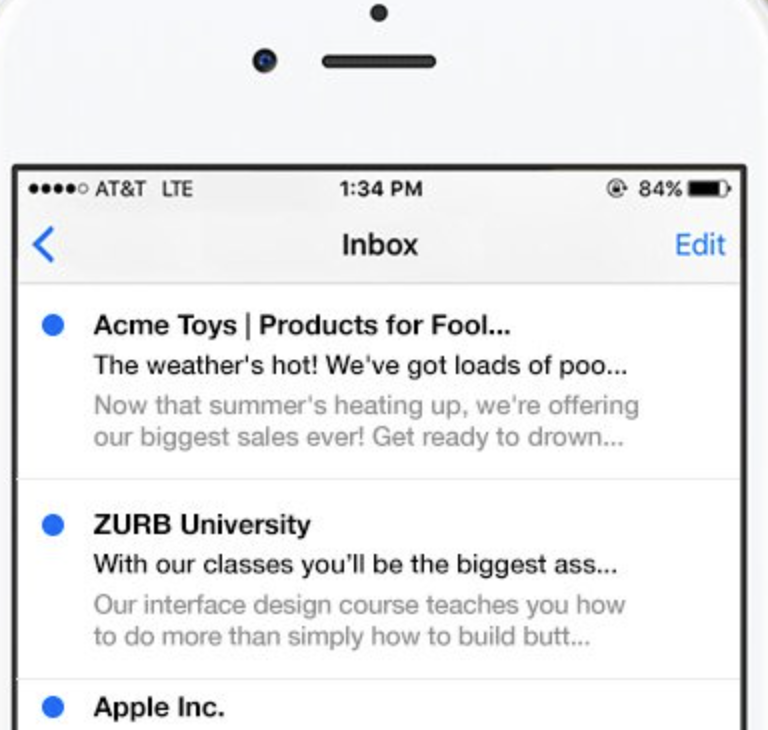
People typically choose to open an email based on two main criteria: the sender's name and the subject line. However, mobile email applications often cut off these elements, which can result in amusing yet often unfortunate outcomes. It's a bit embarrassing, isn't it? At ZURB, we frequently send emails, and we realized we needed a solution to quickly and effectively create engaging subject lines. After searching for an existing tool and coming up empty, we developed TestSubject. This straightforward tool allows you to assess how your email's subject line and sender name appear across various popular mobile devices and email clients. Simply copy and paste your text to receive immediate previews, ensuring you can test before hitting send for added confidence. In addition, you can see how your subject line and sender name display on leading mobile platforms, making it easier than ever to optimize your email's first impression.
Description
harmon.ie is a Microsoft 365 productivity platform that simplifies how organizations save, classify, and manage emails and documents from Outlook. The solution connects Outlook users with SharePoint, Teams, and OneDrive so they can work with important files and messages from one familiar interface. Users can drag and drop emails or attachments into Microsoft 365 locations while harmon.ie captures key metadata automatically. The platform can map email headers to SharePoint fields, apply labels to saved messages, and prompt users to add required metadata when needed. This makes it easier for businesses to keep records organized, searchable, auditable, and aligned with governance policies. harmon.ie offers two product options, including New harmon.ie for Outlook on the Web, Outlook for Mac, new Outlook, and classic Outlook, plus harmon.ie Classic for traditional Outlook for Windows and hybrid SharePoint environments. IT teams can use harmon.ie to support compliance, retention, centralized governance, and secure Microsoft 365 adoption. Business users benefit from a smoother workflow because they can stay inside Outlook instead of navigating SharePoint through a browser. harmon.ie helps enterprises reduce information silos, improve document handling, and make email management easier at scale.
API Access
Has API
No
API Access
Has API
No


Integrations
Microsoft 365
No
Microsoft Copilot
No
Microsoft OneDrive
No
Microsoft Outlook
No
Microsoft SharePoint
No
Microsoft Teams
No
Integrations
Microsoft 365
Yes
Microsoft Copilot
Yes
Microsoft OneDrive
Yes
Microsoft Outlook
Yes
Microsoft SharePoint
Yes
Microsoft Teams
Yes
Pricing Details
No price information available.
Free Trial
No
Free Version
No
Pricing Details
$6 per user per month
Annual subscription. Min 15 users.
Available in USD, EUR, CAD, GBP.
Volume discount for enterprises (150+ users)
Available in USD, EUR, CAD, GBP.
Volume discount for enterprises (150+ users)
Free Trial
Yes
Free Version
No
Deployment
Web-Based
Yes
On-Premises
No
iPhone App
No
iPad App
No
Android App
No
Windows
No
Mac
No
Linux
No
Chromebook
No
Deployment
Web-Based
Yes
On-Premises
Yes
iPhone App
No
iPad App
No
Android App
No
Windows
Yes
Mac
Yes
Linux
No
Chromebook
Yes
Customer Support
Business Hours
Yes
Live Rep (24/7)
No
Online Support
Yes
Customer Support
Business Hours
Yes
Live Rep (24/7)
No
Online Support
Yes
Types of Training
Training Docs
Yes
Webinars
No
Live Training (Online)
No
In Person
No
Types of Training
Training Docs
Yes
Webinars
Yes
Live Training (Online)
Yes
In Person
No
Vendor Details
Company Name
ZURB
Founded
1998
Country
United States
Website
zurb.com/playground/testsubject
Vendor Details
Company Name
harmon.ie
Founded
2011
Country
United States
Website
harmon.ie/
Product Features
Email Testing
A/B Testing
No
Accessibility Testing
No
DMARC Analytics
No
Deliverability Rates
No
HTML Validation
No
IP Blacklist Checking
No
Improvement Recommendations
No
Pre-Send Email Testing
No
Preview Across Browsers & Devices
No
Reporting / Analytics
No
Sender Reputation Scoring
No
Spam Testing
No
Product Features
Collaboration
Brainstorming
No
Calendar Management
No
Chat / Messaging
No
Contact Management
No
Content Management
Yes
Document Management
Yes
Project Management
Yes
Real Time Editing
No
Task Management
No
Version Control
Yes
Video Conferencing
No
Content Collaboration
Client Portal
No
Cloud Storage
No
Digital Asset Management
No
Document Creation / Editing
Yes
Document Management
Yes
Electronic Signature
No
Feedback Management
No
File Sharing
Yes
Messaging / Discussion
No
Real-Time / Interactive Editing
No
Roles / Permissions
No
Search
Yes
Version Control
Yes
Video / Image Editing
No
Workflow / Approval Process
Yes
Email Archiving
Access Control
Yes
Backup Management
Yes
Compliance Management
Yes
Data Deduplication
No
Data Export
No
Encryption
No
Retention Management
Yes
Storage Management
No
Threat Protection
No
eDiscovery
Yes
Email Management
Data Recovery
Yes
Email Archiving
Yes
Email Deletion
Yes
Email Discovery
Yes
Email Monitoring
No
Email Recall
No
Queue Manager
No
Response Management
No
Routing
No
Shared Inboxes
Yes
Signature Management
No
Spam Blocker
No
Whitelisting / Blacklisting
No
Knowledge Management
Artificial Intelligence (AI)
Yes
Cataloging / Categorization
No
Collaboration
Yes
Content Management
Yes
Decision Tree
No
Discussion Boards
No
Full Text Search
No
Knowledge Base Management
No
Self Service Portal
No
