Average Ratings 0 Ratings
Average Ratings 0 Ratings
Similar Products
-
ESET PROTECT AdvancedESET Protect Advanced offers a comprehensive cybersecurity solution for businesses of any size. It offers advanced endpoint security against ransomware and zero-day threats. It also includes full disk encryption to ensure legal compliance and data security. The solution uses adaptive scanning, cloud sandboxing and behavioral analysis for proactive cloud-based threats defense. Mobile threat protection secures Android and iOS with anti-malware and anti-theft. It also offers cloud app security, mail server protection, vulnerability and patch management, and cloud app protection. Multi-factor authentication and extended detection and reaction (XDR) improve threat detection and response. The solution provides a single pane of glass remote management to provide visibility into threats and users. It also offers advanced reporting and customized notifications.
-
ActiveBatch Workload AutomationActiveBatch by Redwood is a centralized workload automation platform, that seamlessly connects and automates processes across critical systems like Informatica, SAP, Oracle, Microsoft and more. Use ActiveBatch's low-code Super REST API adapter, intuitive drag-and-drop workflow designer, over 100 pre-built job steps and connectors, available for on-premises, cloud or hybrid environments. Effortlessly manage your processes and maintain visibility with real-time monitoring and customizable alerts via emails or SMS to ensure SLAs are achieved. Experience unparalleled scalability with Managed Smart Queues, optimizing resources for high-volume workloads and reducing end-to-end process times. ActiveBatch holds ISO 27001 and SOC 2, Type II certifications, encrypted connections, and undergoes regular third-party tests. Benefit from continuous updates and unwavering support from our dedicated Customer Success team, providing 24x7 assistance and on-demand training to ensure your success.
-
RunMyJobs by RedwoodRunMyJobs by Redwood is the only SAP endorsed and premium-certified and the most awarded SAP-certified SaaS workload automation platform and only allowing enterprises to achieve end-to-end IT process automation and unify complex across any application, system or environment without limits and with high availability as you scale. We're the #1 job scheduling choice for SAP customers with seamless integration to S/4HANA, BTP, RISE, ECC and more while maintaining a clean core. Empower teams with seamless integration with any present and future tech stack, a low-code editor and a rich library of templates. Monitor processes in real-time with predictive SLA management and get proactive notifications via email or SMS on performance issues or delays in all your processes. Redwood team provides 24/7/365 day global support with the industry’s strongest SLAs and 15-minute response times and a proven approach to migration that secures continuous operations, including team training, on-demand learning and more.
-
ManageEngine Endpoint CentralManageEngine Endpoint Central is a unified endpoint management and security platform designed for IT teams managing diverse and distributed device environments eliminating the need for multiple disconnected products for patching, remote access, mobile management, and security. The platform supports Windows, macOS, Linux, iOS, Android, and Chrome OS. Automated patch deployment covers OS and 1,000+ third-party applications with scheduling, testing, rollback, and compliance reporting. Software can be deployed, updated, or removed across thousands of endpoints simultaneously. OS imaging workflows provision new devices quickly, while continuous asset inventory supports license compliance and audit readiness. Security capabilities are built directly into the platform. Vulnerability assessment identifies and prioritizes endpoint weaknesses by severity. Application control prevents unauthorized software execution. Device control governs USB and peripheral access. Endpoint privilege management removes unnecessary admin rights. EDR delivers behavioral threat detection and incident response, while NGAV blocks malware, ransomware, and zero-day threats. BitLocker and FileVault encryption enforces disk protection across Windows and macOS. Built-in remote desktop allows technicians to connect instantly without third-party software. Integrated MDM covers iOS and Android enrollment, app management, and remote wipe for corporate and BYOD environments. DEX monitoring gives IT teams real-time visibility into device performance enabling proactive issue resolution before productivity is impacted. Available as cloud or on-premises across Free, Professional, Enterprise, UEM, and Security editions.
-
SiteDocsYour Safety & Compliance Made Simple! Businesses that operate in the construction, oil & gas, mining, manufacturing, electrical, plumbing, heating, and excavating industries know all too well how important it is to comply with all mandatory documentation. It is also important to know how a company organizes everything. SiteDocs is an interactive safety management system that transforms organizations from pen-and paper archiving to a fully cloud-based, digital workspace. The system is accessible from any device running iOS or Android and features allow users to work remotely, on mobile, or offline. Employees can now sign and upload photos, add comments, and acknowledge receipt of important documentation. Administrators can also ensure that records, reports and certifications of staff are automatically updated by using the web-based panel's system parameters.
-
ISL Light Remote DesktopISL Light is a remote desktop software that is easy to use for security-conscious users. It offers great value-performance. ISL Light is a powerful tool for IT staff and support personnel to solve problems remotely via remote support, unattended access, or screen-sharing from mobile devices. It is cross-platform and provides 256-bit encrypted sessions, all the standard remote access features, as well as session recording, chat, videocall and multi-monitor support, file transfers, reporting, and many other important extras. Users can choose between cloud and on-premise services. ISL Online license doesn't limit the number or workstations of clients, users, and users you can support. It is a reliable, highly secure software that can be used in all industries, including banks, hospitals, government institutions, and insurances.
-
P3SourceP3Source is a cost-effective, and user-friendly print procurement and resale platform, meticulously designed for corporate, educational, and non-profit print buyers. P3Source also offers features for brokers, print management firms, inplants and print manufacturers to manage and resell work. Crafted by industry-savvy print enthusiasts, P3Source operates as an efficient print procurement management system, revitalizing the conventional 'Bid and Buy' RFQ process commonly used in the Printing and Marketing Services Industry. As a project management hub, P3Source capably handles dozens of simultaneous projects, bringing together all the details, files, approvals, notes, and historical data in one easy-to-search place. It archives completed projects for future access and detailed reporting. P3source's web portals tie together the supply chain. Customers can submit requests, approve projects and upload production files. Suppliers can effortlessly submit quotes, accept orders, post shipment data, and even present their invoices. This streamlined approach ensures quick, hassle-free transactions for all parties. Celebrate the future of print management with P3Source - easy, efficient, and made with you in mind.
-
pCloud BusinesspCloud Business is a cloud storage and file synchronization platform designed for teams that need controlled access, cross-platform compatibility, and predictable storage allocation. It provides centralized file management with granular permissions and optional client-side encryption. Founded in 2013 in Switzerland, pCloud operates under EU-aligned privacy standards and offers data residency in Luxembourg (EU) and Dallas, Texas (US). The platform supports over 23 million users globally. Core Functionality : - Per-User Storage Allocation : 1 TB or 2 TB per user, suitable for small to mid-sized teams and distributed environments. - Virtual File System (pCloud Drive) : Mounts as a local drive on Windows, macOS, and Linux. Files are streamed on demand, reducing local disk usage. - File Sync & Sharing : Folder-level sync, link-based sharing, and permission control (view/edit/manage). Supports password-protected and time-limited links. - Admin & Access Control : Centralized user management, role assignment, and storage distribution via admin console. - Versioning & File History : File versioning with up to 180 days retention, enabling rollback and recovery. - Cross-Platform Support : Native clients for Windows, macOS, Linux, iOS, Android, plus web interface. - Client-Side Encryption (Optional) : Zero-knowledge encryption via pCloud Encryption for sensitive data; encryption keys are not stored server-side. Technical Positioning: - Swiss jurisdiction; GDPR-aligned processing - No file size limits - Works without mandatory ecosystem lock-in (no bundled office suite required) - Compatible with heterogeneous environments (Linux included) Trial : 30-day free trial available for up to 10 users.
-
Files.com6,000+ companies trust Files.com to automate and secure business critical transfers. We obsess about security, compliance, reliability, and performance so your critical business processes just work every time. Easily manage any transfer flow without writing scripts or code, and onboard workloads and partners effortlessly. We support standard file transfer protocols (FTP, SFTP, AS2) for working with external partners and also provide native apps for high performance internal transfers. As a fully Cloud-Native SaaS, there are no servers for you to buy or maintain, there is no installation required, and high availability and redundancy are built in and free. Our InfoSec Program is audited annually by Kirkpatrick Price, a leading information security CPA firm. Our audit covers the scope of the entire Files.com business (not just datacenter operations) and names Files.com specifically. Beware of smaller competitors who try to pass off someone else’s audit as their own. Technical capabilities include encryption at-rest and in-transit, four types of two-factor authentication, nine enterprise identity (SSO) integrations, configurable password and session policies, and a perfect “A+” score from Qualys SSL Labs.
-
ManageEngine EventLog AnalyzerEventLog Analyzer from Manage Engine is the industry's most affordable security information and event management software (SIEM). This cloud-based, secure solution provides all essential SIEM capabilities, including log analysis, log consolidation, user activity monitoring and file integrity monitoring. It also supports event correlation, log log forensics and log retention. Real-time alerting is possible with this powerful and secure solution. Manage Engine's EventLog Analyzer allows users to prevent data breaches, detect the root cause of security issues, and mitigate sophisticated cyber-attacks.
Description
Polo is a contemporary and efficient file management application for Linux, developed using Vala, that features various layouts including single, dual, and quad panes, each capable of hosting multiple tabs. This file manager allows users to create, extract, and navigate archives seamlessly, while also offering integration with cloud storage services. Additionally, Polo facilitates the operation and management of KVM images, allows for the editing of PDF and image files, and supports booting ISO files in a KVM environment or writing them to USB drives. Each pane includes multiple tabs, and users can toggle an embedded terminal with the F4 key for enhanced functionality. When devices are connected, a popup displays them along with options for mounting and unmounting, and the application can handle LUKS encrypted devices, offering locking and unlocking capabilities. Users can browse archives like regular folders and create them in various formats, taking advantage of advanced compression settings for efficient storage. Moreover, Polo's user-friendly interface, combined with its robust features, makes it a versatile tool for both casual and advanced users looking to manage files with ease and efficiency.
Description
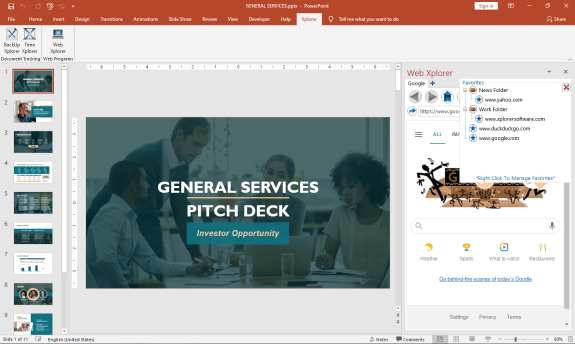
The First MS Office Task Pane Integrated Fully Functionally Web Browser.
Browse the Web and do your research right from your MS Office Task Pane.
*Viewing can be switched to mobile format to take advantage of space constraints
*Save Your Favorites for Easy Navigation
*Save Your Passwords for Your Most Visited Sites
*Set up multiple tabs to open automatically when you open the app
*View Browser Compatible Documents, Audio, Video, and Images (.pdf) right in the Task Pane
You can increase your productivity by never leaving your active screen.
Works with:
Word
API Access
Has API
No
API Access
Has API
No




Integrations
Microsoft Excel
No
Microsoft Outlook
No
Microsoft PowerPoint
No
Microsoft Project
No
Microsoft Word
No
SMS Deliverer
No
Integrations
Microsoft Excel
Yes
Microsoft Outlook
Yes
Microsoft PowerPoint
Yes
Microsoft Project
Yes
Microsoft Word
Yes
SMS Deliverer
Yes
Pricing Details
Free
Free Trial
No
Free Version
Yes
Pricing Details
$29.00
FREE 7 day trial. Purchase a perpetual license that is good for 2 users.
Free Trial
Yes
Free Version
No
Deployment
Web-Based
No
On-Premises
No
iPhone App
No
iPad App
No
Android App
No
Windows
No
Mac
No
Linux
Yes
Chromebook
No
Deployment
Web-Based
No
On-Premises
No
iPhone App
No
iPad App
No
Android App
No
Windows
Yes
Mac
No
Linux
No
Chromebook
No
Customer Support
Business Hours
No
Live Rep (24/7)
No
Online Support
Yes
Customer Support
Business Hours
No
Live Rep (24/7)
No
Online Support
Yes
Types of Training
Training Docs
Yes
Webinars
No
Live Training (Online)
No
In Person
No
Types of Training
Training Docs
Yes
Webinars
No
Live Training (Online)
No
In Person
No
Vendor Details
Company Name
teejee2008
Country
United States
Website
teejee2008.github.io/polo/
Vendor Details
Company Name
Breakthrough Applications
Founded
2020
Country
United States
Website
www.xplorersoftware.com
