Average Ratings 0 Ratings
Average Ratings 3 Ratings
Similar Products
-
PDF GuruEasily convert, edit, merge, and compress your PDF files with just a few simple clicks. You can quickly download your document without any hassle, as our PDF converter generates files in mere seconds! To ensure the safety of your digital information, we implement HTTPS encryption while you create PDF files on our site. You can redact PDFs, alter text, insert new elements, and engage in various other tasks, all from a single platform. Our user-friendly interface is designed for seamless navigation, allowing you to utilize our PDF creator with minimal effort. Compatible with every major operating system, our online PDF maker functions flawlessly on Windows, Mac OS, Linux, iOS, and Android. For those who wish to maintain privacy, you have the option to secure your file by locking or restricting access, preventing others from opening, editing, or printing it. This comprehensive tool simplifies your document management and enhances your productivity.
-
SDS ManagerSDS Manager is a premier provider of SDS Management solutions, featuring one of the world’s largest SDS databases with over 14 million Safety Data Sheets in 25 languages. With SDS Manager, employees can access essential SDS information directly from their mobile devices by simply scanning QR code posters in work areas where chemicals are used. This seamless mobile access promotes both safety and regulatory compliance. Our automated data extraction feature lets you effortlessly add SDS files to your library without any manual typing, significantly improving accuracy and streamlining SDS management. Keep your SDS library updated, organized, and ready for quick access in a secure cloud environment.
-
MobiPDFMobiPDF (formerly PDF Extra) is an intuitive reader and editor that allows you to read, edit, create, OCR, organize, annotate, fill and sign, convert, and share any PDF. This makes MobiPDF an excellent choice for users seeking a budget-friendly alternative to Adobe Acrobat Pro. HERE’S WHAT YOU GET WITH MOBIPDF: Multiple Page View Modes: Enjoy a distraction-free "Read Mode". Advanced Editing Tools: Experience a Word-like PDF editing environment. Two-Way Conversions: Convert PDFs to and from Word, Excel, PowerPoint, or image formats. OCR Support: Make scanned documents searchable. Markup Tools: Highlight, comment, strikethrough, stamp, and more to enhance your documents. Effortless PDF Organizer: Reorder, compress, split, and combine PDFs with ease. Sign & Secure: Add signatures, create and fill forms, and protect your PDFs with passwords, encryption, and digital certificates. Offline Mode: Work freely on your projects, even offline. Seamless translation: One-click translate any PDF into 50+ languages.
-
ONLYOFFICE DocsONLYOFFICE Docs is a secure online office suite for teams and businesses of all sizes. Create and edit docs, sheets, slides, fillable forms and PDFs. Collaborate with your teammates in real time using two co-editing modes, version history and other tools. Enable the AI assistant of your choice — ChatGPT, DeepSeek, Mistral, Groq AI, etc. Generate new content, summarize, translate and do more with your favourite AI tool while working on office files. Integrate ONLYOFFICE Docs into your business platform, whether it be Odoo, Alfresco, Confluence, Pipedrive, Nextcloud, Redmine, SuiteCRM, etc., via an integration app (40+ available integrations). Use Docs within ONLYOFFICE DocSpace, a room-based document collaboration platform equipped with the online office suite. Create dedicated spaces for different purposes, invite your teammates, assign access permissions and collaborate the way you like. With DocSpace, you can store, share and co-edit office files, and even interact with third parties.
-
CirrusPrintCirrusPrint helps you manage and streamline your printing and document delivery across multiple networks. It solves cloud migration issues related to printing and provides the fastest and most direct way to deliver documents to users. With CirrusPrint, traditional network printing is still possible without any changes to operations. You can also print to your users, email your printers, and send a file from your smartphone to a printer anywhere in the country. CirrusPrint can be used on Windows or Linux, either in the cloud or at your own data center. It can accept print jobs and other documents, compress them, and deliver them to remote printers and users. It is easy to integrate with applications. You can print to it as any network printer, email files, drop files into the device, or use REST API. CirrusPrint jobs are sent quickly and securely to remote printers as exact duplicates of the original job.
-
SaaSifySaaSify is an agentic Cloud GTM platform that runs the entire marketplace motion for AWS, Azure, and Google Cloud on one system instead of three separate ones. Its agents draft and file listings in about 90 minutes, move private offers straight through Salesforce or HubSpot, and find and file co-sell opportunities to hyperscaler partner portals automatically, with sync running both ways in real time. Funding requests move through that same pipeline end to end, so committed AWS, Azure, and GCP dollars actually get captured instead of lapsing unused. Hyperscaler experts back every account, working alongside customer teams on FTR approvals, certifications, and quarterly program changes. Revenue, usage, billing, and payout data land in a single source of truth per cloud. More than 500 ISVs run their marketplace motion through SaaSify, managing over $5B in revenue with a 4.9-star rating on G2.
-
wp2printwp2print, an e-commerce web to print system, was created specifically for print providers to sell products online. Wp2print is able to sell digital, wide-format, and book products, as well as blueprints. wp2print comes with production management and proofing. WordPress-based wp2print has many strong advantages. 1. For accurate price calculations, use powerful pricing calculators 2. File uploader that can handle all file formats and unlimited file sizes 3. Online tool for award-winning design 4. Both public and private stores 5. 5. 6. Available for monthly rental or one-time purchase
-
FilerevFilerev is a powerful tool that helps you easily find and manage hidden files, duplicate files, large files, and oversized folders, ensuring a streamlined and clutter-free digital workspace. Key features include advanced scanning technology that identifies the unorganized files taking up the most space and cluttering your Google Drive. Filerev enhances productivity by saving time and reducing the frustration of manual file organization. The custom filters and bulk delete tool give you complete control over finding and removing unwanted files in your account. The storage analyzer lets you browse your folders by size to see where the space is being used in your Google Drive. Whether you're an individual, a small business, or a large enterprise, Filerev offers robust solutions tailored to your needs. Visit filerev.com to discover how Filerev can transform your Google Drive experience and boost efficiency.
-
Nasdaq BoardvantageThe board portal platform and collaboration tool for boards and senior executives. Learn how Nasdaq Boardvantage can make board processes paperless, and reduce the time it takes to prepare meetings. You can create single- or multi-day meetings in a matter of seconds. Add details, attach files, track attendance, and even initiate remote meetings. To protect information, encryption and multiple layers provide protection for confidentiality, integrity, availability, and security. Quickly create and distribute Board and Committee Evaluations, Conflict of Interest, and general questionnaires. Manage files, contacts and signatures. Collaboration with notifications, annotations and unanimous consent votes, esignatures and in-app email security. Accessible on any device, smartphone, tablet, or desktop. Sync seamlessly online and offline.
-
IPVanishIPVanish VPN protects personal data in the face of privacy threats. Protect your connection over hotspots or unsecured networks today. We have the solution for you, whether you need a Wi Fi hotspot shield or safe file access. IPVanish VPN and storage solutions simplify online security for the entire home. There are setups for mobile, desktop, consoles, routers, and routers. VPN privacy can protect your internet activity. You can also pair VPN + storage to provide complete online protection. To go incognito, you need more than a private internet browser. Our anonymous IP addresses will keep your internet activity secretive and help keep hackers, ISPs and advertisers away from your connection. VPN can protect your Wi-Fi connection as well as your location data. The best data defense combines security and convenience. Secure your most valuable files with remote wiping, automated syncing and encrypted backup.
Description
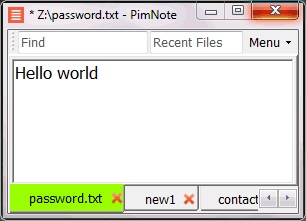
PimNote is a text editor that allows for faster document access. It also combines both the useful and unutilized features of all other text editors.
This tool is designed for knowledge management. You can quickly access the recent file list with a single click. You can easily access an old file that has been opened long ago with the unlimited and searchable recent files list. You can type less with the one-click search and find history feature.
This product is designed for remote work. No freezing from a remote file monitoring/opening/writing when disconnected. You can save files offline by closing the application and not closing the tabs. During file opening, auto-reconnect the network drive. Recurring file notifications are displayed politely on top bar, instead of a popup dialog box that requires frequent actions and tends not to be used.
Description
WordPad serves as a straightforward text-editing application that allows users to create and modify documents, incorporating text with various fonts and colors, as well as the ability to insert images and links to other files. This versatile tool enables the opening and saving of multiple file formats including text files (.txt), rich text files (.rtf), Word documents (.docx), and OpenDocument text files (.odt). It is important to note that files in unsupported formats will open as plain text and may not display as intended. Certain functionalities, such as headers, footers, and annotations, are not compatible with WordPad, meaning any file containing these elements will lose that content upon saving. To avoid losing original content when modifying such a file, it is advisable to select the "Save as" option and save it under a different filename, thus allowing you to edit a duplicate while preserving the original. For those seeking clarification on the functions of various buttons, simply press and hold a button for a brief description, or hover over it with a mouse for additional guidance. By utilizing these features effectively, users can maximize their experience with WordPad.
API Access
Has API
No
API Access
Has API
No

Integrations
C#
Yes
C++
No
CSS
No
HTML
No
Jarte
No
Java
No
MathML Kit
No
Megaladata
No
Microsoft 365
No
Python
No
Integrations
C#
No
C++
Yes
CSS
Yes
HTML
Yes
Jarte
Yes
Java
Yes
MathML Kit
Yes
Megaladata
Yes
Microsoft 365
Yes
Python
Yes
Pricing Details
No price information available.
Free Trial
No
Free Version
Yes
Pricing Details
No price information available.
Free Trial
No
Free Version
No
Deployment
Web-Based
No
On-Premises
No
iPhone App
No
iPad App
No
Android App
No
Windows
Yes
Mac
No
Linux
No
Chromebook
No
Deployment
Web-Based
No
On-Premises
No
iPhone App
No
iPad App
No
Android App
Yes
Windows
Yes
Mac
No
Linux
No
Chromebook
No
Customer Support
Business Hours
No
Live Rep (24/7)
No
Online Support
Yes
Customer Support
Business Hours
No
Live Rep (24/7)
No
Online Support
Yes
Types of Training
Training Docs
Yes
Webinars
No
Live Training (Online)
No
In Person
Yes
Types of Training
Training Docs
Yes
Webinars
No
Live Training (Online)
No
In Person
No
Vendor Details
Company Name
Pimtel
Founded
2018
Website
www.pimtel.com/pimnote/
Vendor Details
Company Name
Microsoft
Founded
1975
Country
United States
Website
hs.windows.microsoft.com/hhweb/content/m-en-us/p-6.2/id-7479c387-8dc4-40b6-9506-cc7a58c61f0a/
Product Features
Text Editors
API
No
Auto-Complete
No
Code Folding
No
Column Editing
No
Customizable Themes
No
Debugging
No
Formatting / Table Editing
No
Keyboard Shortcuts
No
Multi-Monitor Editing
No
Syntax Highlighting
No
WYSIWYG
No
Product Features
Text Editors
API
No
Auto-Complete
No
Code Folding
No
Column Editing
No
Customizable Themes
No
Debugging
No
Formatting / Table Editing
No
Keyboard Shortcuts
No
Multi-Monitor Editing
No
Syntax Highlighting
No
WYSIWYG
No
