Average Ratings 1 Rating
Average Ratings 0 Ratings
Similar Products
-
MobiPDFMobiPDF (formerly PDF Extra) is an intuitive reader and editor that allows you to read, edit, create, OCR, organize, annotate, fill and sign, convert, and share any PDF. This makes MobiPDF an excellent choice for users seeking a budget-friendly alternative to Adobe Acrobat Pro. HERE’S WHAT YOU GET WITH MOBIPDF: Multiple Page View Modes: Enjoy a distraction-free "Read Mode". Advanced Editing Tools: Experience a Word-like PDF editing environment. Two-Way Conversions: Convert PDFs to and from Word, Excel, PowerPoint, or image formats. OCR Support: Make scanned documents searchable. Markup Tools: Highlight, comment, strikethrough, stamp, and more to enhance your documents. Effortless PDF Organizer: Reorder, compress, split, and combine PDFs with ease. Sign & Secure: Add signatures, create and fill forms, and protect your PDFs with passwords, encryption, and digital certificates. Offline Mode: Work freely on your projects, even offline. Seamless translation: One-click translate any PDF into 50+ languages.
-
CompanyCamCompanyCam is a photo-based solution created specifically for contractors. Users can take unlimited photos—which are location and time stamped, sent to the cloud, and stored securely. Every photo is organized by project and instantly available to your team, allowing you to see what’s going on anytime, anywhere.
-
Construction Daily ReportsYou can save up to an hour per day on daily reports CDR – Construction Daily Reports is the fastest custom daily reporting solution available for the construction industry. It can be accessed on our mobile app for Android or Apple devices as well as our website portal. You can customize your reports by entering project details. Then, you can take photos and make notes using your mobile device. CDR will email your completed report in professional PDF format to you after you sign it. We also save it on our servers so that you can upload it to your cloud storage. CDR is a mobile-friendly, time-saving construction software designed to simplify your reporting process. Start your free trial now!
-
RAD PDFInstall-free PDF editing, form filling, redaction, signing, viewing, and more on your website with RAD PDF! Packaged as an easy to use library / WebControl (compatible with .NET 3.5+, .NET Core, and .NET 5+), RAD PDF can be used with just about any flavor of ASP.NET including MVC, Razor, Blazor, WebForms, and more. RAD PDF is compatible with 99% of internet browsers, including those on Linux, Mac OS X, Microsoft Windows, and mobile. No plugins. No Adobe Reader. RAD PDF is more than a PDF to HTML converter. It natively supports all the most common PDF features including annotations, bookmarks, form fields, page labels, and more. With advanced PDF options, RAD PDF allows you to selectively enable and disable features not available with Adobe Acrobat Reader, like protecting a PDF from being downloaded while still viewable online. RAD PDF users can use PDF form fields directly from the web browser by enabling PDF form filling and PDF form saving without having to install any software. Integrating directly with ASP.NET, RAD PDF allows your web application to capture input data, build custom workflows, and provide an intuitive graphical user interface (GUI) for just about any online PDF interaction imaginable!
-
AestheticsProAestheticsPro is today's most comprehensive medical aesthetic software. HIPAA cloud compliant with integrated POS, targeted advertising, and results driven reporting paired with electronic charting and client portal with "book now" capabilities. AestheticsPro provides everything you need to run your medical spa business.
-
Nasdaq MetrioNasdaq Metrio is a sustainability reporting platform tailored for businesses at various stages of their ESG journey. It merges meticulous data collection, tracking, and management with emissions calculations and assurance. Additionally, it provides a comprehensive library of metrics from various rater and ranker frameworks as well as regulatory bodies, all cross-referenced, de-duplicated, and clarified, complete with guidance notes.
-
Portfolio ManagerBlue Sky's "Portfolio Manager" Lease Management Software is an easy to learn and use SaaS solution for centralized management of lease contracts. By managing your lease contracts and associated maintenance contracts throughout the entire lifecycle you can strengthen the audit process, reduce costs, increase cash flows and mitigate risk with centralized visibility that drives enterprise value. Portfolio Manager provides complete status management for running leasing RFP's, tracking status, notes, documents and next steps for every open project. Flat file data imports allow for efficient data entry. Fully customizable with robust reporting capabilities. The report writer allows every data field to be exported to excel. Pre-built templates are available to feed most ASC842 lease accounting software templates. End of lease term management is automated with custom parameters and automatic notifications to ensure you never miss an end of lease term notification. Custom Programming available.
-
VaizVaiz is a work management platform built for small and mid-sized teams — startups, agencies, and growing SaaS companies — who want the structure of tools like Jira, Asana, or ClickUp without the complexity or price tag. It centralizes task management, document sharing, and team coordination in one lightweight workspace, so teams of 5-50 people can get started in minutes, not weeks. Vaiz offers customizable task boards (lists, Kanban, Gantt charts), an AI assistant that drafts, summarizes, and analyzes work, and built-in automation that handles routine tasks without extra setup. Integrations with tools like Slack, GitHub, and Google Workspace keep teams aligned without switching between apps. Vaiz scales with you, from a 5-person startup to a growing team, without forcing you to re-learn the tool as you grow."
-
CharityTrackerSpend less time digging through stacks of papers and more time serving. Your client documents can now be accessible from anywhere. CharityTracker offers more than secure storage—it’s a smart, seamless way to optimize your case management. CharityTracker is simple to implement and cost-effective. You will love the speed at which you can get up-and-running with CharityTracker’s cloud-based, hosted solution. You’ll have CharityTracker’s beautifully-designed interface operational quickly. CharityTracker is a cloud-based, HIPAA compliant software that’s easy to use for nonprofits of all sizes. With no setup fees, hidden fees, or contracts, you can cancel anytime! Our time saving solution provides a secure way to streamline how you manage cases, record case notes & assistance, create reports, collaborate, set goals, measure outcomes, make referrals & prove your impact with change-over-time reports for your funders. We're at work in with thousands of communities! Book a free demo. Pricing starts at just $20/mo. user
-
Google Cloud Speech-to-TextAn API powered by Google's AI technology allows you to accurately convert speech into text. You can accurately caption your content, provide a better user experience with products using voice commands, and gain insight from customer interactions to improve your service. Google's deep learning neural network algorithms are the most advanced in automatic speech recognition (ASR). Speech-to-Text allows for experimentation, creation, management, and customization of custom resources. You can deploy speech recognition wherever you need it, whether it's in the cloud using the API or on-premises using Speech-to-Text O-Prem. You can customize speech recognition to translate domain-specific terms or rare words. Automated conversion of spoken numbers into addresses, years and currencies. Our user interface makes it easy to experiment with your speech audio.
Description
Many people consider NoteTab to be the premier replacement for traditional Notepad. For webmasters, it serves as the quickest HTML editor available. Others find it to be the most adaptable text editing tool. For those who are more experienced, it functions as a powerful text-processing machine. What will it become for you? Soon, we will share the ten key features that have contributed to NoteTab’s reputation as one of the most celebrated text editors in history. But before that, here's a fascinating tidbit for those unfamiliar with NoteTab: the tab bar. This beloved feature allows users to open multiple files simultaneously, each represented by its own tab, and provides the flexibility to rearrange these tabs within the handy tab bar to suit personal preferences. With such versatility, it’s no wonder NoteTab continues to be a favorite among many.
Description
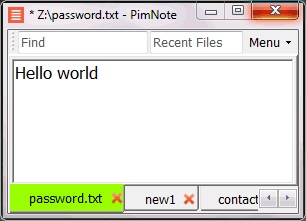
PimNote is a text editor that allows for faster document access. It also combines both the useful and unutilized features of all other text editors.
This tool is designed for knowledge management. You can quickly access the recent file list with a single click. You can easily access an old file that has been opened long ago with the unlimited and searchable recent files list. You can type less with the one-click search and find history feature.
This product is designed for remote work. No freezing from a remote file monitoring/opening/writing when disconnected. You can save files offline by closing the application and not closing the tabs. During file opening, auto-reconnect the network drive. Recurring file notifications are displayed politely on top bar, instead of a popup dialog box that requires frequent actions and tends not to be used.
API Access
Has API
No
API Access
Has API
No


Pricing Details
$39.95 one-time payment
Free Trial
No
Free Version
Yes
Pricing Details
No price information available.
Free Trial
No
Free Version
Yes
Deployment
Web-Based
No
On-Premises
No
iPhone App
No
iPad App
No
Android App
No
Windows
Yes
Mac
No
Linux
No
Chromebook
No
Deployment
Web-Based
No
On-Premises
No
iPhone App
No
iPad App
No
Android App
No
Windows
Yes
Mac
No
Linux
No
Chromebook
No
Customer Support
Business Hours
Yes
Live Rep (24/7)
No
Online Support
Yes
Customer Support
Business Hours
No
Live Rep (24/7)
No
Online Support
Yes
Types of Training
Training Docs
Yes
Webinars
No
Live Training (Online)
No
In Person
No
Types of Training
Training Docs
Yes
Webinars
No
Live Training (Online)
No
In Person
Yes
Vendor Details
Company Name
Fookes Software
Founded
1996
Country
Switzerland
Website
www.notetab.com
Vendor Details
Company Name
Pimtel
Founded
2018
Website
www.pimtel.com/pimnote/
Product Features
Code Editors
API
No
Auto-Complete
No
Code Folding
No
Column Editing
No
Customizable Themes
No
Debugging
No
Formatting / Table Editing
No
Keyboard Shortcuts
No
Multi-Monitor Editing
No
Syntax Highlighting
No
WYSIWYG
No
Text Editors
API
Yes
Auto-Complete
Yes
Code Folding
Yes
Column Editing
Yes
Customizable Themes
Yes
Debugging
Yes
Formatting / Table Editing
Yes
Keyboard Shortcuts
Yes
Multi-Monitor Editing
Yes
Syntax Highlighting
Yes
WYSIWYG
No
Product Features
Text Editors
API
No
Auto-Complete
No
Code Folding
No
Column Editing
No
Customizable Themes
No
Debugging
No
Formatting / Table Editing
No
Keyboard Shortcuts
No
Multi-Monitor Editing
No
Syntax Highlighting
No
WYSIWYG
No
