Average Ratings 0 Ratings
Average Ratings 0 Ratings
Similar Products
-
JAMS SchedulerJAMS is an automation orchestration and job scheduling solution that runs, monitors, and manages critical IT processes from a single console. JAMS automates jobs across Windows, Linux, UNIX, IBM i, z/OS, and OpenVMS, with native integrations for the databases, BI tools, and ERP systems already running your business. Jobs run on any schedule or trigger off other events, with dependency management keeping workflows in order and an audit trail logging every execution. JAMS includes two AI capabilities at no additional cost. JAX is an AI agent built into the JAMS Web Client: ask it a question in plain language, and it finds a job, troubleshoots a failure, or looks up how to do something, grounded in JAMS documentation. It acts only when asked, and every change waits for your approval. JAMS MCP brings JAMS into the AI coding tools teams already use, including Cursor, Claude Code, GitHub Copilot, and Claude Desktop. For teams managing thousands of jobs across SQL Server, ADF, Airflow, SAP, JDE, and Banner, this cuts tribal knowledge and middle-of-the-night troubleshooting. Knowledge that once lived in one person's head becomes something any team member can ask about directly. The AI lives in the product, not in the support queue. Support is staffed by humans JAMS will never outsource, based in the United States, the United Kingdom, and Australia. New tickets go to long-tenured engineers, and every JAMS customer has the CEO's cell phone number. JAMS' mission is to reduce the operational burden of critical automation, so teams spend more time on the work automation was meant to free them for.
-
RunMyJobs by RedwoodRunMyJobs by Redwood is the only SAP endorsed and premium-certified and the most awarded SAP-certified SaaS workload automation platform and only allowing enterprises to achieve end-to-end IT process automation and unify complex across any application, system or environment without limits and with high availability as you scale. We're the #1 job scheduling choice for SAP customers with seamless integration to S/4HANA, BTP, RISE, ECC and more while maintaining a clean core. Empower teams with seamless integration with any present and future tech stack, a low-code editor and a rich library of templates. Monitor processes in real-time with predictive SLA management and get proactive notifications via email or SMS on performance issues or delays in all your processes. Redwood team provides 24/7/365 day global support with the industry’s strongest SLAs and 15-minute response times and a proven approach to migration that secures continuous operations, including team training, on-demand learning and more.
-
Process StreetProcess Street is the Compliance Operations Platform built for teams that need to move fast without breaking standards. It combines document control, workflow automation, and AI-powered oversight in a single system so every policy is followed, every step is tracked, and every audit is effortless. Unlike legacy GRC tools or static SOP docs, Process Street turns compliance into a living system. Policies are documented in governed, version-controlled Pages. Those policies are executed through dynamic workflows with built-in task assignment, approvals, and forms. Every action is logged, monitored, and optimized in real time by Cora, our AI compliance agent. Used across industries like financial services, real estate, healthcare, and manufacturing, Process Street helps teams automate employee onboarding, streamline audits, manage policy updates, enforce vendor reviews, and run critical processes at scale. No code required. No micromanagement. Just proof that work gets done right, every time. Companies like Salesforce, Colliers, Drift, and Hartford Healthcare trust Process Street to eliminate busywork, improve operational visibility, and reduce compliance risk across the business. With native integrations, role-based access, audit trails, and ISO-aligned workflows, it is the platform that makes compliance a competitive advantage. From onboarding to audits, Process Street is how high-stakes teams enforce standards, automate execution, and prove compliance by default.
-
StackAIStackAI is an enterprise AI automation platform that allows organizations to build end-to-end internal tools and processes with AI agents. It ensures every workflow is secure, compliant, and governed, so teams can automate complex processes without heavy engineering. With a visual workflow builder and multi-agent orchestration, StackAI enables full automation from knowledge retrieval to approvals and reporting. Enterprise data sources like SharePoint, Confluence, Notion, Google Drive, and internal databases can be connected with versioning, citations, and access controls to protect sensitive information. AI agents can be deployed as chat assistants, advanced forms, or APIs integrated into Slack, Teams, Salesforce, HubSpot, ServiceNow, or custom apps. Security is built in with SSO (Okta, Azure AD, Google), RBAC, audit logs, PII masking, and data residency. Analytics and cost governance let teams track performance, while evaluations and guardrails ensure reliability before production. StackAI also offers model flexibility, routing tasks across OpenAI, Anthropic, Google, or local LLMs with fine-grained controls for accuracy. A template library accelerates adoption with ready-to-use workflows like Contract Analyzer, Support Desk AI Assistant, RFP Response Builder, and Investment Memo Generator. By consolidating fragmented processes into secure, AI-powered workflows, StackAI reduces manual work, speeds decision-making, and empowers teams to build trusted automation at scale.
-
PBRS Power BI Reports DistributionPBRS brings automated report production and distribution to organizations using Microsoft Power BI and SSRS. Developed by ChristianSteven Software, it runs in your Windows environment and coordinates reporting tasks that would otherwise involve manual exports or multiple automation flows. Build workflows for Power BI Service, Power BI Report Server, Power BI Paginated Reports and Microsoft SSRS. Launch them at regular intervals, on custom calendars, after a dataset refresh completes, or in response to supported database, file, email and system events. For personalized (Dynamic) reporting, PBRS reads SQL or JSON instructions to apply each recipient's filters, parameters, output format and delivery details. Report bursting allows a shared report to become separate outputs for customers, branches, departments or individual users. Produce PDF documents, Excel workbooks and CSV files where supported. Use Excel templates and formatting, merge suitable exports into workbook tabs, or collect several reports into a single email, ZIP archive or bookmarked PDF. Passwords and encryption help protect PDF documents. Route finished files to email addresses, Teams, SharePoint, OneDrive, Google Drive, Dropbox, FTP or SFTP servers, network folders, Slack and printers. Deliver exported documents to external audiences without requiring them to access Power BI. Execution records, notifications, retry settings and blank-report handling support unattended operation. A REST API lets developers connect supported scheduling and execution functions to their own applications. PBRS suits reporting operations that need consistent output, recipient-specific content and coordinated delivery across multiple reporting sources.
-
Files.com6,000+ companies trust Files.com to automate and secure business critical transfers. We obsess about security, compliance, reliability, and performance so your critical business processes just work every time. Easily manage any transfer flow without writing scripts or code, and onboard workloads and partners effortlessly. We support standard file transfer protocols (FTP, SFTP, AS2) for working with external partners and also provide native apps for high performance internal transfers. As a fully Cloud-Native SaaS, there are no servers for you to buy or maintain, there is no installation required, and high availability and redundancy are built in and free. Our InfoSec Program is audited annually by Kirkpatrick Price, a leading information security CPA firm. Our audit covers the scope of the entire Files.com business (not just datacenter operations) and names Files.com specifically. Beware of smaller competitors who try to pass off someone else’s audit as their own. Technical capabilities include encryption at-rest and in-transit, four types of two-factor authentication, nine enterprise identity (SSO) integrations, configurable password and session policies, and a perfect “A+” score from Qualys SSL Labs.
-
JSCAPE MFT ServerJSCAPE by Redwood is a secure managed file transfer (MFT) software that automates complex file workflows, consolidating manual processes, custom scripts and siloed tools into a single, reliable platform. Low-code automation triggers enable IT teams to orchestrate file transfers across Windows, Linux, macOS, Solaris and any other platform, with unlimited users, trading partners and concurrent connections included and no additional middleware required. JSCAPE delivers enterprise-grade security, backed by an unblemished track record since 1999 and active third-party certifications that most MFT providers don't hold: SOC 2 Type 1 and Type 2, ISO 27001, Drummond Certified™, and FIPS 140-2 and 140-3 validated encryption. Quarterly penetration testing and annual third-party audits keep your environment audit-ready year-round. The solution handles any file size and any protocol — SFTP, FTP/S, HTTP/S, AS2, OFTP2, WebDAV, and more — while meeting compliance requirements for HIPAA, PCI DSS, SOX, GDPR and GLBA. It also fits cleanly into any environment (on-premises, cloud, hybrid, containerized or SaaS), with native integrations for Microsoft Azure, AWS, IBM Cloud, CyberArk, Box, Dropbox and leading workload automation solutions like RunMyJobs. Trusted by 1,000+ organizations in 57+ countries, JSCAPE includes 24/7/365 expert technical support with an 8-minute median response time and online training at no extra cost in every plan. Request a personalized demo today.
-
FloatFloat is the #1 rated resource management software that gives 4,500+ teams the essential data and context they need when resourcing client work. Success in professional services isn’t just about assigning work: it’s building the high-performing teams who deliver it. With Float, you can make smarter resourcing decisions and adapt work as it shifts to build a winning team for every job. The world’s top teams don’t just wing it. They resource client work the right way with Float. You should, too. Try for free at float.com.
-
CirrusPrintCirrusPrint helps you manage and streamline your printing and document delivery across multiple networks. It solves cloud migration issues related to printing and provides the fastest and most direct way to deliver documents to users. With CirrusPrint, traditional network printing is still possible without any changes to operations. You can also print to your users, email your printers, and send a file from your smartphone to a printer anywhere in the country. CirrusPrint can be used on Windows or Linux, either in the cloud or at your own data center. It can accept print jobs and other documents, compress them, and deliver them to remote printers and users. It is easy to integrate with applications. You can print to it as any network printer, email files, drop files into the device, or use REST API. CirrusPrint jobs are sent quickly and securely to remote printers as exact duplicates of the original job.
-
ScreencaptScreencapt allows you to record the entire screen or a selected area. You can also record a specific window. Screencapt is the ideal screen recorder because of its flexibility. Using the integrated audio recording you can also add your commentary or system sound directly into the screen recording. This is particularly useful when creating explanation videos or presentations. Screencapt's ability to record a webcam is a special feature. You can now add your comments and reactions to the video. This makes your screen recordings more personal and professional. Screencapt offers advanced options to record the cursor. You can choose to hide the cursor or add special effects to highlight specific actions. This is especially useful for software tutorials and demonstrations where a clear cursor view is required.
Description
MacroWin is a desktop application for Windows designed to help users create and execute macros that streamline repetitive tasks across various applications and the operating system. Users can set off macros through a variety of triggers such as hotkeys, text abbreviations, scheduled times, application or file events, changes in devices, voice commands, and web requests, with certain conditions determining if the macros should run. The actions that macros can perform include typing, clicking, managing files and windows, navigating web pages, handling emails, and interacting with text displayed on the screen. With a user-friendly visual flow editor or a list format, users have the flexibility to construct, record, test, and execute macros in the background effortlessly. Additional features encompass user profiles, different operational modes, floating panels, pre-built macros, and AI-driven assistance for building and refining macros. AI clients can integrate through the Macro Control Protocol (MCP) to access macros and propose modifications for the user's consideration. While MacroWin operates locally on Windows, the optional MacroWin Cloud feature provides syncing, backup solutions, remote access, and webhooks. This tool is ideal for both individual users and teams looking to enhance their efficiency by automating frequent tasks on their computers, ultimately saving time and reducing manual effort.
Description
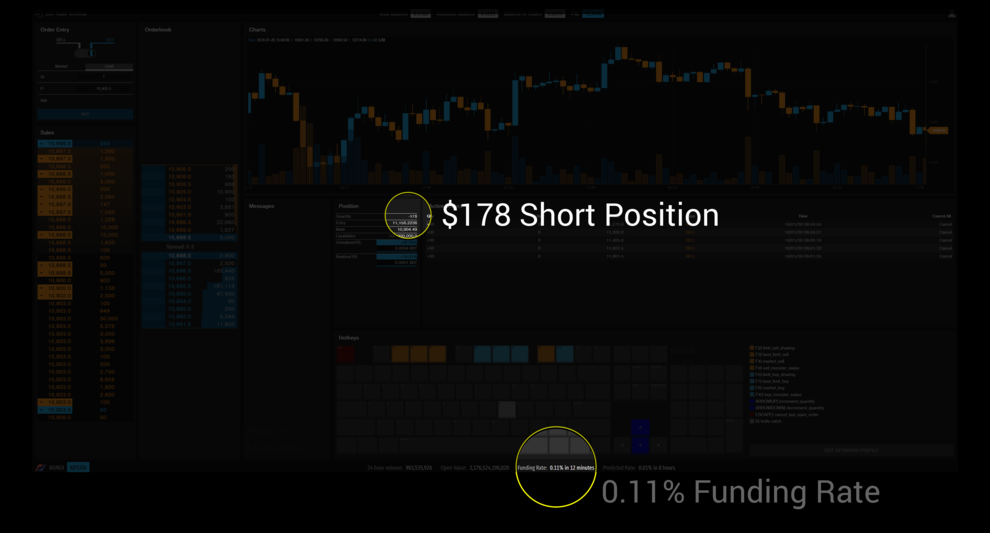
Discover a highly effective and lucrative method to engage with the global cryptocurrency markets through XRayTrade. This platform offers preset hotkeys for common trading actions while also giving you the freedom to customize your own shortcuts. Utilizing hotkeys allows for the swift and accurate execution of intricate commands with just a single keystroke. By developing macros, you can eliminate the need for repetitive trading tasks, streamlining your trading process significantly. You can craft tailored macros that cater to specific markets, enabling you to click once to open or close trades effortlessly. After entering a trade size, a single click on the order book will trigger immediate execution of that order. Explore a diverse range of cryptocurrency products, markets, and cutting-edge tools that leverage the global landscape of digital currencies. XRayTrade stands out as a reliable, high-performance platform equipped with robust features designed to enhance your trading experience. With a uniquely engineered infrastructure, the platform is adept at swiftly adapting to and incorporating new innovations in cryptocurrency technology, ensuring you remain at the forefront of the market.
API Access
Has API
Yes
API Access
Has API
Yes




Integrations
Claude Code
Yes
Claude Desktop
Yes
Cursor
Yes
Gemini CLI
Yes
GitHub Copilot
Yes
Model Context Protocol (MCP)
Yes
OpenAI Codex
Yes
Telegram
No
Visual Studio Code
Yes
Integrations
Claude Code
No
Claude Desktop
No
Cursor
No
Gemini CLI
No
GitHub Copilot
No
Model Context Protocol (MCP)
No
OpenAI Codex
No
Telegram
Yes
Visual Studio Code
No
Pricing Details
$39 one-time
Free includes up to 3 enabled macros and 15 steps per macro. Pro is $39 once through December 31, 2026, then $49; the license includes updates and covers 2 PCs. A 14-day Pro trial requires a free account but no card. Optional MacroWin Cloud costs $6/month or $60/year and adds sync, online backups, remote control, webhooks and other cloud features.
Free Trial
Yes
Free Version
Yes
Pricing Details
No price information available.
Free Trial
No
Free Version
No
Deployment
Web-Based
No
On-Premises
Yes
iPhone App
No
iPad App
No
Android App
No
Windows
Yes
Mac
No
Linux
No
Chromebook
No
Deployment
Web-Based
Yes
On-Premises
No
iPhone App
Yes
iPad App
Yes
Android App
Yes
Windows
No
Mac
No
Linux
No
Chromebook
No
Customer Support
Business Hours
No
Live Rep (24/7)
No
Online Support
Yes
Customer Support
Business Hours
No
Live Rep (24/7)
No
Online Support
Yes
Types of Training
Training Docs
Yes
Webinars
No
Live Training (Online)
No
In Person
No
Types of Training
Training Docs
Yes
Webinars
No
Live Training (Online)
No
In Person
No
Vendor Details
Company Name
WaveBit
Country
South Africa
Website
macrowin.org/
Vendor Details
Company Name
XRayTrade
Founded
2017
Country
South Korea
Website
xray.trade/
