Rambox
5.0 out of 5 starsAverage Ratings 0 Ratings
Average Ratings 3 Ratings
Similar Products
-
Curtain MonGuard Screen WatermarkCurtain MonGuard Screen Watermark is an enterprise solution for displaying screen watermarks that administrators can enable on users' computers. This screen watermark can display various user information, such as the computer name, username, and IP address. The purpose of this watermark is to effectively grab the user's attention and serve as a reminder before they take a screenshot or photograph the screen to share the information with others. The key benefit of Curtain MonGuard is that it encourages users to "think before sharing" sensitive information. If the content being shared contains confidential company data, the watermark can help trace the source of the leaked information back to the user responsible. This allows organizations to hold users accountable and mitigate the consequences of data breaches or unauthorized information sharing. Key features: - On-screen watermark - Full screen-watermark - Application screen-watermark - Supports over 500 Applications - Self-defined content of watermark - Screen-watermark by condition - Central administration - Integration with Active Directory - Uninstall password for client - Password management - Admin delegation - Self protection for the software
-
ForethoughtForethought is the most advanced generative AI agent for customer support and your 24/7 AI team member. Trained on your unique data sets and upholding the highest security protocols, Forethought delivers natural conversations through AI and eliminates inefficiencies to improve response times, resolution rates, and customer satisfaction scores at every interaction. - Add an AI Agent that is a 24/7 team member, reducing workload so your team can focus on delivering exceptional support. - Only Forethought ingests historical and current ticket data for AI specific to your business needs to deliver a personalized experience. - We're not just about meeting privacy standards – we're setting them, to keep you and your data secure every step of the way.
-
MobiPDFMobiPDF (formerly PDF Extra) is an intuitive reader and editor that allows you to read, edit, create, OCR, organize, annotate, fill and sign, convert, and share any PDF. This makes MobiPDF an excellent choice for users seeking a budget-friendly alternative to Adobe Acrobat Pro. HERE’S WHAT YOU GET WITH MOBIPDF: Multiple Page View Modes: Enjoy a distraction-free "Read Mode". Advanced Editing Tools: Experience a Word-like PDF editing environment. Two-Way Conversions: Convert PDFs to and from Word, Excel, PowerPoint, or image formats. OCR Support: Make scanned documents searchable. Markup Tools: Highlight, comment, strikethrough, stamp, and more to enhance your documents. Effortless PDF Organizer: Reorder, compress, split, and combine PDFs with ease. Sign & Secure: Add signatures, create and fill forms, and protect your PDFs with passwords, encryption, and digital certificates. Offline Mode: Work freely on your projects, even offline. Seamless translation: One-click translate any PDF into 50+ languages.
-
ManageEngine ADSelfService PlusBoth IT teams and end users are afflicted by password reset tickets. IT teams will often push more urgent issues down the queue to ensure that users don't have their work put on hold while their passwords reset. Password reset tickets can be costly if they aren't addressed promptly. Nearly 30 percent of all help desk tickets were caused by forgotten passwords. It is not surprising that large companies have spent more than $1 million to resolve password-related help desk requests. It is a good habit to change passwords regularly, as it helps prevent cyberattacks caused by stolen credentials. Security experts recommend that administrators ensure that users change their passwords regularly and have password expiration policies in place.
-
Keeper SecurityPassword security is the foundation of cybersecurity. Keeper's powerful password security platform will protect your business from cyberthreats and data breaches related to passwords. Research shows that 81% of data breaches can be attributed to weak passwords. Password security platforms are an affordable and easy way for companies to address the root cause of most data breaches. Your business can significantly reduce the risk of data breaches by implementing Keeper. Keeper creates strong passwords for all websites and apps, then secures them on all devices. Each employee receives a private vault to store and manage their passwords, credentials and files, as well as private client data. Employees will save time and frustration by not having to remember, reset, reuse, or remember passwords. Industry compliance is achieved through strict and customizable role-based access controls. This includes 2FA, usage auditing, and event reporting.
-
Monitask🚀 Supercharge Your Team's Productivity! 🚀 Introducing the ultimate productivity hack for the modern workforce. Whether your squad is crushing it in the office, remote, or rocking that hybrid life, we've got you covered. 📊 What's in the box? Smart Time Tracking: Auto clock-in/out. No more "I forgot" excuses! Random Screenshots: Catch those Insta-scrolling moments Web Detective: Know if they're coding or... "coding" 😉 Real-time Mission Control: See who's winning at work Ninja Mode: Stealth monitoring for the win Perfect for: Startups, agencies, outsourcing pros, and corporate giants 💡 Why it's awesome: Turn productivity data into team superpowers Spot workflow kryptonite and zap it Keep it ethical: Privacy for employees, insights for you 🕵️ Ninja Mode: Psst! Our stealth feature lets you observe natural work habits. It's like having a productivity crystal ball! 🔒 Fort Knox-level security included. Because we're paranoid, so you don't have to be. Ready to transform your team into productivity superheroes? Let's go! 🦸♂️🦸♀️
-
Proton PassProton Pass for Business is a privacy-first password and identity manager that helps organizations secure access at scale without sacrificing usability. Built with end-to-end encryption and a strict zero-knowledge architecture, it ensures that passwords, passkeys, secure notes, and payment details remain accessible only to authorized users within your team. Not even Proton can view your data. Teams can securely create, store, and share credentials via encrypted vaults, enabling safe and efficient collaboration. Granular admin controls allow IT managers to oversee permissions, enforce strong password policies, monitor access, and manage users throughout the employee lifecycle from onboarding to offboarding. Built-in password generation, autofill, and cross-device syncing streamline everyday workflows while maintaining high security standards. Proton Pass for Business also includes advanced features such as email alias integration to protect employee identities, dark web monitoring to detect compromised credentials, and detailed activity logs for visibility and compliance. Its open-source foundation promotes transparency and trust, and independent audits reinforce its security model. Hosted in Switzerland and protected by strong privacy laws, Proton Pass offers organizations a secure alternative to traditional password managers. With seamless browser extensions, an intuitive design, and enterprise-ready controls, it empowers teams to reduce credential-related risks, prevent unauthorized access, and improve productivity, all within a secure, encrypted environment.
-
Rocket Secure Host AccessSafeguarding mission-critical host and mainframe applications is vital. Rocket® Secure Host Access is a security-first terminal emulation platform that brings modern identity and access management directly to your green screen environments. We help you eliminate vulnerabilities using passwordless, phishing-resistant authentication that dramatically reduces credential-based threats. Designed for desktop, web, and hybrid ecosystems, this solution empowers your team to work securely without disrupting daily workflows. When you need to meet rigorous compliance standards like HIPAA, PCI-DSS, and DORA, Rocket Secure Host Access ensures your sensitive data remains protected through advanced TLS 1.3 and SSH encryption. - Extend zero-trust security to legacy systems. - Simplify ongoing administration across all environments. - Achieve full compliance with global data privacy regulations. Modernize your enterprise security posture today. Let us partner with you to protect your most valuable assets.
-
ConcordConcord Horizon is an AI native contract platform built from a complete rewrite of Concord’s technology, applying ten years of experience to a modern architecture for faster and more accurate contract work. The redesigned interface offers light and dark mode, collapsible navigation, full screen focus, custom columns, advanced filtering, and consistent tables across modules. AI Copilot supports natural language questions, contract summaries, key point extraction, and fast portfolio insights, while AI Search adds lexical and semantic search with improved performance and multi actions on results. MCP brings contract intelligence into AI tools like ChatGPT and Claude for summaries, tables, or automated monitoring. Concord applies a strict zero data retention policy with AI partners and never uses customer data to train AI models .
-
UniqkeyUniqkey is Europe’s leading password and access manager. It simplifies employee security while empowering companies with enhanced control over their cloud infrastructure, access security, and employee management. Uniqkey combats the most significant threats to company infrastructure by safeguarding critical systems and company credentials with state-of-the-art encryption. It also offers unique insights and a comprehensive view of IT infrastructure, employee access, and security scores, making it a valuable tool for IT teams to monitor security policies and assess the impact of awareness campaigns with confidence. With powerful integrations and synergies with existing infrastructure such as Microsoft, IT managers can quickly provision or de-provision users for seamless onboarding and offboarding, all while protecting their entire IT infrastructure with advanced encryption. Engineered by leading European security experts, we leverage the latest encryption methodologies and technology, including offline encryption of all our data. Our modern tech stack and servers, hosted locally in Denmark, ensure maximum security, data integrity, and compliance with European regulations, providing our customers with peace of mind.
Description
Lida serves as an AI assistant for Windows desktop users, aiding them in navigating and completing tasks within various applications. This intelligent assistant can monitor the screen during sessions initiated by users and interact using voice commands. It offers a Guide mode that highlights interface elements while waiting for user input, a Teach mode that provides narrated guidance alongside the user’s activities, and an Agent mode that can perform clicks and typing on the user's behalf, with safeguards in place for more sensitive actions. Tailored for individuals who are learning software or seeking detailed assistance with routine computer operations, Lida incorporates several safety measures; these include refraining from entering passwords and payment details, pausing during interactions with banking and password management applications, remaining discreet during screen sharing, and having the ability to be halted using a keyboard shortcut. Currently, Lida is accessible through a private preview and those interested must join a waitlist to gain entry. With its innovative features, Lida aims to enhance user productivity and confidence on the desktop.
Description
PRODUCTIVITY SOFTWARE
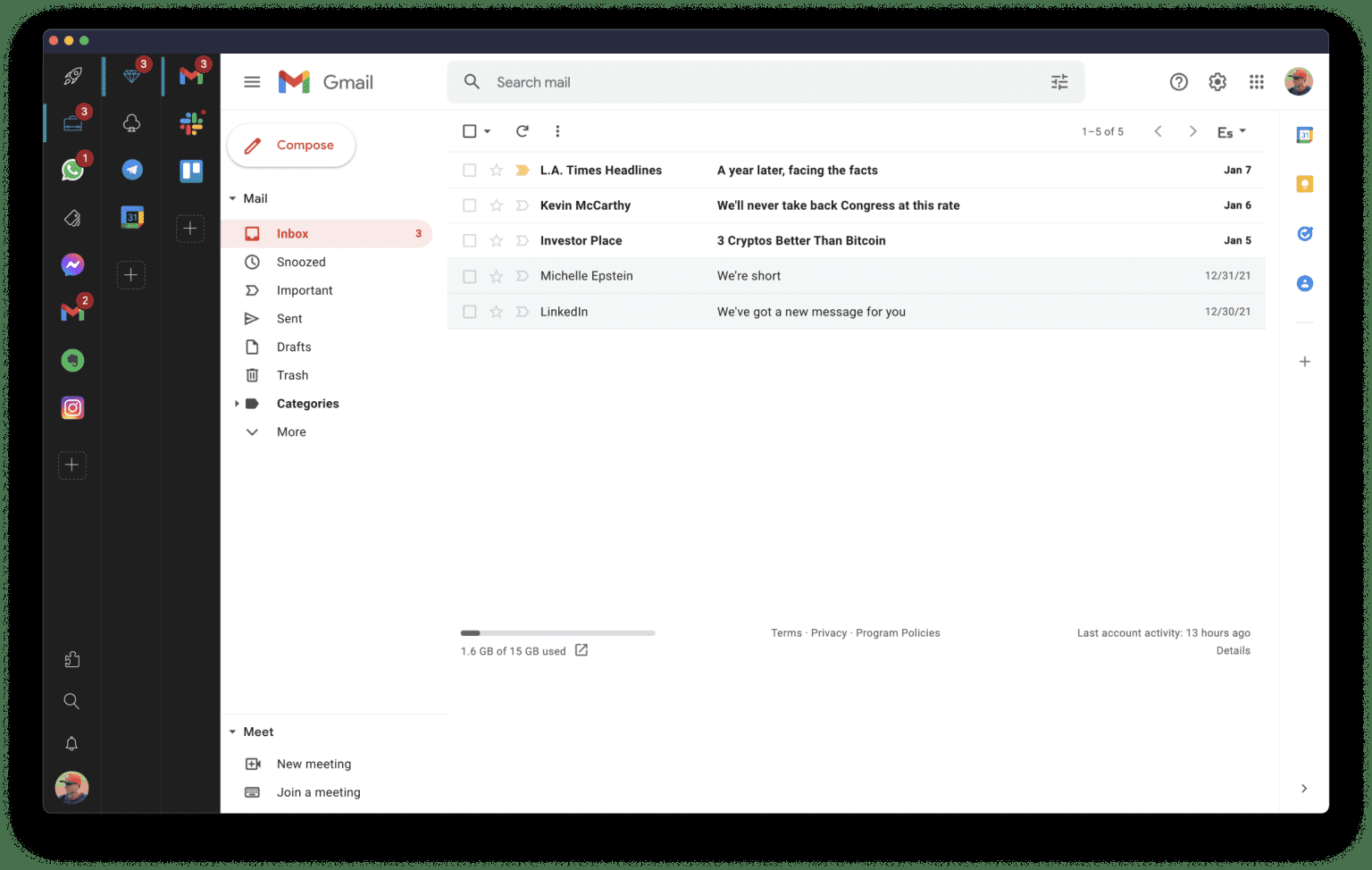
Rambox is a digital workspace organizer that 🚀 boosts productivity for professionals who use web apps frequently. It centralizes all your apps, making it easy to organize and access frequently used applications in one place.
80K+ users across 5,000 companies of all sizes choose Rambox worldwide to simplify their workspace. Select from our list of 700+ apps which you want to use and organize them into different workspaces. You can have multiple sessions of WhatsApp, Gmail, Slack, etc. and stay signed.
Workspaces
With over 700 pre-configured apps, you can instantly add them to your workspace, including:
- Gmail
- Google Apps
- WhatsApp
- Facebook
- iCloud
and much more
And if your app isn't listed, no problem - you can add any custom app in a few easy steps.
Rambox synchronizes app configurations and can disable notifications across all devices in the user dashboard, automatically hibernating inactive apps to free up memory. Plus, users can apply CSS styling and JS code to improve each app's design and performance.
Other features include: dark mode, do not disturb mode, spell checking, ad blocking, password management, notification management, and keyboard shortcuts.
API Access
Has API
No
API Access
Has API
No
Screenshots View All
No images available


Integrations
Acuity Scheduling
No
Agile CRM
No
Alchemer
No
Avora
No
BuzzStream
No
ContentStudio
No
Domo
No
Dribbble
No
Fountain
No
Freedcamp
No
Integrations
Acuity Scheduling
Yes
Agile CRM
Yes
Alchemer
Yes
Avora
Yes
BuzzStream
Yes
ContentStudio
Yes
Domo
Yes
Dribbble
Yes
Fountain
Yes
Freedcamp
Yes
Pricing Details
$0
The Free plan includes 30 credits per month. Pro is $20/month for 600 credits, and Max is $50/month for 1,800 credits. Pro and Max prices are provisional; checkout has not launched, so no payment is currently taken. Access is by invitation during the private preview.
Free Trial
No
Free Version
Yes
Pricing Details
$7 per user per month
Or $5.83 per user per month if billed annually
Free Trial
Yes
Free Version
Yes
Deployment
Web-Based
No
On-Premises
No
iPhone App
No
iPad App
No
Android App
No
Windows
Yes
Mac
No
Linux
No
Chromebook
No
Deployment
Web-Based
No
On-Premises
Yes
iPhone App
No
iPad App
No
Android App
No
Windows
Yes
Mac
Yes
Linux
Yes
Chromebook
No
Customer Support
Business Hours
No
Live Rep (24/7)
No
Online Support
No
Customer Support
Business Hours
No
Live Rep (24/7)
No
Online Support
Yes
Types of Training
Training Docs
Yes
Webinars
No
Live Training (Online)
No
In Person
No
Types of Training
Training Docs
Yes
Webinars
No
Live Training (Online)
No
In Person
No
Vendor Details
Company Name
Lida
Founded
2026
Country
India
Website
trylida.com
Vendor Details
Company Name
Rambox
Founded
2016
Country
United States
Website
rambox.app/
Product Features
Product Features
Digital Workplace
Activity / News Feed
No
Calendar Management
Yes
Chat / Messaging
Yes
Content Management
No
Document Management
Yes
Employee Directory
No
File Sharing
Yes
Knowledge Management
No
Surveys & Feedback
No
Task Management
Yes
Messaging
End-to-End Encryption (E2EE)
No
File Sharing
Yes
Groups / Channels
No
Payments
No
Search / Filter
Yes
Self-Destructing Messages
No
Stickers / GIFs
No
Threaded Discussion
No
Video Conferencing
Yes
Voice Calling
No
Productivity
Collaboration
Yes
Database Creation
No
Document Creation
No
File Sharing
Yes
Notes Management
No
Office Suite
Yes
Presentation Tools
Yes
Project Management
Yes
Task Management
No
Team Chat
No
Team Chat
End-to-End Encryption (E2EE)
No
File Sharing
Yes
Groups / Channels
No
Payments
No
Search / Filter
Yes
Self-Destructing Messages
No
Stickers / GIFs
No
Threaded Discussion
No
Video Conferencing
Yes
Voice Calling
No
Alternatives
No Alternatives
