Average Ratings 0 Ratings
Average Ratings 0 Ratings
Similar Products
-
DaylightDaylight combines cutting-edge agentic AI with top-tier human skills to offer an advanced managed detection and response service that transcends mere notifications, striving to “take command” of your cybersecurity landscape. It ensures comprehensive monitoring of your entire environment, leaving no gaps, while providing context-sensitive protection that adapts and evolves based on your systems and historical incidents, including communications through platforms like Slack. This service boasts an exceptionally low rate of false positives, the quickest detection and response times in the industry, and seamless integration with your existing IT and security tools, accommodating limitless platforms and integrations while delivering actionable insights through AI-enhanced dashboards without unnecessary noise. With Daylight, you receive true comprehensive threat detection and response without the need for escalations, round-the-clock expert assistance, tailored response workflows, extensive visibility across your environment, and quantifiable enhancements in analyst efficiency and response time, all designed to transition your security operations from a reactive stance to a proactive command approach. This holistic approach not only empowers your team but also fortifies your defenses against evolving threats in the digital landscape.
-
TeleRayTeleRay is an industry-first telehealth and image management platform. TeleRay cloud-based medical image management platform allows users to securely share images with professionals (specialists, referring, clinicians) and patients. The platform has many features, including the ability to import or convert DICOM or non DICOM images, query and HL7 connectivity. Integrate with any EMR, view images on an FDA approved viewer anywhere on any device. Complete DICOM image migration is available- set up, training, and implementation is included. Live streaming and remote control of modalities are options and great for many use cases to place professionals virtually in a room any where. TeleRay is the most secure platform with peer 2 peer health and data communication. You can use the app to access workflow tools like waiting rooms, multi-calls, call transfer and sharing of images. It's simple and affordable. More than 3000 locations use our service, including 38 of the top medical centers in more than 20 nations. Get started today for free.
-
ScreencaptScreencapt allows you to record the entire screen or a selected area. You can also record a specific window. Screencapt is the ideal screen recorder because of its flexibility. Using the integrated audio recording you can also add your commentary or system sound directly into the screen recording. This is particularly useful when creating explanation videos or presentations. Screencapt's ability to record a webcam is a special feature. You can now add your comments and reactions to the video. This makes your screen recordings more personal and professional. Screencapt offers advanced options to record the cursor. You can choose to hide the cursor or add special effects to highlight specific actions. This is especially useful for software tutorials and demonstrations where a clear cursor view is required.
-
RemotePeopleRemotePeople helps businesses build international teams through Employer of Record services, recruitment and workforce administration in 150+ countries. Founded in 2018 and based in New York, RemotePeople combines a web platform with dedicated account managers and in-country HR expertise. With EOR, RemotePeople handles local employment contracts, onboarding, payroll, tax administration and statutory benefits while clients manage employees' daily work. EOR Global starts at $499 per employee/month; your rate is confirmed in your quote. EOR Select starts at $199 per employee/month for selected countries and qualifying employee salary ranges. Country and salary conditions apply. Salaries and statutory employer costs are additional; availability and terms vary by country. In-house recruitment and executive search help companies source talent before hiring. Recruitment + EOR costs 2% of annual salary each month for recruitment, plus the EOR fee. Other services include Global Payroll, US Payroll, Contractor Management, Contractor of Record and US PEO. RemotePeople also supports global benefits, equity, visas and immigration, company incorporation, ongoing entity management and transfers from EOR to a client's own entity. Optional support includes employment contracts, legal assistance, background checks, compliance audits, equipment, workplace services, expenses and offboarding. AI Command Center accepts natural-language requests for onboarding, payroll, leave, expenses and contract changes, with expert review of high-impact actions and an audit trail. Employee self-service brings payslips, documents and requests into one platform. Request a demo or country-specific quote; no free trial is offered.
-
Checksum.aiEngineering teams shipping with AI have a new bottleneck: validation. Code output has accelerated. Quality hasn't. Checksum closes the gap. Checksum is a continuous quality platform with a suite of AI agents that handle testing end-to-end, at every stage of the development lifecycle. Where most tools wait for a human to trigger them, Checksum runs autonomously in the background, generating tests, executing them, and repairing failures without manual intervention. Seventy percent of test failures are resolved automatically through real-time auto-recovery. The platform covers every layer: end-to-end UI flows via Playwright, API endpoint chains, and targeted CI tests scoped to exactly what changed in a PR. All tests land as real code in your repository and are delivered as standard Playwright, owned by your team. Checksum is fine-tuned on 1.5+ million test runs and integrates natively with Cursor, Claude Code, and 100+ AI coding agents. Type /checksum and your coding agent's output gets tested before it ever reaches review. Generation and healing happen on Checksum's cloud infrastructure which means no LLM tokens consumed, no local resources required. The result: test suites that stay green as the product evolves, fewer regressions reaching production, and release confidence that scales alongside AI output.
-
Adobe FireflyAdobe Firefly is a versatile AI-powered creative platform designed to help users generate and edit multimedia content with ease. It allows users to create images, videos, and audio using simple text prompts within an interactive and flexible workspace. The platform features tools like generative fill, image editing, and video editing, enabling users to refine and enhance their creations. Firefly also includes quick actions such as background removal, cropping, resizing, and format conversion to streamline workflows. Users can explore an infinite canvas for creative production and experiment with various styles and outputs. The platform encourages creativity by allowing users to remix content from a shared community gallery. With its intuitive design, it reduces the need for advanced technical skills. Firefly integrates AI capabilities to speed up content creation and editing processes. It supports both beginners and professionals in producing high-quality results. Overall, Adobe Firefly provides a powerful and accessible environment for modern digital creativity.
-
ImorgonImprove radiology reporting efficiency and report quality with Imorgon's reporting automation. As the top DICOM SR software for radiology, our solution significantly reduces unnecessary dictation by precisely transferring ultrasound and DEXA modality measurements into Powerscribe, Fluency, or RadAI. This eliminates manual errors and significantly accelerates the generation of reports. Imorgon's unique advantages include: - guaranteed transfer of all measurements - usually DICOM SR - electronic worksheets for direct report population (eliminating dictation from notes) - worksheets with priors, calculators, and clinical decision support (TI-RADS, O-RADS, etc) - integration with Epic and other EHRs. - vendor-neutral Our dedicated support team ensures uninterrupted workflow. Invest in Imorgon for a quick and substantial return on investment, transforming your reporting overhead into a streamlined, high-quality operation.
-
ActCAD SoftwareACTCAD is suitable for professional drawings creation for Architects, Structural Engineers, Civil Engineres, Mechanical Drawings, Electrical drawings, interior design, tool design, machine designs etc.ActCAD is professional grade 2D Drafting and 3D Modeling CAD software which works in dwg and dxf file formats. Most affordable cad software.ActCAD is a native dwg/dxf cad software suitable for professional 2D drafting and 3D modeling projects. ActCAD is trusted by over 30000 users in over 103 countries for more than 10 years. The interface, commands, icons, dialogs, shortcuts etc. are very much similar to other popular cad software tools available in market. Flexible license types available even for single license. There is no learning for existing cad users while saving 80% of the costs.ActCAD offers free email technical support without any limitations. ActCAD can be fully customized and programs can be developed using our free API toolkit. It supports popular programming languages like , lisp dcl, .net, C++ etc. Apart from all regular commands, ActCAD offers many productive tools like pdf to cad converter, Block libraries, Image to Cad converter, handling point sets between Cad and Excel and many more.
-
PDF GuruEasily convert, edit, merge, and compress your PDF files with just a few simple clicks. You can quickly download your document without any hassle, as our PDF converter generates files in mere seconds! To ensure the safety of your digital information, we implement HTTPS encryption while you create PDF files on our site. You can redact PDFs, alter text, insert new elements, and engage in various other tasks, all from a single platform. Our user-friendly interface is designed for seamless navigation, allowing you to utilize our PDF creator with minimal effort. Compatible with every major operating system, our online PDF maker functions flawlessly on Windows, Mac OS, Linux, iOS, and Android. For those who wish to maintain privacy, you have the option to secure your file by locking or restricting access, preventing others from opening, editing, or printing it. This comprehensive tool simplifies your document management and enhances your productivity.
-
OkylineOkyline is an Executable Data Design (EDD) platform focused on executable validation contracts and operational data quality control. Rather than managing separate specifications, validation code, tests, and monitoring dashboards, Okyline centralizes validation and quality supervision around a single readable executable contract acting as the operational reference for enterprise data flows. The same contract powers deterministic validation, advanced business invariant checks, multi-format execution, data quality gates, and historical quality analytics across APIs, events, files, LLM structured outputs, and distributed operational systems. Contracts are designed directly from annotated sample data, making validation rules immediately understandable for developers, architects, QA teams, and business analysts. The Community Edition includes the public specification, a free Java runtime engine, a Claude AI assistant for contract generation, and an online studio supporting executable JSON validation contracts and JSON Schema transpilation. The Enterprise Edition adds native validation for JSONL, XML, CSV, FIXED, and EDI flows together with operational quality dashboards and data quality gates, without requiring databases or centralized infrastructure.erprise Edition supports direct validation of JSON, JSONL, XML, CSV, FIXED, and EDI flows with operational quality dashboards and analytics, without databases.
Description
Kakoune is a remarkably efficient modal text editor that emphasizes real-time feedback and offers powerful, intuitive options for multi-selection. Drawing inspiration from Vim, it presents a unique perspective on modal editing by prioritizing a selection-based workflow, which enhances the natural fluidity of text manipulation. Unlike traditional editors where commands are executed on cursors, Kakoune empowers users by allowing commands to act on selections, thus facilitating precise and rapid editing and navigation. With features such as robust multi-caret editing, context-aware autocompletion, and extensive support for various programming languages, Kakoune is optimized for handling large files and intricate codebases with ease. Its design allows for scripting and extension using shell commands, ensuring seamless integration with UNIX tools and offering users a high degree of customization. Renowned for its remarkable responsiveness and adaptability, Kakoune is particularly well-suited for developers who favor a keyboard-driven interface and value immediate, real-time feedback throughout their editing tasks. This makes it an excellent choice for those looking to enhance their productivity in coding environments.
Description
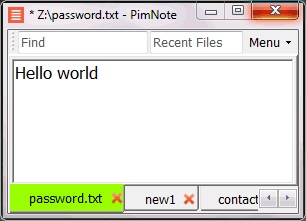
PimNote is a text editor that allows for faster document access. It also combines both the useful and unutilized features of all other text editors.
This tool is designed for knowledge management. You can quickly access the recent file list with a single click. You can easily access an old file that has been opened long ago with the unlimited and searchable recent files list. You can type less with the one-click search and find history feature.
This product is designed for remote work. No freezing from a remote file monitoring/opening/writing when disconnected. You can save files offline by closing the application and not closing the tabs. During file opening, auto-reconnect the network drive. Recurring file notifications are displayed politely on top bar, instead of a popup dialog box that requires frequent actions and tends not to be used.
API Access
Has API
No
API Access
Has API
No


Integrations
C#
Yes
Bash
Yes
C
Yes
C++
Yes
CSS
Yes
Go
Yes
HTML
Yes
Haskell
Yes
Java
Yes
JavaScript
Yes
Integrations
C#
Yes
Bash
No
C
No
C++
No
CSS
No
Go
No
HTML
No
Haskell
No
Java
No
JavaScript
No
Pricing Details
Free
Kakoune is free and open source
Free Trial
No
Free Version
Yes
Pricing Details
No price information available.
Free Trial
No
Free Version
Yes
Deployment
Web-Based
No
On-Premises
No
iPhone App
No
iPad App
No
Android App
No
Windows
No
Mac
Yes
Linux
Yes
Chromebook
No
Deployment
Web-Based
No
On-Premises
No
iPhone App
No
iPad App
No
Android App
No
Windows
Yes
Mac
No
Linux
No
Chromebook
No
Customer Support
Business Hours
No
Live Rep (24/7)
No
Online Support
No
Customer Support
Business Hours
No
Live Rep (24/7)
No
Online Support
Yes
Types of Training
Training Docs
Yes
Webinars
No
Live Training (Online)
No
In Person
No
Types of Training
Training Docs
Yes
Webinars
No
Live Training (Online)
No
In Person
Yes
Vendor Details
Company Name
Kakoune
Website
kakoune.org
Vendor Details
Company Name
Pimtel
Founded
2018
Website
www.pimtel.com/pimnote/
Product Features
Code Editors
API
No
Auto-Complete
No
Code Folding
No
Column Editing
No
Customizable Themes
No
Debugging
No
Formatting / Table Editing
No
Keyboard Shortcuts
No
Multi-Monitor Editing
No
Syntax Highlighting
No
WYSIWYG
No
Text Editors
API
No
Auto-Complete
No
Code Folding
No
Column Editing
No
Customizable Themes
No
Debugging
No
Formatting / Table Editing
No
Keyboard Shortcuts
No
Multi-Monitor Editing
No
Syntax Highlighting
No
WYSIWYG
No
Product Features
Text Editors
API
No
Auto-Complete
No
Code Folding
No
Column Editing
No
Customizable Themes
No
Debugging
No
Formatting / Table Editing
No
Keyboard Shortcuts
No
Multi-Monitor Editing
No
Syntax Highlighting
No
WYSIWYG
No
