Average Ratings 0 Ratings
Average Ratings 0 Ratings
Similar Products
-
Secure EraserSecure Eraser: Secure Data Deletion, Shredders Your Files & Folders. Just because it has been removed from your hard drive doesn't mean that it is gone forever. Anyone can restore the information as long as it was not overwritten. It becomes more difficult if the computer has been resold, or given away. Secure Eraser employs the most well-known method of data disposal. It overwrites sensitive information so that it cannot be recovered even with specialized software. Our award-winning solutions for permanently destroying data eliminate cross-references that may leave traces of deleted files within the allocation table of your hard disk. This Windows software is easy to use and can overwrite sensitive data up to 35 times, regardless of whether they're files, folders or drives, recycle bins, or traces of surfing. You can also delete files that you have already deleted but not for good.
-
FilerevFilerev is a powerful tool that helps you easily find and manage hidden files, duplicate files, large files, and oversized folders, ensuring a streamlined and clutter-free digital workspace. Key features include advanced scanning technology that identifies the unorganized files taking up the most space and cluttering your Google Drive. Filerev enhances productivity by saving time and reducing the frustration of manual file organization. The custom filters and bulk delete tool give you complete control over finding and removing unwanted files in your account. The storage analyzer lets you browse your folders by size to see where the space is being used in your Google Drive. Whether you're an individual, a small business, or a large enterprise, Filerev offers robust solutions tailored to your needs. Visit filerev.com to discover how Filerev can transform your Google Drive experience and boost efficiency.
-
Nutrient SDKNutrient provides an extensive solution for all your PDF requirements, delivering tools that seamlessly operate PDF features across any platform. 1. SDK: Incorporate advanced PDF functionality into iOS, Android, Windows, web, or any cross-platform technology, supplying abilities like PDF viewing, annotation, collaboration, and beyond. 2. Libraries: Employ our powerful .NET and Java libraries to enhance your backend applications with batch processing of redactions and PDF forms, OCR'd scanned text, and PDF document editing, all directly from your application server. 3. Processor: Our agile PDF microservice, Processor, enables rapid generation of PDFs from HTML, including HTML forms, as well as Office-to-PDF conversions, OCR, redaction, and XFDF combining and exporting. 4. PDF API: Take advantage of our hosted PDF API to generate, convert, and alter PDF documents in your workflows. We handle the development and server management, freeing you up to concentrate on your business. At Nutrient, we're not just a tool; we're a committed ally in your success. Gain direct contact with our engineers for expert guidance, utilize comprehensive examples to simplify integration, and make the most of our top-tier documentation.
-
JSCAPE MFT ServerJSCAPE by Redwood is a secure managed file transfer (MFT) software that automates complex file workflows, consolidating manual processes, custom scripts and siloed tools into a single, reliable platform. Low-code automation triggers enable IT teams to orchestrate file transfers across Windows, Linux, macOS, Solaris and any other platform, with unlimited users, trading partners and concurrent connections included and no additional middleware required. JSCAPE delivers enterprise-grade security, backed by an unblemished track record since 1999 and active third-party certifications that most MFT providers don't hold: SOC 2 Type 1 and Type 2, ISO 27001, Drummond Certified™, and FIPS 140-2 and 140-3 validated encryption. Quarterly penetration testing and annual third-party audits keep your environment audit-ready year-round. The solution handles any file size and any protocol — SFTP, FTP/S, HTTP/S, AS2, OFTP2, WebDAV, and more — while meeting compliance requirements for HIPAA, PCI DSS, SOX, GDPR and GLBA. It also fits cleanly into any environment (on-premises, cloud, hybrid, containerized or SaaS), with native integrations for Microsoft Azure, AWS, IBM Cloud, CyberArk, Box, Dropbox and leading workload automation solutions like RunMyJobs. Trusted by 1,000+ organizations in 57+ countries, JSCAPE includes 24/7/365 expert technical support with an 8-minute median response time and online training at no extra cost in every plan. Request a personalized demo today.
-
Thinfinity WorkspaceThinfinity Workspace 7.0's Technical Highlights: - Progressive Web App (PWA) technology for a seamless user experience - Integrated Thinfinity VNC, VirtualUI, and z/Scope for maximum versatility - HTML5 terminal emulation supporting DEC terminals, TN 5220, and TN 3270 protocols - Robust enterprise-grade audit logs for security and compliance management - Proprietary VNC protocol for real-time monitoring and troubleshooting IMPROVE USER EXPERIENCE - Deliver business-critical apps, desktops and files from a single web portal. - Provide simplified remote browser access for your users, while confining them to only the resources that they need. SIMPLIFY IT AND AVOID VPNs - Forget traditional VPN deployments and complexities. - Enable access from Chromebooks, mobile devices or any computer with a Web Browser. Zero setup. KEEP YOUR BUSINESS SECURE - Use enterprise-grade encrypted connections. - Integrate with your existing and external identity platforms. - Apply 2FA or MFA policies with all identity providers.
-
JS7 JobSchedulerJS7 JobScheduler, an Open Source Workload Automation System, is designed for performance and resilience. JS7 implements state-of-the-art security standards. It offers unlimited performance for parallel executions of jobs and workflows. JS7 provides cross-platform job execution and managed file transfer. It supports complex dependencies without the need for coding. The JS7 REST-API allows automation of inventory management and job control. JS7 can operate thousands of Agents across any platform in parallel. Platforms - Cloud scheduling for Docker®, OpenShift®, Kubernetes® etc. - True multi-platform scheduling on premises, for Windows®, Linux®, AIX®, Solaris®, macOS® etc. - Hybrid cloud and on-premises use User Interface - Modern GUI with no-code approach for inventory management, monitoring, and control using web browsers - Near-real-time information provides immediate visibility to status changes, log outputs of jobs and workflows. - Multi-client functionality, role-based access management - OIDC authentication and LDAP integration High Availability - Redundancy & Resilience based on asynchronous design and autonomous Agents - Clustering of all JS7 Products, automatic fail-over and manual switch-over
-
ApifyApify provides the infrastructure developers need to build, deploy, and monetize web automation tools. The platform centers on Apify Store, a marketplace featuring 10,000+ community-built Actors. These are serverless programs that scrape websites, automate browser tasks, and power AI agents. Developers create Actors using JavaScript, Python, or Crawlee (Apify's open-source crawling library), then publish them to the Store. When other users run your Actor, you earn money. Apify manages the infrastructure, handles payments, and processes monthly payouts to thousands of active developers. Apify Store offers ready-to-use solutions for common use cases: extracting data from Amazon, Google Maps, and social platforms; monitoring prices; generating leads; and much more. Under the hood, Actors automatically manage proxy rotation, CAPTCHA solving, JavaScript-heavy pages, and headless browser orchestration. The platform scales on demand with 99.95% uptime and maintains SOC2, GDPR, and CCPA compliance. For workflow automation, Apify connects to Zapier, Make, n8n, and LangChain. The platform also offers an MCP server, enabling AI assistants like Claude to discover and invoke Actors programmatically.
-
Source DefenseSource Defense is an essential element of web safety that protects data at the point where it is entered. Source Defense Platform is a simple, yet effective solution to data security and privacy compliance. It addresses threats and risks that arise from the increased use JavaScript, third party vendors, and open source code in your web properties. The Platform offers options for securing code as well as addressing an ubiquitous gap in managing third-party digital supply chains risk - controlling actions of third-party, forth-party and nth-party JavaScript that powers your website experience. Source Defense Platform provides protection against all types of client-side security incidents, including keylogging, formjacking and digital skimming. Magecart is also protected. - by extending the web security beyond the browser to the server.
-
pCloud BusinesspCloud Business is a cloud storage and file synchronization platform designed for teams that need controlled access, cross-platform compatibility, and predictable storage allocation. It provides centralized file management with granular permissions and optional client-side encryption. Founded in 2013 in Switzerland, pCloud operates under EU-aligned privacy standards and offers data residency in Luxembourg (EU) and Dallas, Texas (US). The platform supports over 23 million users globally. Core Functionality : - Per-User Storage Allocation : 1 TB or 2 TB per user, suitable for small to mid-sized teams and distributed environments. - Virtual File System (pCloud Drive) : Mounts as a local drive on Windows, macOS, and Linux. Files are streamed on demand, reducing local disk usage. - File Sync & Sharing : Folder-level sync, link-based sharing, and permission control (view/edit/manage). Supports password-protected and time-limited links. - Admin & Access Control : Centralized user management, role assignment, and storage distribution via admin console. - Versioning & File History : File versioning with up to 180 days retention, enabling rollback and recovery. - Cross-Platform Support : Native clients for Windows, macOS, Linux, iOS, Android, plus web interface. - Client-Side Encryption (Optional) : Zero-knowledge encryption via pCloud Encryption for sensitive data; encryption keys are not stored server-side. Technical Positioning: - Swiss jurisdiction; GDPR-aligned processing - No file size limits - Works without mandatory ecosystem lock-in (no bundled office suite required) - Compatible with heterogeneous environments (Linux included) Trial : 30-day free trial available for up to 10 users.
-
OkylineOkyline is an Executable Data Design (EDD) platform focused on executable validation contracts and operational data quality control. Rather than managing separate specifications, validation code, tests, and monitoring dashboards, Okyline centralizes validation and quality supervision around a single readable executable contract acting as the operational reference for enterprise data flows. The same contract powers deterministic validation, advanced business invariant checks, multi-format execution, data quality gates, and historical quality analytics across APIs, events, files, LLM structured outputs, and distributed operational systems. Contracts are designed directly from annotated sample data, making validation rules immediately understandable for developers, architects, QA teams, and business analysts. The Community Edition includes the public specification, a free Java runtime engine, a Claude AI assistant for contract generation, and an online studio supporting executable JSON validation contracts and JSON Schema transpilation. The Enterprise Edition adds native validation for JSONL, XML, CSV, FIXED, and EDI flows together with operational quality dashboards and data quality gates, without requiring databases or centralized infrastructure.erprise Edition supports direct validation of JSON, JSONL, XML, CSV, FIXED, and EDI flows with operational quality dashboards and analytics, without databases.
Description
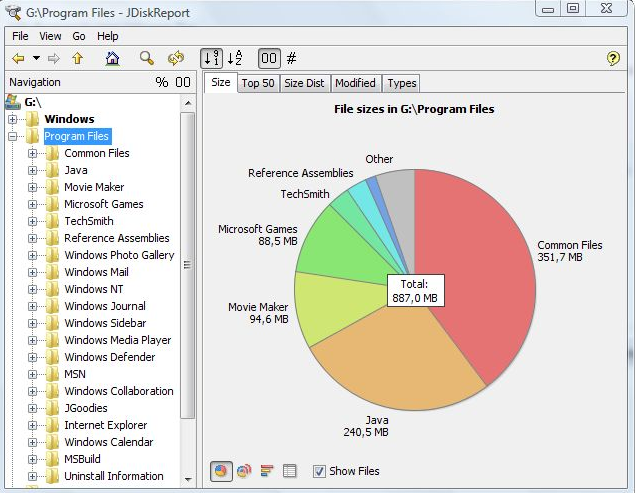
JDiskReport is a useful application that allows users to comprehend the amount of disk space consumed by files and directories while also aiding in the identification of outdated files and folders. The software analyzes your disk drives and compiles various statistics, which can be displayed as summary charts and detailed tables for easier interpretation. It is a completely free, ad-free program that does not have any limitations or expiration dates. This versatile tool is compatible with Windows, Mac, Linux, and other platforms, provided that Java is installed beforehand. Users should ensure that they have Java properly set up prior to installing JDiskReport. The application has been validated across Windows, Mac, and Linux systems, and it is also functional on Solaris and other operating systems that support Java. Additionally, an early version of JDiskReport 2 is currently accessible, which, while less polished than its predecessors from JGoodies, offers a different experience. Although this version is lacking certain features, such as the ability to click on the size pie chart, it can function as a cron job in the background, supplies more detailed information, and showcases a refreshed visual design. As a result, users looking for a robust analysis tool for their disk space management will find JDiskReport to be an invaluable asset.
Description
Wave goodbye to unnecessary bloatware, outdated software, and old backups cluttering your system. It’s time to streamline your computer experience with SpaceSeeker, an intelligent tool that examines your hard drive, reveals what is consuming your space, and enables you to recover gigabytes of precious disk space effortlessly! Rather than merely clearing out your hard drive, SpaceSeeker provides insight into what is genuinely occupying space, allowing you to use your computer longer without it slowing down or running low on storage. With SpaceSeeker in your toolkit, there's no need for expensive cloud storage plans, hardware upgrades, or external hard drives. By optimizing your existing resources, you can work more efficiently and effectively. Our user-friendly visual interface allows you to view all your drives in one convenient location, making it easy to manage your data and implement changes with just a few clicks. Transform your digital workspace into an organized and efficient environment with minimal effort!
API Access
Has API
No
API Access
Has API
No


Integrations
Java
No
Pricing Details
Free
Free Trial
No
Free Version
Yes
Pricing Details
No price information available.
Free Trial
No
Free Version
No
Deployment
Web-Based
No
On-Premises
No
iPhone App
No
iPad App
No
Android App
No
Windows
Yes
Mac
Yes
Linux
Yes
Chromebook
No
Deployment
Web-Based
Yes
On-Premises
No
iPhone App
No
iPad App
No
Android App
No
Windows
No
Mac
No
Linux
No
Chromebook
No
Customer Support
Business Hours
Yes
Live Rep (24/7)
No
Online Support
Yes
Customer Support
Business Hours
Yes
Live Rep (24/7)
No
Online Support
Yes
Types of Training
Training Docs
Yes
Webinars
No
Live Training (Online)
No
In Person
Yes
Types of Training
Training Docs
Yes
Webinars
No
Live Training (Online)
No
In Person
No
Vendor Details
Company Name
JGoodies
Country
Germany
Website
www.jgoodies.com/freeware/jdiskreport/
Vendor Details
Company Name
Solvusoft
Founded
2009
Country
United States
Website
www.solvusoft.com/en/spaceseeker/
