Average Ratings 0 Ratings
Average Ratings 0 Ratings
Similar Products
-
EcholoNEcholoN is a flexible platform for IT Service Management (ITSM), Enterprise Service Management (ESM), Service Desk, Help Desk, Customer Service and Field Service Management. It helps organizations manage service processes, workflows, assets, knowledge and business information in one integrated environment. A key component is the EcholoN Enterprise Application Framework. It enables companies to configure workflows, forms, data structures, roles and business logic and to create individual business applications on the same platform. This allows EcholoN to support requirements beyond traditional ticketing and service management. The platform covers Incident, Request, Problem and Change Management, Service Catalogs, Knowledge Management, IT Asset and Configuration Management, customer and contract processes, complaint management, quality processes, maintenance and technical field service. Workflow automation, rules, notifications, escalations, dashboards and reporting help standardize processes, improve transparency and reduce manual effort. EcholoN can be used across IT and other departments such as customer service, technical service, facilities, HR and quality management. With its modular architecture, integration capabilities and Enterprise Application Framework, EcholoN provides a scalable foundation for ITSM, ESM, Field Service, process automation and custom enterprise applications.
-
ServiceaideServiceaide is an intuitive service management solution which can be implemented within weeks and not months. You will see a real ROI with low administration costs and rapid implementation. Flexible platform that can be used on-premises or in the cloud. Serviceaide is built on ITIL best practice and has all the components that your team requires. You can select the environment that suits your technology, infrastructure, and compliance needs. Serviceaide is a comprehensive and affordable solution that provides IT staff the tools they need to manage everything, from tickets to incident, change, and asset management. Serviceaide features a virtual agent, self service portals, and AI-based functions to support analyst and user productivity. Automate processes in technical workflows, business processes and services to increase business agility.
-
FreshserviceFreshservice is the right choice if you are looking for an IT service desk solution with simplicity. Freshservice is an easy-to-use ITIL service desk from Freshworks that helps businesses modernize IT and other business functions without the complexity and cost. Freshservice provides everything teams need to manage proactive IT services, including asset management, ticketing, configuration management, enhanced impact analysis, robust incident management functions, and more.
-
ServoDeskEasy to use, award-winning Help Desk software for service teams that need to do more with less. Simplisys Service Desk provides flexible solutions for support teams of any size. - Manage multiple data channels with one interface Roles-based access to tickets - Email integration that creates and acknowledges tickets automatically. - Features rich reporting tool and dynamic dashboards. - Roles based Customer Portal - Simple to use business rules and workflows to drive automated processes. - API's for integration with third party software. We offer unparalleled support and market-leading service. Don't waste your time looking through thousands of documents online. Give us a call.
-
SuperOpsSuperOps is the AI-native unified platform for modern MSPs and internal IT teams. It replaces the typical four-to-six-tool IT operations stack - PSA, RMM, helpdesk, MDM, asset tracking, network monitoring, patch management and IT documentation - with a single, built-as-one platform on a shared data layer. That architectural choice is what makes the rest of the platform work, particularly its agentic AI. Monica AI, SuperOps' intelligence layer, was designed alongside the platform from day one. It triages tickets, surfaces patch and CVE risks, drafts worklogs, suggests knowledge base articles, and increasingly handles fully autonomous workflows for routine work. SuperOps supports Windows, macOS, Linux, iOS, iPadOS and Android, integrates with the IT and MSP ecosystem (Slack, Teams, Azure AD, Okta, QuickBooks, Xero, Bitdefender, SentinelOne and more), and bundles Splashtop and ISL Online remote access free. Transparent pricing, fast deployment, founder-led product investment.
-
EZO AssetSonarAssetSonar is a comprehensive IT asset management platform that provides real-time visibility into your entire digital infrastructure. Track and optimize hardware, software, and license management to reduce risks, control IT spend, and improve compliance. AssetSonar is an IT asset management and IT service management platform that provides real-time visibility across your entire digital infrastructure. With native ITSM capabilities, AssetSonar helps track and optimize hardware, software, licenses, and service workflows, reducing risks, controlling IT expenditures, and enhancing compliance. The platform features real-time asset context via its IT Graph, which links tickets, assets, software, and users, enabling faster issue resolution and improved decision-making. With integrated patch management, software governance, and automated workflows, AssetSonar streamlines IT operations, enhances service delivery, and supports more efficient offboarding processes.
-
ZendeskZendesk serves as a robust customer service platform aimed at optimizing support processes and improving the overall experience for customers. With an extensive array of features such as automated AI tools, messaging, live chat, and customizable workflows, it empowers companies to deliver tailored and effective support through various channels. The platform also integrates effortlessly with other applications and offers real-time analytics, enabling organizations to make informed, data-backed choices. Designed to accommodate businesses of any scale—from emerging startups to established corporations—Zendesk prioritizes scalability, security, and the satisfaction of its users. Ultimately, its versatile solutions ensure that companies can adapt their customer service approach to meet evolving demands efficiently.
-
AuvikAuvik Network Management is a network management and monitoring software designed to empower IT professionals with deep visibility, automation, and control over their network infrastructure. This innovative platform is trusted by businesses of all sizes to streamline network operations, enhance security, and optimize performance. One of Auvik's standout features is its real-time network mapping and discovery capabilities. It automatically generates interactive, visual maps of your network topology, allowing you to easily identify devices, connections, and potential bottlenecks. This invaluable insight helps in planning and optimizing network architecture for maximum efficiency.
-
ScreenMeetScreenMeet offers a suite of secure, browser-based remote support and screen-sharing tools designed to enhance customer service and IT support. With capabilities like remote desktop access, live voice and video support, co-browsing, and asynchronous screen recording, ScreenMeet allows agents to assist customers or employees seamlessly. It integrates with major ITSM, CRM, and contact center platforms such as ServiceNow, Salesforce, and Microsoft Dynamics 365, providing a unified support experience. Designed for enterprises, ScreenMeet ensures high security, scalability, and flexibility, making it ideal for businesses aiming to improve support efficiency and customer satisfaction.
-
ISL Light Remote DesktopISL Light is a remote desktop software that is easy to use for security-conscious users. It offers great value-performance. ISL Light is a powerful tool for IT staff and support personnel to solve problems remotely via remote support, unattended access, or screen-sharing from mobile devices. It is cross-platform and provides 256-bit encrypted sessions, all the standard remote access features, as well as session recording, chat, videocall and multi-monitor support, file transfers, reporting, and many other important extras. Users can choose between cloud and on-premise services. ISL Online license doesn't limit the number or workstations of clients, users, and users you can support. It is a reliable, highly secure software that can be used in all industries, including banks, hospitals, government institutions, and insurances.
Description
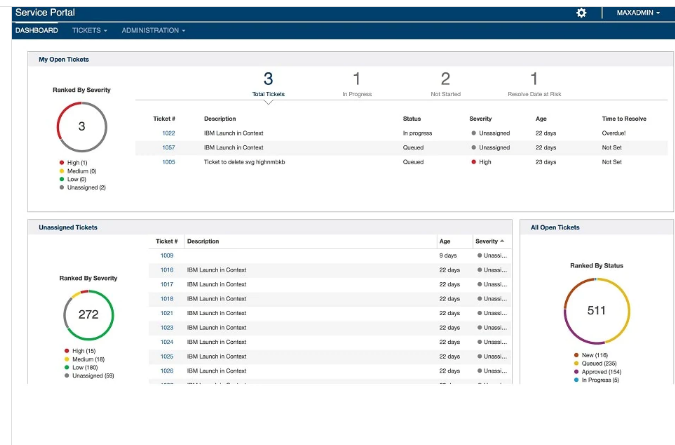
Experience user-friendly self-service options, automated service management, and seamlessly integrated service desk features that adhere to industry best practices. The complexity of managing multi-vendor and multicloud environments continues to rise. IBM Control Desk delivers the essential IT service management (ITSM) needed to streamline the support for both users and infrastructure. By utilizing self-service and automated management, it effectively lowers costs while enhancing user satisfaction through its integrated service desk capabilities based on best practices. Users can make selections from the Service Catalog and Enterprise App Store, allowing them to deploy approved software and access services directly to their devices without needing assistance from IT personnel. Additionally, IT professionals can take advantage of process automation grounded in best practices, collaborative knowledge and problem management, and maintain visibility over assets, configurations, and changes. This enables the management of IT services and operations in alignment with overarching business goals and commitments, ultimately fostering a more efficient and responsive IT environment.
Description
StaffMap 4 boasts a range of new features and improvements, including the ability to import Desks and Assets, a REST API, integration with Azure AD, support for SQL Server databases, Annotations, part-time desk assignments, and the display of Assets and Desks on Maps, along with enhanced themes. You can effectively track all employees, desks, and assets via your company’s floorplans, and quickly find any employee by inputting their name, extension, title, and more. The application is designed to run seamlessly in a standard browser on any device, including mobile phones and tablets, enabling you to manage your floorplans from virtually anywhere at any time. For organizations with their own onsite servers or specific policies that necessitate software operating within their firewall, the self-hosted option may be the most suitable choice. This version allows for direct integration with your Active Directory server, a feature not available in the cloud version. If your intention is to import or synchronize data with Active Directory, opting for the self-hosted solution could prove to be the best decision for your needs. Ultimately, choosing the right deployment option will depend on your organization's specific requirements and infrastructure preferences.
API Access
Has API
No
API Access
Has API
No


Integrations
IBM Cloud Pak for Applications
Yes
IBM Cloud Pak for Data
Yes
IBM Cloud Pak for Integration
Yes
IBM Cloud Pak for Network Automation
Yes
Integrations
IBM Cloud Pak for Applications
No
IBM Cloud Pak for Data
No
IBM Cloud Pak for Integration
No
IBM Cloud Pak for Network Automation
No
Pricing Details
No price information available.
Free Trial
Yes
Free Version
No
Pricing Details
$89 one-time payment
Free Trial
Yes
Free Version
Yes
Deployment
Web-Based
Yes
On-Premises
No
iPhone App
No
iPad App
No
Android App
No
Windows
No
Mac
No
Linux
No
Chromebook
No
Deployment
Web-Based
No
On-Premises
Yes
iPhone App
No
iPad App
No
Android App
No
Windows
Yes
Mac
No
Linux
No
Chromebook
No
Customer Support
Business Hours
No
Live Rep (24/7)
No
Online Support
Yes
Customer Support
Business Hours
Yes
Live Rep (24/7)
No
Online Support
Yes
Types of Training
Training Docs
Yes
Webinars
No
Live Training (Online)
No
In Person
No
Types of Training
Training Docs
Yes
Webinars
No
Live Training (Online)
No
In Person
Yes
Vendor Details
Company Name
IBM
Founded
1911
Country
United States
Website
www.ibm.com/products/it-service-management
Vendor Details
Company Name
Staffmap Software
Founded
2003
Country
Canada
Website
staffmap.com
Product Features
ITSM
Asset Tracking
No
Availability Management
No
Change Management
No
Configuration Management
No
Contract/License Management
No
Dashboard
No
Incident Management
No
Problem Management
No
Project Management
No
Release & Deployment Management
No
Self Service Portal
No
Service Desk
CMDB
No
Change Management
No
IT Asset Management
No
Incident Management
No
Knowledge Base
No
Mobile Access
No
Procurement Management
No
Remote Control
No
SLA Management
No
Self Service Portal
No
Product Features
Facility Management
Asset Management
Yes
Commercial Properties
Yes
Equipment Management
Yes
Facility Scheduling
Yes
Incident Management
Yes
Inspection Management
Yes
Inventory Control
Yes
Maintenance Tracking
Yes
Preventive Maintenance
No
Residential Properties
Yes
Room Scheduling
Yes
Schools
Yes
Space Planning
Yes
Vendor Management
Yes
Visitor Management
Yes
Work Order Management
No
