Wave Browser Reviews

Wave Browser

4.9 out of 5 stars
Learn More for Wave Browser

Average Ratings 61 Ratings

Total 4.5 out of 5 stars
ease 5 out of 5 stars
features 4.5 out of 5 stars
design 4.5 out of 5 stars
support 4.5 out of 5 stars

Average Ratings 52 Ratings

Total 5 out of 5 stars
ease 5 out of 5 stars
features 5 out of 5 stars
design 5 out of 5 stars
support 5 out of 5 stars

Description

Google Chrome is a modern web browser created to deliver speed, security, and productivity in one streamlined experience. Developed by Google, it works smoothly across operating systems and devices, making browsing consistent wherever you sign in. Chrome includes built-in AI tools like Gemini in Chrome, allowing users to summarize content, answer complex questions, and complete tasks using open tabs as context. The browser enhances searching with AI Mode directly in the address bar for deeper, more interactive results. Google Lens lets users search, translate, and identify objects directly from images or webpages. Chrome’s password manager automatically saves and generates strong passwords for safer browsing. Enhanced Safe Browsing actively warns users about phishing, malware, and harmful sites. Chrome offers extensive customization through themes, extensions, and tab management tools. Sync features keep bookmarks, payment methods, and saved data available across devices. Automatic updates ensure Chrome remains fast, stable, and secure without manual effort.

Description

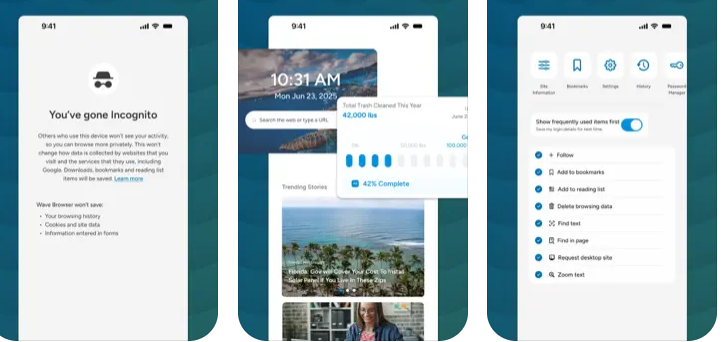
Wave Browser is designed for people who want a safer, faster, and more meaningful way to explore the web. Built on strong security principles, Wave puts you in control of your privacy with customizable cookie and tracker blocking, incognito mode, and clear permission choices. AppEsteem Certification ensures Wave meets strict, independently verified standards for clean installation, transparent behavior, and responsible software practices, giving you confidence every time you browse. Wave is also built for productivity, offering tools that help you stay organized and move through information with purpose. Tab grouping, bookmarks, and a reading list keep ideas within reach, while split screen let you research, compare, or watch without switching between windows. Memory Saver mode helps your device stay fast during heavy sessions, and the built-in AI Assistant and messaging integrations bring your favorite tasks closer to a single click. Designed to be simple and user-friendly, Wave Browser removes friction from everyday browsing. The free ad blocker keeps pages clean, and built-in tools—like the converter, package tracker, price tracker, translation tool, stock tracker, and content notifier—help you get things done without extra extensions. Most importantly, Wave is a browser with real ocean impact built in. Through a certified partnership with 4ocean, Wave helps fund the removal of 100,000 pounds of trash from our ocean, rivers, and coastlines every year. A live impact tracker shows exactly how much waste the Wave community has helped remove, with verified monthly updates from cleanup crews in the U.S., Indonesia, and the Dominican Republic. With Wave Browser, your everyday browsing directly supports a cleaner planet and the people working to protect it.

API Access

Has API Yes 

API Access

Has API No 

Screenshots View All

Screenshots View All

Integrations

JavaScript Yes 
8th Wall Yes 
AZcaptcha Yes 
Casper AI Yes 
Chrome Sidekick Yes 
Coinhub Yes 
DigiRisk Yes 
Enhanced Image Viewer Yes 
ExplainDev Yes 
GoGetSSL Yes 
Google Yes 
Idobata Yes 
Kurator Yes 
MadNotes Yes 
MaxAI Yes 
Olvy Yes 
Prodsmart Yes 
Smart Tabs Organizer Yes 
Supernormal Yes 
Voila Yes 

Integrations

JavaScript Yes 
8th Wall No 
AZcaptcha No 
Casper AI No 
Chrome Sidekick No 
Coinhub No 
DigiRisk No 
Enhanced Image Viewer No 
ExplainDev No 
GoGetSSL No 
Google No 
Idobata No 
Kurator No 
MadNotes No 
MaxAI No 
Olvy No 
Prodsmart No 
Smart Tabs Organizer No 
Supernormal No 
Voila No 

Pricing Details

Free
Free Trial No 
Free Version Yes 

Pricing Details

Free
Wave Browser is completely free to use.
Free Trial Yes 
Free Version Yes 

Deployment

Web-Based No 
On-Premises No 
iPhone App Yes 
iPad App Yes 
Android App Yes 
Windows Yes 
Mac Yes 
Linux Yes 
Chromebook Yes 

Deployment

Web-Based No 
On-Premises No 
iPhone App Yes 
iPad App Yes 
Android App Yes 
Windows Yes 
Mac Yes 
Linux No 
Chromebook No 

Customer Support

Business Hours No 
Live Rep (24/7) No 
Online Support No 

Customer Support

Business Hours Yes 
Live Rep (24/7) No 
Online Support Yes 

Types of Training

Training Docs Yes 
Webinars No 
Live Training (Online) No 
In Person No 

Types of Training

Training Docs Yes 
Webinars No 
Live Training (Online) No 
In Person Yes 

Vendor Details

Company Name

Google

Founded

1998

Country

United States

Website

www.google.com/chrome/

Vendor Details

Company Name

Wave Browser

Country

Cayman Islands

Website

wavebrowser.co

Product Features

Ad Blockers

Wave Browser features an effective, complimentary ad blocker that eliminates disruptive advertisements, pop-ups, and covert trackers, ensuring a faster, more streamlined, and secure online experience. By intercepting the majority of unwanted scripts prior to their loading, Wave Browser enhances loading times and minimizes the chances of encountering harmful threats. With its user-friendly design and seamless interface, navigating the web becomes a breeze. Additionally, privacy options and security measures are integrated to safeguard your online activities. Wave Browser is designed to empower you to explore the internet confidently, reducing distractions and providing enhanced control.

Productivity

Wave Browser is designed to enhance your productivity by integrating essential features into a sleek and minimalist interface that promotes focus throughout your day. It offers a variety of tools, including a reading list, bookmarks, price and package tracking, and a multifunctional converter, all organized within the browser—eliminating the need for additional applications. The handy sidebar provides instant access to your favorite tools and apps, while the split view functionality allows you to work with two pages simultaneously, making it ideal for studying, research, comparisons, or efficient multitasking. Wave Browser’s fluid interface creates a seamless workspace, enabling effortless transitions between tasks. Additionally, each user’s activity contributes to verified ocean cleanup efforts, ensuring that your browsing has a meaningful impact on the world.

Collaboration No 
Database Creation No 
Document Creation No 
File Sharing No 
Notes Management No 
Office Suite No 
Presentation Tools No 
Project Management No 
Task Management No 
Team Chat No 

Web Browsers

Wave Browser is a cutting-edge web browser that leverages the Chromium framework to provide a seamless, modern browsing experience focused on clarity, safety, and efficiency. It comes equipped with a variety of integrated tools and extensions designed to enhance your work, study, and gaming activities. With a strong emphasis on privacy and robust security measures, your online activities remain protected. The browser features a sleek, ocean-themed interface that is both user-friendly and aesthetically pleasing, making it perfect for daily use. Whether you're conducting research, creating content, or simply navigating the internet, Wave Browser ensures quick and dependable performance without being intrusive. Additionally, each user contributes to verified ocean cleanup efforts, turning every browsing session into a significant step towards a healthier planet.

Alternatives

Shift Reviews

Shift

Shift Technologies Inc.
4.3 out of 5 stars

Alternatives

Wave Browser Reviews

Wave Browser

4.9 out of 5 stars
Brave Browser Reviews

Brave Browser

Brave Software
4.4 out of 5 stars
Opera Air Reviews

Opera Air

Opera
Kasm Workspaces Reviews

Kasm Workspaces

Kasm Technologies
4.8 out of 5 stars
Brave Browser Reviews

Brave Browser

Brave Software
4.4 out of 5 stars
Opera One Reviews

Opera One

Opera Software
5.0 out of 5 stars