Average Ratings 0 Ratings
Average Ratings 0 Ratings
Similar Products
-
Wave BrowserWave Browser is designed for people who want a safer, faster, and more meaningful way to explore the web. Built on strong security principles, Wave puts you in control of your privacy with customizable cookie and tracker blocking, incognito mode, and clear permission choices. AppEsteem Certification ensures Wave meets strict, independently verified standards for clean installation, transparent behavior, and responsible software practices, giving you confidence every time you browse. Wave is also built for productivity, offering tools that help you stay organized and move through information with purpose. Tab grouping, bookmarks, and a reading list keep ideas within reach, while split screen let you research, compare, or watch without switching between windows. Memory Saver mode helps your device stay fast during heavy sessions, and the built-in AI Assistant and messaging integrations bring your favorite tasks closer to a single click. Designed to be simple and user-friendly, Wave Browser removes friction from everyday browsing. The free ad blocker keeps pages clean, and built-in tools—like the converter, package tracker, price tracker, translation tool, stock tracker, and content notifier—help you get things done without extra extensions. Most importantly, Wave is a browser with real ocean impact built in. Through a certified partnership with 4ocean, Wave helps fund the removal of 100,000 pounds of trash from our ocean, rivers, and coastlines every year. A live impact tracker shows exactly how much waste the Wave community has helped remove, with verified monthly updates from cleanup crews in the U.S., Indonesia, and the Dominican Republic. With Wave Browser, your everyday browsing directly supports a cleaner planet and the people working to protect it.
-
ShiftShift puts you in control of your browser. Arrange apps, bars, and controls exactly where you want them, building a personalized workspace that works around you — not the other way around. Connect over 1,500 web apps, jump between dedicated Spaces for work, side hustles, and personal browsing, and manage multiple accounts without ever logging in and out. As a pioneer in carbon-neutral browsing, Shift is committed to rethinking what a browser can be — for the people who use it and the world they live in. Started in Victoria, British Columbia in 2016, Shift is a Certified B Corp and proud member of the Redbrick portfolio. What you can do with Shift: - Build your browser: Design a layout tailored to how you use the internet. - Create Spaces: Keep work, side hustles, and passion projects in their own lane. - Integrate Apps: Bring your favorite web apps together in one place. - Templates: Pick from 6 ready-made layouts to get started fast. - Shift AI: A built-in AI assistant that helps you get more done across every tab and app.
-
Kasm WorkspacesKasm Workspaces streams your workplace environment directly to your web browser…on any device and from any location. Kasm is revolutionizing the way businesses deliver digital workspaces. We use our open-source web native container streaming technology to create a modern devops delivery of Desktop as a Service, application streaming, and browser isolation. Kasm is more than a service. It is a platform that is highly configurable and has a robust API that can be customized to your needs at any scale. Workspaces can be deployed wherever the work is. It can be deployed on-premise (including Air-Gapped Networks), in the cloud (Public and Private), or in a hybrid.
-
HERE Enterprise BrowserEverything works right here™. The product of years of collaboration with the world’s largest financial institutions, HERE Enterprise Browser is the first and only browser that solves both enterprise security and workforce productivity. Built on Google Chromium, HERE streamlines workflow and improves employee experience.
-
Private Internet Access (PIA)Browse without revealing your identity by using a private IP address and activating robust encryption to safeguard your online activities from your internet service provider and unsecured public Wi-Fi connections. Experience limitless connectivity with our anonymous VPN service, allowing you to bypass geographical restrictions and protocol limitations effortlessly. Whether you're focused on browsing or streaming content, Private Internet Access guarantees reliable performance. With the most extensive network capacity globally, Private Internet Access ensures top-notch speeds and superior encryption levels. Notably, it is the only VPN service worldwide that has consistently maintained a no-logs policy, providing peace of mind for its users. Take control of your online privacy and enjoy a seamless internet experience.
-
Iris Identity ProtectionIris provides integration-ready identity and cyber protection solutions that help organizations add powerful customer security capabilities directly into their existing products — without building from scratch. Designed for modern digital platforms, Iris makes it easy to embed identity protection into apps, portals, and customer experiences at scale. Identity Protection API Iris’ API suite delivers a multitude of protection solutions—including dark web monitoring & alerts, credit services, risk assessment tools, device protection, and more—into your platform. Teams can fully control the user experience, data flows, and customer journeys while leveraging Iris’ underlying technology and data aggregation. Micro-Experiences Prebuilt, customizable UI components that can be embedded directly into your application. These lightweight modules allow teams to quickly deploy identity protection features — such as alerts, dashboards, and monitoring tools — with minimal development effort. Built for flexibility, Iris supports multiple integration approaches, enrollment methods, and data handling models, so organizations can choose how information flows between users, their systems, and Iris. The platform is designed to scale across large user bases while maintaining strong security and performance standards. By making identity protection a native part of the user experience, Iris helps organizations increase engagement, strengthen trust, and deliver meaningful, always-on protection to their customers.
-
Adaptive SecurityAdaptive Security is OpenAI’s investment for AI cyber threats. The company was founded in 2024 by serial entrepreneurs Brian Long and Andrew Jones. Adaptive has raised $50M+ from investors like OpenAI, a16z and executives at Google Cloud, Fidelity, Plaid, Shopify, and other leading companies. Adaptive protects customers from AI-powered cyber threats like deepfakes, vishing, smishing, and email spear phishing with its next-generation security awareness training and AI phishing simulation platform. With Adaptive, security teams can prepare employees for advanced threats with incredible, highly customized training content that is personalized for employee role and access levels, features open-source intelligence about their company, and includes amazing deepfakes of their own executives. Customers can measure the success of their training program over time with AI-powered phishing simulations. Hyper-realistic deepfake, voice, SMS, and email phishing tests assess risk levels across all threat vectors. Adaptive simulations are powered by an AI open-source intelligence engine that gives clients visibility into how their company's digital footprint can be leveraged by cybercriminals. Today, Adaptive’s customers include leading global organizations like Figma, The Dallas Mavericks, BMC Software, and Stone Point Capital. The company has a world class NPS score of 94, among the highest in cybersecurity.
-
AdmiralAdmiral is the top adblock recovery platform for publishers, helping recover millions of dollars in advertising revenue lost to adblockers, privacy tools, DNS filtering, VPNs, network-level blocking, and other forms of monetization disruption. Trusted by thousands of publishers and backed by more than a decade of expertise, Admiral pioneered Full Spectrum Adblock Recovery—combining multiple recovery approaches to maximize total adblock revenue. As the creator of Visitor Relationship Management (VRM), Admiral extends beyond ad recovery to help publishers recover and grow revenue through subscriptions, registrations, consent management, first-party data, email acquisition, social audience growth, donations, and other visitor monetization strategies. By combining recovery and revenue-growth approaches in one platform, Admiral helps publishers reduce revenue leakage, increase visitor lifetime value, and maximize monetization across the audience lifecycle. Admiral VRM delivers: * Industry-leading Full Spectrum Adblock Recovery * Paid subscriptions, paywalls, and donation campaigns * Visitor Copilot conversational AI for engagement and revenue growth * Registration walls, user accounts, and first-party data * Email, social audience, and app growth * GDPR and CCPA consent management Admiral also provides analytics, journey shaping, visitor segmentation, targeting, testing, and optimization. Publishers can add Admiral's free tag in minutes for immediate visibility into adblock rates and revenue recovery potential.
-
GaffaGaffa is a REST API built for web scraping and browser automation, allowing developers to run real, full browsers at scale with a single API call. It removes the difficulty of managing headless browser frameworks, rotating proxies, CAPTCHA solving, and scaling infrastructure, all of which are handled automatically. JavaScript-heavy and dynamic websites render exactly as they would for a human visitor by default. Beyond standard scraping, Gaffa supports AI-driven structured data extraction (extract data into a defined schema without writing CSS selectors), screenshot and PDF capture, infinite-scroll and form-filling automation, and clean Markdown conversion for feeding webpages directly into LLM and RAG pipelines. A rotating residential proxy network keeps access reliable across regions, and a credit-based pricing model means teams pay only for the browser time and bandwidth they actually use. Gaffa is designed for AI engineers, data teams, and developers who want production-grade web data extraction without having to build and maintain their own infrastructure.
-
Resco Inspections+Resco Inspections+ is a versatile digital solution designed for industries like construction, manufacturing, oil and gas, nonprofits, utilities, and property management. The platform helps organizations move away from paper forms by transforming audits, inspections, surveys, and checklists into fully customizable digital workflows. With native integration with Dynamics 365 and Salesforce, it allows you to extend CRM/ERP data beyond the office, ensuring you can collect and update field data effortlessly. The offline-first architecture is essential for environments where connectivity is unreliable, such as remote oil rigs, construction sites, garages, or even crowded cities. Field technicians, auditors, and inspectors can capture critical data without interruption, and the advanced sync engine ensures it syncs automatically once a connection is available. Inspections+ includes a drag-and-drop questionnaire builder with smart questions, business logic, rules, and media capture, enabling easy no-code customization for safety checks, compliance reports, or trial audits. With real-time data insights, organizations can streamline processes, reduce errors, and make informed decisions on the go.
Description
The latest intelligent adaptive algorithm enhances dark mode, delivering improved visual effects that safeguard your eyesight while conserving battery life. Users can enjoy a genuinely immersive browsing experience in full-screen mode. Articles are presented in a thoughtfully designed layout free from ads and other distractions. The browser supports viewing Markdown, JSON, and PDF files seamlessly. By utilizing over 150,000 rules, it effectively blocks ads and trackers, resulting in a faster experience while also prioritizing user privacy. Features such as floating windows, picture-in-picture, and AirPlay compatibility offer versatility. With boundless power and endless possibilities, this mobile browser is the first to support Tampermonkey-compatible user scripts, allowing users to unlock their coding potential. Furthermore, users can debug, inspect elements, and design web pages directly from their devices. The browser also boasts a range of iPadOS-optimized features aimed at enhancing productivity and the overall browsing experience. With advanced tools at your disposal, you can dissect performance data and gain deeper insights into your online activities, ultimately unlocking new levels of efficiency.
Description
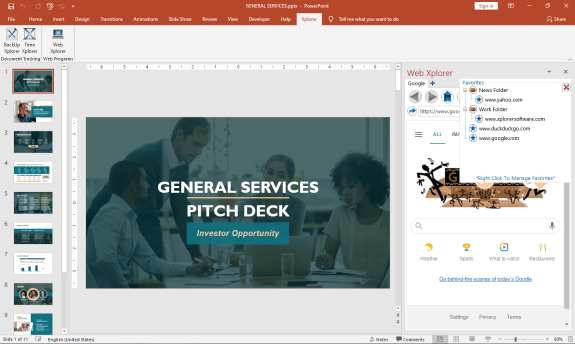
The First MS Office Task Pane Integrated Fully Functionally Web Browser.
Browse the Web and do your research right from your MS Office Task Pane.
*Viewing can be switched to mobile format to take advantage of space constraints
*Save Your Favorites for Easy Navigation
*Save Your Passwords for Your Most Visited Sites
*Set up multiple tabs to open automatically when you open the app
*View Browser Compatible Documents, Audio, Video, and Images (.pdf) right in the Task Pane
You can increase your productivity by never leaving your active screen.
Works with:
Word
API Access
Has API
No
API Access
Has API
No




Integrations
Microsoft Excel
No
Microsoft Outlook
No
Microsoft PowerPoint
No
Microsoft Project
No
Microsoft Word
No
SMS Deliverer
No
Integrations
Microsoft Excel
Yes
Microsoft Outlook
Yes
Microsoft PowerPoint
Yes
Microsoft Project
Yes
Microsoft Word
Yes
SMS Deliverer
Yes
Pricing Details
$2.99 per month
Free Trial
No
Free Version
Yes
Pricing Details
$29.00
FREE 7 day trial. Purchase a perpetual license that is good for 2 users.
Free Trial
Yes
Free Version
No
Deployment
Web-Based
No
On-Premises
No
iPhone App
Yes
iPad App
Yes
Android App
No
Windows
No
Mac
No
Linux
No
Chromebook
No
Deployment
Web-Based
No
On-Premises
No
iPhone App
No
iPad App
No
Android App
No
Windows
Yes
Mac
No
Linux
No
Chromebook
No
Customer Support
Business Hours
No
Live Rep (24/7)
No
Online Support
Yes
Customer Support
Business Hours
No
Live Rep (24/7)
No
Online Support
Yes
Types of Training
Training Docs
No
Webinars
No
Live Training (Online)
No
In Person
No
Types of Training
Training Docs
Yes
Webinars
No
Live Training (Online)
No
In Person
No
Vendor Details
Company Name
Gear Project
Country
China
Website
gear4.app/
Vendor Details
Company Name
Breakthrough Applications
Founded
2020
Country
United States
Website
www.xplorersoftware.com
