Paessler PRTG
4.8 out of 5 starsAverage Ratings 0 Ratings
Average Ratings 109 Ratings
Similar Products
-
UptimeRobotThe ultimate uptime monitoring service. Get 50 monitors with 5-minute checks completely free. Set up in seconds and stay informed about your website’s health at all times. Website monitoring: Get instant alerts when your website goes down. Reliable and accurate monitoring helps you fix issues before they affect users and prevent revenue loss. SSL certificate monitoring: Avoid losing visitors due to expired SSL certificates. Get notified 30 days before expiration so you can renew in time. Ping and port monitoring: Check if your server is online or if your email service is running on port 465. Monitor any port you need with real-time alerts. Cron job monitoring: Track scheduled tasks with heartbeat monitoring. We verify if the request arrives on time, making sure server-side jobs and internet-connected devices are running properly. Status pages: Create up to 100 branded status pages, protect them with a password, and allow subscribers to receive updates. Stay informed with email, SMS, voice calls, push notifications, or integrations with Slack, Zapier, PagerDuty, Telegram, Discord, Microsoft Teams, Google Chat, and more. Maintenance windows: Pause monitoring when you schedule downtime to avoid unnecessary alerts
-
Elecard BoroElecard Boro is a professional software solution designed to monitor video stream health and track QoS/QoE parameters across distributed networks. By providing centralized access to statistics and automated reporting, Boro enables telecom professioals to build a powerful monitoring ecosystem from scratch or easily scale existing infrastructure to ensure flawless broadcast quality. How it works: Boro utilizes distributed software probes to monitor UDP, RTP, HTTP, HLS, DASH, SRT, and RTMP streams. By aggregating multi-point measurements on a centralized server, operators can instantly isolate quality degradation across the entire delivery chain. The platform provides network-wide visibility and real-time alerts for ETSI TR 101 290 errors via Email, SNMP, Webhook, PagerDuty, and Telegram. Key Features: • Rapid Deployment & Scalability: Launch a monitoring probe in just 30 minutes. Easily scale your infrastructure by adding new probes to the unified Boro ecosystem on any hardware. • Proactive Issue Resolution: Monitor over 50 QoS and QoE parameters (including full ETSI TR 101 290 compliance) and use triggers to localize network anomalies before they impact viewers. • Advanced Diagnostics: Use comprehensive analysis of SCTE-35 ad-insertion cues and PCAP stream recording for in-depth delivery troubleshooting. • Effortless Integration & Access: Access monitoring data from any device via an intuitive web interface. Seamlessly integrate Boro into your existing workflow using WebHook, SNMP, and ControlAPI. • Operational Efficiency: Reduce the workload on QA and network engineers through automated regular reporting, advanced visualization dashboards, and smart threshold tuning that eliminates false alarms.
-
AdRem NetCrunchNetCrunch is commercial, self-hosted, agentless network and IT infrastructure monitoring software for Windows Server. It monitors network devices, servers, virtualization platforms, cloud services, applications, websites, logs, telemetry, and network traffic across distributed environments. NetCrunch supports 680+ monitoring targets and provides 270+ ready-to-use Monitoring Packs for devices, applications, and operating systems. Policy-based monitoring automatically applies monitoring settings, Monitoring Packs, thresholds, and alerts to matching devices and systems. Licensing is based on monitored nodes and network interfaces rather than individual sensors, checks, or metrics. NetCrunch provides real-time dashboards and automatic Layer 2 and routing topology maps for visibility into network status and performance. Network traffic analysis supports NetFlow, sFlow, IPFIX, and other flow technologies. Its alerting system supports event correlation, dependency-aware suppression, predictive thresholds, escalation, and 40+ automated response actions, including scripts, notifications, API calls, and integrations with external systems. Distributed Monitoring Probes extend monitoring to remote and isolated locations. NetCrunch also provides a REST API for integration and automation with external IT management, service management, and operational systems. NetCrunch is self-hosted on Windows Server and can monitor on-premises, air-gapped, cloud, and hybrid IT environments.
-
SuperOpsSuperOps is the AI-native unified platform for modern MSPs and internal IT teams. It replaces the typical four-to-six-tool IT operations stack - PSA, RMM, helpdesk, MDM, asset tracking, network monitoring, patch management and IT documentation - with a single, built-as-one platform on a shared data layer. That architectural choice is what makes the rest of the platform work, particularly its agentic AI. Monica AI, SuperOps' intelligence layer, was designed alongside the platform from day one. It triages tickets, surfaces patch and CVE risks, drafts worklogs, suggests knowledge base articles, and increasingly handles fully autonomous workflows for routine work. SuperOps supports Windows, macOS, Linux, iOS, iPadOS and Android, integrates with the IT and MSP ecosystem (Slack, Teams, Azure AD, Okta, QuickBooks, Xero, Bitdefender, SentinelOne and more), and bundles Splashtop and ISL Online remote access free. Transparent pricing, fast deployment, founder-led product investment.
-
NinjaOneNinjaOne automates the hardest parts of IT, empowering more than 20,000 IT teams. By providing deep insights into endpoints, robust security measures, and centralized control, NinjaOne boosts efficiency while safeguarding sensitive data and cutting IT expenses. This comprehensive platform offers a versatile toolkit for managing and securing endpoints, including patch management, mobile device oversight, software distribution, remote support, backup solutions, and more, thanks to its extensive IT and security integrations.
-
Epicor Advanced MESEpicor Advanced Manufacturing Execution System is designed for plastic molders, manufacturers who use repetitive processes and those who have an assembly process that involves multiple machines. It is designed to assist floor operators in monitoring and optimizing their plant operations. Advanced MES helps manufacturers monitor their business and control it with real-time information on plant and machinery. The system allows users to identify inefficient allocations of resources to find new capacity for the business. It can also be used to record machine downtime, scrap and material waste in each production cycle. The software provides real-time monitoring of processes, scheduling in real time and visibility into operations. Users can view production details and descriptors and monitor up to 100,000 cycles. Maintenance teams can access machine condition reports for planning preventive maintenance. Advanced MES integrates accounting and manufacturing estimating capability.
-
OkylineOkyline is an Executable Data Design (EDD) platform focused on executable validation contracts and operational data quality control. Rather than managing separate specifications, validation code, tests, and monitoring dashboards, Okyline centralizes validation and quality supervision around a single readable executable contract acting as the operational reference for enterprise data flows. The same contract powers deterministic validation, advanced business invariant checks, multi-format execution, data quality gates, and historical quality analytics across APIs, events, files, LLM structured outputs, and distributed operational systems. Contracts are designed directly from annotated sample data, making validation rules immediately understandable for developers, architects, QA teams, and business analysts. The Community Edition includes the public specification, a free Java runtime engine, a Claude AI assistant for contract generation, and an online studio supporting executable JSON validation contracts and JSON Schema transpilation. The Enterprise Edition adds native validation for JSONL, XML, CSV, FIXED, and EDI flows together with operational quality dashboards and data quality gates, without requiring databases or centralized infrastructure.erprise Edition supports direct validation of JSON, JSONL, XML, CSV, FIXED, and EDI flows with operational quality dashboards and analytics, without databases.
-
BluepearBluepear is an AI-powered brand and affiliate monitoring platform that helps marketing teams protect their brand in paid search (PPC). It continuously monitors branded search queries 24/7 across all geographies, device types, and search engines — including Google, Bing, Yahoo!, and Yandex — to detect unauthorized use of branded keywords, ad hijacking, coupon code abuse, and trademark violations by affiliates and competitors. The platform automates detection of complex violations that manual audits routinely miss. Its uncloaking tool reveals actual landing pages and full redirect chains behind cloaked affiliate links, capturing screenshots and ad data as evidence. All findings are centralized in a single dashboard with instant alerts delivered via Slack, Telegram, or email, and structured compliance reports can be generated for every incident. Bluepear serves Paid Search/PPC teams, affiliate managers, and marketing compliance teams at brands in e-commerce, travel & ticketing, pharma, health & beauty, marketing agencies, iGaming, and IT/SaaS. Customers include Wargaming, vidaXL, Proton, MoneyGram, IQ Option, and Kilo Health. Key capabilities include brand bidding protection, ad hijacking detection, coupon code monitoring, competitor keyword and ad copy tracking, progress status tracking for violation resolution, and global coverage down to city level. The platform supports custom data exports, policy-based filtering by violation type, and real-time research tools that compare advertiser dynamics, visibility rates, and keyword usage over time. Bluepear offers a 7-day free trial with no credit card required, usage-based pricing, and is accessible on web, iOS, Android, and via API.
-
JS7 JobSchedulerJS7 JobScheduler, an Open Source Workload Automation System, is designed for performance and resilience. JS7 implements state-of-the-art security standards. It offers unlimited performance for parallel executions of jobs and workflows. JS7 provides cross-platform job execution and managed file transfer. It supports complex dependencies without the need for coding. The JS7 REST-API allows automation of inventory management and job control. JS7 can operate thousands of Agents across any platform in parallel. Platforms - Cloud scheduling for Docker®, OpenShift®, Kubernetes® etc. - True multi-platform scheduling on premises, for Windows®, Linux®, AIX®, Solaris®, macOS® etc. - Hybrid cloud and on-premises use User Interface - Modern GUI with no-code approach for inventory management, monitoring, and control using web browsers - Near-real-time information provides immediate visibility to status changes, log outputs of jobs and workflows. - Multi-client functionality, role-based access management - OIDC authentication and LDAP integration High Availability - Redundancy & Resilience based on asynchronous design and autonomous Agents - Clustering of all JS7 Products, automatic fail-over and manual switch-over
-
OvermonitorOvermonitor is cloud-based infrastructure, website, and endpoint monitoring built for teams that want fast setup, clear alerts, and practical visibility without the complexity or cost of enterprise monitoring suites. Monitor websites, servers, endpoints, processes, Windows services, event logs, uptime, response time, SSL certificates, and internal network health from one easy dashboard. At the core of Overmonitor is a small, lightweight server agent that installs quickly, pairs with your account, and reports a heartbeat every minute from inside your network. This gives you visibility beyond public uptime checks, helping detect server outages, stalled services, failing processes, internal connectivity problems, and endpoint health issues before they become customer-facing downtime. Overmonitor supports city-level geotargeted monitoring, practical maintenance windows that reduce alert noise, push notifications for alerts, audible dashboard alerts for operations screens, process monitor rollups, embeddable performance graphs, and flexible à la carte pricing so you only pay for the monitoring you need. Designed for SaaS operators, IT teams, MSPs, developers, and small businesses, Overmonitor helps you track availability, analyze website performance, monitor infrastructure health, and improve end-user experience without being locked into a bloated monitoring platform.
Description
GPUAlert is a monitoring tool designed for Linux that focuses on the performance of NVIDIA and AMD GPUs in environments such as AI/ML servers, GPU workstations, rendering farms, and private data centers. It monitors various metrics including GPU utilization, VRAM usage, temperature, power consumption, hardware health indicators, device availability, host memory, and active processes on the GPU, all while taking container contexts into account. System administrators have the ability to set specific thresholds and define consecutive checking criteria to trigger alerts and recovery notifications, helping to address ongoing issues rather than just sporadic readings. Users can receive notifications via multiple channels, including email, SMS, Telegram, Microsoft Teams, Slack, Discord, LINE, PagerDuty, or through JSON webhooks. The utility operates as a standalone agent running locally, eliminating the need for a cloud monitoring account, and offers a web-based status view, JSON status and history endpoints, as well as Prometheus metrics for integration with existing monitoring solutions. GPUAlert also provides a trial mode for evaluation purposes and can be licensed for either a single Linux node or for broader annual site deployments, making it a flexible choice for organizations of various sizes. This versatility ensures that both small teams and large enterprises can effectively monitor their GPU performance, enhancing operational efficiency and reliability.
Description
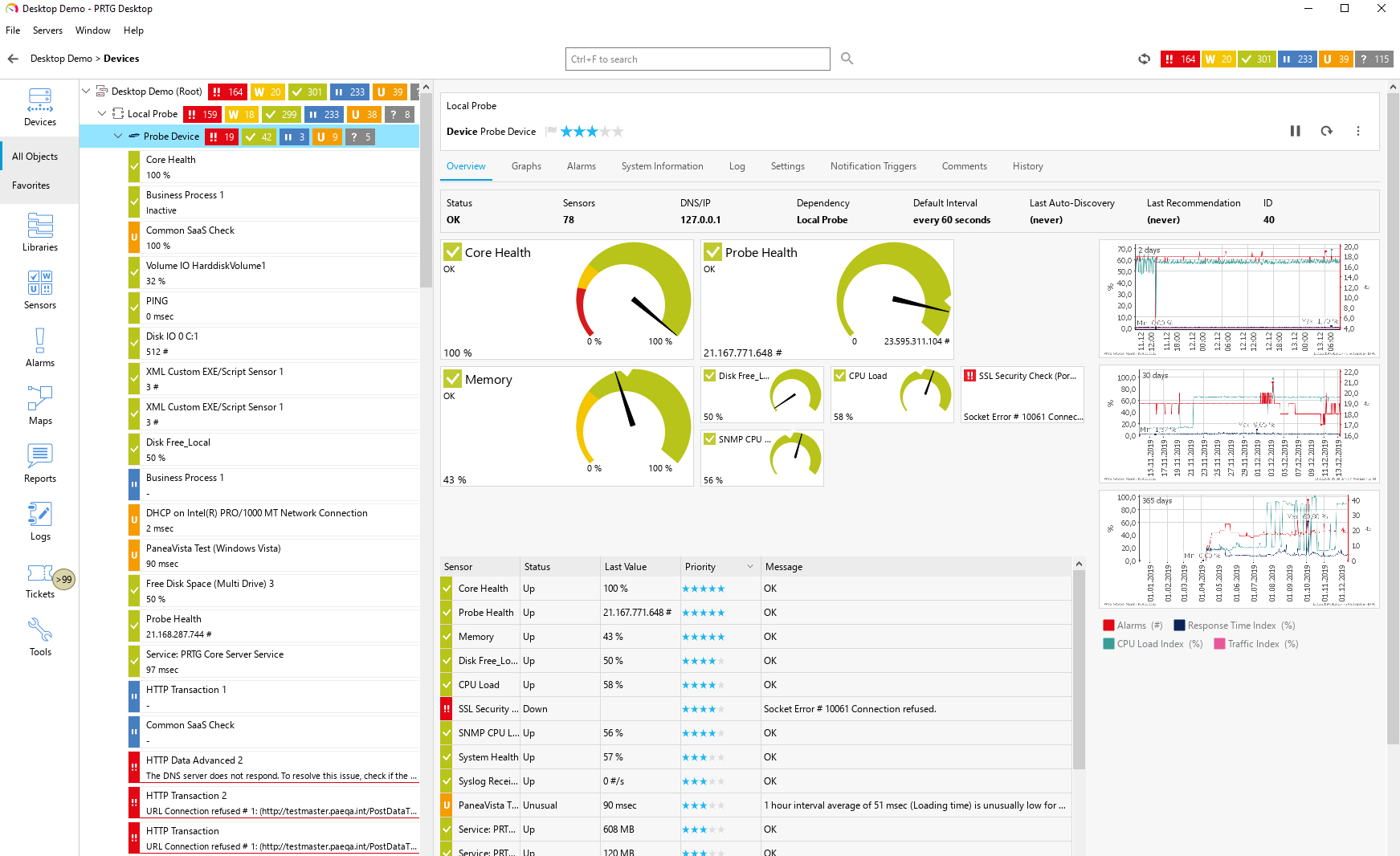
Paessler PRTG is an all-inclusive monitoring solution with an intuitive, user-friendly interface powered by a cutting-edge monitoring engine. It optimizes connections and workloads, reduces operational costs, and prevents outages. It also saves time and controls service level agreements (SLAs). This solution includes specialized monitoring features such as flexible alerting, cluster failover, distributed monitoring, maps, dashboards, and in-depth reporting.
API Access
Has API
Yes
API Access
Has API
Yes


Integrations
ALVAO IT Service Management
No
Active Directory
No
AlertOps
No
AutoMonX
No
BackBox
No
Check Point Infinity
No
DNSWatch
No
GitLab
No
Google Drive
No
LINE
Yes
Integrations
ALVAO IT Service Management
Yes
Active Directory
Yes
AlertOps
Yes
AutoMonX
Yes
BackBox
Yes
Check Point Infinity
Yes
DNSWatch
Yes
GitLab
Yes
Google Drive
Yes
LINE
No
Pricing Details
$149 one-time
A permanent Node License costs $149 USD one time for one physical Linux server, VM, or cloud instance and covers all supported GPUs on that node for the purchased major version. Annual Site Licenses cost $999 for up to 10 nodes, $2,399 for up to 50, or $4,999 for up to 200 nodes at one site. Site plans include updates and email support during the 12-month term; Node licenses include 90 days of setup and activation help.
Free Trial
Yes
Free Version
No
Pricing Details
$2149 for PRTG 500
PRTG 100
Free of charge
• 100 free sensors
PRTG 500- Start Small & Upgrade Later
From $2,149
500 Sensors
PRTG 1000- Small & Medium Sized Environments
From $3,899
1000 Sensors
PRTG 2500- Medium Sized Environments
From $8,099
2,500 Sensors
Best Value:
PRTG 5000- Large Environments
From $14,999
5,000 Sensors
PRTG 10000- Very Large Environments
From $17,899
10.000 Sensors
PRTG Enterprise
Custom Pricing
• Unlimited sensors
• Unlimited server installations
All pricing is based on a subscription basis.
Free Trial
Yes
Free Version
Yes
Deployment
Web-Based
No
On-Premises
Yes
iPhone App
No
iPad App
No
Android App
No
Windows
No
Mac
No
Linux
Yes
Chromebook
No
Deployment
Web-Based
Yes
On-Premises
Yes
iPhone App
Yes
iPad App
Yes
Android App
Yes
Windows
Yes
Mac
No
Linux
No
Chromebook
No
Customer Support
Business Hours
No
Live Rep (24/7)
No
Online Support
Yes
Customer Support
Business Hours
Yes
Live Rep (24/7)
No
Online Support
Yes
Types of Training
Training Docs
Yes
Webinars
No
Live Training (Online)
No
In Person
No
Types of Training
Training Docs
Yes
Webinars
Yes
Live Training (Online)
Yes
In Person
Yes
Vendor Details
Company Name
StanWell Inc.
Country
Taiwan
Website
www.smartbooth.com/gpualert.htm
Vendor Details
Company Name
Paessler GmbH
Founded
1997
Country
Germany
Website
www.paessler.com
Product Features
System Monitoring
Alerts / Notifications
No
Antivirus Management
No
Data Backup / Recovery
No
Device Monitoring
No
Inventory Management
No
Patch Management
No
Policy-based Automation
No
Remote Monitoring
No
Reporting / Analytics
No
Risk Analysis
No
Server Monitoring
No
Service Configuration Management
No
Product Features
Database Monitoring
Anomaly Detection
Yes
Autodiscovery
Yes
Capacity Planning
No
Dashboard
Yes
Dependency Tracking
No
Historical Trend Analysis
Yes
Multitenancy
No
Notifications / Alerts
Yes
Performance Monitoring
Yes
Permissions / Access Controls
No
Predictive Analytics
No
Prioritization
No
Query Analysis
No
Resource Optimization
Yes
Troubleshooting
Yes
IT Infrastructure Monitoring
Alerts / Notifications
Yes
Application Monitoring
Yes
Bandwidth Monitoring
Yes
Capacity Planning
No
Configuration Change Management
No
Data Movement Monitoring
Yes
Health Monitoring
Yes
Multi-Platform Support
Yes
Performance Monitoring
Yes
Point-in-Time Visibility
Yes
Reporting / Analytics
Yes
Virtual Machine Monitoring
Yes
Network Monitoring
Bandwidth Monitoring
Yes
Baseline Manager
Yes
Diagnostic Tools
Yes
IP Address Monitoring
Yes
Internet Usage Monitoring
Yes
Real Time Analytics
Yes
Resource Management
No
SLA Monitoring
Yes
Server Monitoring
Yes
Uptime Monitoring
Yes
Web Traffic Reporting
Yes
System Monitoring
Alerts / Notifications
Yes
Antivirus Management
No
Data Backup / Recovery
No
Device Monitoring
Yes
Inventory Management
Yes
Patch Management
Yes
Policy-based Automation
No
Remote Monitoring
Yes
Reporting / Analytics
Yes
Risk Analysis
Yes
Server Monitoring
Yes
Service Configuration Management
No
VoIP Monitoring
Alerts / Notifications
Yes
Call Detail Record (CDR) Analysis
Yes
Call Quality Monitoring
Yes
IP SLA Monitoring
Yes
Jitter Testing
Yes
Latency Monitoring
Yes
MOS Monitoring
Yes
Packet Loss Monitoring
Yes
QoS Monitoring
Yes
Reporting / Analytics
Yes
Troubleshooting
Yes
Website Monitoring
Availability Testing
Yes
Event Logs
No
Event-Based Notifications
Yes
FTP Monitoring
Yes
Mail Server Monitoring
Yes
Maintenance Scheduling
No
Performance Metrics
Yes
Real Time Monitoring
Yes
Transaction Monitoring
Yes
Uptime Reporting
Yes
Alternatives
No Alternatives