Average Ratings 3 Ratings
Average Ratings 0 Ratings
Similar Products
-
CloudFilerCloudFiler provides filing and searching in both New and Classic Outlook on all phones & tablets, all popular browsers, Macs and ARM based devices. Created Microsoft's new web Add-in technology by the architect of the Oasys email management system previously owned by Arup Group Ltd and the Excitech Mail system owned by Symetri and latterly Pentagon. File to: the cloud, Windows folders, SharePoint, OneDrive, Egnyte, Autodesk Forma, Bentley ProjectWise, etc. Favoured by the biggest businesses globally.
-
pCloud BusinesspCloud Business is a cloud storage and file synchronization platform designed for teams that need controlled access, cross-platform compatibility, and predictable storage allocation. It provides centralized file management with granular permissions and optional client-side encryption. Founded in 2013 in Switzerland, pCloud operates under EU-aligned privacy standards and offers data residency in Luxembourg (EU) and Dallas, Texas (US). The platform supports over 23 million users globally. Core Functionality : - Per-User Storage Allocation : 1 TB or 2 TB per user, suitable for small to mid-sized teams and distributed environments. - Virtual File System (pCloud Drive) : Mounts as a local drive on Windows, macOS, and Linux. Files are streamed on demand, reducing local disk usage. - File Sync & Sharing : Folder-level sync, link-based sharing, and permission control (view/edit/manage). Supports password-protected and time-limited links. - Admin & Access Control : Centralized user management, role assignment, and storage distribution via admin console. - Versioning & File History : File versioning with up to 180 days retention, enabling rollback and recovery. - Cross-Platform Support : Native clients for Windows, macOS, Linux, iOS, Android, plus web interface. - Client-Side Encryption (Optional) : Zero-knowledge encryption via pCloud Encryption for sensitive data; encryption keys are not stored server-side. Technical Positioning: - Swiss jurisdiction; GDPR-aligned processing - No file size limits - Works without mandatory ecosystem lock-in (no bundled office suite required) - Compatible with heterogeneous environments (Linux included) Trial : 30-day free trial available for up to 10 users.
-
Secure EraserSecure Eraser: Secure Data Deletion, Shredders Your Files & Folders. Just because it has been removed from your hard drive doesn't mean that it is gone forever. Anyone can restore the information as long as it was not overwritten. It becomes more difficult if the computer has been resold, or given away. Secure Eraser employs the most well-known method of data disposal. It overwrites sensitive information so that it cannot be recovered even with specialized software. Our award-winning solutions for permanently destroying data eliminate cross-references that may leave traces of deleted files within the allocation table of your hard disk. This Windows software is easy to use and can overwrite sensitive data up to 35 times, regardless of whether they're files, folders or drives, recycle bins, or traces of surfing. You can also delete files that you have already deleted but not for good.
-
FilerevFilerev is a powerful tool that helps you easily find and manage hidden files, duplicate files, large files, and oversized folders, ensuring a streamlined and clutter-free digital workspace. Key features include advanced scanning technology that identifies the unorganized files taking up the most space and cluttering your Google Drive. Filerev enhances productivity by saving time and reducing the frustration of manual file organization. The custom filters and bulk delete tool give you complete control over finding and removing unwanted files in your account. The storage analyzer lets you browse your folders by size to see where the space is being used in your Google Drive. Whether you're an individual, a small business, or a large enterprise, Filerev offers robust solutions tailored to your needs. Visit filerev.com to discover how Filerev can transform your Google Drive experience and boost efficiency.
-
PBRS Power BI Reports DistributionPBRS brings automated report production and distribution to organizations using Microsoft Power BI and SSRS. Developed by ChristianSteven Software, it runs in your Windows environment and coordinates reporting tasks that would otherwise involve manual exports or multiple automation flows. Build workflows for Power BI Service, Power BI Report Server, Power BI Paginated Reports and Microsoft SSRS. Launch them at regular intervals, on custom calendars, after a dataset refresh completes, or in response to supported database, file, email and system events. For personalized (Dynamic) reporting, PBRS reads SQL or JSON instructions to apply each recipient's filters, parameters, output format and delivery details. Report bursting allows a shared report to become separate outputs for customers, branches, departments or individual users. Produce PDF documents, Excel workbooks and CSV files where supported. Use Excel templates and formatting, merge suitable exports into workbook tabs, or collect several reports into a single email, ZIP archive or bookmarked PDF. Passwords and encryption help protect PDF documents. Route finished files to email addresses, Teams, SharePoint, OneDrive, Google Drive, Dropbox, FTP or SFTP servers, network folders, Slack and printers. Deliver exported documents to external audiences without requiring them to access Power BI. Execution records, notifications, retry settings and blank-report handling support unattended operation. A REST API lets developers connect supported scheduling and execution functions to their own applications. PBRS suits reporting operations that need consistent output, recipient-specific content and coordinated delivery across multiple reporting sources.
-
Files.com6,000+ companies trust Files.com to automate and secure business critical transfers. We obsess about security, compliance, reliability, and performance so your critical business processes just work every time. Easily manage any transfer flow without writing scripts or code, and onboard workloads and partners effortlessly. We support standard file transfer protocols (FTP, SFTP, AS2) for working with external partners and also provide native apps for high performance internal transfers. As a fully Cloud-Native SaaS, there are no servers for you to buy or maintain, there is no installation required, and high availability and redundancy are built in and free. Our InfoSec Program is audited annually by Kirkpatrick Price, a leading information security CPA firm. Our audit covers the scope of the entire Files.com business (not just datacenter operations) and names Files.com specifically. Beware of smaller competitors who try to pass off someone else’s audit as their own. Technical capabilities include encryption at-rest and in-transit, four types of two-factor authentication, nine enterprise identity (SSO) integrations, configurable password and session policies, and a perfect “A+” score from Qualys SSL Labs.
-
Globalscape Enhanced File Transfer (EFT)Globalscape's Enhanced File Transfer platform (EFT) is a user-friendly managed file transfer software (MFT). Globalscape EFT is trusted by thousands of Windows-Centric Organizations for mission-critical file transfers. EFT offers security and compliance, as well as powerful tools for collaboration, automation, and analysis. It is available in cloud/SaaS EFT Arcus and on-premises EFT deployments. EFT, unlike traditional file transfer software, provides enterprise-level data security and data transfer automation through integration to back-end systems. EFT administration is simple, yet provides complete control over your file transfer system. EFT replaces insecure legacy systems and expensive leased lines with a high-performing, scalable alternative.
-
Label LIVELabel LIVE is the easiest to use label printer app for designing and printing labels. You can print barcodes and address labels, shelf tags, inventory labels, and many other jobs using Label LIVE. Use your Mac or Windows 10 desktop computer to work with thermal label printers from mydpi, Brother, DYMO and Zebra. Label LIVE generates PDFs that can be sent to any printer that is installed using a driver. This means you can send complex print jobs to inkjet and laser printers, too. Need to import spreadsheet data? Label LIVE can import Excel, Numbers or CSV files with a few clicks.
-
PDF GuruEasily convert, edit, merge, and compress your PDF files with just a few simple clicks. You can quickly download your document without any hassle, as our PDF converter generates files in mere seconds! To ensure the safety of your digital information, we implement HTTPS encryption while you create PDF files on our site. You can redact PDFs, alter text, insert new elements, and engage in various other tasks, all from a single platform. Our user-friendly interface is designed for seamless navigation, allowing you to utilize our PDF creator with minimal effort. Compatible with every major operating system, our online PDF maker functions flawlessly on Windows, Mac OS, Linux, iOS, and Android. For those who wish to maintain privacy, you have the option to secure your file by locking or restricting access, preventing others from opening, editing, or printing it. This comprehensive tool simplifies your document management and enhances your productivity.
-
SynchredibleSynchredible makes it easy to synchronize, copy, and back up individual folders or entire drives with just a single click. Its intuitive assistant guides you step by step in setting up tasks that can be scheduled, triggered by changes (real-time monitoring), or executed automatically when an external storage device is connected. Keep your data synchronized effortlessly and manage it seamlessly! With years of proven technology, Synchredible not only transfers data from A to B but also supports bidirectional synchronization. It automatically detects changes and reliably syncs the most recently edited files. Thanks to advanced duplicate detection, Synchredible saves valuable time by skipping unchanged files, enabling fast synchronization of large datasets in seconds! Synchredible is highly versatile, supporting local folder synchronization, network and USB device synchronization, as well as synchronization with cloud storage.
Description
"Everything" is a powerful search engine designed for Windows that allows users to quickly find files and folders by their names. In contrast to the built-in Windows search feature, "Everything" shows a comprehensive list of all files and folders on the computer from the outset, which is where its name comes from. To narrow down the results, users can enter specific search filters. This software indexes only the names of files and folders, and typically takes just a few seconds to establish its database; for instance, a new installation of Windows 10, which typically has around 120,000 files, can be indexed in approximately one second. Additionally, "Everything" offers a content search function, but it's important to note that file contents are not indexed, making this type of search slower. When operating on a fresh Windows 10 installation, it will consume about 14 MB of RAM and less than 9 MB of disk space, while managing about 1,000,000 files will require around 75 MB of RAM and 45 MB of disk space. Users will see their search results update in real-time as changes are made to the file system. Furthermore, "Everything" is compatible with various versions of Windows, including XP, Vista, 7, 8, and 10, making it a versatile choice for any Windows user. This efficiency and speed make "Everything" an essential tool for anyone needing to manage large volumes of files effectively.
Description
Your computer desktop is cluttered and confusing. The files and applications you need are not always in reach.
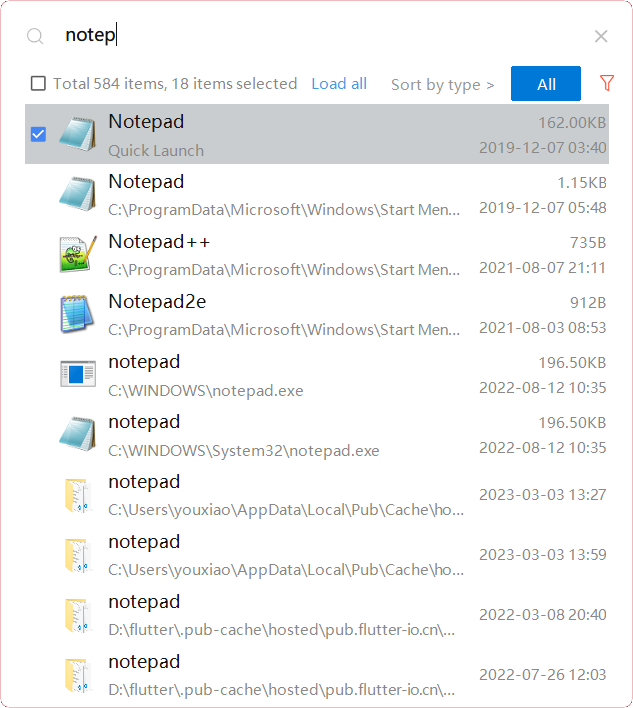
YXFile allows you to tagging file and search file as well as launch apps.
Tag Any File:
YXFile can tag every file type on any file system. The tagging is stored in a data base. YXFile will not alter your file names or create hidden files on your hard disk. You can move or rename files under the same partition. The tags won't be lost
Search for everything:
Search files and folders using their names. as well as file tags, launch items, and file tags.
Launch Apps
Launch App is a favorite feature of YXFile users. You can either type the name of the application or program you wish to open or use a shortcode. Click return and YXFile will open the program.
API Access
Has API
No
API Access
Has API
No



Integrations
No details available.
Integrations
No details available.
Pricing Details
No price information available.
Free Trial
No
Free Version
No
Pricing Details
$39/user
One-time payment for lifetime access to Yfile
Free Trial
Yes
Free Version
No
Deployment
Web-Based
No
On-Premises
No
iPhone App
No
iPad App
No
Android App
No
Windows
Yes
Mac
No
Linux
No
Chromebook
No
Deployment
Web-Based
No
On-Premises
No
iPhone App
No
iPad App
No
Android App
No
Windows
Yes
Mac
No
Linux
No
Chromebook
No
Customer Support
Business Hours
No
Live Rep (24/7)
No
Online Support
Yes
Customer Support
Business Hours
Yes
Live Rep (24/7)
No
Online Support
No
Types of Training
Training Docs
Yes
Webinars
No
Live Training (Online)
No
In Person
No
Types of Training
Training Docs
Yes
Webinars
No
Live Training (Online)
No
In Person
No
Vendor Details
Company Name
Voidtools
Website
www.voidtools.com
Vendor Details
Company Name
ousaa
Founded
2016
Country
China
Website
yxfile.cc/
