Average Ratings 0 Ratings
Average Ratings 200 Ratings
Description
The Enterprise Portfolio Simulator employs advanced modeling techniques to forecast how project portfolios will perform, while simultaneously pinpointing potential risks related to scheduling, finances, and resources. These identified risks are proactively addressed through virtual scenario planning, which facilitates the inclusion of more projects within the portfolio while ensuring they are finished on schedule and adhere to organizational limitations. By integrating seamlessly with your current Project Portfolio Management (PPM) system, EPS enhances your existing project data with modeling capabilities that can be utilized almost immediately. Rather than the lengthy process of adopting a new PPM system and training staff before obtaining results, EPS empowers key decision-makers in project portfolio management to rapidly assess and refine their portfolios. The process of selecting projects is inherently complex, involving the balancing of various competing objectives. It is crucial to prioritize projects, while also evaluating them against the constraints of available resources and budget. Furthermore, careful consideration must be given to the timing of project initiation and the overall strategic alignment within the organization.
Description
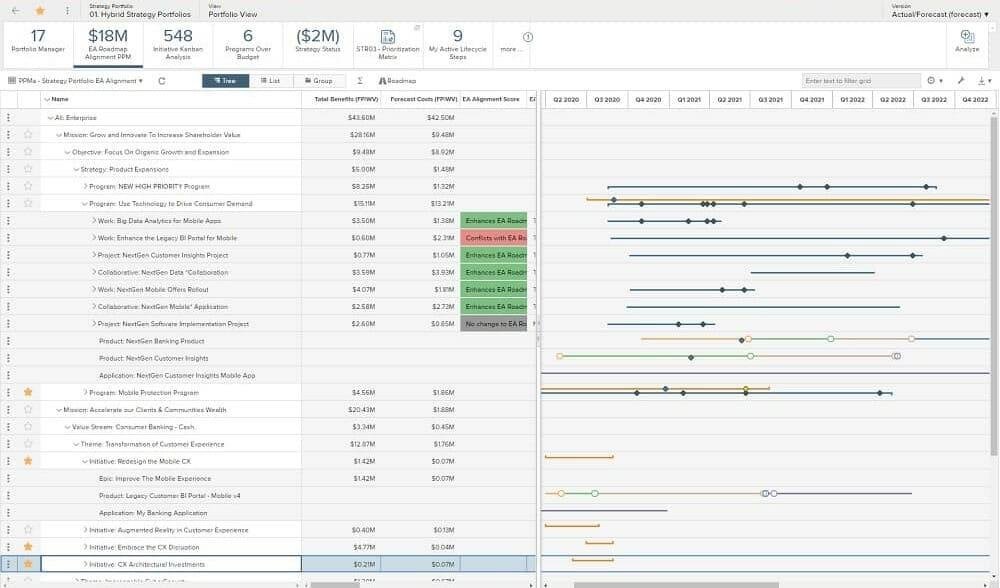
Planview Enterprise One™, which integrates business and technology planning, optimizes all resources, and delivers breakthrough products, services and customer experiences, enables strategic execution to be accelerated. Manage and deliver across all types and technology of work and application portfolios. Transform business requirements into standards that meet strategic objectives. This will reduce cost and mitigate risk. A complete approach to all types of work, including agile, iterative, traditional, and collaborative. Keep teams productive by balancing work and resources. Maximize your use of resources. A scalable user experience ensures that everyone is focused on the right priorities in order to achieve the desired outcomes. Ensure on-time, on-budget project delivery. Projects and people can stay on track with milestones and schedules. Dashboards provide performance insight.
API Access
Has API
No
API Access
Has API
No




Integrations
BugHerd
No
Cognito Forms
No
Integrify
No
Microsoft Power Query
No
Panaya
No
Planview Hub
No
Planview Software Product Delivery
No
Rally Software
No
uPerform
No
Integrations
BugHerd
Yes
Cognito Forms
Yes
Integrify
Yes
Microsoft Power Query
Yes
Panaya
Yes
Planview Hub
Yes
Planview Software Product Delivery
Yes
Rally Software
Yes
uPerform
Yes
Pricing Details
No price information available.
Free Trial
Yes
Free Version
No
Pricing Details
No price information available.
Free Trial
No
Free Version
No
Deployment
Web-Based
Yes
On-Premises
No
iPhone App
No
iPad App
No
Android App
No
Windows
Yes
Mac
No
Linux
No
Chromebook
No
Deployment
Web-Based
Yes
On-Premises
No
iPhone App
No
iPad App
No
Android App
No
Windows
No
Mac
No
Linux
No
Chromebook
No
Customer Support
Business Hours
Yes
Live Rep (24/7)
No
Online Support
Yes
Customer Support
Business Hours
Yes
Live Rep (24/7)
Yes
Online Support
Yes
Types of Training
Training Docs
Yes
Webinars
Yes
Live Training (Online)
Yes
In Person
Yes
Types of Training
Training Docs
Yes
Webinars
Yes
Live Training (Online)
No
In Person
Yes
Vendor Details
Company Name
ProModel
Founded
1988
Country
United States
Website
www.promodel.com/products/eps
Vendor Details
Company Name
Planview
Founded
1989
Country
United States
Website
www.planview.com/products-solutions/products/planview-portfolios/
Product Features
Project Planning
Agile Methodologies
No
Budget Management
Yes
Collaboration Tools
Yes
Due Date Tracking
No
Gantt Charts
Yes
Kanban Board
No
Prioritization
Yes
Progress Tracking
No
Resource Management
Yes
Task Management
Yes
Template Management
No
Traditional Methodologies
No
Strategic Planning
Budgeting & Forecasting
Yes
Dashboard
Yes
Goal Setting / Tracking
Yes
Idea Management
Yes
KPIs
Yes
Modeling & Simulation
Yes
Roadmapping
Yes
Scenario Planning
Yes
Scorecards
Yes
Product Features
Demand Planning
Capacity Planning
No
Data Visualization
No
Historical Reporting
No
Inventory Optimization
No
Planned vs Actual Tracking
No
Product Introduction Planning
No
Promotions Management
No
Replenishment Management
No
Sales Forecasting
No
Supply Forecasting
No
IT Management
Capacity Monitoring
No
Compliance Management
No
Event Logs
No
Hardware Inventory
No
IT Budgeting
No
License Management
No
Patch Management
No
Remote Access
No
Scheduling
No
Software Inventory
No
User Activity Monitoring
No
OKR
Benchmarking
No
Feedback Management
No
Goal Management
No
KPIs
No
Prioritization
No
Progress Tracking
No
Strategic Planning
No
Product Management
Collaboration
No
Feedback Collection
No
Idea Management
No
Milestone Tracking
No
Prioritization
No
Product Roadmapping
No
Release Management
No
Requirements Management
No
Resource Management
No
Workflow Management
No
Product Roadmap
Collaboration
No
Content Import / Export
No
Diagramming
No
Drag & Drop
No
Feature Management
No
Milestone Tracking
No
Prioritization
No
Requirements Management
No
Workflow Management
No
Project Portfolio Management
Budget Management
Yes
Collaboration
Yes
Dashboard
Yes
Issue Management
Yes
Milestone Tracking
Yes
Portfolio Management
Yes
Project Planning
Yes
Requirements Management
Yes
Resource Management
Yes
Status Tracking
Yes
Task Management
Yes
Time & Expense Tracking
Yes
Resource Management
Capacity Management
No
Data Visualization
No
Demand Forecasting
No
Drag & Drop
No
Employee Scheduling
No
Filtered Search
No
Resource Allocation
No
Skills Tracking
No
Utilization Management
No
Strategic Planning
Budgeting & Forecasting
Yes
Dashboard
Yes
Goal Setting / Tracking
Yes
Idea Management
Yes
KPIs
Yes
Modeling & Simulation
Yes
Roadmapping
Yes
Scenario Planning
Yes
Scorecards
Yes
