Average Ratings 0 Ratings
Average Ratings 0 Ratings
Similar Products
-
Gradelink SISGradelink can help your school save time, increase enrollment and accomplish its mission. Gradelink, a renowned student management system and student information system, is suitable for all levels of schools from pre-K to college. It combines teaching, management, and learning tools to help schools achieve their best. It has top features such as attendance management, report cards and classes and scheduling, communications and student/parent information. Gradelink is easy to use. School who move to Gradelink find the setup so easy because set up is handled by our tech support team. Top features include attendance management, report cards, classes and scheduling, standards-grading system, communications, student information, and student/parent access. Lesson plans, grade sheets, parent communication and custom reports all work together in perfect unison. Gradelink is ideal for K8 schools, private schools and Charter schools. Help your school save time, increase enrollment, and achieve its mission with Gradelink. An award-winning student information system and school management system, Gradelink school management software system is suitable for Preschool through High school.
-
ProcareProcare is the most widely used child care management solution for child care centers, before and after school programs, and youth organizations to ease the burdens of running a business, coordinating staff, communicating with parents, and educating their children. ADMINISTRATION Manage every aspect of your center or multi-centers, all in one cloud-based, integrated platform. COMMUNICATION Keep your staff and parents connected on all milestones and activities, whether by phone, email, text, or the app, creating an environment of exceptional child care. BILLING AND PAYMENTS Automated billing and payment collection, making it convenient for parents while providing integrated, real-time data and functionality for providers. FINANCIAL MANAGEMENT Central real-time view of all financials and receivables for the center through the integrated dashboard. LESSON PLANNING Create lesson plans, student assessments, and manage lessons by classroom without the stress and time-consuming task of outdated paper formats. MOBILE APP An easy-to-use app that is fully integrated, for staff and family engagement, allowing centers to stay connected with families. AND MORE.. That’s why over 40,000 customers choose Procare.
-
KinderpediaKINDERPEDIA is an AI-powered, cloud-based school management and communication platform for K-12 schools and childcare centres. Trusted by 2,000+ institutions in 40+ countries, it helps leaders, teachers and admin teams simplify operations, reduce repetitive work, strengthen family engagement and create a connected educational experience. The platform brings academic, administrative, financial and communication workflows into one secure ecosystem. Schools can manage student and family records, attendance, timetables, classroom activities, gradebook, assignments, progress tracking, daily reports, events, admissions, tuition, invoicing, payments and reporting. Kinderpedia includes practical AI tools. They help educators and leaders communicate clearly, create content faster, streamline reporting, document progress and identify patterns. Teachers plan schedules, record attendance, manage lessons, track progress or developmental milestones, share feedback and document observations in real time. Families receive updates, photos, videos, event alerts, progress info, invoices and notifications, with multi-language tools for diverse communities. Kinderpedia’s Admissions CRM supports the journey from first enquiry to enrolment, managing leads, follow-ups, workflows and the transition into the school management system. Financial tools support tuition plans, automated invoicing, payment tracking, family balances, overdue amounts, bank statement import and reports across one or multiple locations. Payment and accounting integrations include Stripe, Paymob, InvoiceXpress, BT Pay, SAGA-compatible exports, CSV/XLS exports and PDF invoices. Dashboards, reports, multi-location management, role-based permissions and secure cloud access give leaders visibility and control as they grow
-
Switcher StudioSwitcher Studio allows you to capture video from multiple angles and edit it in real-time. This will allow you to connect with your community in a more engaging way. You can stream it live or save it for later. Your audience will be attracted to you with relevant content. Make it look great. There's no need to purchase, lug or learn largeequipment. Switcher is compatible with iPads and iPhones. Switcher is so intuitive that anyone can create amazing video with it. You don't need to hire outside videographers or producers. It takes an hour to edit every minute of edited video. Every minute of live-editing takes, well, one second. You can share every moment, live or recorded, external or internal, with video -- no matter what it holds.
-
MuzaicMuzaic.ai is a browser-based tool that scores video automatically. You give it a cut (or a folder of cuts); it returns a finished audio mix — music, SFX, ambience and voiceover as separate layers — mastered to broadcast spec, in roughly 30 seconds per clip. What it actually does The pipeline runs in four stages. First it analyses the video: scenes, objects, pacing, colour and sentiment. From that it builds an audio plan and commits each concept to a clear direction (the site's example: a string quartet under a battle scene) rather than averaging toward something inoffensive. Then it composes every layer to fit the picture and the other layers — SFX land on the action, ambience ducks under speech, the voiceover is drafted from your brief rather than read out. Finally it mixes and masters the result. Existing audio in the source can be kept, replaced or mixed under. Output is three concepts per clip, exported as MP3 or WAV. Layer balance is adjusted inside Muzaic before export; the deliverable is the finished mix, not separate stems. The commercial angle Pricing is metered in minutes of finished audio, not per track or per download; downloads are unlimited. Personal is free for 10 minutes a month, non-commercial only. Creator ($45/month) covers your own brand and paid ads. Studio ($249/month) is for agencies: the licence travels to the client and the legal cover extends to them too. Enterprise adds TV, radio, cinema and OOH, plus a custom contract, DPA and SLA. What it is not It is not a music-generation toy. The free tier exists to test the workflow on your own footage; nothing from it may be published. The target user is a team producing hundreds of ad variants a month, where the audio step is the bottleneck.
-
myACIAt ACI Learning, we don’t just teach IT and cybersecurity—we prepare you to thrive in the real world. Our expert-led videos, immersive labs, and certification prep turn learning into action so you gain the skills that truly matter. myACI, our dynamic training platform, connects knowledge to performance with gamified elements, progress tracking, and powerful analytics for teams and managers alike. Scalable, flexible, and trusted by companies worldwide, ACI Learning helps you build skills, boost retention, and prove ROI with every training initiative.
-
PikmykidMany schools struggle with dismissal processes that waste time, leave students vulnerable, and exhaust staff and faculty. With Pikmykid, schools can trade in their outdated methods for a combination of dismissal management, safety and emergency tools, parent messaging, and real time reporting that keeps your staff happy and students accounted for. No more long car lines, endless front office calls, or missing students – just one powerful platform that allows schools to focus on what really matters – learning.
-
Rezku Point of SaleRezku POS is designed exclusively for the busiest restaurants, bars and pizzerias, providing a comprehensive solution that puts your brand in league with national chains. You can now get your own fully custom-branded, downloadable smartphone ordering app for your restaurant exclusively from Rezku. Rezku comes packaged with all of the advanced functionality restaurants need, without having to resort to 3rd parties and additional fees, including loyalty perks, gift card program with eGift cards, delivery driver management, custom reporting, and a beautiful, customized white-label online ordering site with zero commission for orders. Rezku's fully-loaded feature-set spans the entire scope of operational needs including mobile POS, customer facing displays, advanced kitchen display systems and sticky label printing. Rezku also includes the latest business management functionality industry professionals crave, with an incredibly well-designed manager’s smartphone app that lets you control every aspect of the system, including menus, pricing and time cards, all from the palm of your hand. Rezku delivers exceptional value, revolutionizing your entire operation, modernizing your operations, and growing your bottom line.
-
3Q3Q is an API-first video infrastructure for developers and engineering teams who want direct control over their media backend. A REST video API and native player SDKs give you programmatic access to hosting, ingestion, encoding, live streaming, video-on-demand, and delivery, so you can build video portals, streaming apps, or OTT backends on a single European platform. The stack is transparent by design. 3Q supports adaptive bitrate streaming over HLS and DASH with mixed HEVC and AVC codecs and automatic Live-to-VoD. Delivery runs over a proprietary global CDN, encryption, and HTTP/2 over TLS 1.3. The Cookie- and Consent-free HTML5 Video Player is barrier-free in accordance with WCAG 2.1/BITV 2.0 and needs no consent layer. Video AI exposes speech-to-text transcription, automatic subtitles, translation, and chapter markers through the same API, and integration fits your existing pipeline and video workflows. What sets 3Q apart is ownership. 3Q runs on its own independent European video infrastructure, so your data stays in the EU and under German jurisdiction. 3Q is GDPR-compliant and all processes are ISO/IEC 27001 certified, with modular pay-as-you-go pricing and 24/7 support from real video experts.
-
Coursebox AIEmpower your content transformation with Coursebox, the leading AI-driven eLearning authoring tool. Our platform streamlines the course development process, enabling you to create a well-structured course in a matter of seconds. Once the foundation is set, you can easily refine the content and add any final touches before it's ready for deployment. Whether you're looking to distribute your course privately, sell it to a broader audience, or integrate it into your existing LMS, Coursebox makes it effortless. Designed with a mobile-first approach, Coursebox ensures that your learners stay engaged and motivated through rich, interactive content—complete with videos, quizzes, and other dynamic elements. Leverage our branded learning management system, featuring native mobile apps, to deliver a seamless learning experience. With options for custom hosting and domain personalization, Coursebox offers flexibility to meet your specific needs. Ideal for both organizations and individual educators, Coursebox simplifies the management and segmentation of learners, allowing you to craft personalized learning paths and scale your training programs quickly and efficiently.
Description
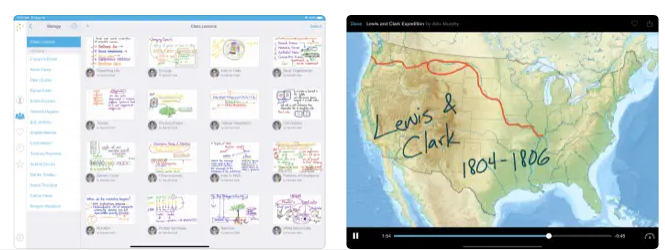
Capture your voice along with your iPad screen to produce engaging video lessons that can be accessed by students and colleagues whenever they need them. You can upload your videos to Educreations and easily share them with anyone, whether through email, Facebook, Twitter, or YouTube, and you also have the option to download them for storage in Dropbox or Google Drive. With all your videos securely hosted in the cloud, they are readily available wherever you go, and you have complete control over who can view each video. You can clarify any topic and quickly share your insights with others, empowering students to take charge of their learning journey and grasp new ideas effectively. Review student submissions to identify misunderstandings and recognize their achievements, allowing you to focus more on meaningful one-on-one interactions. This opens the door for more hands-on learning experiences. Educreations serves as a distinctive interactive whiteboard and screencasting tool that combines simplicity, effectiveness, and enjoyment in its use. You can annotate, animate, and narrate a wide range of materials as you elucidate any topic, making learning not only informative but also enjoyable. With this versatile tool, educators can truly enhance the educational experience for their students.
Description
Movavi Academic is a desktop program that allows students and teachers to edit video. It helps enrich the learning process. The intuitive interface makes it easy to start video creation immediately. Slideshows and videos can be used to explain new topics. Visual elements can grab students' attention and engage them. Movavi Academic allows teachers to offer distance learning and share their experiences with the teachers' community. Students benefit from the ability to access the content whenever they need it, to express their creativity, and to interact with their classmates while doing homework and class. Movavi Academic allows students to start with screencasts and create films for international competitions. You can edit your clips, cut and crop them, join slides with transitions and add speech bubbles. You can also change brightness and contrast. Screen capture is a great way to create online webinars and lessons. Highlight keyboard and mouse actions, add voiceover, and more
API Access
Has API
No
API Access
Has API
No



Integrations
Dropbox
Yes
Facebook
Yes
Google Drive
Yes
X (Twitter)
Yes
YouTube
Yes
Integrations
Dropbox
No
Facebook
No
Google Drive
No
X (Twitter)
No
YouTube
No
Pricing Details
$8.25 per month
Free Trial
No
Free Version
Yes
Pricing Details
$59.95 USD
$10 (with a minimum purchase of 100 licenses per school)
Free Trial
Yes
Free Version
No
Deployment
Web-Based
No
On-Premises
No
iPhone App
No
iPad App
Yes
Android App
No
Windows
No
Mac
No
Linux
No
Chromebook
No
Deployment
Web-Based
No
On-Premises
No
iPhone App
No
iPad App
No
Android App
No
Windows
Yes
Mac
Yes
Linux
No
Chromebook
No
Customer Support
Business Hours
No
Live Rep (24/7)
No
Online Support
Yes
Customer Support
Business Hours
Yes
Live Rep (24/7)
No
Online Support
No
Types of Training
Training Docs
Yes
Webinars
No
Live Training (Online)
No
In Person
No
Types of Training
Training Docs
Yes
Webinars
Yes
Live Training (Online)
No
In Person
No
Vendor Details
Company Name
Educreations
Country
United States
Website
www.educreations.com
Vendor Details
Company Name
Movavi Software
Founded
2003
Country
Cyprus
Website
www.edu.movavi.com
Product Features
Student Engagement Platform
Communication Tools
No
Community Management
No
Event Calendar
No
Higher Education
No
Interactive Learning
No
K-12
No
Location Tracking
No
Mobile App
No
Orientation Management
No
Polls / Voting
No
Safety Management
No
Student Group Management
No
Product Features
Video Editing
3D Video Editing
No
Audio Tools
No
Brand Overlay
No
Collaboration
No
Media Library
No
Social Sharing
No
Speed Adjustment
No
Split / Merge
No
Supports HD Resolution
No
Text Overlay
No
Video Capture
No
Video Stabilization
No
Video Making
Animation
No
Collaboration Tools
No
Customizable Branding
No
Drag & Drop
No
Media Library
No
Privacy Options
No
Social Sharing
No
Templates
No
Text Overlay
No
Text to Video
No
Video Capture
No
Voice-Over
No
