Average Ratings 0 Ratings
Average Ratings 0 Ratings
Similar Products
-
SmartDrawSmartDraw makes professional drawings and diagrams accessible to everyone. Non-technical users can quickly create floor plans, while professionals get the precision and scale they require. With industry-leading floor planning tools and an intuitive interface for traditional diagramming like flowcharts and organizational charts, SmartDraw delivers enterprise-ready power without unnecessary complexity. Key features: - Large collection of symbols and templates - Ability to create custom shapes - Import PDFs, images, Google Maps, Visio files, Visio stencils - Draw to any scale - Enrich drawings with data - Generate manifest and bills of materials - Generate diagrams from data automatically like org charts, AWS, Azure, PI Boards, and more - Use natural language text prompts to generate diagrams with AI - Save files directly to OneDrive, SharePoint, or Google Drive, or other preferred provider - Integrations with the Microsoft and Google enterprise stack plus Confluence and Jira SmartDraw supports a wide range of industries and real-world use cases, helping teams plan, document, and communicate more effectively. Construction professionals use it to create scaled floor plans, site layouts, and electrical and plumbing drawings. Fire departments rely on it for fire pre-planning and incident documentation, while police departments use it for accident reconstruction and crime scene diagrams. IT teams build network diagrams and cloud architectures, HR leaders create organizational charts, and product managers map out processes and workflows. From physical layouts to business processes, SmartDraw provides a single platform that adapts to the needs of each role and industry.
-
ActCAD SoftwareACTCAD is suitable for professional drawings creation for Architects, Structural Engineers, Civil Engineres, Mechanical Drawings, Electrical drawings, interior design, tool design, machine designs etc.ActCAD is professional grade 2D Drafting and 3D Modeling CAD software which works in dwg and dxf file formats. Most affordable cad software.ActCAD is a native dwg/dxf cad software suitable for professional 2D drafting and 3D modeling projects. ActCAD is trusted by over 30000 users in over 103 countries for more than 10 years. The interface, commands, icons, dialogs, shortcuts etc. are very much similar to other popular cad software tools available in market. Flexible license types available even for single license. There is no learning for existing cad users while saving 80% of the costs.ActCAD offers free email technical support without any limitations. ActCAD can be fully customized and programs can be developed using our free API toolkit. It supports popular programming languages like , lisp dcl, .net, C++ etc. Apart from all regular commands, ActCAD offers many productive tools like pdf to cad converter, Block libraries, Image to Cad converter, handling point sets between Cad and Excel and many more.
-
Altium DevelopAltium Develop is a collaborative platform for modern electronics engineering teams that connects requirements management, PCB design, systems engineering, and manufacturing workflows. Built on Altium Designer and Altium 365, the platform provides a centralized environment for design collaboration, requirements traceability, BOM management, supply chain visibility, and engineering change management. Altium Develop helps hardware organizations maintain alignment between requirements, design decisions, and manufacturing outcomes while supporting distributed engineering teams through cloud-based collaboration. Core Features: • PCB design collaboration • ECAD-MCAD co-design workflows • Component and supply chain visibility • BOM and engineering change management • Design review and approval workflows • Cloud-native team collaboration • Requirements management and traceability Used by electronics teams building complex PCB-based products, Altium Develop is frequently evaluated alongside Cadence OrCAD, Cadence Allegro, Autodesk Fusion Electronics, KiCad, Siemens Xpedition, and SOLIDWORKS PCB for organizations seeking greater collaboration and lifecycle visibility across hardware development programs.
-
LetsignitLetsignit serves as a centralized platform for managing email signatures within organizations, regardless of their size. It allows for the creation, assignment, and oversight of signatures for every employee, ensuring uniformity across the company and minimizing the need for manual update requests, which are informed by directory data like Active Directory. Tailored for environments using Microsoft 365 and Exchange, it is compatible with prevalent email clients, promoting brand consistency and regulatory compliance while enabling Marketing and Communications teams to easily execute targeted banner campaigns. Furthermore, Letsignit is hosted on Microsoft Azure and adheres to the ISO 27001 and ISO 27018 certifications, ensuring it meets the security standards required by enterprises, all while simplifying signature management on a large scale. This comprehensive approach empowers organizations to enhance their professional image through consistent email branding.
-
MicroStationMicroStation is the trusted CAD software that empowers infrastructure professionals to design, manage, and deliver projects with precision and efficiency. Its power, flexibility, AI automation, and 3D geospatial context enable innovative designs and creative visualizations. Communicate design changes and unite critical project elements in a single environment, ensuring effective and secure project deliverables. MicroStation scales for any infrastructure project, whether it lasts days, months, or years. MicroStation is the foundation for the entire Bentley modeling environment including digital twins.
-
PBRS Power BI Reports DistributionPBRS brings automated report production and distribution to organizations using Microsoft Power BI and SSRS. Developed by ChristianSteven Software, it runs in your Windows environment and coordinates reporting tasks that would otherwise involve manual exports or multiple automation flows. Build workflows for Power BI Service, Power BI Report Server, Power BI Paginated Reports and Microsoft SSRS. Launch them at regular intervals, on custom calendars, after a dataset refresh completes, or in response to supported database, file, email and system events. For personalized (Dynamic) reporting, PBRS reads SQL or JSON instructions to apply each recipient's filters, parameters, output format and delivery details. Report bursting allows a shared report to become separate outputs for customers, branches, departments or individual users. Produce PDF documents, Excel workbooks and CSV files where supported. Use Excel templates and formatting, merge suitable exports into workbook tabs, or collect several reports into a single email, ZIP archive or bookmarked PDF. Passwords and encryption help protect PDF documents. Route finished files to email addresses, Teams, SharePoint, OneDrive, Google Drive, Dropbox, FTP or SFTP servers, network folders, Slack and printers. Deliver exported documents to external audiences without requiring them to access Power BI. Execution records, notifications, retry settings and blank-report handling support unattended operation. A REST API lets developers connect supported scheduling and execution functions to their own applications. PBRS suits reporting operations that need consistent output, recipient-specific content and coordinated delivery across multiple reporting sources.
-
RAD PDFInstall-free PDF editing, form filling, redaction, signing, viewing, and more on your website with RAD PDF! Packaged as an easy to use library / WebControl (compatible with .NET 3.5+, .NET Core, and .NET 5+), RAD PDF can be used with just about any flavor of ASP.NET including MVC, Razor, Blazor, WebForms, and more. RAD PDF is compatible with 99% of internet browsers, including those on Linux, Mac OS X, Microsoft Windows, and mobile. No plugins. No Adobe Reader. RAD PDF is more than a PDF to HTML converter. It natively supports all the most common PDF features including annotations, bookmarks, form fields, page labels, and more. With advanced PDF options, RAD PDF allows you to selectively enable and disable features not available with Adobe Acrobat Reader, like protecting a PDF from being downloaded while still viewable online. RAD PDF users can use PDF form fields directly from the web browser by enabling PDF form filling and PDF form saving without having to install any software. Integrating directly with ASP.NET, RAD PDF allows your web application to capture input data, build custom workflows, and provide an intuitive graphical user interface (GUI) for just about any online PDF interaction imaginable!
-
MobiPDFMobiPDF (formerly PDF Extra) is an intuitive reader and editor that allows you to read, edit, create, OCR, organize, annotate, fill and sign, convert, and share any PDF. This makes MobiPDF an excellent choice for users seeking a budget-friendly alternative to Adobe Acrobat Pro. HERE’S WHAT YOU GET WITH MOBIPDF: Multiple Page View Modes: Enjoy a distraction-free "Read Mode". Advanced Editing Tools: Experience a Word-like PDF editing environment. Two-Way Conversions: Convert PDFs to and from Word, Excel, PowerPoint, or image formats. OCR Support: Make scanned documents searchable. Markup Tools: Highlight, comment, strikethrough, stamp, and more to enhance your documents. Effortless PDF Organizer: Reorder, compress, split, and combine PDFs with ease. Sign & Secure: Add signatures, create and fill forms, and protect your PDFs with passwords, encryption, and digital certificates. Offline Mode: Work freely on your projects, even offline. Seamless translation: One-click translate any PDF into 50+ languages.
-
Azore CFDAzore is software for computational fluid dynamics. It analyzes fluid flow and heat transfers. CFD allows engineers and scientists to analyze a wide range of fluid mechanics problems, thermal and chemical problems numerically using a computer. Azore can simulate a wide range of fluid dynamics situations, including air, liquids, gases, and particulate-laden flow. Azore is commonly used to model the flow of liquids through a piping or evaluate water velocity profiles around submerged items. Azore can also analyze the flow of gases or air, such as simulating ambient air velocity profiles as they pass around buildings, or investigating the flow, heat transfer, and mechanical equipment inside a room. Azore CFD is able to simulate virtually any incompressible fluid flow model. This includes problems involving conjugate heat transfer, species transport, and steady-state or transient fluid flows.
-
SciSureSciSure is a Scientific Management Platform built to support the full range of laboratory operations for scientific organizations. It combines ELN, LIMS, and Health & Safety functionality, giving teams a single system to document experiments, track sample lineage, manage chemical inventory, and run structured, audit-ready compliance processes. Instead of relying on disconnected systems, organizations get one governed platform that improves reproducibility, increases visibility into lab operations, and reduces risk as they scale.
Description
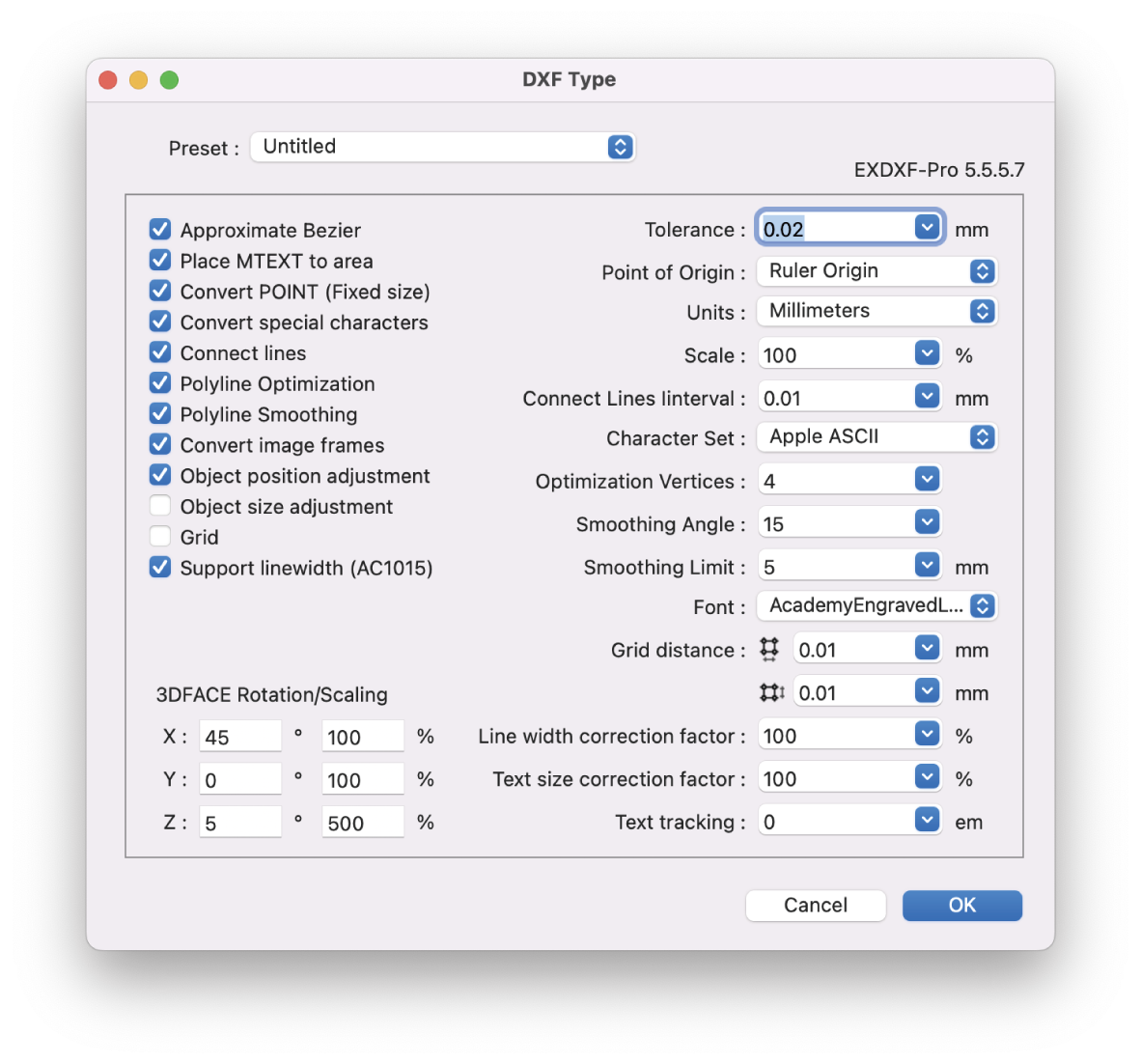
EXDXF-Pro is an ideal DXF convert plug-in that solves data compatibility problems between CAD software and Adobe Illustrator (AI). Specific functions include an "Export function" that outputs DXF data from AI and an "Import function" that opens DXF files in AI.
Recently, CAD software is offered by many manufacturers, and the software is developed to be compatible with other CAD software. In particular, the file format uses the "dxf" extension to ensure compatibility in the exchange of data between CAD software and to facilitate the exchange of data between designers. CAD software and AI also use this "DXF" for data compatibility. However, compatibility problems are not infrequent.
EXDXF-Pro's "Export Function" can output data in R12 format (AC1009) as "DXF" in R12 format, which is a highly popular format that is compatible with many CAD and software. The "Import Function" can also be used to output "DXF" files in R12 format. In addition, the "read function" provides a more comfortable design editing experience with point and line connections and beautiful line rendering using our unique smoothing technology. EXDXF-Pro's read/write function eliminates data compatibility problems between CAD software and Adobe Illustrator.
Description
Map3D is a comprehensive 3D stress analysis software that facilitates quick and straightforward model creation and visualization for three-dimensional structures. Its standout feature is the capability to address an extensive array of 3D issues, which is not commonly found in other analysis tools. Users can effortlessly develop large and intricate fully 3D models thanks to its integrated CAD features. The ability to use both FF and DD elements enables effective simulations of 3D excavations that involve intersecting fractures or shear planes. Furthermore, all versions of Map3D are designed to fully support plastic Fault-Slip and 3D rock-mass plasticity, ensuring compatibility of input files across different versions and offering a seamless upgrade path for users seeking enhanced functionalities. Alongside this, an extensive training program is available to aid in understanding both the software's features and the interpretation of complex engineering results. The software allows users to easily manipulate and analyze results, making it easier to interpret phenomena such as rock mass failure, slip on fault planes, and outcomes related to oriented boreholes as well as ubiquitous slip on joint sets or bedding planes. Ultimately, Map3D equips engineers with a powerful toolset for tackling complex geotechnical challenges.
API Access
Has API
No
API Access
Has API
No




Integrations
Adobe Illustrator
No
Pricing Details
$99 USD per year
Free Trial
Yes
Free Version
No
Pricing Details
No price information available.
Free Trial
No
Free Version
No
Deployment
Web-Based
No
On-Premises
No
iPhone App
No
iPad App
No
Android App
No
Windows
Yes
Mac
Yes
Linux
No
Chromebook
No
Deployment
Web-Based
No
On-Premises
No
iPhone App
No
iPad App
No
Android App
No
Windows
Yes
Mac
No
Linux
No
Chromebook
No
Customer Support
Business Hours
Yes
Live Rep (24/7)
No
Online Support
No
Customer Support
Business Hours
Yes
Live Rep (24/7)
No
Online Support
Yes
Types of Training
Training Docs
No
Webinars
No
Live Training (Online)
No
In Person
No
Types of Training
Training Docs
Yes
Webinars
Yes
Live Training (Online)
Yes
In Person
No
Vendor Details
Company Name
Baby Universe Inc.
Founded
1992
Country
Japan
Website
baby-universe.net/plug-ins/cad/exdxf-pro/
Vendor Details
Company Name
Map3D
Country
United States
Website
www.map3d.com
Product Features
CAD
2 1/2-Axis Milling
No
2D Drawing
Yes
3-Axis Milling
No
3D Modeling
No
4-Axis Milling
No
5-Axis Milling
No
Civil
No
Collaboration
No
Database Connectivity
No
Design Analysis
No
Design Export
No
Document Management
No
Electrical
No
Hole Making
No
Mechanical
No
Mechatronics
No
Presentation Tools
No
Simulate Cycles
No
Spiral Output
No
Structural Engineering
No
Toolpath Simulation
No
User Defined Cycles
No
Product Features
CAD
2 1/2-Axis Milling
No
2D Drawing
No
3-Axis Milling
No
3D Modeling
No
4-Axis Milling
No
5-Axis Milling
No
Civil
No
Collaboration
No
Database Connectivity
No
Design Analysis
No
Design Export
No
Document Management
No
Electrical
No
Hole Making
No
Mechanical
No
Mechatronics
No
Presentation Tools
No
Simulate Cycles
No
Spiral Output
No
Structural Engineering
No
Toolpath Simulation
No
User Defined Cycles
No
Engineering
2D Drawing
No
3D Modeling
No
Chemical Engineering
No
Civil Engineering
No
Collaboration
No
Design Analysis
No
Design Export
No
Document Management
No
Electrical Engineering
No
Mechanical Engineering
No
Mechatronics
No
Presentation Tools
No
Structural Engineering
No
