Average Ratings 0 Ratings
Average Ratings 0 Ratings
Similar Products
-
FlagsmithFlagsmith gives software engineering teams a self-hosted or fully managed feature flagging platform for controlling releases across web, mobile, and backend systems. Ship code behind a flag, then decide who sees it — by environment, user, or custom segment — without redeploying. Run Flagsmith however fits your infrastructure: our managed cloud, your own private cloud, or fully on-premise. What you get: Progressive rollouts with one-click rollback if something breaks Live config changes — flip features on or off instantly, no redeploy required Segment-based A/B and multivariate testing Project and role-based access control for multi-team organizations Native integrations with the tools already in your stack MCP support and a CLI so AI agents and scripts can manage flags directly Open source at its core, Flagsmith is built for teams that want control over where their configuration data lives.
-
ArboStarARBOSTAR stands at the forefront of business management solutions for the tree care and landscaping industry, offering a revolutionary, all-in-one platform. This cloud-based system is designed for businesses of any size, integrating essential tools to streamline operations. From Client Relationship Management (CRM) and Field & Equipment Management to Business Analytics, Accounting, Finance, Payment Processing, IP Telephony & SMS, Human Capital Management, and Quality Assurance with an ERP system, ARBOSTAR brings every necessary module under one roof for efficient and effective management. The interactive Map View feature further simplifies scheduling and marketing by showing real-time locations of leads, crews, and equipment, optimizing your business operations with ease.
-
AuvikAuvik Network Management is a network management and monitoring software designed to empower IT professionals with deep visibility, automation, and control over their network infrastructure. This innovative platform is trusted by businesses of all sizes to streamline network operations, enhance security, and optimize performance. One of Auvik's standout features is its real-time network mapping and discovery capabilities. It automatically generates interactive, visual maps of your network topology, allowing you to easily identify devices, connections, and potential bottlenecks. This invaluable insight helps in planning and optimizing network architecture for maximum efficiency.
-
RaimaDBRaimaDB, an embedded time series database that can be used for Edge and IoT devices, can run in-memory. It is a lightweight, secure, and extremely powerful RDBMS. It has been field tested by more than 20 000 developers around the world and has been deployed in excess of 25 000 000 times. RaimaDB is a high-performance, cross-platform embedded database optimized for mission-critical applications in industries such as IoT and edge computing. Its lightweight design makes it ideal for resource-constrained environments, supporting both in-memory and persistent storage options. RaimaDB offers flexible data modeling, including traditional relational models and direct relationships through network model sets. With ACID-compliant transactions and advanced indexing methods like B+Tree, Hash Table, R-Tree, and AVL-Tree, it ensures data reliability and efficiency. Built for real-time processing, it incorporates multi-version concurrency control (MVCC) and snapshot isolation, making it a robust solution for applications demanding speed and reliability.
-
iPlumiPlum is a mobile first solution for business professionals. The solution provides a separate line with calling, texting and phone system features on your mobile for individuals or an enterprise. iPlum works on your existing smartphone without changing carriers. It is simple to use, backed with enterprise security controls. The platform provides HIPAA compliance for healthcare professionals and Mobile communication compliance for financial & legal sector employees. Businesses get advanced features like auto-attendant, extensions, call recording, transcriptions, auto-text reply and more for their mobile line. You can get a prompt response to your calls and texts during business hours. A centralized portal helps you organize your team. Manage iPlum users from different profiles and permissions through a corporate account. You can show your customers that you care by automatically sending business
-
QBenchBuilt for testing laboratories, QBench is a cloud LIMS that brings samples, workflows, lab data, inventory, reporting, quality processes, and client interactions into a single system. From order placement through sample processing, results, and automated reporting, QBench supports every stage of lab operations. Lab teams configure their own workflows, data fields, and automation rules, so the software fits existing processes instead of forcing new ones. When requirements shift, labs can adjust fields, processes, and automations without depending heavily on custom code. Instruments, software, and outside systems connect to QBench through file parsers and a robust API, which moves data automatically and limits repetitive entry and transcription mistakes. For reporting beyond the LIMS, labs can connect QBench to Tableau, Power BI, Domo, or Looker via REST API. What labs get with QBench: Sample and workflow management Configurable workflows and custom data fields Workflow automation Instrument and system integrations File parsing and API connectivity Inventory management A client portal Automated reporting Analytics and operational insights Connections to Tableau, Power BI, Domo, and Looker A built-in Quality Management System (QMS) Because it runs in the cloud, lab teams get secure access to their data, workflows, quality management, and reporting in one centralized platform. Implementation and ongoing guidance come from a team that includes former bench scientists who understand laboratory workflows.
-
Curbside LaundriesCurbside Laundries is the leader in wash and fold software designed exclusively for laundromats. The POS software manages the wash and fold process to help eliminate mistakes and has a built in laundry pickup and delivery solution too. Customers can schedule laundry pickups from their phones and the Curbside software manages the entire process from beginning to end. The software is designed by laundromat owners and is used by hundreds of laundromats across the United States, over 2 MILLION orders have been placed through Curbside Software and over 90 MILLION pounds of laundry has been processed through the Curbside System, too. At Curbside Laundries, we do not just provide software, we provide the expertise to help you grow your business. In addition, we provide our clients with free tours to our laundromat in Long Beach, California where we process over $1,500,000 of wash and fold EVERY year from a single location.
-
Wash-Dry-Fold POSWash-Dry-Fold POS is a laundromat POS system engineered by laundromat operators, built by the team running Liberty Laundry in Tulsa, Oklahoma. One platform runs wash-dry-fold, pickup and delivery, commercial accounts, and retail — every feature included, no long-term contract. Purpose-built for laundry operations rather than adapted from generic retail software: • Wash-dry-fold — order intake, weigh-in, pricing, and live status tracking • Pickup and delivery — customer accounts, scheduling, and recurring orders • Order tracking — a Kanban pipeline from drop-off to ready-for-pickup • Commercial accounts — B2B invoicing for hotels, gyms, and salons • Hardware integrations — Speed Queen / Alliance, Laundroworks, ESD, FasCard, LaundryCard machine-start and card systems • Attendant controls — role-based logins and guided task workflows • Theft prevention — audit reporting on voids, discounts, and cash variance • Repair tracking and analytics — maintenance logs plus revenue, labor, and machine-start data
-
TicketsauceTicketing platforms are either antiquated, expensive, lack customer support, or most are all of the above. Ticketsauce and NIGHTOUT came together because we see the whitespace that no other company is addressing; A fully integrated event ticketing and marketing powerhouse with fair and transparent pricing. - Full White Label White label customizable ticketing solution that allows you to brand the event pages, tickets, and admin software. Sell your white label ticketing solution to manage events and generate more revenue. - Venue Management & Seating You can create completely customizable booth layouts and seating arrangements for any venue. You can combine seating and general admission tickets, or sell seats at a table. - Virtual & Livestream Events Monetizing virtual events has never been easier. You can host a virtual event on a variety of platforms and display custom banner ads. You can still retain your sponsorship revenue even if you host a virtual event using our event tools. -Marketing Get premium exposure across the NIGHTOUT Marketplace and their affiliates to reach your targeted audience via web, mobile, and newsletters so your events get in front of the right customers at the right time.
-
SharesightSharesight, a popular investment portfolio tracker, is used in more than 100 countries around the world. It tracks all your stocks, ETFs and dividends in one place. Sharesight allows you to compare your portfolio with an index or a specific stock, and see your total investment return over a period of time. Track your investments across multiple exchanges, currencies and brokers. This eliminates the need for ongoing data input, as all dividends, stock splits, and corporate actions are handled by an automated system, saving you both time & money. Sharesight is free to use. Join hundreds of thousands of other investors who are tracking their portfolio performance.
Description
CudaText is a versatile text editor that operates across multiple platforms and is developed using Object Pascal. As an open-source initiative, it provides users the freedom to utilize its features at no cost, including for commercial purposes. On an Intel Core i3 3GHz processor running Linux, the application launches quickly and efficiently. Users can enhance its functionality through Python-based add-ons, plugins, linters, and external tools, making it highly adaptable. The syntax parser, powered by the EControl engine, is robust and supports over 270 languages with rich syntax highlighting. It also enables the visualization of code structures, such as functions and classes, contingent on the capabilities of the lexer. Additional features include code folding, the ability to use multiple carets and selections, as well as advanced find and replace options that utilize regular expressions. Configuration files are conveniently stored in JSON format, allowing for lexer-specific settings. The interface is tabbed and includes options for split views and windows, accommodating up to six groups of tabs. A command palette with fuzzy matching enhances navigation, while a minimap and micromap aid in text editing. CudaText also displays unprinted whitespace and supports a wide array of encodings, catering to diverse user needs. Furthermore, it allows for customizable hotkeys and includes a binary/hex viewer capable of handling files of virtually any size, which is particularly useful for analyzing large log files up to 10 GB. The combination of these features makes CudaText a powerful tool for programmers and writers alike.
Description
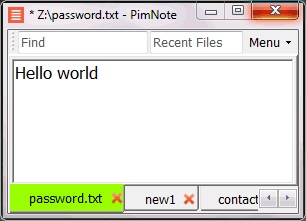
PimNote is a text editor that allows for faster document access. It also combines both the useful and unutilized features of all other text editors.
This tool is designed for knowledge management. You can quickly access the recent file list with a single click. You can easily access an old file that has been opened long ago with the unlimited and searchable recent files list. You can type less with the one-click search and find history feature.
This product is designed for remote work. No freezing from a remote file monitoring/opening/writing when disconnected. You can save files offline by closing the application and not closing the tabs. During file opening, auto-reconnect the network drive. Recurring file notifications are displayed politely on top bar, instead of a popup dialog box that requires frequent actions and tends not to be used.
API Access
Has API
No
API Access
Has API
No


Integrations
C
Yes
C#
No
C++
Yes
CSS
Yes
HTML
Yes
JSON
Yes
Java
Yes
JavaScript
Yes
PHP
Yes
Pascal
Yes
Integrations
C
No
C#
Yes
C++
No
CSS
No
HTML
No
JSON
No
Java
No
JavaScript
No
PHP
No
Pascal
No
Pricing Details
No price information available.
Free Trial
No
Free Version
No
Pricing Details
No price information available.
Free Trial
No
Free Version
Yes
Deployment
Web-Based
No
On-Premises
No
iPhone App
No
iPad App
No
Android App
No
Windows
Yes
Mac
Yes
Linux
Yes
Chromebook
No
Deployment
Web-Based
No
On-Premises
No
iPhone App
No
iPad App
No
Android App
No
Windows
Yes
Mac
No
Linux
No
Chromebook
No
Customer Support
Business Hours
No
Live Rep (24/7)
No
Online Support
Yes
Customer Support
Business Hours
No
Live Rep (24/7)
No
Online Support
Yes
Types of Training
Training Docs
Yes
Webinars
No
Live Training (Online)
No
In Person
No
Types of Training
Training Docs
Yes
Webinars
No
Live Training (Online)
No
In Person
Yes
Vendor Details
Company Name
CudaText
Website
sourceforge.net/projects/cudatext/
Vendor Details
Company Name
Pimtel
Founded
2018
Website
www.pimtel.com/pimnote/
Product Features
Code Editors
API
No
Auto-Complete
No
Code Folding
No
Column Editing
No
Customizable Themes
No
Debugging
No
Formatting / Table Editing
No
Keyboard Shortcuts
No
Multi-Monitor Editing
No
Syntax Highlighting
No
WYSIWYG
No
Text Editors
API
No
Auto-Complete
No
Code Folding
No
Column Editing
No
Customizable Themes
No
Debugging
No
Formatting / Table Editing
No
Keyboard Shortcuts
No
Multi-Monitor Editing
No
Syntax Highlighting
No
WYSIWYG
No
Product Features
Text Editors
API
No
Auto-Complete
No
Code Folding
No
Column Editing
No
Customizable Themes
No
Debugging
No
Formatting / Table Editing
No
Keyboard Shortcuts
No
Multi-Monitor Editing
No
Syntax Highlighting
No
WYSIWYG
No
