Average Ratings 0 Ratings
Average Ratings 0 Ratings
Similar Products
-
Acuity SchedulingSimplify the process of booking and managing appointments effortlessly with Acuity Scheduling. This user-friendly online appointment scheduling tool empowers professionals and businesses to conveniently fill their calendars without the associated stress. Clients can view your availability in real time, book appointments quickly, and make payments upfront, allowing you to avoid the tedious task of constant organization and rescheduling. Additionally, Acuity's features help streamline your workflow, making your scheduling experience even more efficient.
-
gtechnagtechna’s smart parking management and enforcement solution is trusted by leading cities worldwide. Our cloud-based system empowers municipalities, transportation agencies, and universities with cutting-edge applications that increase parking revenue, cut operational costs, and improve the driver experience. By choosing gtechna for your parking management and enforcement needs, you're partnering with an industry leader known for constant innovation. Cities like Washington, D.C., Boston, Pittsburgh, Toronto, and Vancouver have already transformed their parking infrastructure with gtechna—now it's your turn to experience the future of parking. Upgrade to a scalable parking management and
-
SmartDrawSmartDraw makes professional drawings and diagrams accessible to everyone. Non-technical users can quickly create floor plans, while professionals get the precision and scale they require. With industry-leading floor planning tools and an intuitive interface for traditional diagramming like flowcharts and organizational charts, SmartDraw delivers enterprise-ready power without unnecessary complexity. Key features: - Large collection of symbols and templates - Ability to create custom shapes - Import PDFs, images, Google Maps, Visio files, Visio stencils - Draw to any scale - Enrich drawings with data - Generate manifest and bills of materials - Generate diagrams from data automatically like org charts, AWS, Azure, PI Boards, and more - Use natural language text prompts to generate diagrams with AI - Save files directly to OneDrive, SharePoint, or Google Drive, or other preferred provider - Integrations with the Microsoft and Google enterprise stack plus Confluence and Jira SmartDraw supports a wide range of industries and real-world use cases, helping teams plan, document, and communicate more effectively. Construction professionals use it to create scaled floor plans, site layouts, and electrical and plumbing drawings. Fire departments rely on it for fire pre-planning and incident documentation, while police departments use it for accident reconstruction and crime scene diagrams. IT teams build network diagrams and cloud architectures, HR leaders create organizational charts, and product managers map out processes and workflows. From physical layouts to business processes, SmartDraw provides a single platform that adapts to the needs of each role and industry.
-
CallHubCallHub is a digital organizing platform built for political campaigns, nonprofits, advocacy groups, unions, and businesses to scale their outreach through calling, texting, email, and workflow automation. The platform includes Predictive, Power, and Auto Dialers for efficient and personalized calling. Its AI-powered Smart Insights analyze call sentiment, while Dynamic Caller ID, Spam Shield, and SHAKEN/STIR compliance ensure higher connection and answer rates. CallHub’s texting tools, Peer-to-Peer Texting, Text Broadcasts, and Text-to-Join support SMS/MMS, URL tracking, and automated replies. Workflow automation enables coordinated multi-channel campaigns, and the mobile app empowers volunteers to participate from anywhere. With native integrations for NationBuilder, NGP VAN, Salesforce, and Blackbaud, CallHub ensures seamless data sync across CRMs. The platform is SOC 2, ISO 27001, GDPR, and TCPA compliant. Trusted by over 200,000 campaigns worldwide, CallHub has powered 1 billion calls and 750 million texts, helping organizations connect, mobilize, and win.
-
FilecampFilecamp is a cloud-based Digital Asset Management (DAM) software solution that helps marketing & creative teams organize and share their digital media such as images, videos, and brand guidelines. Filecamp comes with unlimited users, each user configured with their own set of user-, admin-, and folder permissions. Filecamp's unique custom branding options will make sure your DAM system matches your brand guidelines. The built-in online proofing and commenting tools allow you to review and approve creative work. Prices start at only USD 29/month and their free 30-day trial allows you to test the solution with your files, teammates, and customers.
-
YodeckNext-generation technology for digital signage professionals Yodeck, a cloud-based digital signage platform, is unbeatable. It powers your screen with dynamic content that instantly engages your target audience. Yodeck makes it easy to create, schedule, and design content from the web. To get your message across to those who matter most to you, use attention-grabbing media such as videos, images and PDF files, Office documents, data dashboards, and social media. It provides enterprise-grade security and control. Yodeck's drag-and-drop editing feature allows users to be creative in organizing content into interesting layouts. Yodeck is proud to offer a unique digital signage solution for businesses of all sizes. This includes local diners as well as global leaders like Delta Airlines, Autodesk and Adobe.
-
QuantCloud solution to manage retail spaces, product categories and planograms. Smart automatic generation of planograms based on sales is possible. This allows for the maintenance of planograms in a current state even in large sales networks with many stores. Quant is a complete solution for Space Planning and Category Management, planograms and ranging, shelf labels and POS printing, communication and in-store marketing. Quant Cloud offers all the benefits of cloud computing. You can work remotely on the same projects with your colleagues around the globe and access the same database from different computers. There is no need to create complex infrastructures or overload your IT department. Our consultants are always available to assist you. We train your users, and assist with data integration so Quant can go live in less than 12 week.
-
ROLLERAt ROLLER, we help leisure and attractions businesses unlock their full potential and grow with confidence. Trusted by more than 3,000 venues across 30+ countries—including leading brands like Sky Zone, Altitude, American Dream, Uptown Jungle, Flip Out, Oxygen, Innoflate, and Jumpsquare—we bring deep expertise in the unique needs of the attractions industry. From family entertainment centers and trampoline parks to water parks, zoos, aquariums, and children’s museums, ROLLER supports a wide range of venue types. Our all-in-one, cloud-based platform is designed to simplify operations and maximize revenue. With integrated tools for ticketing, point of sale, memberships, payments, and digital waivers, ROLLER enables operators to streamline workflows, improve the guest experience, and make smarter business decisions—all from a single system.
-
JOpt.TourOptimizerJOpt.TourOptimizer is an enterprise optimization engine for route planning, scheduling, and resource allocation across logistics, transportation, dispatch, and field service operations. It is built for organizations that need to solve complex planning problems under real-world business constraints rather than simple consumer-grade route calculation. The platform supports vehicle routing and scheduling scenarios such as VRP, CVRP, VRPTW, pickup and delivery, multi-depot planning, heterogeneous fleets, and workforce scheduling. JOpt.TourOptimizer can model time windows, working hours, visit durations, capacities, skills and expertise levels, territories, zone governance, overnight stays, alternate destinations, and custom business rules. This makes it suitable for production deployments where feasibility, transparency, and operational reliability matter. It is designed to generate practical plans that help teams balance travel time, service commitments, workload distribution, and operational cost in demanding enterprise environments. The solution is available both as an embedded Java SDK and as a Docker-based REST API with OpenAPI and Swagger support. This allows software vendors, enterprise developers, and system integrators to embed advanced optimization into TMS, ERP, CRM, WMS, dispatch systems, customer platforms, and field service applications. With support for scalable integration and modern service architectures, JOpt.TourOptimizer helps organizations improve planning efficiency, service quality, SLA compliance, transparency, and operational resilience at scale. It also supports enterprise integration strategies that require reproducible optimization runs, structured outputs, and flexible deployment models.
-
MentorCityMentorCity is an intuitive online mentoring program that helps to build the future of individuals and organizations through the power and connections of relationships. MentorCity is a unique online mentoring software that can be used by schools, companies, and associations to help with member engagement, succession planning, diversity and inclusion strategies, and leadership development. MentorCity is a powerful personal development tool that helps organizations save time by reducing matching responsibilities. This allows program administrators to concentrate their efforts on creating a mentoring culture that produces exceptional results. business mentoring software, corporate mentoring software, mentoring platform, mentoring platform software, mentoring software, online mentoring platform
Description
Digitally controlled curbs enhance safety, improve efficiency, and prepare urban areas for future developments. Smart Zones consist of designated areas along the curb that cities oversee and manage digitally. By utilizing a mobile application, drivers can access real-time information regarding availability, allowing them to reserve and pay for parking spaces seamlessly. This technology helps alleviate congestion, minimize chaos, and reduce safety risks on the streets by connecting commercial drivers with secure and legal parking spots in Smart Zones. Additionally, comprehensive program design and implementation assistance allow for the rapid and scalable creation of asset-light, revenue-generating Smart Zones. This innovative approach not only streamlines urban mobility but also contributes to a more organized and safer city environment.
Description
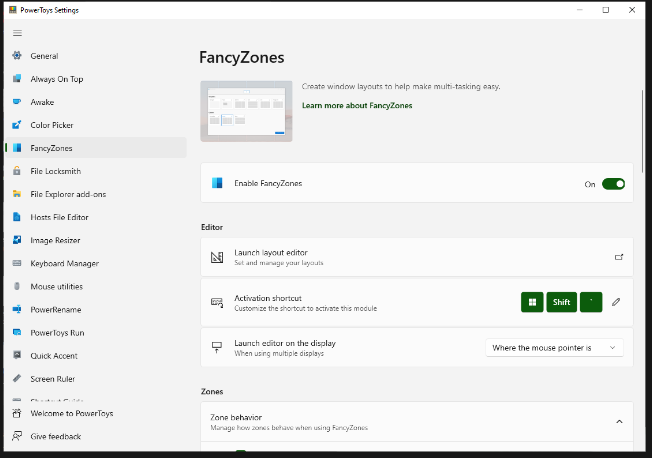
FancyZones serves as a window management tool designed to help users arrange and snap their application windows into optimized layouts, enhancing workflow efficiency and allowing for quick restoration of these layouts. This utility empowers you to specify a series of designated zones on your desktop where windows can be directed. By dragging a window into a predetermined zone or using a designated keyboard shortcut, the respective window automatically resizes and relocates to occupy that zone completely. Additionally, if you have the "Use non-primary mouse button to toggle zone activation" option activated, you can enter zone selection mode by simply clicking the secondary mouse button. When two zones are positioned next to each other, a window can be adjusted to span the combined area of both zones, effectively rounding up to the smallest rectangle that encompasses the two. As you maneuver the mouse cursor close to the shared boundary of two zones, both zones become active at the same time, giving you the flexibility to drop the window into either or both. Moreover, you can drag the window until it activates one zone and then, by pressing and holding the control key while continuing to drag, select multiple zones to expand your layout options. This feature significantly streamlines the process of organizing your desktop workspace efficiently.
API Access
Has API
No
API Access
Has API
No


Integrations
No details available.
Integrations
No details available.
Pricing Details
No price information available.
Free Trial
Yes
Free Version
No
Pricing Details
Free
Free Trial
No
Free Version
Yes
Deployment
Web-Based
No
On-Premises
No
iPhone App
Yes
iPad App
Yes
Android App
No
Windows
No
Mac
No
Linux
No
Chromebook
No
Deployment
Web-Based
No
On-Premises
No
iPhone App
No
iPad App
No
Android App
No
Windows
Yes
Mac
No
Linux
No
Chromebook
No
Customer Support
Business Hours
No
Live Rep (24/7)
No
Online Support
No
Customer Support
Business Hours
Yes
Live Rep (24/7)
No
Online Support
Yes
Types of Training
Training Docs
No
Webinars
No
Live Training (Online)
No
In Person
No
Types of Training
Training Docs
Yes
Webinars
Yes
Live Training (Online)
No
In Person
Yes
Vendor Details
Company Name
Coord
Website
coord.co
Vendor Details
Company Name
Microsoft
Country
United States
Website
learn.microsoft.com/en-us/windows/powertoys/fancyzones
Product Features
Municipal
Animal Licensing
No
Code Enforcement
No
Fund Accounting
No
Inventory Management
No
License Issuance
No
Parking Management
No
Permit Issuance
No
Planning & Zoning
No
Property Database
No
Taxation & Assessment
No
Utility Billing
No
Work Order Management
No
