Average Ratings 0 Ratings
Average Ratings 0 Ratings
Similar Products
-
SilverwareAt Silverware, we believe in empowering hospitality businesses with innovative, reliable, and scalable technology. Founded over 30 years ago, we provide enterprise solutions for tier-one hotels and resorts, multi-unit restaurant operations, and large-scale venues. As a Fullsteam company, our commitment goes beyond just providing software—we build relationships. With over 100+ integrations and a dedicated support team, we’re with you at every step. That’s why hospitality leaders in over 30 countries trust Silverware POS to drive operational efficiency and enhance guest experiences, ensuring success through custom-tailored solutions that grow with your business. Set the gold standard with Silverware.
-
HighchartsHighcharts, a Javascript-based charting library, makes it easy to add interactive charts and graphs to web or mobile projects of any size. Highcharts is used by more than 80% of the 100 biggest companies in the world, as well as thousands of developers from a variety of industries, including finance, publishing, application development, and data science. Highcharts is in active development since 2009. It remains a favorite among developers due to its robust feature set and ease-of-use documentation, accessibility features and vibrant community.
-
DXchartsIn just a few days, you can integrate and customize a lightning-fast financial table with your product. You can make changes or create a completely new interface. You want more? We offer a full access alternative. Data feeds with futures and indices, equities, FX and cryptocurrencies by default. Sign up now to get your data feeds. DXcharts can be integrated with any market data source, as it is data feed-agnostic. Native libraries for all platforms. Native web, native mobile & desktop. Get a solution that is specifically tailored to your product. Analyzing statistics from trading activity can help you evaluate securities and predict their future movements. You can create custom studies with the intuitive dxScript. You can adjust the layout of charts however you like and sync them by instrument, chart type and timeframe, range, studies & appearance.
-
All in One AccessibilityAn AI based accessibility tool enables websites to be accessible among people with hearing or vision impairments, motor impaired, color blind, dyslexia, cognitive & learning impairments, seizure & epileptic, ADHD, elderly, and Parkinson. It installs in just 2 minutes. It reduces the risk of time-consuming accessibility lawsuits by improving accessibility compliance for the standards WCAG 2.0, 2.1, 2.2, ADA, Section 508, European EAA EN 301 549, Canada ACA, California Unruh, Israeli Standard 5568, Australian DDA, UK Equality Act, Ontario AODA, Indian RPD Act, GIGW 3.0, France RGAA, German BITV, Brazilian Inclusion law LBI 13.146/2015, Spain UNE 139803:2012, JIS X 8341, Italian Stanca Act, Switzerland DDA & more. It supports GDPR, HIPAA, CCPA, SOC Type 2, ISO 9001:2015, & ISO 27001:2022. It supports 190+ languages. It is a cornerstone of improving web accessibility through its ease of use for companies of all sizes and with the help of paid add-ons like manual accessibility audit, remediation, PDF accessibility remediation, VPAT/ ACR, white label subscription, live site translation, SkynetAccessibility Scanner, video subtitle, and voice search. Top features of the All in One Accessibility: - AI Screen Reader - Accessibility statement - Accessibility interface for UI design fixes - Free Accessibility Statement Generator - Keyboard / Voice Navigation - Talk & Type - Libras (Brazilian Portuguese) Sign Language - Dashboard Automatic accessibility score - AI based Image Alternative Text remediation - AI based Text to Speech Screen Reader - Select Screen Reader Voice - Auto-detect language - Keyboard navigation adjustments - Content, Color, Contrast, Orientation Adjustment - Custom widget color, position, icon size, type - Dedicated support
-
Coursebox AIEmpower your content transformation with Coursebox, the leading AI-driven eLearning authoring tool. Our platform streamlines the course development process, enabling you to create a well-structured course in a matter of seconds. Once the foundation is set, you can easily refine the content and add any final touches before it's ready for deployment. Whether you're looking to distribute your course privately, sell it to a broader audience, or integrate it into your existing LMS, Coursebox makes it effortless. Designed with a mobile-first approach, Coursebox ensures that your learners stay engaged and motivated through rich, interactive content—complete with videos, quizzes, and other dynamic elements. Leverage our branded learning management system, featuring native mobile apps, to deliver a seamless learning experience. With options for custom hosting and domain personalization, Coursebox offers flexibility to meet your specific needs. Ideal for both organizations and individual educators, Coursebox simplifies the management and segmentation of learners, allowing you to craft personalized learning paths and scale your training programs quickly and efficiently.
-
Gradelink SISGradelink can help your school save time, increase enrollment and accomplish its mission. Gradelink, a renowned student management system and student information system, is suitable for all levels of schools from pre-K to college. It combines teaching, management, and learning tools to help schools achieve their best. It has top features such as attendance management, report cards and classes and scheduling, communications and student/parent information. Gradelink is easy to use. School who move to Gradelink find the setup so easy because set up is handled by our tech support team. Top features include attendance management, report cards, classes and scheduling, standards-grading system, communications, student information, and student/parent access. Lesson plans, grade sheets, parent communication and custom reports all work together in perfect unison. Gradelink is ideal for K8 schools, private schools and Charter schools. Help your school save time, increase enrollment, and achieve its mission with Gradelink. An award-winning student information system and school management system, Gradelink school management software system is suitable for Preschool through High school.
-
GearsetGearset is a full‑featured Salesforce DevOps solution built for the enterprise, giving teams the tools to adopt best practices across every stage of the DevOps lifecycle. From metadata and CPQ deployments to CI/CD, testing, code analysis, sandbox seeding, backups, archiving, and observability, Gearset gives teams unmatched insight and control over their Salesforce workflows. Over 3,000 organizations — including names like McKesson and IBM — rely on Gearset to deliver with security and scale in mind. With advanced governance, detailed audit trails, SOX/ISO/HIPAA support, multi‑team pipelines, integrated security checks, and adherence to ISO 27001, SOC 2, GDPR, CCPA/CPRA, and HIPAA, Gearset combines enterprise‑ready compliance with rapid onboarding and an intuitive interface — all in one platform. Leading firms in finance, healthcare, and tech trust Gearset to power their DevOps initiatives without adding complexity.
-
8am8am is a unified, purpose-built platform for professional services firms—combining world-class tools for practice management, payments, automation, and compliance under one brand. The company’s ecosystem includes leading solutions such as LawPay for secure, next-day payments; MyCase and CasePeer for client and case management; DocketWise for immigration law automation; and CPACharge for accounting professionals. Together, these products streamline every stage of the client journey—from lead intake and scheduling to invoicing and analytics. 8am’s intelligent workflows help firms stay IOLTA-compliant, improve cash flow, and reduce administrative burdens, freeing professionals to focus on meaningful client work. Backed by enterprise-grade security and deep industry expertise, 8am provides reliability and peace of mind for regulated professionals. With over 20 years of innovation and partnerships with 175+ bar and professional associations, the company stands at the forefront of legal and financial technology. Whether you’re managing a small practice or scaling an enterprise firm, 8am delivers tailored solutions that drive productivity and client trust. By uniting technology and service, 8am helps professionals reclaim their day and achieve more with less effort.
-
PropelPropel is a modern, AI-powered cloud platform built for how manufacturers work today. It unifies Product Lifecycle Management (PLM), Quality Management System (QMS), and Product Information Management (PIM) into one intelligent system, giving teams a connected, always-accurate view of their products. With AI embedded across the platform through Propel One, manufacturers can automate routine work, surface insights faster, and make better decisions with confidence. AI continuously learns from product data to proactively flag risks, highlight trends, and guide next best actions across teams. Instead of relying on spreadsheets, siloed tools, and manual handoffs, teams manage product data, changes, and quality processes in a single governed environment with full traceability. Propel creates a true digital product record that spans design, development, manufacturing, commercialization, and continuous improvement. Built-in workflows standardize change management, streamline quality events, and support compliance without slowing teams down. Trusted by medical device, high tech, and industrial manufacturers, Propel helps organizations reduce errors, shorten cycle times, and improve collaboration across engineering, quality, operations, supply chain, and product teams. The result is faster launches, higher product quality, and a more resilient foundation for growth as products and processes become more complex. Propel has been recognized by Deloitte as a fast-growing technology company and named to the Inc. 5000 list of fastest-growing private companies, reflecting strong customer adoption and momentum helping manufacturers modernize how they build, manage, and deliver products. Designed to scale with growing products, teams, and regulatory demands.
-
Hotspot ShieldSafeguard your personal information with top-tier encryption designed for military use, while enjoying unrestricted access to global websites and streaming services. Hotspot Shield ensures your connection is encrypted and maintains a strict no-logs policy, effectively protecting your identity and sensitive data from potential hackers and cyber threats. Boasting servers in over 80 countries and more than 35 cities, our unique Hydra protocol enhances your VPN experience, delivering swift and secure connections ideal for gaming, streaming, downloading, P2P sharing, and beyond. Experience the peace of mind that comes with knowing your online activities are safe and private. Take control of your digital presence today!
Description
Color Finale® 2 is an advanced plugin that enhances Final Cut Pro with comprehensive and professional-grade color grading capabilities. This tool is tailored for high-level post-production work and is regarded as the most user-friendly color grading plugin for beginners. Developed with the needs of vloggers, videographers, editors, and colorists in mind, Color Finale® 2 is designed to be intuitive while offering a full suite of professional color grading tools that seasoned colorists will recognize. It stands out as the quickest color grading software available for Final Cut Pro, featuring a straightforward interface, streamlined workflow, real-time processing, and semi-automated features that significantly accelerate the color grading process. Crafted by experts in color grading, the team behind Color Finale® 2 boasts over two decades of experience in creating high-end color correction systems, collaborating with leading colorists worldwide, and contributing to notable film projects. This plugin offers the most comprehensive color grading toolkit, combining sophisticated color grading and advanced image processing capabilities seamlessly within your Final Cut Pro timeline, making it an invaluable asset for anyone looking to elevate their video projects. With Color Finale® 2, users can achieve striking visual results that meet professional standards.
Description
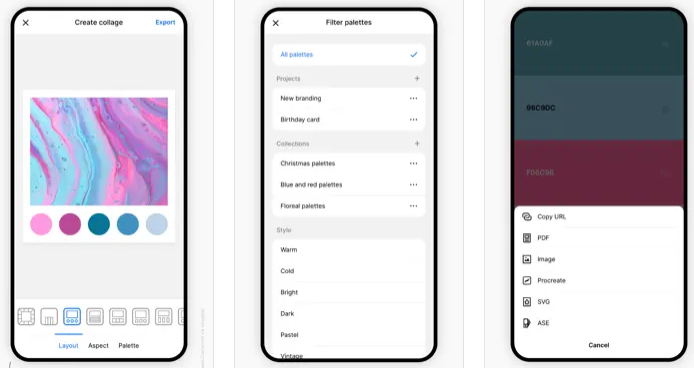
Coolors is a rapid color palette generator that assists you in crafting the ideal color palette or finding inspiration from a myriad of stunning color schemes. Accessible via web platforms, mobile applications, plugins, and extensions, it allows users to create color palettes in mere seconds by tapping the space bar, secure preferred colors to enhance the palette, and rearrange or modify the number of colors included. Additionally, it features an Image Picker to derive color schemes from personal photos and a Contrast Checker to ensure the combinations are accessible for all users. The Palette Visualizer offers a way to see how colors look in real design scenarios, while other tools, including a Color Picker, Collage Maker, gradient generator, and extensive color libraries, further enhance the experience. Users can export their palettes in various formats such as PDF, image, CSS, and SVG, as well as share links and integrate with design software like Figma or a Chrome extension. The platform also supports multiple color-space values including HEX, RGB, and CMYK, and includes functionalities for simulating color-blindness along with adjusting luminance, hue, and temperature for precision in design. Overall, Coolors combines functionality and creativity to cater to both amateur and professional designers alike.
API Access
Has API
Yes
API Access
Has API
No


Integrations
Adobe Acrobat
No
CSS
No
Figma
No
Final Cut Pro
Yes
Google Chrome
No
Instagram
No
Integrations
Adobe Acrobat
Yes
CSS
Yes
Figma
Yes
Final Cut Pro
No
Google Chrome
Yes
Instagram
Yes
Pricing Details
$99 one-time payment
Free Trial
Yes
Free Version
No
Pricing Details
Free
Free Trial
No
Free Version
Yes
Deployment
Web-Based
No
On-Premises
No
iPhone App
No
iPad App
No
Android App
No
Windows
No
Mac
Yes
Linux
No
Chromebook
No
Deployment
Web-Based
Yes
On-Premises
No
iPhone App
Yes
iPad App
Yes
Android App
Yes
Windows
No
Mac
Yes
Linux
No
Chromebook
No
Customer Support
Business Hours
No
Live Rep (24/7)
No
Online Support
Yes
Customer Support
Business Hours
No
Live Rep (24/7)
No
Online Support
Yes
Types of Training
Training Docs
Yes
Webinars
No
Live Training (Online)
No
In Person
No
Types of Training
Training Docs
Yes
Webinars
No
Live Training (Online)
Yes
In Person
No
Vendor Details
Company Name
Color Finale
Country
United States
Website
colorfinale.com
Vendor Details
Company Name
Coolors
Founded
2014
Country
Italy
Website
coolors.co
Product Features
Product Features
Graphic Design
Collaboration
No
Data Visualization
No
Filtering
No
Image Database
No
Image Editor
No
Templates
No
