Average Ratings 0 Ratings
Average Ratings 0 Ratings
Similar Products
-
FathomFathom is an AI meeting assistant that helps users capture, summarize, search, and act on meetings with less manual work. The platform creates accurate transcripts, instant summaries, action items, and follow-up notes so users can focus on live conversations instead of taking notes. Fathom supports both traditional meeting capture and bot-free capture through its desktop app. Teams can use Fathom as a shared source of truth across customer calls, internal meetings, strategy sessions, and project conversations. Ask Fathom lets users search across meetings and ask questions about conversations, decisions, commitments, risks, and next steps. The platform also supports topic monitoring so important moments and signals are easier to find. Fathom syncs meeting notes, insights, and action items into tools such as Slack, Salesforce, HubSpot, Notion, Asana, Gmail, Zoom, Google Meet, Microsoft Teams, ChatGPT, Claude, Zapier, and API or MCP workflows. It supports security and compliance needs with SOC 2 Type II, GDPR, HIPAA compliance, SSO, and SCIM. By combining AI notetaking, bot-free capture, transcripts, summaries, integrations, search, and workflow automation, Fathom helps teams move from meetings to execution faster.
-
Google WorkspaceGoogle Workspace is an all-in-one cloud productivity platform developed by Google to help businesses manage communication, collaboration, document creation, and workflow automation from a centralized environment. The platform combines professional email, cloud storage, video conferencing, document editing, team messaging, scheduling, and AI-powered assistance into one subscription-based ecosystem optimized for modern work environments. Google Workspace includes applications such as Gmail, Google Drive, Google Meet, Docs, Sheets, Slides, Calendar, Chat, Keep, Forms, Sites, NotebookLM, and Gemini AI, enabling teams to work together seamlessly across devices and locations. One of the platform’s core strengths is its built-in AI functionality powered by Gemini, which helps users draft emails, summarize meetings, generate research insights, automate repetitive tasks, and improve productivity using contextual awareness from workplace data. Google Workspace also supports advanced collaboration features including real-time editing, appointment scheduling, eSignatures, document sharing, cloud storage management, and AI-assisted research tools. Businesses benefit from enterprise-grade security features such as AI-powered threat protection, data classification, endpoint management, Data Loss Prevention, secure access controls, and compliance support for enterprise environments. The platform offers scalable pricing plans suitable for startups, small businesses, enterprises, educational institutions, nonprofits, and government organizations. Google Workspace also simplifies data migration and onboarding with built-in migration tools and partner support for transferring emails, files, and business information securely into the cloud.
-
Construction Daily ReportsYou can save up to an hour per day on daily reports CDR – Construction Daily Reports is the fastest custom daily reporting solution available for the construction industry. It can be accessed on our mobile app for Android or Apple devices as well as our website portal. You can customize your reports by entering project details. Then, you can take photos and make notes using your mobile device. CDR will email your completed report in professional PDF format to you after you sign it. We also save it on our servers so that you can upload it to your cloud storage. CDR is a mobile-friendly, time-saving construction software designed to simplify your reporting process. Start your free trial now!
-
CanopyCanopy, a cloud-based practice management system for accountants, is available. Our suite of features allows you to streamline your firm and connect with clients. It includes workflow, document management and billing, payments, a robust CRM, secure client portal, and tools that automate any post-filing issues such as IRS notices.
-
CompanyCamCompanyCam is a photo-based solution created specifically for contractors. Users can take unlimited photos—which are location and time stamped, sent to the cloud, and stored securely. Every photo is organized by project and instantly available to your team, allowing you to see what’s going on anytime, anywhere.
-
Process StreetProcess Street is the Compliance Operations Platform built for teams that need to move fast without breaking standards. It combines document control, workflow automation, and AI-powered oversight in a single system so every policy is followed, every step is tracked, and every audit is effortless. Unlike legacy GRC tools or static SOP docs, Process Street turns compliance into a living system. Policies are documented in governed, version-controlled Pages. Those policies are executed through dynamic workflows with built-in task assignment, approvals, and forms. Every action is logged, monitored, and optimized in real time by Cora, our AI compliance agent. Used across industries like financial services, real estate, healthcare, and manufacturing, Process Street helps teams automate employee onboarding, streamline audits, manage policy updates, enforce vendor reviews, and run critical processes at scale. No code required. No micromanagement. Just proof that work gets done right, every time. Companies like Salesforce, Colliers, Drift, and Hartford Healthcare trust Process Street to eliminate busywork, improve operational visibility, and reduce compliance risk across the business. With native integrations, role-based access, audit trails, and ISO-aligned workflows, it is the platform that makes compliance a competitive advantage. From onboarding to audits, Process Street is how high-stakes teams enforce standards, automate execution, and prove compliance by default.
-
ScreencaptScreencapt allows you to record the entire screen or a selected area. You can also record a specific window. Screencapt is the ideal screen recorder because of its flexibility. Using the integrated audio recording you can also add your commentary or system sound directly into the screen recording. This is particularly useful when creating explanation videos or presentations. Screencapt's ability to record a webcam is a special feature. You can now add your comments and reactions to the video. This makes your screen recordings more personal and professional. Screencapt offers advanced options to record the cursor. You can choose to hide the cursor or add special effects to highlight specific actions. This is especially useful for software tutorials and demonstrations where a clear cursor view is required.
-
AestheticsProAestheticsPro is today's most comprehensive medical aesthetic software. HIPAA cloud compliant with integrated POS, targeted advertising, and results driven reporting paired with electronic charting and client portal with "book now" capabilities. AestheticsPro provides everything you need to run your medical spa business.
-
Coursebox AIEmpower your content transformation with Coursebox, the leading AI-driven eLearning authoring tool. Our platform streamlines the course development process, enabling you to create a well-structured course in a matter of seconds. Once the foundation is set, you can easily refine the content and add any final touches before it's ready for deployment. Whether you're looking to distribute your course privately, sell it to a broader audience, or integrate it into your existing LMS, Coursebox makes it effortless. Designed with a mobile-first approach, Coursebox ensures that your learners stay engaged and motivated through rich, interactive content—complete with videos, quizzes, and other dynamic elements. Leverage our branded learning management system, featuring native mobile apps, to deliver a seamless learning experience. With options for custom hosting and domain personalization, Coursebox offers flexibility to meet your specific needs. Ideal for both organizations and individual educators, Coursebox simplifies the management and segmentation of learners, allowing you to craft personalized learning paths and scale your training programs quickly and efficiently.
-
Nasdaq MetrioNasdaq Metrio is a sustainability reporting platform tailored for businesses at various stages of their ESG journey. It merges meticulous data collection, tracking, and management with emissions calculations and assurance. Additionally, it provides a comprehensive library of metrics from various rater and ranker frameworks as well as regulatory bodies, all cross-referenced, de-duplicated, and clarified, complete with guidance notes.
Description
Coconote is an advanced AI-powered note-taking application that efficiently converts lectures, meetings, videos, and documents into neatly organized notes, comprehensive transcripts, quizzes, flashcards, and even facilitates AI chat, with support for more than 100 languages. Users can easily record or upload various formats such as audio, video, documents, and YouTube links, and Coconote promptly transcribes and organizes this content into well-structured notes and summaries. The app boasts a variety of features, including the creation of quizzes and flashcards, an AI chat function that allows users to inquire about their notes, seamless synchronization across multiple devices, and the capability to handle a wide array of media types for uploads and recordings. Designed with the goal of enhancing study efficiency, the application eliminates the need for manual transcription or traditional note-taking methods. On mobile devices, Coconote allows users to capture lectures and generate study materials effortlessly while on the move. By automating the note-taking process, it empowers users to focus on understanding rather than writing, ultimately transforming raw input into refined educational resources. The innovative design of Coconote not only facilitates easier studying but also encourages more effective information retention.
Description
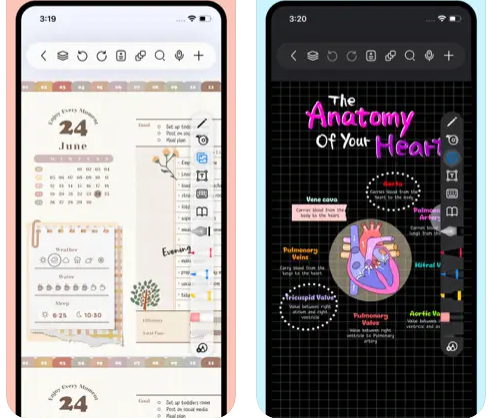
Freenotes delivers a digital note-taking platform that seamlessly combines the experience of writing on paper with advanced AI features. The app provides realistic pen strokes that replicate authentic handwriting, enhancing both sketching and note-taking, and includes functionalities such as handwriting-to-text conversion, a variety of stickers, and multiple brush styles. Your notes are easily synced through iCloud and various multi-cloud backup options. Freenotes also enables PDF annotation, allowing users to highlight, mark up, and translate text within their documents, as well as add hyperlinks to other pages or external websites. It supports picture-in-picture video mode and split-screen functionality, making it possible to take notes while watching educational videos or attending lectures. The integrated AI assistant allows you to capture screenshots or upload documents to receive quick answers or summaries of content. To keep your notes organized, you can categorize them into folders, and a swift search feature helps you find information rapidly. Additionally, Freenotes is designed to enhance productivity, making it an ideal choice for students and professionals alike.
API Access
Has API
No
API Access
Has API
No


Pricing Details
Free
Free Trial
No
Free Version
Yes
Pricing Details
Free
Free Trial
No
Free Version
Yes
Deployment
Web-Based
Yes
On-Premises
No
iPhone App
Yes
iPad App
Yes
Android App
Yes
Windows
No
Mac
Yes
Linux
No
Chromebook
No
Deployment
Web-Based
No
On-Premises
No
iPhone App
Yes
iPad App
Yes
Android App
No
Windows
No
Mac
Yes
Linux
No
Chromebook
No
Customer Support
Business Hours
Yes
Live Rep (24/7)
No
Online Support
Yes
Customer Support
Business Hours
No
Live Rep (24/7)
No
Online Support
Yes
Types of Training
Training Docs
Yes
Webinars
No
Live Training (Online)
No
In Person
Yes
Types of Training
Training Docs
Yes
Webinars
No
Live Training (Online)
No
In Person
No
Vendor Details
Company Name
Coconote
Country
United States
Website
coconote.app/
Vendor Details
Company Name
Freenotes
Country
China
Website
apps.apple.com/us/app/freenotes-ai-notes-taking/id6464237904
Product Features
Note-Taking
Categories / Organization
No
Clip From Web
No
Document Scanning
No
Formatting / Markdown
No
Handwriting
No
Hyperlinking
No
Image Insertion
No
List/Checklist Creation
No
Printing
No
Search
No
Sharing / Collaboration
No
Syncing
No
Templates
No
Voice Notes
No
Product Features
Note-Taking
Categories / Organization
No
Clip From Web
No
Document Scanning
No
Formatting / Markdown
No
Handwriting
No
Hyperlinking
No
Image Insertion
No
List/Checklist Creation
No
Printing
No
Search
No
Sharing / Collaboration
No
Syncing
No
Templates
No
Voice Notes
No
