Average Ratings 0 Ratings
Average Ratings 0 Ratings
Similar Products
-
MarkMagicMarkMagic barcode label software makes it easy to design and print barcode labels, electronic forms, and RFID tags that you need to communicate your needs with customers and suppliers. MarkMagic is the barcoding engine in the most popular warehouse management software, such as Infor, Honeywell Intelligrated and Apparel Business Systems. MarkMagic is powerful and simple to use. You'll see why thousands upon thousands of software vendors and customers around the world rely on it to create business critical documents.
-
Label LIVELabel LIVE is the easiest to use label printer app for designing and printing labels. You can print barcodes and address labels, shelf tags, inventory labels, and many other jobs using Label LIVE. Use your Mac or Windows 10 desktop computer to work with thermal label printers from mydpi, Brother, DYMO and Zebra. Label LIVE generates PDFs that can be sent to any printer that is installed using a driver. This means you can send complex print jobs to inkjet and laser printers, too. Need to import spreadsheet data? Label LIVE can import Excel, Numbers or CSV files with a few clicks.
-
ShareMyToolboxDiscover ShareMyToolbox - Your Tool Tracking Solution for Construction Teams. Effortlessly oversee small tools and equipment. Seamlessly compatible with Apple and Android devices, users can delve into their company's tool inventory. Smoothly request tools and embrace assignments with the ease of barcode scanning. Harness the potential of GPS coordinates captured during scans, precisely displayed on an interactive map. Tailored meticulously for contractors, our system redefines user-friendliness. Embark on your tool tracking odyssey with three simple steps: Effortless Organization: Cultivate an inventory of tools and equipment, shaping your personalized cloud catalog of invaluable assets. Enhanced Visibility: Empower field personnel, granting rapid access to survey the company's diverse assets via our intuitive mobile app. Cultivate Accountability: Equip field workers with the power to manage tool transactions seamlessly – check-ins, check-outs, and transfers – all facilitated through the convenience of barcodes and QR codes.
-
FishbowlFishbowl is the best-selling software for warehouse and manufacturing management. Fishbowl is a software that allows small and medium-sized companies, such as manufacturers, distributors, or service providers, to seamlessly integrate advanced inventory features into QuickBooks. It offers multi-location tracking, bill of materials, billing, shipping, auto reorder points and integrations with EDI shopping carts, merchant service, and other business solutions. Fishbowl is an excellent choice if you're looking for an affordable solution to manage inventory. It can help your company take advantage of the latest technology in order to streamline operations and save money.
-
LabWare LIMS14,000 laboratories. 125 countries 98% customer satisfaction! LabWare's range of laboratory automation solutions can help you increase productivity, throughput and efficiency, as well as data integrity and compliance. LabWare offers flexible deployment options. Laboratories that are looking to deploy in a matter of days can choose the fully-validated and cost-optimized SaaS LIMS with best practice workflows. Laboratories who require a fully customizable enterprise-level LIMS/ELN for their business can choose from either self-hosted or flexible cloud deployment options. LabWare users have access to world-class features like lot management, sample and stability management, instrument interfacing and workflows and dashboards, inventory and COA management, COAs, barcoding and many more.
-
LogicalDOCLogicalDOC empowers organizations all over the globe to take complete control of their document management. This premier document management system (DMS), which focuses on business process automation and quick content retrieval, allows teams to create, collaborate and manage large volumes of documents. It also stores valuable company data in one central repository. The system features include drag-and-drop document uploads, forms management, optical characters recognition (OCR), duplicate detection and barcode recognition, event logs, document archiving and integrated document workflow. Schedule a free, no obligation, one-on-one demo today.
-
PackageX WorkflowsBuilding Logistics is a comprehensive solution that manages the incoming flow of packages in buildings, offices, universities, and hotels, ensuring seamless tracking, scanning, sorting, and recipient notifications for each package. With PackageX’s advanced AI scanning technology, the system captures text, QR codes, and barcodes to ensure flawless package intake, enabling efficient package management. The platform also features data validation, automatic contact matching, customizable notifications, and chain of custody tracking, all designed to improve delivery workflows and reduce errors. By providing a more efficient system, PackageX increases delivery speed, accuracy, and overall operational efficiency, making it the ideal choice for managing package logistics in high-traffic environments. With 99% accuracy in package intake, zero lost packages, and twice the efficiency of traditional methods, PackageX delivers a seamless and hassle-free recipient experience.
-
Square POSSquare POS is a simple, intuitive point-of sale (POS) solution. It provides a rich set of tools for inventory tracking, sales tracking, online payment processing and digital receipts. Square POS is available for Android and iOS devices. It records transactions offline by storing data locally, then automatically syncing information when there is an Internet connection. Square POS allows users to manage details such as names, prices and quantities. It also offers features such as a barcode scanner and discounts, credit card processing and gift cards, refunds and more.
-
OnroOnro is a courier management system designed for companies that operate and manage delivery services. For most courier companies evaluating software, the key question is whether it can manage the full delivery lifecycle. Onro supports this by covering order intake, dispatching, driver assignment, route execution, real-time tracking, and proof of delivery. Orders can be created manually, through APIs, or via integrations with external systems. Onro provides real-time status updates across deliveries, drivers, and warehouses that allow teams to monitor what is happening in the field and respond to exceptions during execution. Courier companies need structured dispatching. Onro supports both manual and rule-based assignment. Drivers receive tasks through mobile applications and update delivery statuses as they complete each step. Warehouse and hub management is another core requirement for many logistics businesses. Onro includes multi-warehouse support where shipments can move between locations using defined statuses such as arrival, readiness for transfer, in transit, and destination confirmation. Barcode scanning is used in warehouse environments to process high volumes of parcels with reduced manual input. The platform provides notification workflows and tracking visibility so customers can follow delivery progress and receive updates throughout the process. Onro is designed to support both small courier operations and larger enterprise logistics businesses that operate across multiple locations and delivery models. Different teams such as dispatchers, drivers, warehouse staff, and administrators operate within the same system. AI features are included to support repetitive operational tasks and reduce manual coordination across delivery workflows.
-
Vibe RetailVibe Retail is a cloud-based point-of-sale (POS) and retail operations system designed exclusively for businesses that sell physical products through one or multiple locations. Unlike most POS platforms that attempt to serve restaurants, hospitality, or service-based businesses, Vibe Retail focuses only on retail, allowing the platform to be engineered around real retail workflows rather than generalized use cases. The system centralizes inventory, sales, employee, customer, and supplier data into a single, mobile-friendly interface. Retailers can track inventory across stores and warehouses in real time, manage product variations such as size, color, and material, and maintain serialized inventory for traceability. Additional capabilities include barcode generation and scanning, purchase order creation, supplier receiving, delivery reconciliation, and real-time stock transfers between locations. On the transaction side, Vibe Retail supports multiple retail payment types, including credit and debit cards, cash, checks, gift cards, and EBT. Retail-specific workflows such as layaway, delivery fulfillment, loyalty programs, and branded receipts are built into the system. Mobile receipt printing and role-based staff permissions allow retailers to operate efficiently both at fixed checkout counters and on the sales floor. Vibe Retail integrates with ecommerce platforms such as Shopify and WooCommerce, synchronizing inventory, orders, and customer data across online and physical channels. Built-in analytics provide more than 40 real-time reports covering sales performance, inventory movement, employee activity, and operational metrics, helping retailers maintain visibility and control as they scale.
Description
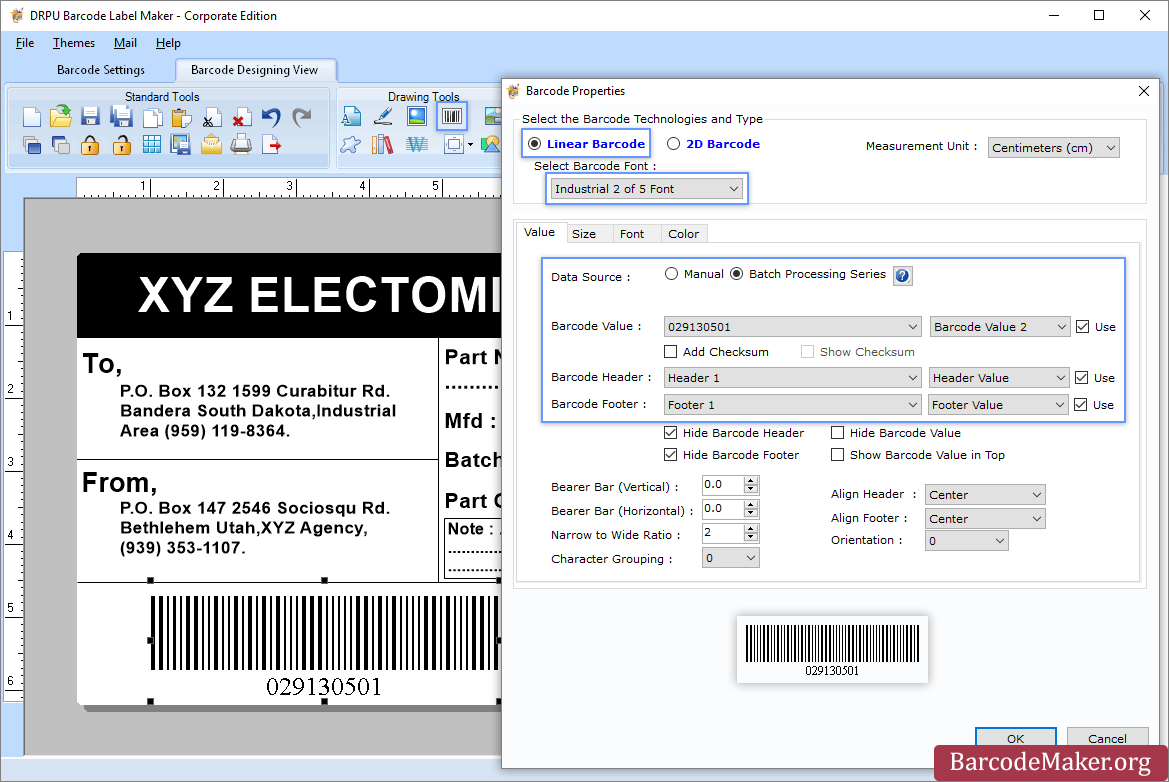
The optimal solution for generating barcodes in the publishing sector is a dedicated barcode label maker:
To start, download and install the Publisher Barcode Generator compatible with Windows. Once installed, open the application and select either the Quick Barcode Mode or the Barcode Designing View Mode. In Quick Barcode Mode, users can opt for either Linear or 2D barcode fonts, input the desired barcode along with header and footer values, and if needed, activate Batch Processing to create multiple barcodes simultaneously. Alternatively, in the Barcode Designing View Mode, users can personalize their labels by adjusting general properties, background settings, and image processing features. To add a barcode, navigate to the Drawing Tools tab and double-click on the barcode to access its properties, where you can select the barcode type and font before entering the specific barcode information. If you plan to generate barcodes in batches, remember to enable the Batch Processing Series option. Finally, the generated barcode labels or tags can be saved in various formats, facilitating easy usage across different platforms. This comprehensive approach ensures that users have all the tools necessary for efficient barcode label creation tailored to their needs.
Description
LablePath is a sophisticated barcode label creation and printing software that serves as a comprehensive solution for all your barcode labeling requirements. This user-friendly tool allows you to produce high-quality, printable barcode labels—including barcode stickers, asset tags, and security tags—utilizing both linear and 2D barcode fonts with just a few clicks. The intuitive barcode generator can create vibrant, customized labels in various sizes, incorporating your chosen text and captions, and it can save the generated images in standard formats like JPEG, GIF, Bitmap, and PNG directly on your computer. With LablePath, designing barcode labels is a straightforward process that can be completed in just a few simple steps. Overall, this software streamlines the entire labeling process, making it accessible for users of all skill levels.
API Access
Has API
No
API Access
Has API
No


Integrations
No details available.
Integrations
No details available.
Pricing Details
$50 one-time payment
Free Trial
Yes
Free Version
No
Pricing Details
No price information available.
Free Trial
No
Free Version
No
Deployment
Web-Based
No
On-Premises
No
iPhone App
No
iPad App
No
Android App
No
Windows
Yes
Mac
No
Linux
No
Chromebook
No
Deployment
Web-Based
No
On-Premises
No
iPhone App
No
iPad App
No
Android App
No
Windows
Yes
Mac
No
Linux
No
Chromebook
No
Customer Support
Business Hours
No
Live Rep (24/7)
Yes
Online Support
Yes
Customer Support
Business Hours
Yes
Live Rep (24/7)
No
Online Support
Yes
Types of Training
Training Docs
Yes
Webinars
No
Live Training (Online)
No
In Person
No
Types of Training
Training Docs
No
Webinars
No
Live Training (Online)
No
In Person
No
Vendor Details
Company Name
BarcodeMaker.org
Country
India
Website
www.barcodemaker.org
Vendor Details
Company Name
VDPSOFT
Website
www.vdpsoft.com/label/barcode-label-printing-software.html
Product Features
Barcoding
Barcode Generation
No
Barcode Scanning
No
Custom Labels
No
Inventory Management
No
Label Templates
No
RFID
No
Receiving Labels
No
Serial Number Tracking
No
Shipping Labels
No
Product Features
Label Printing
Automation
No
Barcode Support
No
Categorization
No
Design Tools
No
Hardware Integration
No
Multi-Language Support
No
Product Data Integration
No
Regulatory Compliance
No
Templates
No
