Average Ratings 0 Ratings
Average Ratings 0 Ratings
Similar Products
-
Coursebox AIEmpower your content transformation with Coursebox, the leading AI-driven eLearning authoring tool. Our platform streamlines the course development process, enabling you to create a well-structured course in a matter of seconds. Once the foundation is set, you can easily refine the content and add any final touches before it's ready for deployment. Whether you're looking to distribute your course privately, sell it to a broader audience, or integrate it into your existing LMS, Coursebox makes it effortless. Designed with a mobile-first approach, Coursebox ensures that your learners stay engaged and motivated through rich, interactive content—complete with videos, quizzes, and other dynamic elements. Leverage our branded learning management system, featuring native mobile apps, to deliver a seamless learning experience. With options for custom hosting and domain personalization, Coursebox offers flexibility to meet your specific needs. Ideal for both organizations and individual educators, Coursebox simplifies the management and segmentation of learners, allowing you to craft personalized learning paths and scale your training programs quickly and efficiently.
-
EurekosEurekos is the customer training LMS built to educate the world outside your organization – partners, distributors, resellers and the networks beyond. Most companies spend years perfecting their product or service, then hand customers a repurposed employee training course and hope for the best. When those customers churn, the product gets the blame. Usually, the training is the problem. Eurekos fixes that. We help you turn training from a cost into a growth engine. The ability to sell courses, accreditations and learning paths directly through the platform doesn’t just help retain business. It transforms customer education into a revenue stream. The same thinking runs through the entire platform – in how Saga AI adapts every learning journey to the individual, in how training portals can be customized to different customers and regions, and in how we work with you long after you go live. Eurekos Product Features:•Saga AI –Saga AI delivers contextual knowledge discovery, automated content creation and adaptive learning paths that adjust to each learner's behavior and progress. • Learning journeys and adaptive paths – Build any training path imaginable.• Built-in course authoring – 40+ customizable, interactive authoring tools built directly into the LMS. • Certification and accreditation – Create, manage and track complex certification programs with full automation..• Security and compliance – ISO/IEC 27001 & 27701 certified. • Unlimited branded portals – Deploy separate, fully branded learning environments for different cust. segments, partners or regions.• eCommerce • Mobile learning – Native mobile app for iOS and Android.• Global reach – 195+ languages with full localization support. Cloud and on-premise options.• Integrations and API – Open API & 40+ integrations
-
SynapSynap is an intelligent online exam platform for secure, question-based learning, trusted by organisations worldwide. Designed to help businesses, training providers, and educational institutions create, deliver, and manage both practice and high-stakes exams with ease. Synap offers a fully customisable, brandable portal, allowing companies to maintain their identity while providing seamless exam experiences. Our platform supports diverse question types including images, MCQs, and EMQs, which can be created directly or imported in bulk via CSV to streamline large-scale assessment needs. Integrated proctoring ensures exam integrity by monitoring candidates during live exams, preventing cheating and fraud. Synap delivers robust analytics and reporting tools, giving organisations detailed insights into learner performance, progress, and question effectiveness. This data empowers businesses to make informed decisions, improve training outcomes, and identify skill gaps quickly. With flexible exam timers, question randomisation, and secure environments, Synap scales effortlessly from small teams to enterprise-level clients. Plus, easy LMS integrations and API support enable smooth workflow automation. Synap’s intuitive interface requires minimal training, enabling organisations to deploy exams quickly and efficiently. Our dedicated customer success team provides ongoing support to ensure smooth implementation and continuous optimisation. Synap also supports compliance with data protection regulations, giving organisations peace of mind when handling sensitive learner data.
-
myACIAt ACI Learning, we don’t just teach IT and cybersecurity—we prepare you to thrive in the real world. Our expert-led videos, immersive labs, and certification prep turn learning into action so you gain the skills that truly matter. myACI, our dynamic training platform, connects knowledge to performance with gamified elements, progress tracking, and powerful analytics for teams and managers alike. Scalable, flexible, and trusted by companies worldwide, ACI Learning helps you build skills, boost retention, and prove ROI with every training initiative.
-
MedTrainerMedTrainer accelerates and simplifies healthcare workforce education, compliance, and credentialing. MedTrainer’s natively built software platform provides a seamless user experience that helps healthcare organizations thrive in managing their workforce. Learning: A healthcare-specific learning management system (LMS) enriched with thousands of education courses and resources created by subject matter experts to satisfy regulatory, accreditation requirements, and provide continuing education credit. Compliance: A technology solution that combines incident reporting, document, and policy management, and highly customizable reports to improve compliance. Credentialing: An end-to-end credentialing capability with automation, workflows, and centralized data to simplify the process and reduce costly delays. From PSV to provider enrollment and privileging, everything is in one platform with complete visibility.
-
CompanyCamCompanyCam is a photo-based solution created specifically for contractors. Users can take unlimited photos—which are location and time stamped, sent to the cloud, and stored securely. Every photo is organized by project and instantly available to your team, allowing you to see what’s going on anytime, anywhere.
-
BridgeBridge is an easy-to-use LMS with employee development built in. Uniquely combining learning management, career and skill development, and performance and talent management all in one easy-to-use solution, it helps organizations stay on top of upskilling without administrative overwhelm. With Bridge, you can easily consolidate your learning tech stack, resulting in streamlined training and development programs, saved admin time, and a more engaging experience for employees and managers alike. You have the option of using the fully integrated Talent Suite, or choosing only the stand-alone products below: Bridge LMS: Simple, effective, and hassle-free learning. Admins quickly create and distribute compliance courses, employee learning, partner and customer education, and skill-building programs across teams. Learners easily find everything they need in one place. Bridge Performance Management: With 1on1 tools, talent reviews, skills mapping, and performance analytics, Bridge moves your team beyond completion rates, giving leaders the insights they need to cut skills gaps, and align talent with business goals. Bridge Skills Management Software: With a clear view of skills mastery across your organization, AI-powered skills mapping and personalized development plans, Bridge helps your workforce build tomorrow’s skills today. Real-time labor market data from Lightcast helps you create a skills taxonomy fit for the future. With courses auto-tagged with the right skills and courses automatically recommended to your learners, upskilling stays on track year round. Plus, peer-to-peer learning and skills mentoring is effortlessly facilitated right in the platform.
-
Google WorkspaceGoogle Workspace is an all-in-one cloud productivity platform developed by Google to help businesses manage communication, collaboration, document creation, and workflow automation from a centralized environment. The platform combines professional email, cloud storage, video conferencing, document editing, team messaging, scheduling, and AI-powered assistance into one subscription-based ecosystem optimized for modern work environments. Google Workspace includes applications such as Gmail, Google Drive, Google Meet, Docs, Sheets, Slides, Calendar, Chat, Keep, Forms, Sites, NotebookLM, and Gemini AI, enabling teams to work together seamlessly across devices and locations. One of the platform’s core strengths is its built-in AI functionality powered by Gemini, which helps users draft emails, summarize meetings, generate research insights, automate repetitive tasks, and improve productivity using contextual awareness from workplace data. Google Workspace also supports advanced collaboration features including real-time editing, appointment scheduling, eSignatures, document sharing, cloud storage management, and AI-assisted research tools. Businesses benefit from enterprise-grade security features such as AI-powered threat protection, data classification, endpoint management, Data Loss Prevention, secure access controls, and compliance support for enterprise environments. The platform offers scalable pricing plans suitable for startups, small businesses, enterprises, educational institutions, nonprofits, and government organizations. Google Workspace also simplifies data migration and onboarding with built-in migration tools and partner support for transferring emails, files, and business information securely into the cloud.
-
Construction Daily ReportsYou can save up to an hour per day on daily reports CDR – Construction Daily Reports is the fastest custom daily reporting solution available for the construction industry. It can be accessed on our mobile app for Android or Apple devices as well as our website portal. You can customize your reports by entering project details. Then, you can take photos and make notes using your mobile device. CDR will email your completed report in professional PDF format to you after you sign it. We also save it on our servers so that you can upload it to your cloud storage. CDR is a mobile-friendly, time-saving construction software designed to simplify your reporting process. Start your free trial now!
-
OdooOdoo is an open-source, fully customizable and extensible software that includes hundreds of professionally designed business applications. Odoo's intuitive database can meet most business needs including CRM, Sales, Projects, Manufacturing, Inventory, Accounting, and Accounting. Odoo is a software solution that can be used to meet all company needs, regardless of size or budget. Odoo's seamless design makes it easy for businesses to become more efficient and save time. Each module is interconnected to offer a seamless experience from one app to the next. Users can automate many tasks that would otherwise require manual inputs to multiple applications. Odoo enables teams to collaborate with each other from one platform, allowing them to keep all business functions in one place.
Description
Amanote is specifically crafted to meet the unique requirements of students, enhancing their productivity and effectiveness during lectures and study sessions. The platform significantly enhances the process of note-taking for presentations, lectures, and conferences. With Amanote, users can create clear, organized, and detailed notes directly on their course materials. This tool not only boosts productivity but also frees up personal time for users. Additionally, students can easily share their notes with peers, preparing them for upcoming exams. Amanote comes equipped with a wide array of features designed to simplify note-taking and studying. When you listen to recorded content, Amanote indicates which slide is currently being discussed, making it easier to follow along. You can conveniently export your notes alongside each slide or page to PDF format. Users are also able to incorporate mathematical or chemical formulas (using LaTeX), drawings, charts, and code into their notes, making it a versatile tool for various subjects. Overall, Amanote transforms the note-taking experience, making it more efficient and tailored to the needs of today's learners.
Description
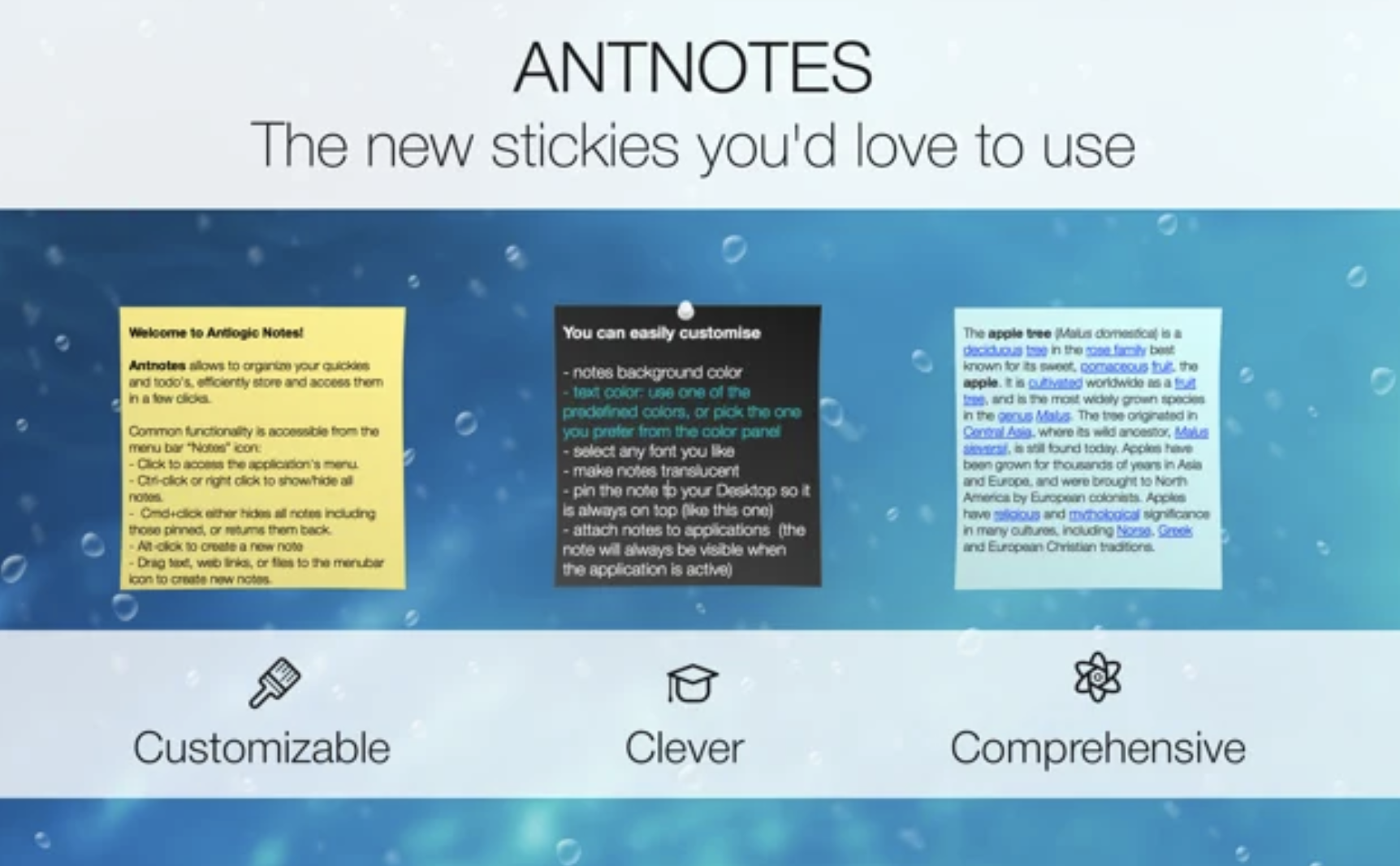
The Antnotes app serves as a versatile alternative to the conventional stickies application, featuring enhanced customization and a variety of additional capabilities. Our aim was to keep the interface user-friendly while incorporating more complex functionalities such as a notes archive, options for importing and exporting notes, the ability to link notes to specific applications, and extensive customization features. Users can access Antnotes for free, enjoying a range of essential functions, while also having the option to purchase a fully-featured version, which supports our ongoing development efforts. Each note can be tailored in size, position on the screen, background color, text font, and color, and users can choose to make notes translucent or pinned, allowing them to remain visible above other windows. Additionally, notes can be minimized to a slim stripe that displays the title without occupying much screen space. The app also supports standard rich text editing features, enabling users to format text in bold, italic, or underline styles, insert images and hyperlinks, and drag and drop text and files into the notes for a more interactive experience. Overall, Antnotes combines practicality with flexibility, making it a valuable tool for managing your thoughts and reminders efficiently.
API Access
Has API
No
API Access
Has API
No




Integrations
Blackboard Collaborate
Yes
Canvas
Yes
Cornerstone LMS
Yes
D2L Brightspace
Yes
Docebo
Yes
Elium
Yes
Moodle
Yes
SAP Cloud Platform
Yes
TalentLMS
Yes
Teachable
Yes
Integrations
Blackboard Collaborate
No
Canvas
No
Cornerstone LMS
No
D2L Brightspace
No
Docebo
No
Elium
No
Moodle
No
SAP Cloud Platform
No
TalentLMS
No
Teachable
No
Pricing Details
€3.99 per month
Free Trial
No
Free Version
Yes
Pricing Details
No price information available.
Free Trial
No
Free Version
No
Deployment
Web-Based
Yes
On-Premises
No
iPhone App
Yes
iPad App
Yes
Android App
Yes
Windows
Yes
Mac
Yes
Linux
No
Chromebook
No
Deployment
Web-Based
No
On-Premises
No
iPhone App
No
iPad App
No
Android App
No
Windows
No
Mac
Yes
Linux
No
Chromebook
No
Customer Support
Business Hours
No
Live Rep (24/7)
No
Online Support
Yes
Customer Support
Business Hours
No
Live Rep (24/7)
No
Online Support
Yes
Types of Training
Training Docs
Yes
Webinars
No
Live Training (Online)
No
In Person
No
Types of Training
Training Docs
No
Webinars
No
Live Training (Online)
No
In Person
No
Vendor Details
Company Name
Amanote
Founded
2016
Country
Belgium
Website
amanote.com
Vendor Details
Company Name
Antnotes
Website
www.antnotes.com
Product Features
Course Authoring
Content Import / Export
Yes
Course Publishing
No
Gamification
No
Instructor-Led Courses
No
Interactive Content
Yes
PowerPoint Conversion
Yes
Self-Paced Courses
Yes
Storyboarding
No
Template Management
No
Test / Quiz Creation
No
Video Management
No
eLearning Authoring Tools
Content Import / Export
Yes
Course Publishing
No
Gamification
No
Instructor-Led Courses
No
Interactive Content
Yes
PowerPoint Conversion
Yes
Self-Paced Courses
Yes
Storyboarding
No
Template Management
No
Test / Quiz Creation
No
Video Management
No
Note-Taking
Categories / Organization
No
Clip From Web
No
Document Scanning
No
Formatting / Markdown
No
Handwriting
No
Hyperlinking
No
Image Insertion
No
List/Checklist Creation
No
Printing
No
Search
No
Sharing / Collaboration
No
Syncing
No
Templates
No
Voice Notes
No
Productivity
Collaboration
Yes
Database Creation
No
Document Creation
Yes
File Sharing
Yes
Notes Management
Yes
Office Suite
No
Presentation Tools
Yes
Project Management
No
Task Management
No
Team Chat
No
Product Features
Note-Taking
Categories / Organization
No
Clip From Web
No
Document Scanning
No
Formatting / Markdown
No
Handwriting
No
Hyperlinking
No
Image Insertion
No
List/Checklist Creation
No
Printing
No
Search
No
Sharing / Collaboration
No
Syncing
No
Templates
No
Voice Notes
No
