Average Ratings 0 Ratings
Average Ratings 0 Ratings
Similar Products
-
SmartDrawSmartDraw makes professional drawings and diagrams accessible to everyone. Non-technical users can quickly create floor plans, while professionals get the precision and scale they require. With industry-leading floor planning tools and an intuitive interface for traditional diagramming like flowcharts and organizational charts, SmartDraw delivers enterprise-ready power without unnecessary complexity. Key features: - Large collection of symbols and templates - Ability to create custom shapes - Import PDFs, images, Google Maps, Visio files, Visio stencils - Draw to any scale - Enrich drawings with data - Generate manifest and bills of materials - Generate diagrams from data automatically like org charts, AWS, Azure, PI Boards, and more - Use natural language text prompts to generate diagrams with AI - Save files directly to OneDrive, SharePoint, or Google Drive, or other preferred provider - Integrations with the Microsoft and Google enterprise stack plus Confluence and Jira SmartDraw supports a wide range of industries and real-world use cases, helping teams plan, document, and communicate more effectively. Construction professionals use it to create scaled floor plans, site layouts, and electrical and plumbing drawings. Fire departments rely on it for fire pre-planning and incident documentation, while police departments use it for accident reconstruction and crime scene diagrams. IT teams build network diagrams and cloud architectures, HR leaders create organizational charts, and product managers map out processes and workflows. From physical layouts to business processes, SmartDraw provides a single platform that adapts to the needs of each role and industry.
-
Shoplogix Smart Factory PlatformFor over two decades, Shoplogix has helped leading manufacturers worldwide unlock hidden production potential by transforming real-time machine and performance data into actionable insights. The platform automatically captures signals like downtime, scrap, and throughput, delivering visual dashboards that enable teams to identify bottlenecks, reduce losses, and improve continuously—both during shifts and in post-shift analysis. With OneSignal connectivity, Shoplogix integrates with any machine brand or type to deliver real-time, granular insights on slow-running, starved, or idle machines. Its intuitive visual management system allows operators and managers alike to quickly detect and act on issues. Integrated analytics provide powerful, slice-and-dice capabilities similar to leading BI tools, without leaving the platform. Designed for agility, Shoplogix supports scaling from a single line to multi-plant operations across geographies. Continuous improvement tools like Action Plans and Digital Andon alerts keep teams engaged, aligned, and empowered to act—making Shoplogix a powerful ally in the pursuit of operational excellence.
-
Control DControl D is a customizable DNS filtering and traffic redirection platform that leverages Secure DNS protocols like DNS-over-HTTPS, DNS-over-TLS and DNS-over-QUIC, with support for Legacy DNS. With Control D you can: block malicious threats, block unwanted types of content network wide (ads & trackers, IoT telemetry, adult content, socials, and more), redirect traffic using transparent proxies and gain visibility on network events and usage patterns, with client level granularity. Think of it as your personal Authoritative DNS resolver for the entire Internet that gives you granular control over what domains get resolved, redirected or blocked.
-
ClickLearnClickLearn simplifies complex business processes using popular software. You can create multi-format learning materials in any language and publish them to a 24/7 learning portal with just one click. A video walkthrough of the process, with narration in your preferred language. Put your learning to the test. This interactive simulation of your workplace allows you to test your knowledge without any hints. Interactive simulation of your workplace environment that guides you through the process. This guide is step-by-step. ClickLearn wrote this guide with perfectly cropped screenshots. ClickLearn Assist can be your go-to helper when you are stuck, need process help, or want to try a new process in the live system. You don't have to worry about making another mistake. All your learning materials can be auto-translated with a click of a button
-
PathSolutions TotalViewTotalView offers network monitoring as well as root-cause troubleshooting of problems in plain-English. The solution monitors every device as well as every interface on every device. In addition, TotalView goes deep, collecting 19 error counters, performance, configuration, and connectedness so nothing is outside of it’s view. A built-in heuristics engine analyzes this information to produce plain-English answers to problems. Complex problems can now be solved by junior level engineers leaving the senior level engineers to work on more strategic level projects. The core product includes everything needed to run a perfectly healthy network: Configuration management, server monitoring, cloud service monitoring, IPAM, NetFlow, path mapping, and diagramming. Get Total Network Visibility on your network and solve more problems faster.
-
PBRS Power BI Reports DistributionPBRS brings automated report production and distribution to organizations using Microsoft Power BI and SSRS. Developed by ChristianSteven Software, it runs in your Windows environment and coordinates reporting tasks that would otherwise involve manual exports or multiple automation flows. Build workflows for Power BI Service, Power BI Report Server, Power BI Paginated Reports and Microsoft SSRS. Launch them at regular intervals, on custom calendars, after a dataset refresh completes, or in response to supported database, file, email and system events. For personalized (Dynamic) reporting, PBRS reads SQL or JSON instructions to apply each recipient's filters, parameters, output format and delivery details. Report bursting allows a shared report to become separate outputs for customers, branches, departments or individual users. Produce PDF documents, Excel workbooks and CSV files where supported. Use Excel templates and formatting, merge suitable exports into workbook tabs, or collect several reports into a single email, ZIP archive or bookmarked PDF. Passwords and encryption help protect PDF documents. Route finished files to email addresses, Teams, SharePoint, OneDrive, Google Drive, Dropbox, FTP or SFTP servers, network folders, Slack and printers. Deliver exported documents to external audiences without requiring them to access Power BI. Execution records, notifications, retry settings and blank-report handling support unattended operation. A REST API lets developers connect supported scheduling and execution functions to their own applications. PBRS suits reporting operations that need consistent output, recipient-specific content and coordinated delivery across multiple reporting sources.
-
LTXMost AI video tools hand you a black box: closed weights, a subscription, and no way to see what is happening under the hood. LTX takes the opposite approach. Built by Lightricks, LTX is an open foundation model that generates and simulates across video, audio, and the physical world, and it puts the weights, the code, and the control in your hands. At the center of the model is LTX-2.5, a 22B-parameter dual-stream diffusion transformer that produces native 4K video at up to 50 frames per second, with audio and video generated together in a single pass rather than stitched together afterward. Artificial Analysis, an independent benchmarking group, currently ranks LTX among the top three AI video models in the world. You choose how you want to use it. Download the open weights and run LTX-2.5 on your own hardware. License the model for on-premise deployment backed by enterprise support. Or build directly on LTX Studio, the production suite that turns the model into a full creative workflow. Companies like ElevenLabs, Asteria Film Co., Magnopus, and NVIDIA already rely on LTX for their own work. LTX is not built for one-off social clips. It is infrastructure for teams that generate motion, audio, and physical environments as part of their own products and pipelines.
-
Portfolio ManagerBlue Sky's "Portfolio Manager" Lease Management Software is an easy to learn and use SaaS solution for centralized management of lease contracts. By managing your lease contracts and associated maintenance contracts throughout the entire lifecycle you can strengthen the audit process, reduce costs, increase cash flows and mitigate risk with centralized visibility that drives enterprise value. Portfolio Manager provides complete status management for running leasing RFP's, tracking status, notes, documents and next steps for every open project. Flat file data imports allow for efficient data entry. Fully customizable with robust reporting capabilities. The report writer allows every data field to be exported to excel. Pre-built templates are available to feed most ASC842 lease accounting software templates. End of lease term management is automated with custom parameters and automatic notifications to ensure you never miss an end of lease term notification. Custom Programming available.
-
ONLYOFFICE DocsONLYOFFICE Docs is a secure online office suite for teams and businesses of all sizes. Create and edit docs, sheets, slides, fillable forms and PDFs. Collaborate with your teammates in real time using two co-editing modes, version history and other tools. Enable the AI assistant of your choice — ChatGPT, DeepSeek, Mistral, Groq AI, etc. Generate new content, summarize, translate and do more with your favourite AI tool while working on office files. Integrate ONLYOFFICE Docs into your business platform, whether it be Odoo, Alfresco, Confluence, Pipedrive, Nextcloud, Redmine, SuiteCRM, etc., via an integration app (40+ available integrations). Use Docs within ONLYOFFICE DocSpace, a room-based document collaboration platform equipped with the online office suite. Create dedicated spaces for different purposes, invite your teammates, assign access permissions and collaborate the way you like. With DocSpace, you can store, share and co-edit office files, and even interact with third parties.
-
SiteDocsYour Safety & Compliance Made Simple! Businesses that operate in the construction, oil & gas, mining, manufacturing, electrical, plumbing, heating, and excavating industries know all too well how important it is to comply with all mandatory documentation. It is also important to know how a company organizes everything. SiteDocs is an interactive safety management system that transforms organizations from pen-and paper archiving to a fully cloud-based, digital workspace. The system is accessible from any device running iOS or Android and features allow users to work remotely, on mobile, or offline. Employees can now sign and upload photos, add comments, and acknowledge receipt of important documentation. Administrators can also ensure that records, reports and certifications of staff are automatically updated by using the web-based panel's system parameters.
Description
AltonaLab's IoT software features a robust and user-friendly CAD interface that is ideal for creating intricate diagrams. Be sure to explore the documentation and dive into the fascinating realm of IoT software! A new connection is initiated when the user left-clicks on a block's input or output, drags the mouse towards another input/output while keeping the button pressed, and then releases it over the target. To access the Parameters editor, simply double-click on the block or right-click, where each parameter is listed on a separate row. The uniqueness of the parameter Name is crucial as it must be distinctive within the diagram. When the diagram is locked, this parameter plays a vital role in defining the overall dimensions of the diagram. This clever mechanism effectively conceals any blocks and contours that extend beyond the visible area, which is determined by the parameters LockedCanvasHeight and LockedCanvasWidth, ensuring that only the controls within the visible area are displayed for user interaction. This streamlined approach maximizes usability and enhances the overall diagramming experience.
Description
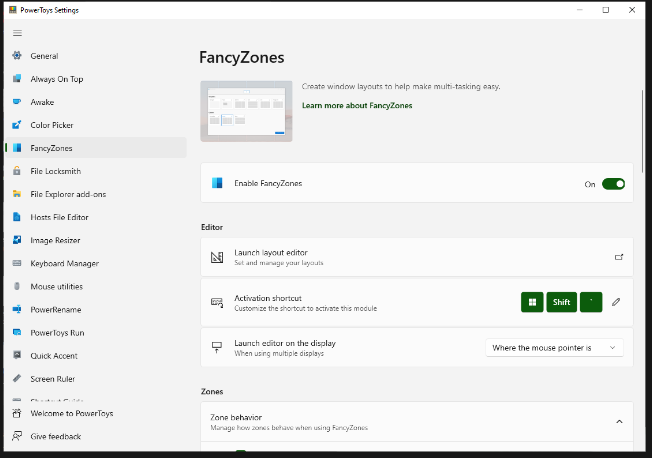
FancyZones serves as a window management tool designed to help users arrange and snap their application windows into optimized layouts, enhancing workflow efficiency and allowing for quick restoration of these layouts. This utility empowers you to specify a series of designated zones on your desktop where windows can be directed. By dragging a window into a predetermined zone or using a designated keyboard shortcut, the respective window automatically resizes and relocates to occupy that zone completely. Additionally, if you have the "Use non-primary mouse button to toggle zone activation" option activated, you can enter zone selection mode by simply clicking the secondary mouse button. When two zones are positioned next to each other, a window can be adjusted to span the combined area of both zones, effectively rounding up to the smallest rectangle that encompasses the two. As you maneuver the mouse cursor close to the shared boundary of two zones, both zones become active at the same time, giving you the flexibility to drop the window into either or both. Moreover, you can drag the window until it activates one zone and then, by pressing and holding the control key while continuing to drag, select multiple zones to expand your layout options. This feature significantly streamlines the process of organizing your desktop workspace efficiently.
API Access
Has API
No
API Access
Has API
No


Integrations
No details available.
Integrations
No details available.
Pricing Details
$50 one-time payment
Free Trial
No
Free Version
No
Pricing Details
Free
Free Trial
No
Free Version
Yes
Deployment
Web-Based
No
On-Premises
No
iPhone App
No
iPad App
No
Android App
No
Windows
Yes
Mac
No
Linux
No
Chromebook
No
Deployment
Web-Based
No
On-Premises
No
iPhone App
No
iPad App
No
Android App
No
Windows
Yes
Mac
No
Linux
No
Chromebook
No
Customer Support
Business Hours
Yes
Live Rep (24/7)
No
Online Support
Yes
Customer Support
Business Hours
Yes
Live Rep (24/7)
No
Online Support
Yes
Types of Training
Training Docs
Yes
Webinars
No
Live Training (Online)
No
In Person
Yes
Types of Training
Training Docs
Yes
Webinars
Yes
Live Training (Online)
No
In Person
Yes
Vendor Details
Company Name
AltonaLab
Country
Bulgaria
Website
scada.altonalab.com
Vendor Details
Company Name
Microsoft
Country
United States
Website
learn.microsoft.com/en-us/windows/powertoys/fancyzones
Product Features
Diagram
Data Import / Export
Yes
Drag & Drop
No
Flowchart
Yes
For Developers
Yes
Mind Map
No
Multi-User Collaboration
No
Organizational Charting
No
Templates
No
