Average Ratings 23 Ratings
Average Ratings 0 Ratings
Similar Products
-
Adobe FireflyAdobe Firefly is a versatile AI-powered creative platform designed to help users generate and edit multimedia content with ease. It allows users to create images, videos, and audio using simple text prompts within an interactive and flexible workspace. The platform features tools like generative fill, image editing, and video editing, enabling users to refine and enhance their creations. Firefly also includes quick actions such as background removal, cropping, resizing, and format conversion to streamline workflows. Users can explore an infinite canvas for creative production and experiment with various styles and outputs. The platform encourages creativity by allowing users to remix content from a shared community gallery. With its intuitive design, it reduces the need for advanced technical skills. Firefly integrates AI capabilities to speed up content creation and editing processes. It supports both beginners and professionals in producing high-quality results. Overall, Adobe Firefly provides a powerful and accessible environment for modern digital creativity.
-
RAD PDFInstall-free PDF editing, form filling, redaction, signing, viewing, and more on your website with RAD PDF! Packaged as an easy to use library / WebControl (compatible with .NET 3.5+, .NET Core, and .NET 5+), RAD PDF can be used with just about any flavor of ASP.NET including MVC, Razor, Blazor, WebForms, and more. RAD PDF is compatible with 99% of internet browsers, including those on Linux, Mac OS X, Microsoft Windows, and mobile. No plugins. No Adobe Reader. RAD PDF is more than a PDF to HTML converter. It natively supports all the most common PDF features including annotations, bookmarks, form fields, page labels, and more. With advanced PDF options, RAD PDF allows you to selectively enable and disable features not available with Adobe Acrobat Reader, like protecting a PDF from being downloaded while still viewable online. RAD PDF users can use PDF form fields directly from the web browser by enabling PDF form filling and PDF form saving without having to install any software. Integrating directly with ASP.NET, RAD PDF allows your web application to capture input data, build custom workflows, and provide an intuitive graphical user interface (GUI) for just about any online PDF interaction imaginable!
-
MobiPDFMobiPDF (formerly PDF Extra) is an intuitive reader and editor that allows you to read, edit, create, OCR, organize, annotate, fill and sign, convert, and share any PDF. This makes MobiPDF an excellent choice for users seeking a budget-friendly alternative to Adobe Acrobat Pro. HERE’S WHAT YOU GET WITH MOBIPDF: Multiple Page View Modes: Enjoy a distraction-free "Read Mode". Advanced Editing Tools: Experience a Word-like PDF editing environment. Two-Way Conversions: Convert PDFs to and from Word, Excel, PowerPoint, or image formats. OCR Support: Make scanned documents searchable. Markup Tools: Highlight, comment, strikethrough, stamp, and more to enhance your documents. Effortless PDF Organizer: Reorder, compress, split, and combine PDFs with ease. Sign & Secure: Add signatures, create and fill forms, and protect your PDFs with passwords, encryption, and digital certificates. Offline Mode: Work freely on your projects, even offline. Seamless translation: One-click translate any PDF into 50+ languages.
-
Switcher StudioSwitcher Studio allows you to capture video from multiple angles and edit it in real-time. This will allow you to connect with your community in a more engaging way. You can stream it live or save it for later. Your audience will be attracted to you with relevant content. Make it look great. There's no need to purchase, lug or learn largeequipment. Switcher is compatible with iPads and iPhones. Switcher is so intuitive that anyone can create amazing video with it. You don't need to hire outside videographers or producers. It takes an hour to edit every minute of edited video. Every minute of live-editing takes, well, one second. You can share every moment, live or recorded, external or internal, with video -- no matter what it holds.
-
Adobe AcrobatAdobe Acrobat is an all-in-one PDF productivity and e-signature platform and one of the leading enterprise document platforms that scales for global teams — designed to simplify document creation, editing, collaboration, and protection. Users can edit text and images directly within PDFs, reorganize pages, and compare file versions to quickly identify changes. The software enables fast conversion between PDFs and common file formats such as Microsoft Word, Excel, PowerPoint, and image files. Integrated e-signature capabilities allow businesses to collect legally binding signatures and track responses securely. With Acrobat Studio, Adobe Acrobat expands beyond core PDF and e‑signature tasks into an AI‑powered workspace for document insight, content creation, and collaboration.Acrobat AI Assistant adds intelligent document support by summarizing content, generating insights, and answering contextual questions with cited references. PDF Spaces creates a collaborative workspace where teams can centralize files, comments, and AI-driven guidance. Built-in protection tools safeguard documents with encryption, permissions, and redaction features. Mobile apps such as Acrobat Reader and Adobe Scan ensure access and editing capabilities from anywhere. Designed for individuals, students, and enterprises, Adobe Acrobat helps reduce document processing time and improve overall productivity.
-
DriveStrikeDriveStrike is simple to use, implement, and manage. DriveStrike allows you to perform remote wipe, remote lock, or remote locate commands on any platform. Mobile device management MDM for mobile platforms. Integrated drive encryption support. Our support team is available to answer any questions, help you install our services, or manage your account. It's never been easier to protect your data and devices. We are happy to answer any questions you may have or help you understand how to best protect your data. Protect your business with a device- and data protection platform that keeps all devices protected with a single solution. Your Workstations, iPads and iPads, Smartphones as well as Tablets, Tablets, Tablets, and Laptops will be protected, organized, secure, & protected.
-
YodeckNext-generation technology for digital signage professionals Yodeck, a cloud-based digital signage platform, is unbeatable. It powers your screen with dynamic content that instantly engages your target audience. Yodeck makes it easy to create, schedule, and design content from the web. To get your message across to those who matter most to you, use attention-grabbing media such as videos, images and PDF files, Office documents, data dashboards, and social media. It provides enterprise-grade security and control. Yodeck's drag-and-drop editing feature allows users to be creative in organizing content into interesting layouts. Yodeck is proud to offer a unique digital signage solution for businesses of all sizes. This includes local diners as well as global leaders like Delta Airlines, Autodesk and Adobe.
-
CompanyCamCompanyCam is a photo-based solution created specifically for contractors. Users can take unlimited photos—which are location and time stamped, sent to the cloud, and stored securely. Every photo is organized by project and instantly available to your team, allowing you to see what’s going on anytime, anywhere.
-
ManageEngine Endpoint CentralManageEngine Endpoint Central is a unified endpoint management and security platform designed for IT teams managing diverse and distributed device environments eliminating the need for multiple disconnected products for patching, remote access, mobile management, and security. The platform supports Windows, macOS, Linux, iOS, Android, and Chrome OS. Automated patch deployment covers OS and 1,000+ third-party applications with scheduling, testing, rollback, and compliance reporting. Software can be deployed, updated, or removed across thousands of endpoints simultaneously. OS imaging workflows provision new devices quickly, while continuous asset inventory supports license compliance and audit readiness. Security capabilities are built directly into the platform. Vulnerability assessment identifies and prioritizes endpoint weaknesses by severity. Application control prevents unauthorized software execution. Device control governs USB and peripheral access. Endpoint privilege management removes unnecessary admin rights. EDR delivers behavioral threat detection and incident response, while NGAV blocks malware, ransomware, and zero-day threats. BitLocker and FileVault encryption enforces disk protection across Windows and macOS. Built-in remote desktop allows technicians to connect instantly without third-party software. Integrated MDM covers iOS and Android enrollment, app management, and remote wipe for corporate and BYOD environments. DEX monitoring gives IT teams real-time visibility into device performance enabling proactive issue resolution before productivity is impacted. Available as cloud or on-premises across Free, Professional, Enterprise, UEM, and Security editions.
-
PBXwarePBXware is the first and most established IP PBX Professional Open Standards Turnkey Telephony Platform. PBXware has been providing flexible, reliable and scalable Next Generation Communication Systems (NGCS) and VoIP solutions to small and medium-sized businesses (SMBs), enterprises and Internet Telephony Service Providers, (ITSPs), call centers and governments around the world since 2004. This is done by combining the best of the latest technologies. Bicom Systems softswitch is available in the Business, Call Center, and Multi-Tenant Editions. Each edition supports specific features that maximize performance, reliability, expandability, and expandability.
Description
At the heart of nearly every creative endeavor lies the finest imaging and graphic design software, which encompasses a wide array of functions from photo retouching and compositing to digital artistry, animation, and graphic creation. Now, you can tap into the capabilities of Photoshop on both desktop and iPad, allowing you to create whenever inspiration strikes. With our advanced photography tools, you can effortlessly make routine edits or dramatically transform images across both platforms. You can crop, eliminate unwanted objects, retouch, and merge photographs, as well as experiment with colors and effects to revolutionize your photography. Whether you're designing posters, packaging, banners, or websites, all of your design ventures can begin with Photoshop. By merging images and text, you can fabricate completely new visuals, utilizing unlimited layers and masks for intricate designs. Furthermore, Photoshop is now accessible online, enabling Adobe to extend its functionality for sharing, reviewing, and light editing of cloud documents in the .psdc format. This allows collaborators to access your work directly in their browsers, provide insightful feedback, and perform basic edits without the need for downloads, making teamwork more efficient than ever before.
Description
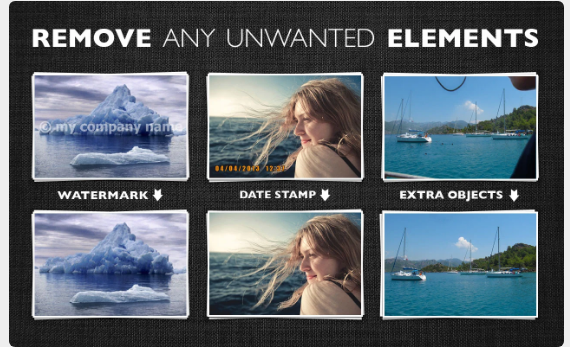
Inpaint effortlessly fills in selected areas with expertly generated textures derived from the surrounding image data. Visit our Tutorials page to discover how straightforward it is for anyone to achieve impressive results in just a few easy steps. You can either drag and drop a file here or click to upload an image, ensuring the format is JPG, PNG, or WebP, with a maximum file size of 10Mb and a resolution limit of 4.2 megapixels. Are pesky tourists constantly interrupting your perfect shots? Eliminate them from your photos using Inpaint! With a few simple actions, you can create stunning images that capture your original vision. Inpaint quickly allows you to highlight unwanted objects or people in your photo, and then you simply let Inpaint take care of the rest. Beyond the desired elements we want to feature in our pictures, there are often many distractions that detract from the overall composition. So, why not clear those away with Inpaint for a cleaner, more focused image? This tool is designed to enhance your photography experience, making it more enjoyable and efficient.
API Access
Has API
No
API Access
Has API
No


Integrations
Acorn
Yes
Adobe Illustrator
Yes
ArionFX
Yes
Brault
Yes
Cua
Yes
DxO FilmPack
Yes
Fleekdrive
Yes
FontAgent
Yes
Geographic Imager
Yes
MediaGraph
Yes
Integrations
Acorn
No
Adobe Illustrator
No
ArionFX
No
Brault
No
Cua
No
DxO FilmPack
No
Fleekdrive
No
FontAgent
No
Geographic Imager
No
MediaGraph
No
Pricing Details
$20.99 per month
Free Trial
Yes
Free Version
Yes
Pricing Details
$19.99 one-time payment
Free Trial
No
Free Version
No
Deployment
Web-Based
Yes
On-Premises
No
iPhone App
Yes
iPad App
Yes
Android App
Yes
Windows
Yes
Mac
Yes
Linux
No
Chromebook
No
Deployment
Web-Based
Yes
On-Premises
No
iPhone App
No
iPad App
No
Android App
No
Windows
Yes
Mac
Yes
Linux
No
Chromebook
No
Customer Support
Business Hours
No
Live Rep (24/7)
No
Online Support
Yes
Customer Support
Business Hours
No
Live Rep (24/7)
No
Online Support
Yes
Types of Training
Training Docs
Yes
Webinars
No
Live Training (Online)
No
In Person
No
Types of Training
Training Docs
Yes
Webinars
No
Live Training (Online)
No
In Person
No
Vendor Details
Company Name
Adobe
Founded
1982
Country
United States
Website
www.adobe.com/products/photoshop.html
Vendor Details
Company Name
Inpaint
Country
United States
Website
theinpaint.com
Product Features
Graphic Design
Collaboration
Yes
Data Visualization
Yes
Filtering
Yes
Image Database
Yes
Image Editor
Yes
Templates
Yes
