TinyPNG (by Tinify) is a free image optimization service built for developers and designers. It utilizes smart lossy compression to reduce the file sizes of JPEG, PNG, WebP, and AVIF files by up to 80% with no visible quality loss. That means faster load times, better SEO, and lower bandwidth.
You can compress, convert, and resize images via a clean web interface or integrate it into your workflow with the API. The platform also provides an image CDN for fast global delivery of optimized assets. SDKs are available for Python, Node.js, PHP, Java, Ruby, and .NET. WordPress plugin included, plus plenty of community-driven integrations.
No tuning, no noise, Tinify just works. Whether you're optimizing a handful of images or processing millions, it scales effortlessly. All plans include a generous free tier, and support is quick when you need it.
George the panda 🐼 approves.
Learn more

Adobe Firefly is a versatile AI-powered creative platform designed to help users generate and edit multimedia content with ease. It allows users to create images, videos, and audio using simple text prompts within an interactive and flexible workspace. The platform features tools like generative fill, image editing, and video editing, enabling users to refine and enhance their creations. Firefly also includes quick actions such as background removal, cropping, resizing, and format conversion to streamline workflows. Users can explore an infinite canvas for creative production and experiment with various styles and outputs. The platform encourages creativity by allowing users to remix content from a shared community gallery. With its intuitive design, it reduces the need for advanced technical skills. Firefly integrates AI capabilities to speed up content creation and editing processes. It supports both beginners and professionals in producing high-quality results. Overall, Adobe Firefly provides a powerful and accessible environment for modern digital creativity.
Learn more
TouchRemove
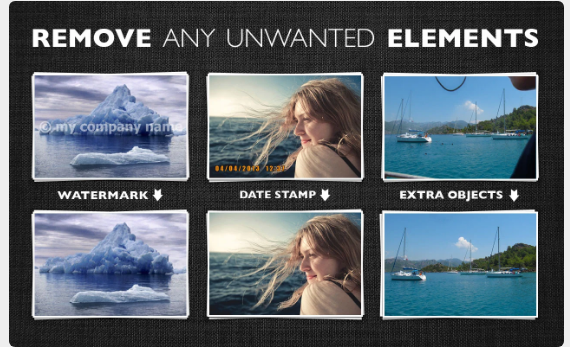
Utilize Image Inpainting to eliminate undesirable elements and individuals from your photos. You can easily get rid of pesky photobombers, unsightly telephone wires, and other distractions, while also correcting imperfections such as scratches and stains on images, as well as blemishes and pimples in portrait photography. This powerful tool allows for a cleaner and more appealing visual experience.
Learn more
Sketch
The most exceptional products are conceived in Sketch. This comprehensive digital design platform enables you to create, prototype, collaborate, and transform your concepts into remarkable products. Designed specifically for Mac, it caters to the needs of designers like you, allowing for the creation of outstanding work with essential tools that enhance your workflow and innovative features that elevate your designs significantly. Leveraging the best of macOS technologies, Sketch provides familiarity, power, and performance precisely where it is most needed. Its user interface intuitively adapts to display the tools you require while allowing you to focus by minimizing distractions. You can develop reusable components to maintain consistency and lay the groundwork for your product's design system. Additionally, you can validate your ideas and convert static designs into interactive prototypes that are ready for sharing within minutes. Moreover, you can rigorously test your designs using real and diverse data sets that effortlessly incorporate faces, names, locations, and much more with just a few clicks, ensuring that your product resonates with its intended audience. Explore the endless possibilities of design with Sketch and watch your ideas come to life like never before.
Learn more