
Web Xplorer Description
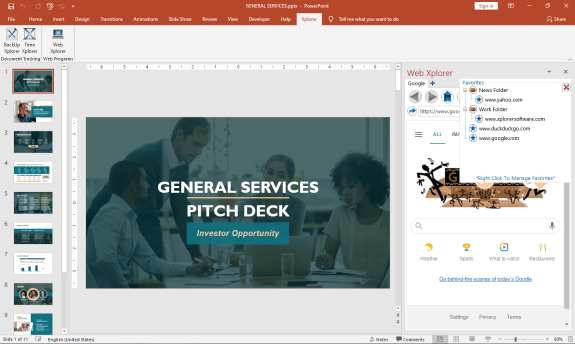
The First MS Office Task Pane Integrated Fully Functionally Web Browser.
Browse the Web and do your research right from your MS Office Task Pane.
*Viewing can be switched to mobile format to take advantage of space constraints
*Save Your Favorites for Easy Navigation
*Save Your Passwords for Your Most Visited Sites
*Set up multiple tabs to open automatically when you open the app
*View Browser Compatible Documents, Audio, Video, and Images (.pdf) right in the Task Pane
You can increase your productivity by never leaving your active screen.
Works with:
Word
Web Xplorer Alternatives
Wave Browser
Wave Browser is designed for people who want a safer, faster, and more meaningful way to explore the web. Built on strong security principles, Wave puts you in control of your privacy with customizable cookie and tracker blocking, incognito mode, and clear permission choices. AppEsteem Certification ensures Wave meets strict, independently verified standards for clean installation, transparent behavior, and responsible software practices, giving you confidence every time you browse.
Wave is also built for productivity, offering tools that help you stay organized and move through information with purpose. Tab grouping, bookmarks, and a reading list keep ideas within reach, while split screen let you research, compare, or watch without switching between windows. Memory Saver mode helps your device stay fast during heavy sessions, and the built-in AI Assistant and messaging integrations bring your favorite tasks closer to a single click.
Designed to be simple and user-friendly, Wave Browser removes friction from everyday browsing. The free ad blocker keeps pages clean, and built-in tools—like the converter, package tracker, price tracker, translation tool, stock tracker, and content notifier—help you get things done without extra extensions.
Most importantly, Wave is a browser with real ocean impact built in. Through a certified partnership with 4ocean, Wave helps fund the removal of 100,000 pounds of trash from our ocean, rivers, and coastlines every year. A live impact tracker shows exactly how much waste the Wave community has helped remove, with verified monthly updates from cleanup crews in the U.S., Indonesia, and the Dominican Republic. With Wave Browser, your everyday browsing directly supports a cleaner planet and the people working to protect it.
Learn more
CryptoTab
Experience CryptoTab, the pioneering browser that integrates mining capabilities, compatible with both desktop systems (Windows and Mac) and mobile devices (Android and iPhone/iPad). You can earn bitcoin effortlessly while enjoying videos, engaging in conversations, or playing online games. Join a thriving global community of over 20 million users who are already benefiting from CryptoTab Browser. Download this innovative browsing platform that merges cutting-edge web technologies with a distinctive built-in mining algorithm. For those seeking more flexibility, CryptoTab PRO offers a comprehensive suite of tools to enhance your online exploration. Simply activate the mining feature and enjoy scrolling through your newsfeed, chatting on social media, or watching your favorite shows on Netflix, as CryptoTab's mining algorithm seamlessly manages the process. Boost your earnings by inviting new users to join the mining network through your personalized link, allowing you to multiply your income and take your first steps towards acquiring Bitcoin. Whether you are a casual user or a dedicated miner, CryptoTab provides an engaging and rewarding online experience.
Learn more
Opera Mini
You can save up to 90% on your data and surf faster on slow networks. Smart Browsing automatically chooses the best browsing mode. Smart Browsing's built-in ad blocking feature helps you eliminate annoying popup ads from all webpages. This improves mobile-data usage, and allows for smoother browsing. Opera Mini is all about speed. Opera Mini optimizes and compresses content before it reaches your computer. This makes pages load faster even on slow connections. You can safely visit any website in private mode, without leaving any history or cookies. You can easily switch between private and normal tabs. Opera Mini is yours to control. You can customize the layout, theme, and navigation of Opera Mini. Opera Mini will make you stand out. You can browse the way that you like. Opera Mini's Speed Dials make it easier to access your favorite pages. While browsing, keep recommendations and popular sites close at hand.
Learn more
Polo File Manager
Polo is a contemporary and efficient file management application for Linux, developed using Vala, that features various layouts including single, dual, and quad panes, each capable of hosting multiple tabs. This file manager allows users to create, extract, and navigate archives seamlessly, while also offering integration with cloud storage services. Additionally, Polo facilitates the operation and management of KVM images, allows for the editing of PDF and image files, and supports booting ISO files in a KVM environment or writing them to USB drives. Each pane includes multiple tabs, and users can toggle an embedded terminal with the F4 key for enhanced functionality. When devices are connected, a popup displays them along with options for mounting and unmounting, and the application can handle LUKS encrypted devices, offering locking and unlocking capabilities. Users can browse archives like regular folders and create them in various formats, taking advantage of advanced compression settings for efficient storage. Moreover, Polo's user-friendly interface, combined with its robust features, makes it a versatile tool for both casual and advanced users looking to manage files with ease and efficiency.
Learn more
Pricing
Pricing Starts At:
$29.00
Pricing Information:
FREE 7 day trial. Purchase a perpetual license that is good for 2 users.
Free Trial:
Yes
Integrations
Company Details
Company:
Breakthrough Applications
Year Founded:
2020
Headquarters:
United States
Website:
www.xplorersoftware.com
Media

Web Xplorer | Excel Task Pane



Recommended Products
Our Free Plans just got better! | Auth0
You asked, we delivered! Auth0 is excited to expand our Free and Paid plans to include more options so you can focus on building, deploying, and scaling applications without having to worry about your security. Auth0 now, thank yourself later.
Product Details
Platforms
Windows
Types of Training
Training Docs
Training Videos
Customer Support
Online Support
Web Xplorer Features and Options
Web Xplorer User Reviews
Write a Review- Previous
- Next
