Average Ratings 0 Ratings
Average Ratings 0 Ratings
Similar Products
-
ActiveBatch Workload AutomationActiveBatch by Redwood is a centralized workload automation platform, that seamlessly connects and automates processes across critical systems like Informatica, SAP, Oracle, Microsoft and more. Use ActiveBatch's low-code Super REST API adapter, intuitive drag-and-drop workflow designer, over 100 pre-built job steps and connectors, available for on-premises, cloud or hybrid environments. Effortlessly manage your processes and maintain visibility with real-time monitoring and customizable alerts via emails or SMS to ensure SLAs are achieved. Experience unparalleled scalability with Managed Smart Queues, optimizing resources for high-volume workloads and reducing end-to-end process times. ActiveBatch holds ISO 27001 and SOC 2, Type II certifications, encrypted connections, and undergoes regular third-party tests. Benefit from continuous updates and unwavering support from our dedicated Customer Success team, providing 24x7 assistance and on-demand training to ensure your success.
-
RunMyJobs by RedwoodRunMyJobs by Redwood is the only SAP endorsed and premium-certified and the most awarded SAP-certified SaaS workload automation platform and only allowing enterprises to achieve end-to-end IT process automation and unify complex across any application, system or environment without limits and with high availability as you scale. We're the #1 job scheduling choice for SAP customers with seamless integration to S/4HANA, BTP, RISE, ECC and more while maintaining a clean core. Empower teams with seamless integration with any present and future tech stack, a low-code editor and a rich library of templates. Monitor processes in real-time with predictive SLA management and get proactive notifications via email or SMS on performance issues or delays in all your processes. Redwood team provides 24/7/365 day global support with the industry’s strongest SLAs and 15-minute response times and a proven approach to migration that secures continuous operations, including team training, on-demand learning and more.
-
ESET PROTECT AdvancedESET Protect Advanced offers a comprehensive cybersecurity solution for businesses of any size. It offers advanced endpoint security against ransomware and zero-day threats. It also includes full disk encryption to ensure legal compliance and data security. The solution uses adaptive scanning, cloud sandboxing and behavioral analysis for proactive cloud-based threats defense. Mobile threat protection secures Android and iOS with anti-malware and anti-theft. It also offers cloud app security, mail server protection, vulnerability and patch management, and cloud app protection. Multi-factor authentication and extended detection and reaction (XDR) improve threat detection and response. The solution provides a single pane of glass remote management to provide visibility into threats and users. It also offers advanced reporting and customized notifications.
-
Secure EraserSecure Eraser: Secure Data Deletion, Shredders Your Files & Folders. Just because it has been removed from your hard drive doesn't mean that it is gone forever. Anyone can restore the information as long as it was not overwritten. It becomes more difficult if the computer has been resold, or given away. Secure Eraser employs the most well-known method of data disposal. It overwrites sensitive information so that it cannot be recovered even with specialized software. Our award-winning solutions for permanently destroying data eliminate cross-references that may leave traces of deleted files within the allocation table of your hard disk. This Windows software is easy to use and can overwrite sensitive data up to 35 times, regardless of whether they're files, folders or drives, recycle bins, or traces of surfing. You can also delete files that you have already deleted but not for good.
-
FilerevFilerev is a powerful tool that helps you easily find and manage hidden files, duplicate files, large files, and oversized folders, ensuring a streamlined and clutter-free digital workspace. Key features include advanced scanning technology that identifies the unorganized files taking up the most space and cluttering your Google Drive. Filerev enhances productivity by saving time and reducing the frustration of manual file organization. The custom filters and bulk delete tool give you complete control over finding and removing unwanted files in your account. The storage analyzer lets you browse your folders by size to see where the space is being used in your Google Drive. Whether you're an individual, a small business, or a large enterprise, Filerev offers robust solutions tailored to your needs. Visit filerev.com to discover how Filerev can transform your Google Drive experience and boost efficiency.
-
pCloud BusinesspCloud Business is a cloud storage and file synchronization platform designed for teams that need controlled access, cross-platform compatibility, and predictable storage allocation. It provides centralized file management with granular permissions and optional client-side encryption. Founded in 2013 in Switzerland, pCloud operates under EU-aligned privacy standards and offers data residency in Luxembourg (EU) and Dallas, Texas (US). The platform supports over 23 million users globally. Core Functionality : - Per-User Storage Allocation : 1 TB or 2 TB per user, suitable for small to mid-sized teams and distributed environments. - Virtual File System (pCloud Drive) : Mounts as a local drive on Windows, macOS, and Linux. Files are streamed on demand, reducing local disk usage. - File Sync & Sharing : Folder-level sync, link-based sharing, and permission control (view/edit/manage). Supports password-protected and time-limited links. - Admin & Access Control : Centralized user management, role assignment, and storage distribution via admin console. - Versioning & File History : File versioning with up to 180 days retention, enabling rollback and recovery. - Cross-Platform Support : Native clients for Windows, macOS, Linux, iOS, Android, plus web interface. - Client-Side Encryption (Optional) : Zero-knowledge encryption via pCloud Encryption for sensitive data; encryption keys are not stored server-side. Technical Positioning: - Swiss jurisdiction; GDPR-aligned processing - No file size limits - Works without mandatory ecosystem lock-in (no bundled office suite required) - Compatible with heterogeneous environments (Linux included) Trial : 30-day free trial available for up to 10 users.
-
CloudFilerCloudFiler provides filing and searching in both New and Classic Outlook on all phones & tablets, all popular browsers, Macs and ARM based devices. Created Microsoft's new web Add-in technology by the architect of the Oasys email management system previously owned by Arup Group Ltd and the Excitech Mail system owned by Symetri and latterly Pentagon. File to: the cloud, Windows folders, SharePoint, OneDrive, Egnyte, Autodesk Forma, Bentley ProjectWise, etc. Favoured by the biggest businesses globally.
-
SynchredibleSynchredible makes it easy to synchronize, copy, and back up individual folders or entire drives with just a single click. Its intuitive assistant guides you step by step in setting up tasks that can be scheduled, triggered by changes (real-time monitoring), or executed automatically when an external storage device is connected. Keep your data synchronized effortlessly and manage it seamlessly! With years of proven technology, Synchredible not only transfers data from A to B but also supports bidirectional synchronization. It automatically detects changes and reliably syncs the most recently edited files. Thanks to advanced duplicate detection, Synchredible saves valuable time by skipping unchanged files, enabling fast synchronization of large datasets in seconds! Synchredible is highly versatile, supporting local folder synchronization, network and USB device synchronization, as well as synchronization with cloud storage.
-
MobiPDFMobiPDF (formerly PDF Extra) is an intuitive reader and editor that allows you to read, edit, create, OCR, organize, annotate, fill and sign, convert, and share any PDF. This makes MobiPDF an excellent choice for users seeking a budget-friendly alternative to Adobe Acrobat Pro. HERE’S WHAT YOU GET WITH MOBIPDF: Multiple Page View Modes: Enjoy a distraction-free "Read Mode". Advanced Editing Tools: Experience a Word-like PDF editing environment. Two-Way Conversions: Convert PDFs to and from Word, Excel, PowerPoint, or image formats. OCR Support: Make scanned documents searchable. Markup Tools: Highlight, comment, strikethrough, stamp, and more to enhance your documents. Effortless PDF Organizer: Reorder, compress, split, and combine PDFs with ease. Sign & Secure: Add signatures, create and fill forms, and protect your PDFs with passwords, encryption, and digital certificates. Offline Mode: Work freely on your projects, even offline. Seamless translation: One-click translate any PDF into 50+ languages.
-
PBRS Power BI Reports DistributionPBRS brings automated report production and distribution to organizations using Microsoft Power BI and SSRS. Developed by ChristianSteven Software, it runs in your Windows environment and coordinates reporting tasks that would otherwise involve manual exports or multiple automation flows. Build workflows for Power BI Service, Power BI Report Server, Power BI Paginated Reports and Microsoft SSRS. Launch them at regular intervals, on custom calendars, after a dataset refresh completes, or in response to supported database, file, email and system events. For personalized (Dynamic) reporting, PBRS reads SQL or JSON instructions to apply each recipient's filters, parameters, output format and delivery details. Report bursting allows a shared report to become separate outputs for customers, branches, departments or individual users. Produce PDF documents, Excel workbooks and CSV files where supported. Use Excel templates and formatting, merge suitable exports into workbook tabs, or collect several reports into a single email, ZIP archive or bookmarked PDF. Passwords and encryption help protect PDF documents. Route finished files to email addresses, Teams, SharePoint, OneDrive, Google Drive, Dropbox, FTP or SFTP servers, network folders, Slack and printers. Deliver exported documents to external audiences without requiring them to access Power BI. Execution records, notifications, retry settings and blank-report handling support unattended operation. A REST API lets developers connect supported scheduling and execution functions to their own applications. PBRS suits reporting operations that need consistent output, recipient-specific content and coordinated delivery across multiple reporting sources.
Description
Introducing Shrestha Files Pro X, a contemporary dual-pane file management solution designed for Windows 10 and 11, featuring a tabbed interface and vibrant themes that enhance your workflow. This innovative application sports a sleek and minimalist aesthetic, making it perfect for anyone eager to elevate their productivity. Available on the Microsoft Store, it seamlessly integrates with the Fluent design principles of Windows, ensuring a cohesive user experience. Users can choose between the straightforward single-pane view or the more sophisticated dual-pane setup tailored for advanced users. You can effortlessly drag and drop files or folders between tabs, and the application intelligently saves your open tabs, view preferences, and pane dimensions for future sessions. The robust search functionality allows you to locate items within your current directory and its subdirectories. Options for viewing include simple lists, detailed lists, small grids, medium grids, large grids, and tile formats. Additionally, built-in viewers for text and image files enhance usability, while the tabbed interface bears a resemblance to popular web browsers, allowing easy tab management across panes. Users can even create personalized themes, in addition to the standard colorful options provided. With its array of features, Shrestha Files Pro X stands out as an essential tool for efficient file management on your Windows device.
Description
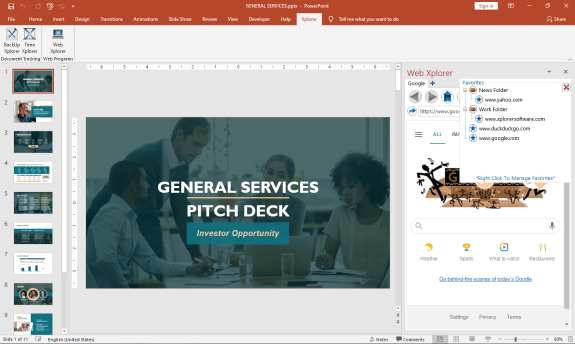
The First MS Office Task Pane Integrated Fully Functionally Web Browser.
Browse the Web and do your research right from your MS Office Task Pane.
*Viewing can be switched to mobile format to take advantage of space constraints
*Save Your Favorites for Easy Navigation
*Save Your Passwords for Your Most Visited Sites
*Set up multiple tabs to open automatically when you open the app
*View Browser Compatible Documents, Audio, Video, and Images (.pdf) right in the Task Pane
You can increase your productivity by never leaving your active screen.
Works with:
Word
API Access
Has API
No
API Access
Has API
No




Integrations
Microsoft Excel
No
Microsoft Outlook
No
Microsoft PowerPoint
No
Microsoft Project
No
Microsoft Word
No
SMS Deliverer
No
Integrations
Microsoft Excel
Yes
Microsoft Outlook
Yes
Microsoft PowerPoint
Yes
Microsoft Project
Yes
Microsoft Word
Yes
SMS Deliverer
Yes
Pricing Details
Free
Free Trial
No
Free Version
Yes
Pricing Details
$29.00
FREE 7 day trial. Purchase a perpetual license that is good for 2 users.
Free Trial
Yes
Free Version
No
Deployment
Web-Based
No
On-Premises
No
iPhone App
No
iPad App
No
Android App
No
Windows
Yes
Mac
No
Linux
No
Chromebook
No
Deployment
Web-Based
No
On-Premises
No
iPhone App
No
iPad App
No
Android App
No
Windows
Yes
Mac
No
Linux
No
Chromebook
No
Customer Support
Business Hours
No
Live Rep (24/7)
No
Online Support
Yes
Customer Support
Business Hours
No
Live Rep (24/7)
No
Online Support
Yes
Types of Training
Training Docs
Yes
Webinars
No
Live Training (Online)
No
In Person
No
Types of Training
Training Docs
Yes
Webinars
No
Live Training (Online)
No
In Person
No
Vendor Details
Company Name
JPT Games and Apps
Founded
2020
Website
jptgamesandapps.github.io/ShresthaFiles/
Vendor Details
Company Name
Breakthrough Applications
Founded
2020
Country
United States
Website
www.xplorersoftware.com
