Average Ratings 0 Ratings
Average Ratings 0 Ratings
Similar Products
-
JDisc DiscoveryJDisc Discovery is a powerful IT asset management and network discovery tool, designed to provide organizations with clear, real-time insights into their entire IT environment. By automatically scanning the network, it identifies and catalogs devices, from physical servers and workstations to virtual machines and network appliances, giving users a detailed inventory of their assets. The tool captures essential data such as hardware specifications, installed software, system configurations, and interdependencies among devices. A key advantage of JDisc Discovery is its agentless architecture. Rather than requiring installation on each device, it uses multiple protocols (like SNMP, SSH, WMI) to gather information, ensuring quick deployment and compatibility across various operating systems, including Windows, Linux, and Unix. This makes it ideal for diverse and dynamic IT ecosystems, enabling efficient and non-intrusive data collection.
-
AdRem NetCrunchNetCrunch is commercial, self-hosted, agentless network and IT infrastructure monitoring software for Windows Server. It monitors network devices, servers, virtualization platforms, cloud services, applications, websites, logs, telemetry, and network traffic across distributed environments. NetCrunch supports 680+ monitoring targets and provides 270+ ready-to-use Monitoring Packs for devices, applications, and operating systems. Policy-based monitoring automatically applies monitoring settings, Monitoring Packs, thresholds, and alerts to matching devices and systems. Licensing is based on monitored nodes and network interfaces rather than individual sensors, checks, or metrics. NetCrunch provides real-time dashboards and automatic Layer 2 and routing topology maps for visibility into network status and performance. Network traffic analysis supports NetFlow, sFlow, IPFIX, and other flow technologies. Its alerting system supports event correlation, dependency-aware suppression, predictive thresholds, escalation, and 40+ automated response actions, including scripts, notifications, API calls, and integrations with external systems. Distributed Monitoring Probes extend monitoring to remote and isolated locations. NetCrunch also provides a REST API for integration and automation with external IT management, service management, and operational systems. NetCrunch is self-hosted on Windows Server and can monitor on-premises, air-gapped, cloud, and hybrid IT environments.
-
PostScan MailPostScan Mail is a virtual mailbox service that provides individuals and businesses with a convenient and secure way to manage their postal mail online. With PostScan Mail, users can access their physical mail from anywhere in the world through their digital devices. The service allows users to view and manage their mail, receive notifications of new mail items, forward mail to any address, scan and shred unwanted mail, and even deposit checks remotely. PostScan Mail eliminates the need for physical mailboxes and offers a practical solution for people who are always on the go or live in multiple locations. It is a modern and efficient way to manage your postal mail, making your life easier and more streamlined.
-
PathSolutions TotalViewTotalView offers network monitoring as well as root-cause troubleshooting of problems in plain-English. The solution monitors every device as well as every interface on every device. In addition, TotalView goes deep, collecting 19 error counters, performance, configuration, and connectedness so nothing is outside of it’s view. A built-in heuristics engine analyzes this information to produce plain-English answers to problems. Complex problems can now be solved by junior level engineers leaving the senior level engineers to work on more strategic level projects. The core product includes everything needed to run a perfectly healthy network: Configuration management, server monitoring, cloud service monitoring, IPAM, NetFlow, path mapping, and diagramming. Get Total Network Visibility on your network and solve more problems faster.
-
ManageEngine ADManager PlusADManager Plus is an effortless and user-friendly solution for managing and reporting on Windows Active Directory (AD), designed to assist both AD administrators and help desk staff with their daily operations. Featuring a centralized and user-friendly web interface, this software addresses a range of intricate tasks, including the bulk management of user accounts and various AD objects, delegation of role-based access to help desk personnel, and the generation of a comprehensive array of AD reports, many of which are critical for compliance audit purposes. Additionally, this Active Directory tool provides mobile applications that enable AD administrators and technicians to carry out essential user management functions from their smartphones or tablets while on the go. It simplifies the process of creating multiple users and groups in Office 365, managing licenses, establishing Exchange mailboxes, migrating existing mailboxes, setting storage limits, and adding proxy addresses, thereby enhancing overall efficiency. With its robust features, ADManager Plus stands out as a vital asset for organizations aiming to streamline their AD management processes.
-
PylonPylon's intuitive design software allows you to create accurate proposals from anywhere, in less than 2 minutes. Pylon is the only software that allows you to view high-resolution imagery within your app. Pylon's award winning 3D Solar Shading toolkit helps you identify and track shading impacts throughout the year. Pylon's load profile analysis and interval data analysis will help you and your team to better understand customer consumption patterns. Analyze load profiles & interval data. You can close more solar proposals by using interactive Web & PDF proposals and native eSignatures. Fully integrated solar CRM that integrates with your solar design software to convert proposals. Pylon Solar CRM offers 2-way SMS and email communications, team management, lead management and pre-made deal pipelines.
-
Curtain MonGuard Screen WatermarkCurtain MonGuard Screen Watermark is an enterprise solution for displaying screen watermarks that administrators can enable on users' computers. This screen watermark can display various user information, such as the computer name, username, and IP address. The purpose of this watermark is to effectively grab the user's attention and serve as a reminder before they take a screenshot or photograph the screen to share the information with others. The key benefit of Curtain MonGuard is that it encourages users to "think before sharing" sensitive information. If the content being shared contains confidential company data, the watermark can help trace the source of the leaked information back to the user responsible. This allows organizations to hold users accountable and mitigate the consequences of data breaches or unauthorized information sharing. Key features: - On-screen watermark - Full screen-watermark - Application screen-watermark - Supports over 500 Applications - Self-defined content of watermark - Screen-watermark by condition - Central administration - Integration with Active Directory - Uninstall password for client - Password management - Admin delegation - Self protection for the software
-
CrankWheelCrankWheel allows you to share your screen while on a call. This makes it easy to create engaging presentations. You can send a link via email or SMS to the viewer and they will be able to view it in any browser on any device. CrankWheel was designed for simplicity and can be shared with customers to facilitate business deals. CrankWheel can be used to complement calls from insurance agents, mortgage advisors and solar advisors as well as educators and customer support specialists. CrankWheel is easy to integrate with websites and allows users to add a Demo button to receive quick notifications. We can show you if they are paying attention. Our Chrome Extension has enabled over 50,000 users to share their screens with prospects, regardless of their technical skills or device choice. CrankWheel can be used on old browsers and obscure devices, even with poor network connections. It works on Mac, Android, iOS, Blackberries, Internet Explorer, and Android.
-
Source DefenseSource Defense is an essential element of web safety that protects data at the point where it is entered. Source Defense Platform is a simple, yet effective solution to data security and privacy compliance. It addresses threats and risks that arise from the increased use JavaScript, third party vendors, and open source code in your web properties. The Platform offers options for securing code as well as addressing an ubiquitous gap in managing third-party digital supply chains risk - controlling actions of third-party, forth-party and nth-party JavaScript that powers your website experience. Source Defense Platform provides protection against all types of client-side security incidents, including keylogging, formjacking and digital skimming. Magecart is also protected. - by extending the web security beyond the browser to the server.
-
LeakCheckTake control of your cybersecurity and safeguard your credentials with ASCOMP LeakCheck. This privacy-focused Windows application allows you to verify if your email addresses and passwords have been compromised in historical data leaks, performing all checks securely right from your desktop. Security is the top priority: LeakCheck uses advanced k-anonymity technology. Your passwords are never transmitted in plain text; instead, encrypted hashes are used to safely query extensive breach databases. If any match is found, the software displays immediate warnings alongside detailed context, including the name, source, and date of the breach. With LeakCheck, you can proactively defend your online identity, pinpoint vulnerable accounts, and update compromised passwords before unauthorized users can exploit them.
Description
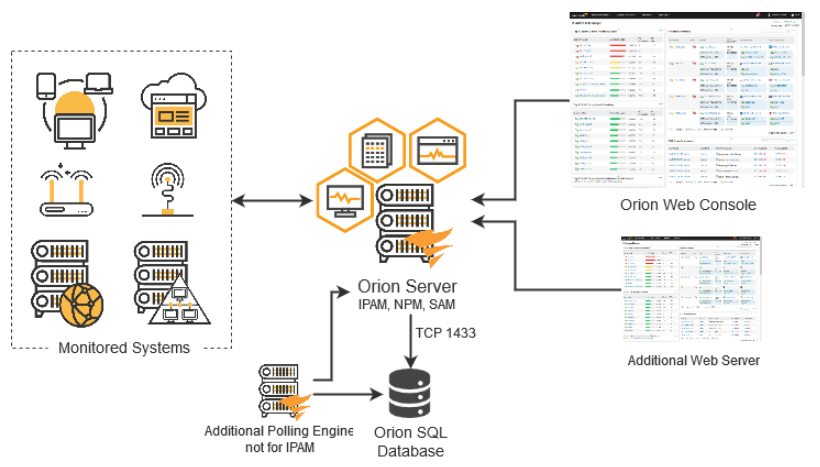
SolarWinds® IPAM IP address tracking software automatically identifies the IPv4 addresses in your network and facilitates the creation of IPv6 subnets through an intuitive step-by-step wizard. It continuously scans the IP addresses in managed subnets utilizing ICMP, SNMP, and neighborhood scanning methods, ensuring that changes to MAC addresses, hostnames, and status (reserved, transient, in use, and available) are accurately logged and maintained. This automated feature allows for the retrieval of historical information related to any IP address over a designated timeframe. Additionally, the tool provides a timestamp that administrators can use to enhance their network troubleshooting efforts. By accessing comprehensive device information, network admins can swiftly analyze and resolve any issues that arise. Utilize the SolarWinds IP address tracker to pinpoint existing conflicts, determine which device originally held the IP address, and modify the IP of the conflicting device as necessary, thereby ensuring smoother network operations and reducing downtime.
Description
Automate network configuration management, compliance, and save time. This can help optimize IT resources and reduce costs. Automated network configuration management and backup can reduce costs, save time, and help you stay compliant. Don't worry about whether your inventory lists and spreadsheets are reliable, accurate, current, and reliable. SolarWinds®, Network Configuration Manager (NCM) allows you to quickly create an accurate inventory of all your network devices. You can use network scanning and discovery for up-to-date information about all network devices. It is crucial to compare network configurations quickly and accurately for a variety of reasons. One example is to verify against security policies to ensure there aren't any discrepancies between saved and running configurations. Another example is to quickly identify and correct any unauthorized or failed modifications. Automating network configuration management makes it easier to schedule regular backups.
API Access
Has API
No
API Access
Has API
No


Integrations
Datto Workplace
No
SQL Sentry
Yes
SolarWinds Engineer's Toolset
No
SolarWinds NetFlow Traffic Analyzer
No
SolarWinds Network Performance Monitor (NPM)
No
SolarWinds Web Help Desk
No
Integrations
Datto Workplace
Yes
SQL Sentry
No
SolarWinds Engineer's Toolset
Yes
SolarWinds NetFlow Traffic Analyzer
Yes
SolarWinds Network Performance Monitor (NPM)
Yes
SolarWinds Web Help Desk
Yes
Pricing Details
$1,288 one-time payment
Free Trial
Yes
Free Version
No
Pricing Details
$2,995 one-time fee
Free Trial
Yes
Free Version
No
Deployment
Web-Based
No
On-Premises
No
iPhone App
No
iPad App
No
Android App
No
Windows
Yes
Mac
No
Linux
No
Chromebook
No
Deployment
Web-Based
Yes
On-Premises
No
iPhone App
No
iPad App
No
Android App
No
Windows
Yes
Mac
No
Linux
No
Chromebook
No
Customer Support
Business Hours
Yes
Live Rep (24/7)
No
Online Support
Yes
Customer Support
Business Hours
Yes
Live Rep (24/7)
Yes
Online Support
Yes
Types of Training
Training Docs
Yes
Webinars
No
Live Training (Online)
Yes
In Person
No
Types of Training
Training Docs
Yes
Webinars
Yes
Live Training (Online)
Yes
In Person
No
Vendor Details
Company Name
SolarWinds
Founded
1999
Country
United States
Website
www.solarwinds.com/ip-address-manager/use-cases/ip-address-tracker
Vendor Details
Company Name
SolarWinds
Founded
2000
Country
United States
Website
www.solarwinds.com/network-configuration-manager
Product Features
Product Features
Compliance
Archiving & Retention
Yes
Artificial Intelligence (AI)
No
Audit Management
Yes
Compliance Tracking
No
Controls Testing
No
Environmental Compliance
No
FDA Compliance
No
HIPAA Compliance
Yes
ISO Compliance
No
Incident Management
No
OSHA Compliance
No
Risk Management
Yes
Sarbanes-Oxley Compliance
Yes
Surveys & Feedback
No
Version Control
Yes
Workflow / Process Automation
No
Network Automation
Compliance Monitoring
No
Configuration Backup
No
Configuration Changes
No
Network Orchestration
No
Performance Monitoring
No
Tool Access Control
No
Vulnerability Assessments
No
